HotPDF exports a page of any loaded PDF document to standalone SVG markup with a single call, BuildLoadedPageSVG, which returns the complete SVG document as a string. The exported markup carries the page geometry, text as real SVG text elements, embedded raster images, and the stroke state that PDF operators had established at each drawing operation
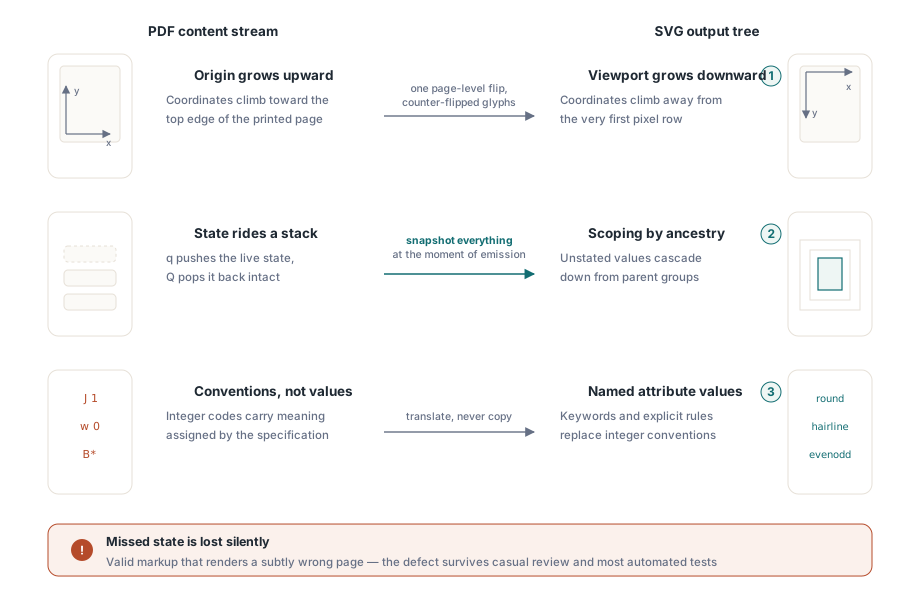
That last part is where most homegrown converters quietly fall apart. Turning a PDF page into SVG looks like a coordinate problem and turns out to be a state problem. PDF is a stack machine whose graphics state changes as the content stream is interpreted; SVG is a declarative tree whose elements each carry their own presentation attributes. Anything the interpreter fails to snapshot at the moment an element is emitted is simply gone from the output, and the failure is silent: you get valid SVG that renders a subtly wrong page
Why does a PDF page not just convert into SVG?
Three mismatches make the conversion non-trivial, and all three produce output that looks plausible until you compare it side by side with the original. The first is the y axis. PDF user space grows upward from the bottom-left corner of the page; SVG grows downward from the top-left. A single page-level flip fixes the drawing coordinates and then breaks every glyph, because flipping the whole canvas also mirrors the letterforms
The second mismatch is inheritance. In PDF, q and Q push and pop a graphics state that includes line width, line cap, line join, miter limit, dash array, dash phase and alpha. In SVG, an element that does not name an attribute inherits it from an ancestor group, which is a different scoping rule entirely. An exporter that tracks only the current transformation matrix and forgets the stroke state lets restored state after a Q leak into the elements that follow
The third is that PDF expresses several things by convention rather than by value. Line caps and joins are integers, zero line width means a device-space hairline rather than an invisible line, and the star variants of the painting operators change the winding rule instead of the color. Each of those needs a translation, not a copy
One call for the common case
For the ordinary job of exporting pages for a web viewer, a diffing tool or a design handoff, the API surface is one function. BuildLoadedPageSVG takes a zero-based page index against the currently loaded document and returns the SVG document as an AnsiString:
var
  Pdf: THotPDF;
  I: Integer;
  Svg: AnsiString;
  Output: TFileStream;
begin
  Pdf := THotPDF.Create(nil);
  try
    if Pdf.LoadFromFile('statements.pdf', '') <= 0 then
      Exit;                     // LoadFromFile returns the page count
    for I := 0 to Pdf.LoadedPageCount - 1 do
    begin
      Svg := Pdf.BuildLoadedPageSVG(I);
      if Length(Svg) = 0 then
        Continue;
      Output := TFileStream.Create(Format('page-%d.svg', [I + 1]), fmCreate);
      try
        Output.WriteBuffer(Svg[1], Length(Svg));
      finally
        Output.Free;
      end;
    end;
  finally
    Pdf.Free;
  end;
end;
The same export is exposed by the HotPDF command line tool as its export-svg command, which is useful in build pipelines and regression scripts where you want a text-diffable representation of a page without writing any Pascal. Because SVG is text, it makes a natural companion to the raster path described in rendering a PDF page to a bitmap: the bitmap tells you what the page looks like, the SVG tells you what it is made of
How is PDF text mapped onto SVG text elements?
HotPDF composes the text matrix chain as prefix by CTM by text matrix by glyph flip, where the glyph flip is a right multiplication by matrix(1,0,0,-1,0,0). That right-hand factor exists solely to cancel the page-level vertical flip for glyph shapes, since SVG text drawn in a flipped local frame would otherwise appear upside down. Putting the correction in the matrix rather than in special-cased code means rotated, mirrored and sheared text all come out right without extra branches
Horizontal positioning uses the multi-value x syntax of the SVG text element, one coordinate per character, accumulated from each glyph advance plus the character spacing Tc and word spacing Tw in force at the time. Horizontal scaling Tz is folded into the a and c columns of the text matrix rather than emitted separately, so a viewer that ignores exotic text attributes still places every glyph where the PDF put it. Text produced through complex shaping, covered in complex script text shaping, travels the same path, because the shaper has already resolved clusters into positioned glyphs by the time the content stream is interpreted
Rotation and images: two flips that are easy to get backwards
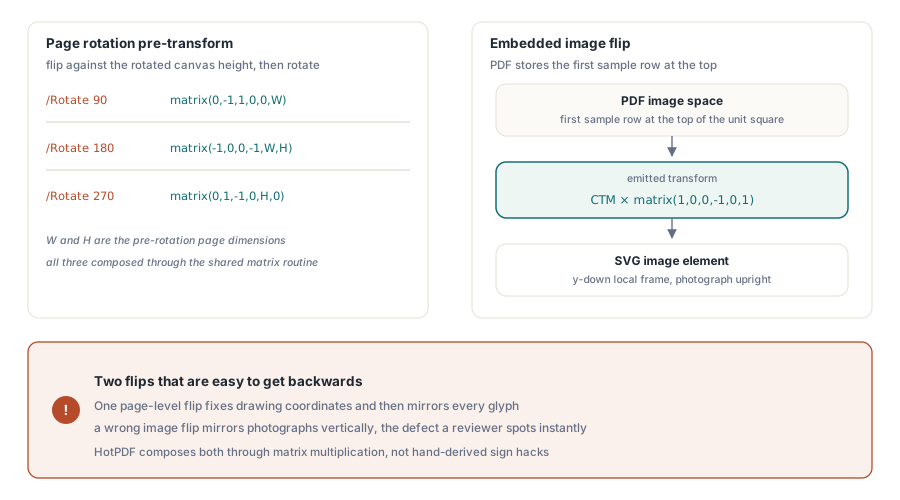
A page with a non-zero /Rotate entry needs a pre-transform composed of a flip against the rotated canvas height and a rotation expressed in y-up display space. The three rotation matrices are (0,-1,1,0,0,W) for 90 degrees, (-1,0,0,-1,W,H) for 180 and (0,1,-1,0,H,0) for 270, with W and H the pre-rotation page dimensions. Deriving these by hand invites sign errors in exactly three places, so the exporter composes them through the same matrix multiplication routine that handles every other transform
Embedded images need a flip of their own, because PDF image space places the first sample row at the top edge of the unit square while the SVG image element carries a y-down local frame. The emitted transform is therefore the CTM right multiplied by matrix(1,0,0,-1,0,1). Getting this wrong produces vertically mirrored photographs on an otherwise perfect page, which is the kind of defect a reviewer spots instantly and an automated test often does not
What does the graphics state device actually preserve?
HotPDF dispatches the stroke-state operators w, J, j, M and d through a separate optional device interface, so stroke fidelity was added without changing the vtable of the existing content device and without breaking binary compatibility for code built against earlier versions. Concretely, the exported SVG receives translated keywords rather than raw PDF integers:
// PDF integer enumerations become SVG keyword attributes
//   line cap  0, 1, 2  ->  butt, round, square
//   line join 0, 1, 2  ->  miter, round, bevel
//
// Zero line width means a device-space hairline in PDF, so the
// exporter emits vector-effect="non-scaling-stroke" to keep the
// stroke visible and near one device pixel wide after the CTM
//
// f* B* b* select the even-odd rule and emit fill-rule="evenodd",
// while f B b keep the SVG default of nonzero winding
Restoring state at a Q covers opacity, line width, cap, join, miter limit, dash array and dash phase together. Nested Form XObjects snapshot and restore the same full set at their boundaries, so a dashed border defined inside a stamp cannot leak its pattern into the page content that follows. If you already track clipping and CTM behavior for other reasons, this is the same state model that appears in EMF and WMF vector import, running in the opposite direction
Boundaries worth knowing before you ship it
The exporter is honest about its scope, and learning the edges up front is cheaper than discovering them in production. Color reaches the SVG device through the rg, RG, g and G operators. Fills established through a color space plus scn, which is how Separation, DeviceN and ICCBased colors are painted, do not arrive at the device as a resolved RGB triple, so pages that use spot colors this way export their geometry but not those colors. For print-oriented sources, rasterize instead or flatten the spot colors first; the painting model itself is covered in rendering Separation and DeviceN spot colors
Two smaller notes save debugging time. Hexadecimal color literals are emitted in uppercase, so a test asserting #ff0000 fails against a perfectly correct #FF0000. And the SVG device is reference counted through its interface, which means releasing it is a matter of letting the interface go out of scope rather than calling Free on the object, a distinction that matters if you extend the device to emit your own markup alongside the page content
SVG export pairs naturally with structural comparison when you need to know whether a generated document really changed between two builds. The wider toolkit around loaded documents, from rendering to editing to export, is documented on the HotPDF Delphi PDF component page