The content stream says /CS0 cs 1 scn 0 0 200 80 re f, and /CS0 in the page resources is a Separation space for a red Pantone ink. Read correctly, that rectangle is solid red. Read with the name lookup missing, the operand 1 lands in the initial DeviceGray space, where 1 means white, and you get a white box on a white page. Spot-color rendering lives or dies on two steps: finding the named color space, then running its tint-transform function to get real alternate-space values
That white box does not look like an error. A missing glyph or a black block gets reported; a headline that has vanished into the background usually gets blamed on the file. What follows covers how the loaded-document renderer handles Separation, DeviceN and the CIE-based spaces, where renderers go wrong, and a test that can actually fail
Why do spot colors come out black, gray or white?
Spot colors go wrong whenever a renderer supports only the device color operators. ISO 32000-1 §8.6 sorts color spaces into three families: device spaces (DeviceGray, DeviceRGB, DeviceCMYK), CIE-based spaces (CalGray, CalRGB, Lab, ICCBased) and special spaces (Indexed, Pattern, Separation, DeviceN). Only the device family can be painted with rg, g and k. Everything else goes through the generic operators: cs or CS selects a space by name from the resource dictionary, and sc, SC, scn or SCN supplies the component values. Skip those operators and the previous color stays in force, which on a page that opens with its spot-color headline is the initial DeviceGray black
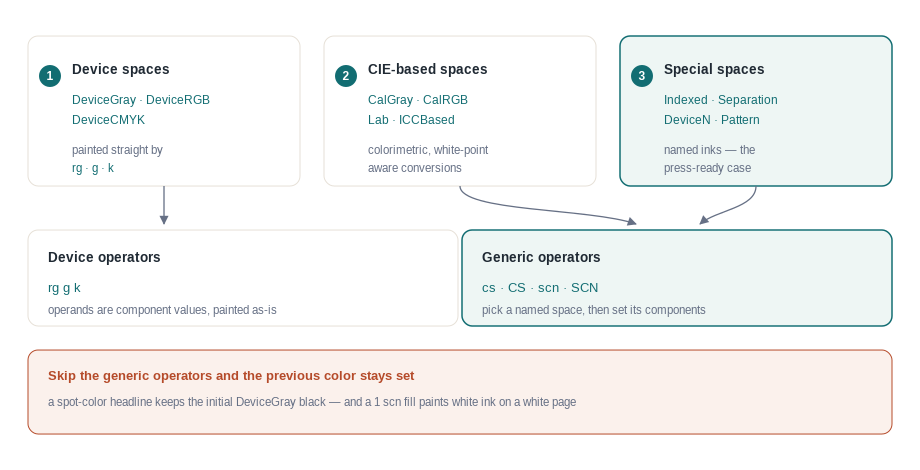
In the HotPDF page renderer all three families go through the same resolution path. A color space written as a bare name, an inline array or an indirect reference comes out the same. Every fill and stroke color then ends up as one RGB triple for the bitmap
The two failure colors are chosen on purpose. A space the resolver cannot interpret at all paints black. A Separation or DeviceN space that parses but whose tint transform cannot be evaluated paints mid-gray (128, 128, 128). That gray is deliberate: it tells you the ink was found and the function was the problem, which is a different bug report from "the color space was never recognized". Nested spaces are capped at a depth of 64, so a malformed file whose alternate space refers back to itself resolves as unsupported instead of recursing forever
What a tint transform actually computes
A Separation space is an array of four entries: the family name, the ink name, an alternate space and a tint-transform function. [/Separation /PANTONE485 /DeviceCMYK f] means that when the content stream writes 0.8 scn, the value 0.8 goes into function f and the four numbers that come out are painted as CMYK. DeviceN does the same with an array of ink names and an N-input function, optionally followed by an attributes dictionary whose /Subtype /NChannel marks the newer NChannel form. On screen the ink name tells you almost nothing. The function is the color
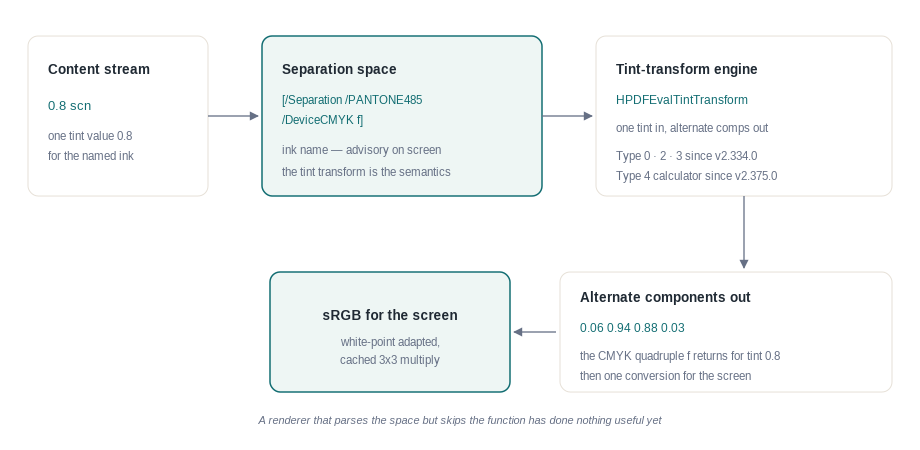
HPDFEvalTintTransform evaluates all four function types of ISO 32000-1 §7.10. Type 2 exponential functions compute C0 + x^N * (C1 - C0) with the input clipped to /Domain; outputs are clipped to /Range only when the dictionary has one, because a Lab alternate needs L values up to 100. Type 3 stitching functions are simpler than they sound. /Bounds picks the sub-function, and the matching /Encode pair remaps the input for it. Type 0 sampled functions take any bit depth the specification allows: 1, 2, 4, 8, 12, 16, 24 or 32 bits per sample. Type 0 is the same lookup table described from the writing side in the article on building Type 0 color LUTs; rendering walks that structure backwards, from sample bytes to component values
Type 4 PostScript calculators are where a straightforward port goes wrong. The operator set in ISO 32000-1 §7.10.5 looks like plain arithmetic. Three of its operators are not. PostScript round sends halves toward the greater integer, while Delphi's Round uses banker's rounding and turns 2.5 into 2. The trigonometric operators work in degrees, and atan returns an angle in [0, 360). And exp takes two operands, base first, then exponent. It is not e^x. HPDFEvalPostScriptCalculator is in the unit interface precisely so a calculator program can be checked on its own, without building a PDF around it
uses
  SysUtils, HPDFRenderColorSpace;

procedure CheckCalculatorCorners;
var
  Inputs, Outputs: THPDFColorComps;
begin
  FillChar(Inputs, SizeOf(Inputs), 0);
  FillChar(Outputs, SizeOf(Outputs), 0);

  // PostScript round: 2.5 goes up to 3 (Delphi's Round(2.5) gives 2)
  Inputs[0] := 2.5;
  if not HPDFEvalPostScriptCalculator(BytesOf('{ round }'),
    Inputs, 1, Outputs, 1) then
    raise Exception.Create('round program rejected');
  Assert(Outputs[0] = 3.0);  // your own check, not part of the library

  // exp is base^exponent: 3 2 exp = 9, not e^3
  Inputs[0] := 3.0;
  if not HPDFEvalPostScriptCalculator(BytesOf('{ 2 exp }'),
    Inputs, 1, Outputs, 1) then
    raise Exception.Create('exp program rejected');
  Assert(Outputs[0] = 9.0);  // your own check, not part of the library
end;
The same evaluator drives function-based gradients, so calculator ramps also appear correctly in axial and radial shading rendering. Precision is double throughout, which is fine for display and regression rendering; a software calculator will still not match a RIP to the last bit, and press proofing needs color management after the tint transform
CalGray, CalRGB, Lab and embedded ICC profiles
The CIE-based families take the other branch of the same resolver. Lab values go through the standard Lab to XYZ to sRGB chain, including the 6/29 breakpoint in the inverse function. CalRGB applies a gamma per channel, then its 3x3 matrix. CalGray needs only its single gamma. The XYZ-to-sRGB matrix is Bradford-adapted to the white point the color space declares and is computed once when the space is parsed, so each pixel costs one 3x3 multiply whatever illuminant the file names
ICCBased spaces are converted through the embedded profile itself. The renderer checks that the profile parses and that its component count matches /N. The operating system's color management engine then builds a profile-to-sRGB transform, using the profile's own rendering intent. /Alternate, or DeviceGray, DeviceRGB or DeviceCMYK for an /N of 1, 3 or 4 when /Alternate is absent, is used only when the profile is invalid or no transform can be built. When an ICCBased space is the alternate of a Separation or DeviceN ink, the tint transform output goes through that same profile
Two settings on THotPDF change this path. RenderColourIntent defaults to rciDocument, which keeps whatever intent the file asks for; rciPerceptual, rciRelativeColorimetric, rciSaturation and rciAbsoluteColorimetric override it. ConfigureRenderICCWorkflow(ProofProfile, OutputProfile, BlackPointCompensation) takes the profiles as streams and inserts a proof stage, and ClearRenderICCWorkflow removes it again. Leave the intent at rciDocument for an ordinary viewer. The author of a press file picked an intent for a reason, and overriding it only makes sense when you are deliberately proofing against a different output condition
Three lookup traps that turn ink into white or black
The most expensive trap is one character long. A content-stream tokenizer naturally hands a name operand over with its slash (/CS0), while the keys of the /ColorSpace resource dictionary are stored without it (CS0). Compare them as they are and every named lookup misses, every time, falling back to DeviceGray. That is exactly where the white box in the opening comes from: 1 scn in DeviceGray is white. The HotPDF renderer strips the slash before every operand-to-resource lookup, for color spaces, patterns, shadings, graphics states and fonts alike
The second trap is an indirect reference to an array. /CS0 5 0 R pointing at a standalone [/Separation ...] array object is perfectly legal, and a resolver that only follows references to dictionaries and streams sees an unresolved reference and parses nothing. The HotPDF renderer resolves the reference first and treats the nested alternate space and tint transform the same way. An inline array and a referenced one end up as the same color space
The third trap is array length. /C0 and /C1 in a Type 2 function hold one number per output component: one for a DeviceGray alternate, three for DeviceRGB, four for DeviceCMYK. Read them into a fixed four-element buffer with a reader that insists on an exact length and every non-CMYK case fails, both arrays stay at zero, and the exponential tint paints black. The renderer reads such keys with a fill-what-exists reader and keeps the specification defaults, [0.0] for C0 and [1.0] for C1, for anything the file leaves out. The same rule applies to /Domain, /Range, /Decode and /BBox: any key whose length depends on the data needs that kind of reader
Inspecting a page ink by ink
A composite RGB bitmap can look right while one ink is wrong: a Pantone red and a CMYK red are close enough on screen that nobody notices which one the file used. For that, THotPDF can list the named inks on a loaded page and render each one as its own plate. GetLoadedPageSpotColorants collects ink names from every Separation and DeviceN space in the page resources, including spaces nested inside Form XObjects, patterns, shadings, soft masks and the Indexed or Pattern spaces built on top of them. RenderLoadedPageSeparationPlate renders one ink as a grayscale bitmap where black is 100% coverage and white is none
var
  Pdf: THotPDF;
  Inks: THPDFAnsiStringArray;
  Plate: TBitmap;
  I: Integer;
begin
  Pdf := THotPDF.Create(nil);
  try
    if Pdf.LoadFromFile('carton.pdf', '') <= 0 then
      raise Exception.Create('carton.pdf could not be loaded');
    Inks := Pdf.GetLoadedPageSpotColorants(0);
    for I := 0 to High(Inks) do
    begin
      // Ink names may contain spaces, so number the files instead
      Plate := Pdf.RenderLoadedPageSeparationPlate(0, 150, Inks[I]);
      if Plate = nil then
        Continue;
      try
        Plate.SaveToFile(Format('plate-%d.bmp', [I]));
      finally
        Plate.Free;
      end;
    end;
  finally
    Pdf.Free;
  end;
end;
Ink names match without regard to case, and a Separation space named /All contributes to every plate, as the specification intends for registration marks. Cyan, Magenta, Yellow and Black also work as plate names: DeviceCMYK content supplies its own components, while RGB content is split with a simple RGB-to-CMYK estimate, so read process plates from an RGB page as a rough guide only
The RenderOverprintPreview property is off by default. With it on, fills and strokes that have overprint set in their graphics state, painted in DeviceGray, Separation, DeviceN, or DeviceCMYK with overprint mode 1, are composited with the inks already underneath instead of knocking them out. Keep it off for a document viewer. Switch it on when checking packaging or label artwork, because a spot varnish or a white underprint set to overprint is invisible without it
A rendering test that can actually fail
An assertion that the rendered bitmap is "not all black" will pass on every one of the failures above. Drop the spot inks to DeviceGray and you get gray and white pixels, which are not black. Count non-white pixels and the gray fallback passes too. The check has to name the color it expects
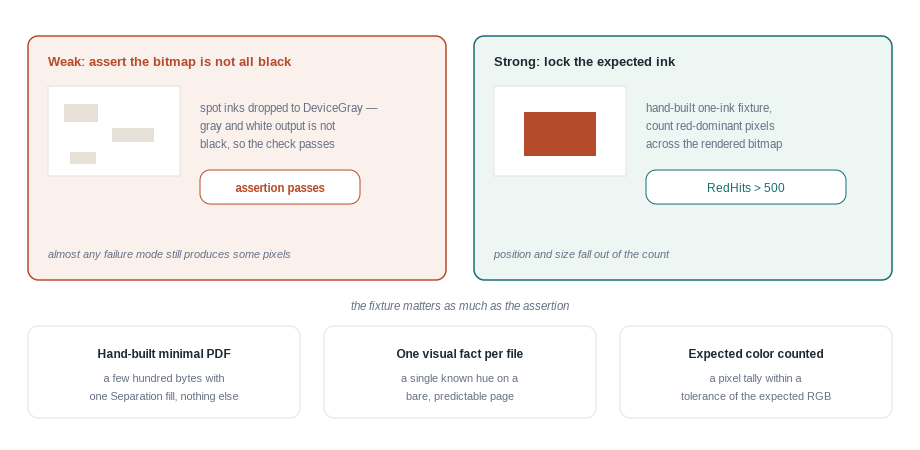
Build a minimal PDF by hand: one page, one Separation space whose tint transform maps 1.0 to a clear red in DeviceRGB or DeviceCMYK, one filled rectangle. Render it with RenderLoadedPageToBitmap, covered in the page-to-bitmap rendering guide, and count clearly red pixels. Rendering the plate for the same ink adds a second check that does not depend on the alternate space at all
var
  Pdf: THotPDF;
  Bmp, Plate: TBitmap;
  X, Y, RedHits, InkHits: Integer;
  Px: TColor;
begin
  Pdf := THotPDF.Create(nil);
  try
    if Pdf.LoadFromFile('spot-red-test.pdf', '') <= 0 then
      raise Exception.Create('test file did not load');

    Bmp := Pdf.RenderLoadedPageToBitmap(0, 96);
    Plate := Pdf.RenderLoadedPageSeparationPlate(0, 96, 'PANTONE485');
    try
      // Your own check: both render calls return nil when they fail
      if (Bmp = nil) or (Plate = nil) then
        raise Exception.Create('render failed');
      RedHits := 0;
      InkHits := 0;
      // Canvas.Pixels is slow but fine for a one-page test file
      for Y := 0 to Bmp.Height - 1 do
        for X := 0 to Bmp.Width - 1 do
        begin
          Px := ColorToRGB(Bmp.Canvas.Pixels[X, Y]);
          if (GetRValue(Px) > 180) and (GetGValue(Px) < 100) and
             (GetBValue(Px) < 100) then
            Inc(RedHits);
          if GetRValue(ColorToRGB(Plate.Canvas.Pixels[X, Y])) < 64 then
            Inc(InkHits);
        end;
      // Your own thresholds: a real area of the expected red on the
      // composite, and the same area dark on the ink's own plate
      Assert(RedHits > 500);
      Assert(InkHits > 500);
    finally
      Plate.Free;
      Bmp.Free;
    end;
  finally
    Pdf.Free;
  end;
end;
Both bitmaps share the page and the DPI, so they have the same size. The hand-built file does more work than the assertion: with a single fill on an empty page, a failure points at one stage, and a red count of zero with a dark plate means the name lookup and the ink are fine while the tint transform or the alternate space is not. A real print-shop file exercises far more code, but when it renders wrong it cannot tell you which of those stages broke
Separation, DeviceN and CIE-based color rendering, the plate and overprint previews, and the ICC proofing settings above all belong to the loaded-document renderer in the HotPDF Delphi Component, which works the same way in Delphi and C++Builder projects