HotPDF renders a loaded PDF page into a Delphi TBitmap through a single call: RenderLoadedPageToBitmap(PageIndex, DPI). The function interprets the page's content stream and returns a caller-owned 24-bit RGB bitmap at the resolution you choose, which is exactly what a thumbnail strip, a print preview, or a PDF-to-image export pipeline needs. This article walks through the API, then through the part that separates a usable renderer from a toy: drawing text from the embedded font programs themselves rather than from lookalike system fonts
Why is rendering a PDF page harder than drawing an image?
A PDF page is not a picture. It is a program: a stream of operators that build paths, select fonts, set colors, and place glyphs, executed against the graphics model defined in ISO 32000-1 §8. Nothing in the file says what any pixel looks like. To produce a bitmap you must run that program — maintain a current transformation matrix, a graphics-state stack for q/Q, a clipping path, fill and stroke color spaces — and rasterize the result. That is why "just show page 3 as an image" is a content-stream interpreter, not a file-format conversion
HotPDF's renderer, introduced in v2.253.0, is built as six decoupled units mirroring that model: an affine-matrix core for the PDF [a b c d e f] transform algebra, a graphics-state stack, a color-space resolver (DeviceRGB, DeviceGray, DeviceCMYK, Indexed), a path builder that bridges PDF path operators to GDI, a font-metrics layer that reads /Widths arrays for correct advances, and the interpreter that dispatches operators and drives the other five. Image XObjects go through the same decode stack the library uses for extraction, so every image filter HotPDF can decode for extraction — including JPXDecode-compressed JPEG 2000 images — also appears in rendered output
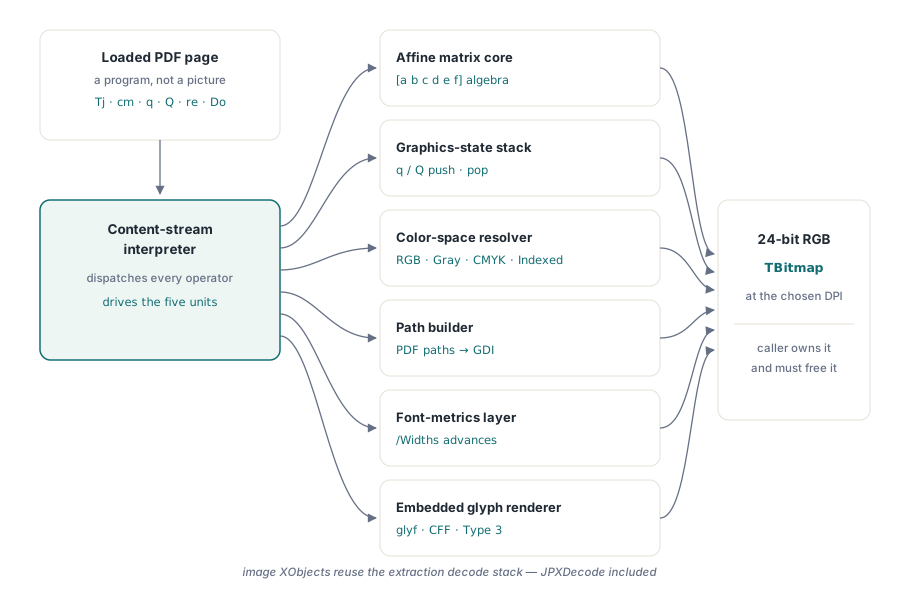
Rendering a loaded page to a TBitmap
RenderLoadedPageToBitmap takes a zero-based page index and a DPI value, where 72 DPI maps one PDF user-space unit to one pixel. It returns nil on failure (out-of-range index, missing resources) rather than raising, so a viewer can skip a bad page and keep going. The caller owns the returned bitmap and must free it
var
  Pdf: THotPDF;
  Bmp: TBitmap;
begin
  Pdf := THotPDF.Create(nil);
  try
    if Pdf.LoadFromFile('report.pdf') > 0 then
    begin
      Bmp := Pdf.RenderLoadedPageToBitmap(0, 144);  // page 1 at 144 DPI
      if Bmp <> nil then
      try
        Image1.Picture.Assign(Bmp);
      finally
        Bmp.Free;  // caller owns the bitmap
      end;
    end;
  finally
    Pdf.Free;
  end;
end;
The DPI argument does the scaling work for every common scenario. A thumbnail strip renders at 36 or 48 DPI and gets small, fast bitmaps; an on-screen preview at 96 or 144 DPI matches typical display density; an export path at 300 DPI produces print-quality images. Page rotation from the /Rotate entry and the /MediaBox origin flip (PDF puts the origin bottom-left, GDI top-left) are handled inside the page-to-device matrix, so a US Letter page at 72 DPI comes back as exactly 612×792 pixels the right way up
Why do rendered PDF thumbnails show wrong glyphs?
Wrong or approximate glyphs in rendered PDF output almost always mean the renderer is substituting a system font instead of using the font embedded in the file. The first HotPDF renderer did exactly that: it stripped the subset prefix from /BaseFont (turning ABCDEF+Arial into Arial), asked GDI for a system font of that name, and drew the text with it. For a document that uses Arial or Times New Roman with standard encoding, the result looks close. But it is an approximation, and it breaks in well-defined ways
Subset-embedded fonts are the worst case. A subset font may carry only the forty glyphs a document actually uses, with character codes assigned in an order private to that file — code 1 might be "T", code 2 "h", and so on. A system font knows nothing about that private assignment, so text either disappears or comes out as the wrong characters entirely. Custom encodings, symbol fonts, barcode fonts, and any face not installed on the rendering machine fail the same way. A renderer that stops at system-font substitution produces thumbnails that are recognizably the page — until the page uses the fonts that made embedding necessary in the first place
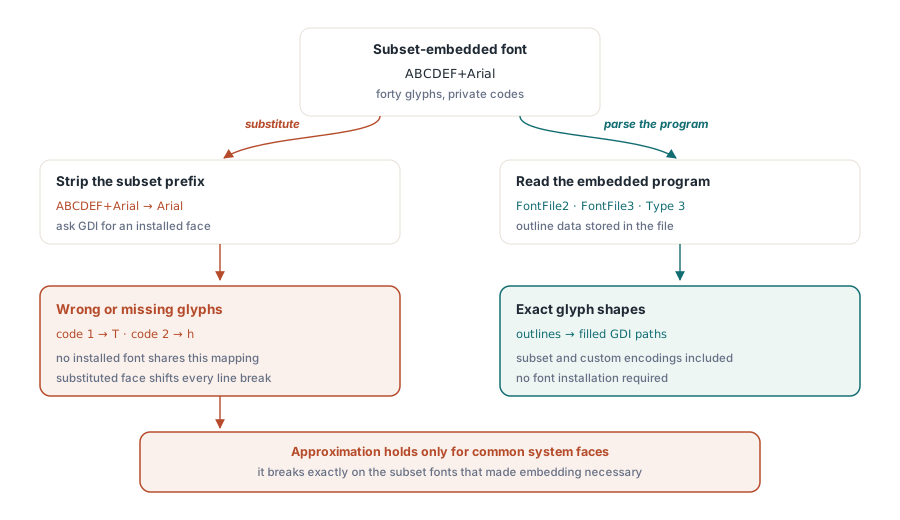
Embedded glyph rendering: drawing from the font program itself
HotPDF closed that gap across five releases (v2.268.0 through v2.272.0) by parsing the embedded font programs and replaying their glyph outlines as filled GDI vector paths. Text in a rendered page now comes from the same outline data a conforming viewer uses, which means subset fonts, custom encodings, and uninstalled faces render with their exact shapes. The coverage was built up by font flavor:
For Type0/CIDFontType2 fonts with an embedded TrueType program (FontFile2), the renderer parses the glyf and loca tables directly: quadratic contours are converted to the cubic Béziers GDI understands, implied on-curve points between consecutive off-curve points are reconstructed, and composite glyphs are recursively replayed. Both Identity and explicit stream CIDToGIDMap layouts are supported, and CID advances honor the /W and /DW width entries, so two-byte Identity-H text steps correctly
CFF programs (FontFile3, whether CIDFontType0C, Type1C, or an OpenType wrapper) get a full Type 2 charstring interpreter: lines, curves, the flex family, hint masks, and local/global subroutine calls with the correct subroutine bias. CID-keyed CFF programs map character codes through the font's charset, which matters for subset fonts whose glyph order differs from CID order, and per-glyph font-DICT selection through FDArray/FDSelect is honored. Simple (non-CID) TrueType fonts resolve one-byte codes through the embedded font's own cmap table with a robust subtable chain — Unicode formats 4 and 12 first, then symbol subtables with the F000 private-use mirror, then legacy Macintosh formats — while simple Type1 fonts resolve through the CFF program's built-in encoding
Two refinements complete the picture. First, simple-font /Encoding dictionaries are resolved per the priority ISO 32000-1 §9.6.6 prescribes: /Differences arrays override the base encoding, which overrides the font program's own map — the path TeX and PostScript-derived toolchains depend on, with glyph names resolving through the Adobe Glyph List, the CFF charset, or the TrueType cmap. Second, Type3 fonts, whose glyphs are themselves little content streams, are replayed through the renderer with the font matrix, font size, and text matrix composed; glyph-space /Widths are interpreted through the /FontMatrix as ISO 32000-1 §9.6.5 requires, and glyph procedures declaring a d1 bounding box are clipped to it, so a malformed barcode glyph cannot paint outside its cell. When a code cannot be mapped — a damaged program, an unmapped character — the renderer falls back to system-font drawing for that glyph rather than dropping the text run
How do you make repeated renders fast?
The answer HotPDF ships is a most-recently-used page cache: RenderLoadedPageToBitmapCached keeps up to RenderCacheCapacity rendered pages (default 8) keyed by page index and DPI, and a cache hit returns a fresh caller-owned copy without touching the content stream — typically thousands of times faster than re-interpreting the page. That pattern fits viewers exactly: a user flipping between two pages, or a resize event that re-requests the same page at the same DPI, hits the cache every time
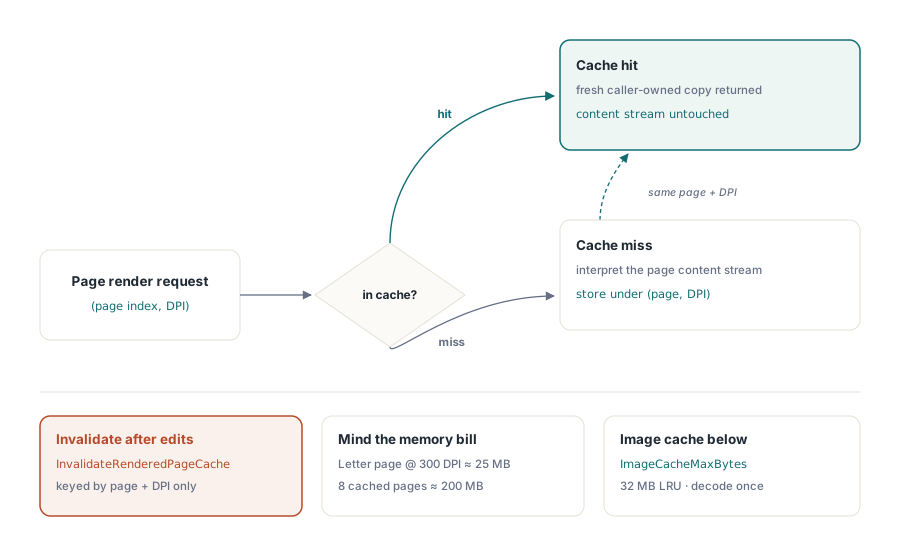
// Thumbnail strip: first pass renders, scrolling back hits the cache
for I := 0 to ThumbCount - 1 do
begin
  Bmp := Pdf.RenderLoadedPageToBitmapCached(I, 48);
  if Bmp <> nil then
  try
    ThumbList.AddThumbnail(I, Bmp);
  finally
    Bmp.Free;
  end;
end;

// After editing a loaded page in place:
Pdf.InvalidateRenderedPageCache;  // next render reflects the change
Be honest about the memory bill before raising the capacity. A US Letter page at 300 DPI is 2550×3300 pixels, about 25 MB as a 24-bit bitmap, so eight cached pages at export resolution hold roughly 200 MB. At thumbnail DPI the same eight entries cost well under a megabyte. Size RenderCacheCapacity for the DPI you actually cache at, and call InvalidateRenderedPageCache after any in-place edit — the cache is keyed by page and DPI only, and it cannot see that the underlying content changed. Loading a new document clears it automatically
A second cache works underneath the page cache: decoded image XObjects are kept in a byte-budgeted store bounded by ImageCacheMaxBytes (default 32 MB) with least-recently-used eviction. A logo or letterhead image repeated on every page decodes once per document load instead of once per Do operator, which roughly halves render time for shared-image pages and speeds up multi-page TIFF export by the same measure. InvalidateRenderedPageCache clears this cache too
What still renders approximately
The renderer targets the common document-PDF subset, and it is worth knowing where the edges are. CalRGB, Lab, and ICC-based color spaces are approximated rather than color-managed — device color spaces, Indexed palettes, and sampled Type 0 function color lookups are handled, but a print-production file relying on ICC rendering intents will not be colorimetrically exact. Shading patterns (sh) and blend modes beyond simple alpha are likewise out of scope, and Form XObject recursion is depth-limited as a cycle guard. For invoices, reports, contracts, and forms — pages made of text, paths, and images — the output is faithful; for a design proof full of gradients and transparency groups, treat the bitmap as a preview, not a proof
The practical reading: if your pipeline generates documents with HotPDF or consumes typical business PDFs, RenderLoadedPageToBitmap round-trips them with the exact embedded glyph shapes, correct CID advances, and correct page geometry. The approximations live in the corners of the graphics model that business documents rarely visit
RenderLoadedPageToBitmap, its cached variant, and the embedded-glyph rendering pipeline described here ship as part of the HotPDF Delphi Component for Delphi and C++Builder — a native VCL library with no external DLL dependencies, covering PDF creation, editing, text extraction, and page rendering in one package