You have a PDF on disk, a customer scanned it from a stack of invoices, and your job is to pull the page images back out as bitmaps for an OCR pass. You load the file, you find the image XObjects, and then you discover the part nobody warns you about: the bytes in those streams are not pixels. They are a JPEG codestream, or a wavelet-compressed JPEG 2000 blob, or a Group 4 fax run, or an indexed raster behind a palette behind a Flate filter. The image object knows its width and height, but the actual samples are sealed inside whatever filter the producer chose. Getting a usable TBitmap means undoing that filter, and PDF gives you roughly eight different ways the bytes can be sealed
This is the gap that ExtractLoadedImage fills in HotPDF, the native VCL PDF component for Delphi and C++Builder. It enumerates the image XObjects in a document you loaded, reports what each one is, and decodes the ones it can back into a 24-bit bitmap. The interesting part is not the API surface, which is three methods. It is why a separate decode path has to exist at all, and what it can and cannot turn back into pixels
Why loaded images are not already decoded
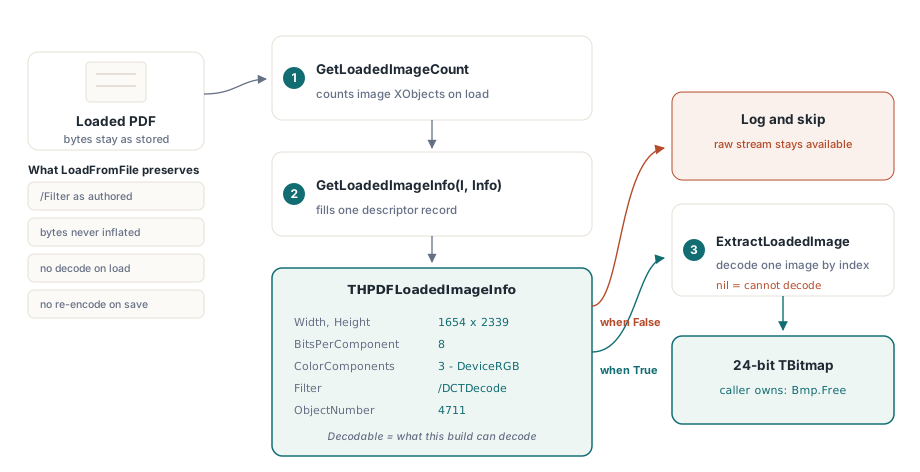
HotPDF's loader is built around pass-through fidelity. When you call LoadFromFile, the image streams are kept exactly as they appear in the source file: the original filter, the original compressed bytes, the original dictionary. That is deliberate. The whole point of loading a document is usually to copy pages, merge files, stamp them, re-permission them, and write them back out, and for all of that the cheapest and safest thing to do is leave each image stream untouched. Decoding every image to a raster on load would burn memory and CPU on work most callers never need, and re-encoding on save would degrade images that should have been copied verbatim
The consequence is that the loaded object graph carries no pixels. An image XObject whose /Filter is /DCTDecode holds JPEG bytes; HotPDF never ran a JPEG decoder against it, because nothing in the copy-and-rewrite path needed to. So when you actually want pixels, the extraction API has to do the decoding itself, from scratch, for whichever filter that particular image happens to use. This is the same reason the encode-side codecs are independent of the loader: the article on adding JPEG 2000 images to PDFs in Delphi describes how the JPX engine plugs into the creation side, and that engine simply was not wired into the read path until the extraction API needed it
The three-method API
The surface is small. GetLoadedImageCount returns how many image XObjects the loaded document contains. GetLoadedImageInfo fills a descriptor record for one of them by index. ExtractLoadedImage returns the decoded bitmap, or nil when it cannot decode that image. Enumeration is index-based and stable for a given load: internally it walks the indirect-object table and collects every stream whose /Subtype resolves to /Image, so the index you pass to GetLoadedImageInfo is the same index you pass to ExtractLoadedImage
var
  Pdf: THotPDF;
  Info: THPDFLoadedImageInfo;
  Bmp: TBitmap;
  I, Count: Integer;
begin
  Pdf := THotPDF.Create(nil);
  try
    if Pdf.LoadFromFile('scanned-invoices.pdf', '') <= 0 then
      Exit;
    Count := Pdf.GetLoadedImageCount;
    for I := 0 to Count - 1 do
    begin
      if not Pdf.GetLoadedImageInfo(I, Info) then
        Continue;
      if not Info.Decodable then
        Continue;                       // filter or colour space not supported
      Bmp := Pdf.ExtractLoadedImage(I);
      if Bmp <> nil then
      try
        Bmp.SaveToFile(Format('img_%d.bmp', [I]));
      finally
        Bmp.Free;                       // caller owns the bitmap
      end;
    end;
  finally
    Pdf.Free;
  end;
end;
Two contract details matter here. First, the returned TBitmap is yours to free; the document does not cache or own it. Second, check Decodable before you call, and check the result against nil after. The method does not raise on an unsupported filter, it returns nil, and a silent nil in a batch loop is exactly the kind of thing that swallows a page of a thousand-page job without anyone noticing
Reading the descriptor before you decode
THPDFLoadedImageInfo tells you what an image is without committing to a full decode. Its fields come straight off the image dictionary: Width and Height in samples, BitsPerComponent, ColorComponents and ColorSpace describing the post-decode interpretation (1 for gray, 3 for RGB, 4 for CMYK), Filter as the named compression, IsImageMask for stencil masks, ObjectNumber for the underlying indirect object, and Decodable
That last flag is the honest one. Decodable is True only when the running build can actually turn this specific filter-and-color-space combination into a bitmap. It encodes the real support matrix, not a wish: an image whose Filter the current build does not understand reports Decodable = False, and you can branch on that to log, skip, or fall back to extracting the raw stream yourself. Treat it as a precondition, not a hint
// Triage every image before committing to a decode.
var
  Pdf: THotPDF;
  Info: THPDFLoadedImageInfo;
  I: Integer;
begin
  // ... Pdf loaded ...
  for I := 0 to Pdf.GetLoadedImageCount - 1 do
  begin
    if not Pdf.GetLoadedImageInfo(I, Info) then
      Continue;
    if Info.Decodable then
      // ExtractLoadedImage(I) will return a TBitmap
    else
      // unsupported filter/colour space: log the object and skip
      Writeln(Format('Image %d obj %d: %dx%d %s/%s not decodable',
        [I, Info.ObjectNumber, Info.Width, Info.Height,
         String(Info.Filter), String(Info.ColorSpace)]));
  end;
end;
One implementation detail bites people who build descriptor records by hand. THPDFLoadedImageInfo holds two AnsiString fields, Filter and ColorSpace. These are managed types with reference counting, so the reflex of zeroing a record with FillChar(Info, SizeOf(Info), 0) is wrong here: it overwrites the string reference without decrementing it, which leaks or corrupts. HotPDF initializes the record field by field for exactly that reason, and if you ever copy this pattern in your own code, do the same
One dispatcher, eight filter paths
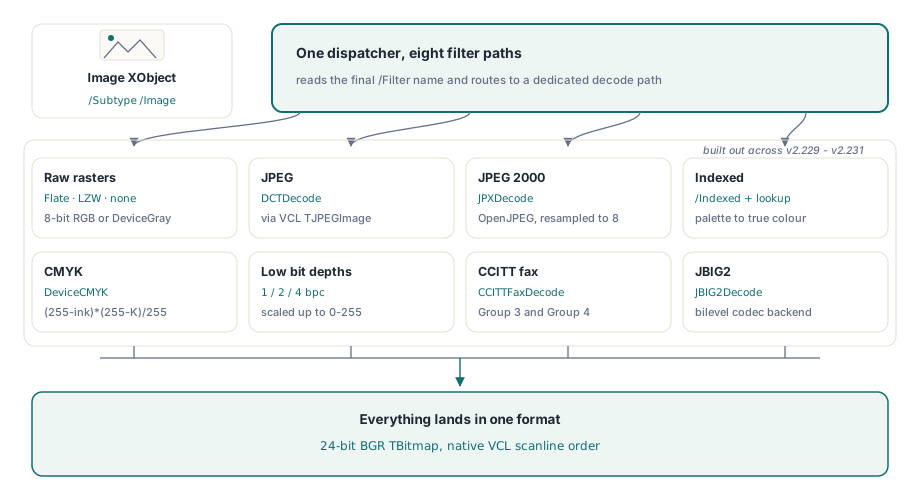
The reason this feature took a series of releases rather than one is that PDF does not have an image format. It has filters, and §8.9.5 of ISO 32000-1 lets an image XObject name any of them in /Filter, with the sample interpretation governed separately by /ColorSpace, /BitsPerComponent and an optional /Decode array. ExtractLoadedImage reads the filter name and routes to a dedicated decoder for each case. The supported set, built up across v2.229 through v2.231, now covers eight distinct paths
- Raw rasters (FlateDecode, LZWDecode, or no filter) in 8-bit DeviceRGB or DeviceGray. The bytes inflate to a packed raster, and the only transform is a channel swap, covered below
- DCTDecode (JPEG). The codestream is handed to the VCL's
TJPEGImage, which resolves geometry and color, and the result is assigned into a 24-bit bitmap - JPXDecode (JPEG 2000). Decoded through the OpenJPEG backend, the same engine described in the JPEG 2000 article, with high-bit-depth components resampled down to 8 bits
- Indexed color. The palette is read from the
[/Indexed base hival lookup]array and each sample is expanded through the lookup table to true color - DeviceCMYK. Four-channel samples are converted to RGB with the standard ink-on-white formula
- Sub-8-bit DeviceGray and Indexed at 1, 2, or 4 bits per component, unpacked sample by sample and scaled to the 0–255 range
- CCITTFaxDecode, the Group 3 and Group 4 fax filters, decoded by a dedicated T.4/T.6 backend
- JBIG2Decode, the high-ratio bilevel filter, decoded through the registered JBIG2 backend that the native JBIG2 compression article covers from the encode side
Everything lands in the same place: a 24-bit BGR bitmap, because that is what a VCL TBitmap stores natively and what every downstream consumer expects
The transforms that silently change pixels
Two of these paths involve a transform that is easy to get subtly wrong, and worth understanding even if you never touch the decoder yourself. The first is the color-order swap. A PDF DeviceRGB raster stores samples in red-green-blue order, top row first. A VCL 24-bit scanline stores them in blue-green-red order. So decoding a plain RGB image is not a memcpy; each pixel's first and third bytes are exchanged on the way into the scanline. Get that backwards and your reds and blues trade places, which looks fine on a grayscale test image and catastrophically wrong on a color one. Row order, for what it is worth, maps straight through: PDF's top-down rasters line up with VCL's ScanLine[0] as the top visual row, so no vertical flip is needed
The second is CMYK. PDF DeviceCMYK images carry four inks, and the conversion to RGB is a per-channel computation, not a lookup: each output channel is (255 - ink) * (255 - K) / 255. This is a device approximation, not a color-managed conversion through an ICC profile, so the result is correct enough for display and re-rasterization but is not the right path if you need print-accurate color. If your workflow demands fidelity, treat the extracted bitmap as a preview and keep the original CMYK stream for the color-managed pipeline
The Indexed path hides a parsing trap of its own. The palette in an /Indexed color space can be stored as a literal string or as a hexadecimal string, and HotPDF stores a hex string's value as the hex text, not the decoded bytes. So when the palette is a hex string, the lookup table has to be run through a hex-to-bytes decode first; a literal string is already raw bytes. Miss that branch and a four-color indexed image comes out as garbage, because every palette entry is being read off the wrong byte boundary
Filter chains: the last filter is the image's own
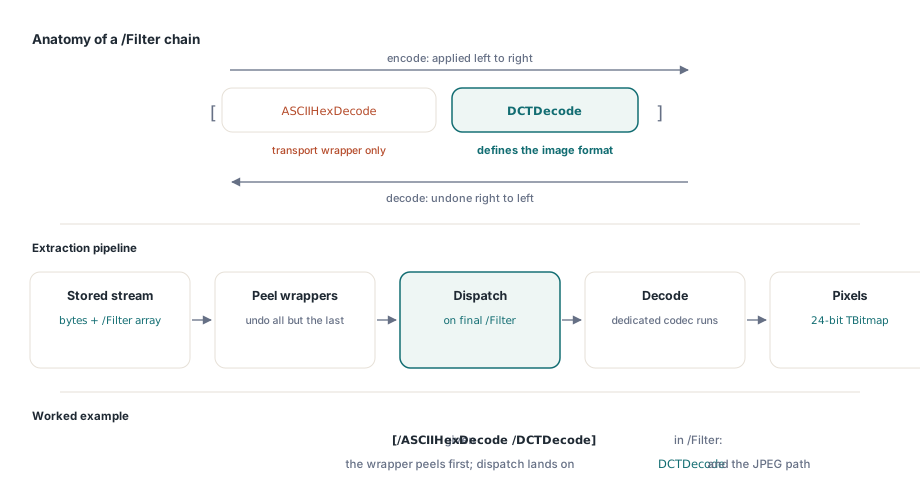
A single /Filter name is the easy case. PDF also allows a chain of filters, where the stream has been passed through several in sequence, listed in order in a /Filter array such as [/ASCII85Decode /FlateDecode] or [/ASCIIHexDecode /DCTDecode] (ISO 32000-1 §7.4). The semantics are precise: the filters apply left to right on encode, so on decode you undo them right to left, and the last filter in the array is the one that actually defines the image format. The leading filters are just transport encodings wrapped around it
The extractor handles this by peeling. Before any image decoder runs, every filter in the chain except the last is applied to produce the input the final filter expects, and only then does dispatch happen on that last filter. So [/ASCII85Decode /DCTDecode] first un-ASCII85s the stream, then routes the result to the JPEG path; [/FlateDecode] wrapped around a raw raster inflates and then runs the raster path. This is what lets the eight decoders stay simple. None of them has to know about ASCII85 or hex transport wrappers, because by the time a decoder sees the bytes, the wrappers are already gone. It also means a chain whose final filter is unsupported still fails cleanly at the dispatch step rather than halfway through
Where extraction stops, and what to do then
Be honest with yourself about the boundaries. An image whose final filter is outside the supported set returns nil, and so does one whose color space the build cannot interpret. Soft masks and alpha are not reconstructed into the bitmap; you get the base image, not a composited result. Bit depths above 8 from JPEG 2000 are resampled down, which is lossy on purpose and the wrong move if you are re-archiving rather than displaying. And an image mask, a one-bit stencil with no color of its own, is described by the descriptor but is a different thing from a pictorial image; decode it expecting a photo and you will be surprised
When extraction is not enough, the raw stream is still right there in the loaded object graph, filter and all, and you can pull it out byte for byte and hand it to a specialized codec of your own. That is the fallback the pass-through design preserves on purpose: the original bytes are never thrown away, so the worst case is that you decode them yourself rather than that the data is gone. For most real jobs, though, the supported eight filters cover what scanners, office suites, and report engines actually emit, and a loop over GetLoadedImageCount with a Decodable guard turns a loaded PDF back into a folder of bitmaps in a few lines
The loaded-image extraction API, along with the full set of decode filters described here, ships in the HotPDF Delphi Component for Delphi and C++Builder