PDF Functions are one of the quieter corners of the spec. Most developers meet them once, as the thing a Type 2 axial shading needs in order to fade between two colors, and never look again. That is a shame, because the function machinery is a small general-purpose evaluator that the format reuses for shadings, transfer functions, halftone spot functions, separation tints, and soft-mask transfer curves. Of the four function types, Type 0 is the most powerful and the least understood. It is a sampled function: a multi-dimensional grid of output values that the reader interpolates between. Because the grid can hold any numbers you put in it, a Type 0 function can express an arbitrary nonlinear mapping, which is the exact shape of a color lookup table
This article walks the Type 0 dictionary as ISO 32000-1 defines it in §7.10.2, then shows the two cases that matter most in a document pipeline: a three-input RGB-to-RGB color correction LUT, and a one-input spot-color tint transform. The same sampled-function builder serves both, and the difference between them is entirely a question of how many inputs the grid has
A sampled function is a grid the reader interpolates
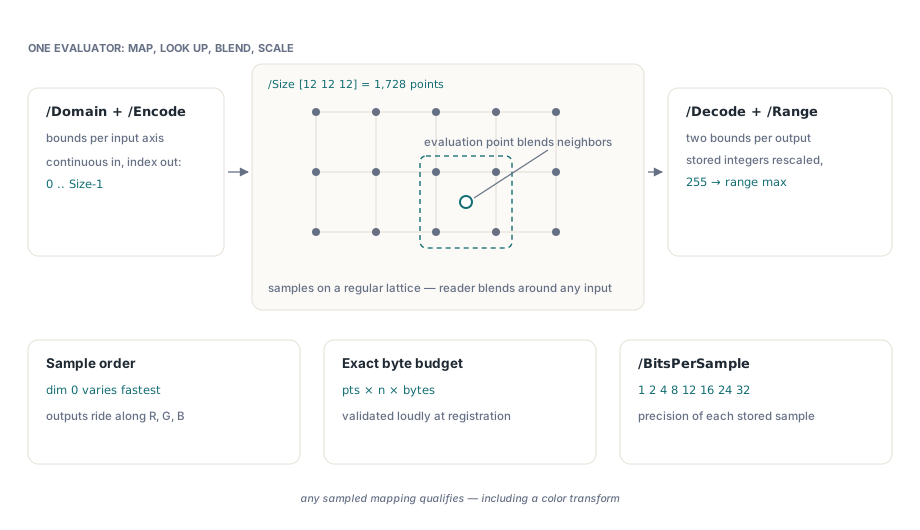
A Type 0 function maps an m-input vector to an n-output vector by storing samples on a regular grid and interpolating between them. ISO 32000-1 §7.10.2 lists the keys that describe that grid. /Domain holds two numbers per input, the low and high bound of each input axis. /Range holds two numbers per output component. /Size is an array of m integers giving the number of samples along each input axis, so a grid that is twelve samples on a side in three dimensions has /Size [12 12 12] and stores 1,728 grid points. /BitsPerSample sets the precision of each stored value; HotPDF accepts 1, 2, 4, 8, 12, 16, 24, and 32 bits, matching the values Table 38 permits
The sample stream is read in a fixed order. The first input dimension varies fastest, then the second, and so on, and at each grid point the n output components are stored in order. For an RGB-to-RGB table that is three bytes per grid point at eight bits, laid out red-output, green-output, blue-output, swept across the red input first. Two more keys map the continuous world onto the integer grid. /Encode maps each input from its /Domain interval to the sample-index range 0 to Size[i] - 1, and /Decode maps the raw stored integers back onto the /Range intervals. When you leave them at their defaults, an input spanning [0 1] lands cleanly on the full grid and a stored byte of 255 decodes to the top of its output range, which is what an [0,1]-normalized color LUT wants
Order 1 against Order 3
Between grid points the reader has to interpolate, and /Order chooses how. /Order 1 is multilinear interpolation: linear along one axis, bilinear across two, trilinear across three. It is fast, it is exactly what the hardware in most viewers does, and for a smooth color transform it is usually indistinguishable from anything fancier. /Order 3 requests cubic-spline interpolation, which fits a smoother curve through the samples at the cost of more work and a wider support region around each evaluated point
The tradeoff is grid density against curve smoothness. Cubic order earns its keep when the grid is coarse and the mapping has visible curvature, because a straight line between two distant samples can flatten a tone curve in a way the eye catches on gradients. Once the grid is dense, the segments are short enough that linear interpolation tracks the curve closely and cubic buys little. A practical rule is to reach for /Order 3 only with small grids or steep transforms, and otherwise leave it at the linear default. Note that /Order applies to Type 0 functions only, and HotPDF rejects any value other than 1 or 3
The 3D LUT: three inputs, three outputs
An RGB-to-RGB color correction is the textbook case for a three-input grid, the classic 3D LUT used in color grading and device matching. Each axis of the cube is one input channel, every grid point stores the corrected RGB triple for that input coordinate, and the reader trilinearly interpolates the corner samples around any incoming color. Three inputs are unavoidable here because the corrected red can depend on the input green and blue, not just on the input red; a per-channel curve cannot express channel crosstalk, but a cube can
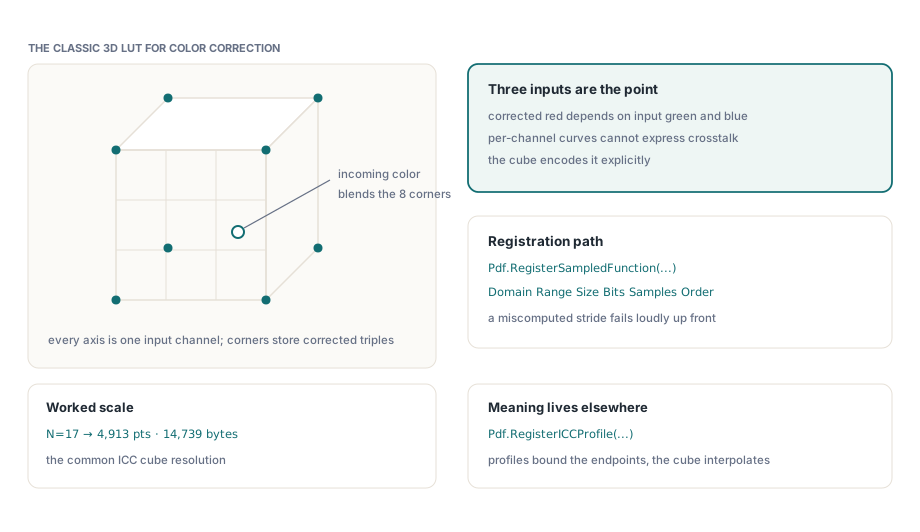
HotPDF builds the Type 0 stream through RegisterSampledFunction, which takes the /Domain, /Range, /Size, /BitsPerSample, and sample bytes directly and returns the function object. For a standard normalized cube you pass [0,1] bounds on all three input axes and all three outputs, an N x N x N size, and the flattened sample table. The builder validates that the byte count matches the grid: for a byte-aligned depth it expects OutputCount x (BitsPerSample div 8) x the product of the sizes, and raises if the array is the wrong length, so a miscomputed stride fails loudly at registration rather than rendering as garbage later
const
  N = 17;  // 17 x 17 x 17 cube, the common ICC LUT resolution
var
  LutFn: THPDFStreamObject;
  Samples: TBytes;
begin
  // Fill Samples with N*N*N grid points, 3 bytes each (R,G,B output),
  // red input varying fastest. Build the corrected triple for each
  // grid coordinate with your ICC-managed conversion, then store it.
  SetLength(Samples, N * N * N * 3);
  BuildCorrectedCube(Samples, N);   // your color-managed fill

  LutFn := Pdf.RegisterSampledFunction(
    [0,1, 0,1, 0,1],   // /Domain: three input axes on [0,1]
    [0,1, 0,1, 0,1],   // /Range:  three output channels on [0,1]
    [N, N, N],         // /Size:   the cube resolution per axis
    8,                 // /BitsPerSample
    Samples,
    1);                // /Order 1 = trilinear
end;
The colorimetric correctness of the cube lives in how you fill it, not in the PDF function. The honest path is to compute each grid point through an ICC-managed conversion, the same engine that drives a soft-proof, so the numbers in the grid mean something against a defined source and destination profile. Register the profiles that bound the conversion with RegisterICCProfile, which records an ICCBased color space (1, 3, or 4 components) and returns a resource name you can attach to the content that the LUT feeds. The Type 0 function carries the interpolation table; the ICC profile carries the meaning of the endpoints
The 1D case: a spot-color tint transform
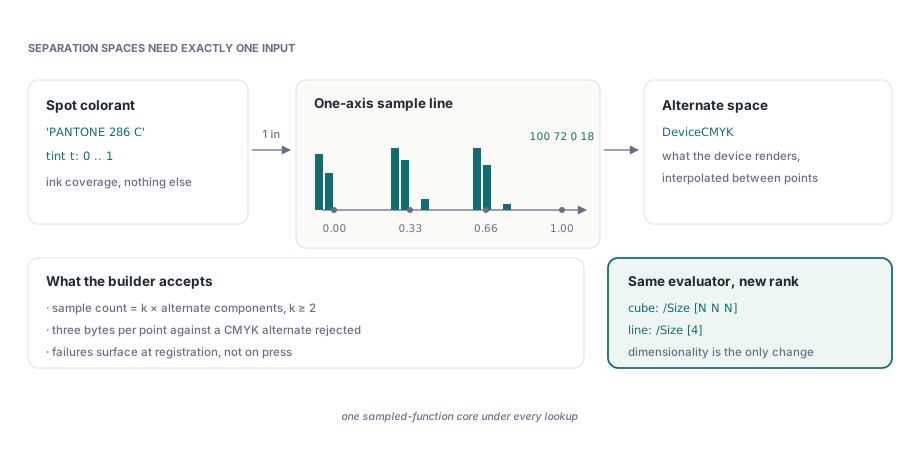
Separation color spaces lean on the same machinery for an entirely different job. A Separation space, defined in ISO 32000-1 §8.6.6.4, represents a single colorant, a spot ink such as a Pantone or a varnish, by pairing a name with a tint transform: a function that maps the one-dimensional tint value, 0 for no ink to 1 for full ink, onto an alternate color space the device can actually render, usually CMYK. That tint transform is frequently a Type 0 function, and now the grid has exactly one input axis
This is the clean contrast with the 3D LUT. A spot ink is one degree of freedom, so its tint transform needs one input and the grid is a line of samples, each holding the CMYK (or other alternate) value at that tint level. The RGB cube needs three inputs because its domain is three-dimensional and the channels interact. Same function type, same interpolation rules, different dimensionality; the spec reuses one evaluator and lets /Size decide whether you are walking a line, a plane, or a cube. HotPDF wraps the whole separation in RegisterSeparationLUT, which builds the one-input Type 0 tint transform from a flat byte array internally and returns the color-space resource name
var
  SpotCS: AnsiString;
begin
  // Four CMYK output bytes per tint grid point, tint domain [0..1].
  // Here 0% ink -> all zero, 100% ink -> a rich spot build,
  // with two interior steps; the tint transform interpolates between.
  SpotCS := Pdf.RegisterSeparationLUT(
    'PANTONE 286 C',         // colorant name
    'DeviceCMYK',            // alternate color space
    [  0,   0,   0,   0,     // tint 0.00 -> 0,0,0,0
      90,  60,   0,   0,     // tint 0.33
     100,  80,   0,  10,     // tint 0.66
     100,  72,   0,  18]);   // tint 1.00 -> full ink build
  // Use SpotCS with SetFillColorSpace / SetFillColor on a page.
end;
The sample count has to be a whole number of grid points: a positive multiple of the alternate space's component count, and at least two points so there is a segment to interpolate. Pass three bytes per point against a CMYK alternate and the call rejects it, the same defensive validation the 3D builder applies, which is what you want from a function that will otherwise fail silently at print time
Where the same machinery shows up again
Once you see Type 0 as a generic interpolation table, two more device-control features stop looking like special cases. A transfer function adjusts component values on their way to the output device, and it is just a function per channel; HotPDF registers it as an ExtGState through RegisterTransferFunctionState, which accepts either one combined function or an array of per-channel functions. Because those functions are ordinary function objects, you can hand it the very THPDFStreamObject that RegisterSampledFunction returns and drive a transfer curve from a sampled table rather than a formula
var
  ToneFn: THPDFStreamObject;
  GsName: AnsiString;
begin
  // A single-input, single-output sampled tone curve on [0,1].
  ToneFn := Pdf.RegisterSampledFunction(
    [0,1], [0,1], [256], 8, ToneCurveBytes, 1);

  // Apply it to all channels as a combined /TR2 transfer function.
  GsName := Pdf.RegisterTransferFunctionState(ToneFn, []);
  // Select GsName on the page before drawing the affected content.
end;
Black generation and undercolor removal sit in the same family. When a device converts RGB to CMYK it decides how much of the gray component to carry as black ink, and the spec expresses that decision as a function, the /BG2 and /UCR2 entries of a graphics-state dictionary, each a single-input curve from the computed gray to a black amount. Those are Type 0 functions too when you want a measured curve rather than an analytic one, built the same way through RegisterSampledFunction and placed in the graphics state. The lesson worth keeping is that the PDF function is never where color management happens; it is the lookup table that carries a decision you made with a real color engine, and Type 0 is the one function type flexible enough to carry any decision at all
For the broader picture of how fonts, images, and color resources are emitted into a finished document, see our walkthrough of report output with fonts and images. When the output has to survive an archival or print preflight check, the color-space and output-intent rules covered in the PDF/A, PDF/X, and PDF/UA validation guide govern which of these functions are allowed and how device color must be tagged. All of it ships in the HotPDF Delphi Component for Delphi and C++Builder, alongside the shading, ICC, and separation APIs that build on the same Type 0 core