PDF/A, PDF/X, and PDF/UA are three different standards solving three different problems: long-term archiving, print exchange, and accessibility. They are not three checkboxes on one compliance form, and the most common mistake is treating them as if they were. A file can be flawless PDF/A and useless for a print shop; a perfect print master can be unreadable to a screen reader. Worse, all three are constraints on the file's internal structure, not on how it looks. A document that opens cleanly in every viewer you own can still fail validation on the first try, and usually does
HotPDF, losLab's native VCL PDF library, treats conformance as something you declare before the first page exists. You set a compliance property, attach the structures the standard requires, and the library refuses configurations that contradict the profile at save time. That is a better model than generating a file and hoping a post-processor can retrofit it, because most of what these standards require cannot be added after the fact
Three ISO standards, three different promises
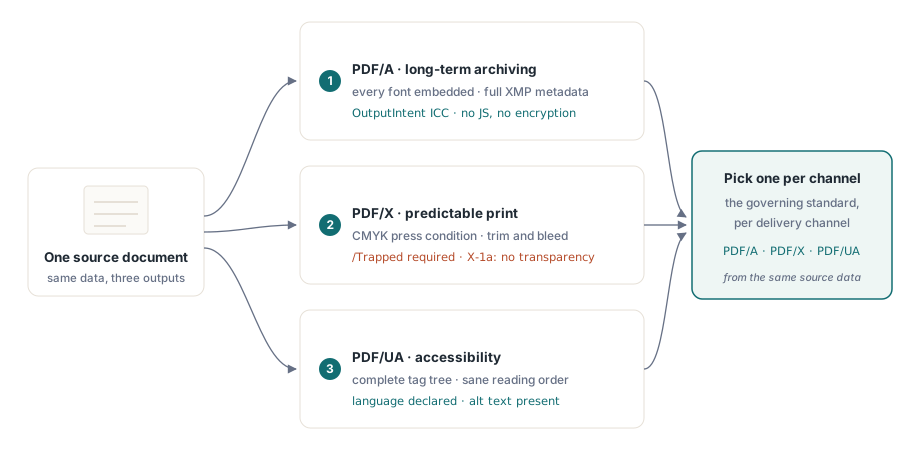
PDF/A (ISO 19005) is about time. It promises a file will still render identically decades from now, so it demands complete self-containment: every font embedded, every color given device-independent meaning through an OutputIntent, full XMP metadata, and a ban on anything whose behavior depends on the environment. Encryption and JavaScript are out, because nobody can guarantee the decryptor or the script engine will exist in 2050
PDF/X (ISO 15930) is about color on paper. It exists so a designer can hand a file to a print shop neither of them has to discuss, which means characterized printing conditions, a mandatory /Trapped key, defined trim and bleed geometry, and, in the X-1a flavor, no live transparency for the RIP to guess at. PDF/UA (ISO 14289) is about who can read the result. Assistive technology needs a complete tag tree, a sane reading order, a declared document language, and text alternatives for anything that is not text
Because the three pull in different directions, pick the governing standard per output channel rather than chasing one file that satisfies all of them. A CMYK-only print master is precisely the wrong thing to hand a screen-reader user who never sees color, and the archival profile's lockdown on dynamic behavior collides with anything interactive. Generate per channel from the same source data and you sidestep the whole conflict
PDF/A: the OutputIntent is the part everyone forgets
If a PDF/A file fails validation, the OutputIntent is the first thing to check. It is the structure generators skip most often, precisely because nothing visible depends on it. ISO 19005 requires one: an embedded ICC profile that pins down what the document's device colors actually mean. HotPDF makes that profile an explicit input rather than an afterthought:
var
  Pdf: THotPDF;
  ICC: TFileStream;
begin
  Pdf := THotPDF.Create(nil);
  try
    Pdf.FileName := 'invoice-archival.pdf';
    Pdf.PDFACompliance := 'B';            // level B: visual fidelity
    Pdf.Lang := 'en-US';
    Pdf.StandardFontEmulation := False;   // embed real fonts, no Base-14 emulation
    ICC := TFileStream.Create('sRGB.icc', fmOpenRead);
    try
      Pdf.AddPDFAOutputIntent('sRGB IEC61966-2.1', '', ICC, 3, 'DeviceRGB');
    finally
      ICC.Free;
    end;
    Pdf.BeginDoc;
    Pdf.CurrentPage.SetFont('Arial', [], 11);
    Pdf.CurrentPage.TextOut(50, 760, 0, 'Archival invoice body');
    Pdf.EndDoc;
  finally
    Pdf.Free;
  end;
end;
A few details decide pass or fail here. StandardFontEmulation has to be off: emulated Base-14 fonts are not embedded, and embedding is non-negotiable under ISO 19005. Encryption has to stay disabled, so never combine PDFACompliance with ActivateProtection; an encrypted archival file is a contradiction the validator catches immediately. The component count in AddPDFAOutputIntent must match the profile, which is 3 for an RGB profile like sRGB IEC61966-2.1 and 4 for CMYK. HotPDF tracks DeviceRGB and DeviceCMYK usage against the declared intent as it writes, so a stray CMYK fill in an RGB-intent document turns into a reported problem rather than a silent one
One thing worth saying about the ICC profile: treat it as a versioned deployment artifact, not a file someone once dropped on the build server. Its bytes are embedded into every document you generate, so a truncated or corrupted profile quietly poisons a whole batch, and you find out only at validation time. Ship it with your installer, record its checksum in the run log, and load it through the TFileStream pattern shown above so a missing file fails loudly during generation instead of silently at the archive gate
PDF/X for print: Trapped, CMYK, and the press profile
Print masters invert the color story. The press wants characterized CMYK, and the standard makes you state whether trapping has been applied even when the honest answer is that you have no idea. The /Trapped key is mandatory regardless:
Pdf.PDFXCompliance := 'X-1a';
Pdf.Trapped := 'Unknown';        // mandatory key under ISO 15930
ICC := TFileStream.Create('FOGRA39.icc', fmOpenRead);
try
  Pdf.AddPDFXOutputIntent('FOGRA39 (ISO 12647-2:2004)', '', ICC, 4, 'DeviceCMYK');
finally
  ICC.Free;
end;
Pdf.BeginDoc;
// draw with CMYK-safe colors, no transparency, no encryption
Pdf.EndDoc;
The component count is now 4 for the CMYK press profile. X-1a also forbids live transparency, so audit any drawing code that layers translucent elements; whatever a viewer composites on screen is exactly what a RIP will refuse to interpret. When your shop sends a different characterization, swap the profile bytes and the identifier string but leave the surrounding structure alone
PDF/UA: structure is generated, never retrofitted
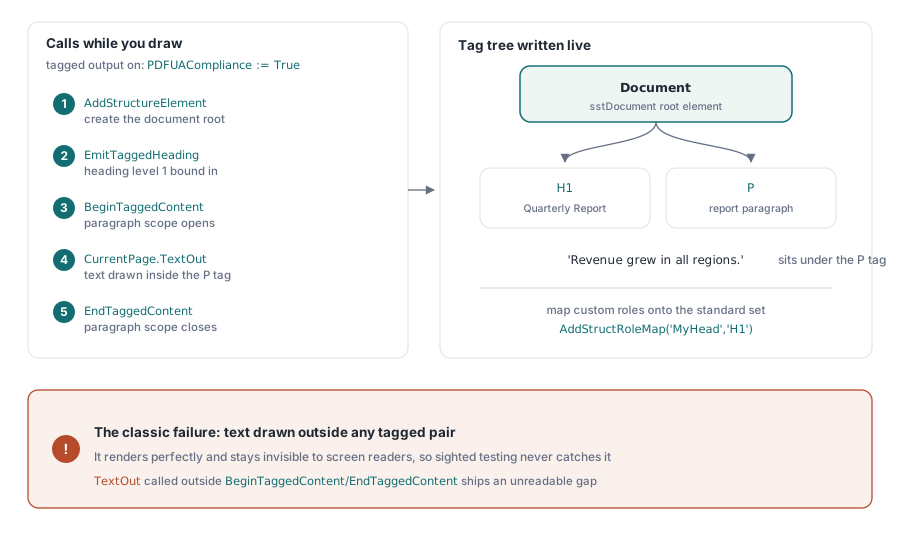
Accessibility is the standard teams most often try to bolt on at the end, and it punishes that approach harder than the other two. The tag tree has to mirror the order in which content was logically created, which is information you simply do not have anymore once the file is written. Setting PDFUACompliance turns on tagged output, and the structure API binds each drawing call to its semantic role as you go:
Pdf.PDFUACompliance := True;     // auto-enables tagged PDF
Pdf.Lang := 'en-US';             // set explicitly; empty falls back to 'en'
Pdf.BeginDoc;

Root := Pdf.AddStructureElement(sstDocument, nil);
H1 := Pdf.EmitTaggedHeading(1, Root, 50, 700, 'Quarterly Report');
Para := Pdf.BeginTaggedContent('P', Root);
Pdf.CurrentPage.TextOut(50, 650, 0, 'Revenue grew in all regions.');
Pdf.EndTaggedContent;

Pdf.EndDoc;
The failure to watch for is text drawn outside any BeginTaggedContent/EndTaggedContent pair. It renders perfectly and stays invisible to a screen reader, so no sighted tester ever catches it; the bug ships and surfaces only when an actual assistive-technology user hits the gap. When your templates carry custom structure role names, map them onto the standard set with AddStructRoleMap('MyHead', 'H1') so conforming readers know what they mean. ISO 14289 also requires a declared language. HotPDF falls back to 'en' when Lang is empty, but that is a safety net, not a reason to leave the real document language unset
Verification: trust the validator, not the viewer
A viewer that opens your file proves nothing about conformance, so verification belongs in the release path with tools that check structure rather than rendering. For PDF/A and PDF/UA, veraPDF is the reference-grade open validator; it reports failures by ISO clause, which maps straight back to the configuration above. For PDF/X, Adobe Acrobat's Preflight profiles are still the practical check, because press conformance is as much about color intent as syntax
The generator does its own part of this. At save time HotPDF reconciles the feature flags against the configured PDF version, silently downgrading what the version cannot express, such as AES-256 dropping to AES-128 below PDF 1.7. The compliance gates in EndDoc go further and raise outright on hard contradictions, like asking for PDFACompliance together with encryption. Neither of these replaces the external validator. They just stop impossible configurations from ever reaching it
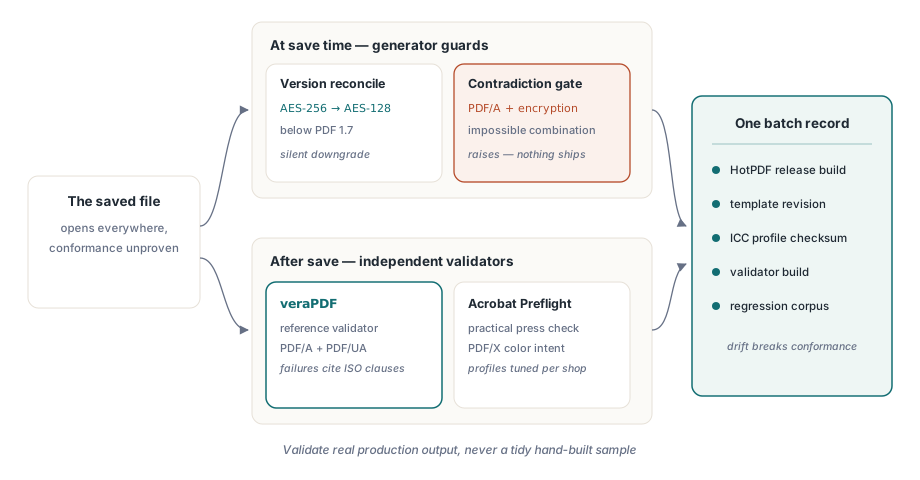
One habit pays off repeatedly: version the whole compliance setup as a unit. The HotPDF release, the template revision, the ICC profile checksum, the validator build that signed off. Conformance drifts the moment any one of them changes under the others, and the ugliest audits are the ones where nobody can reconstruct which combination produced a five-year-old archive file. A single configuration record per batch settles that for good
Last, run the validator on real production output, never on a tidy hand-built sample. The failures that bite come from data nobody anticipated: a customer logo that arrives as CMYK while the intent says RGB, a template tweak that slips in an unembedded font, a new code path that draws text outside the tag tree. Keep one known-bad file from each past incident as a regression input and the compliance gate stays honest over time. For the rendering side of these pipelines, see our article on report output, fonts, and images with HotPDF; for wiring validators into a build, there is a companion piece on automating PDF preflight checks
The compliance properties, output intents, and tagging API used in these examples ship with the HotPDF Delphi Component for Delphi and C++Builder; the product page links the full reference for every call shown here