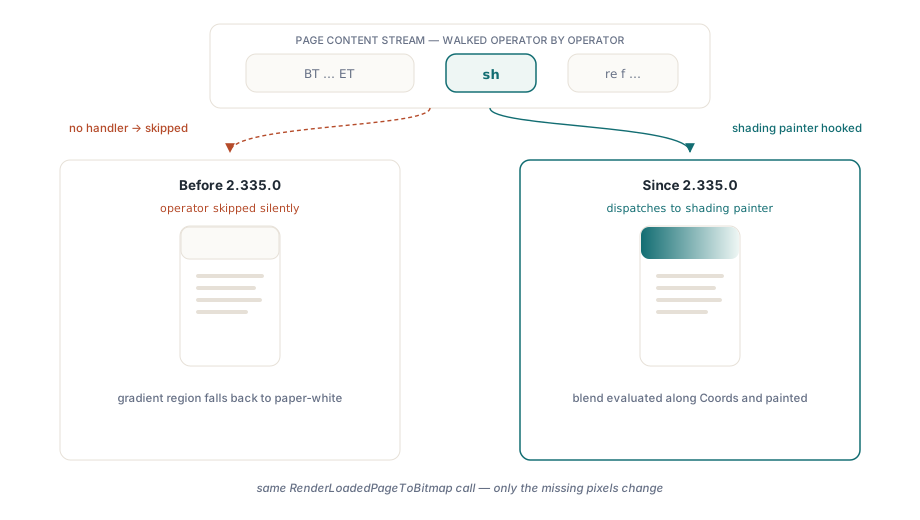
A PDF whose header carries a Word- or Excel-style gradient background, rendered to an image, used to come back with a blank white rectangle where the color blend should be. HotPDF's page renderer now honors the PDF sh (shading) operator for Type 2 axial and Type 3 radial gradients: it evaluates the shading's function along the gradient axis and paints the blend, where earlier versions silently dropped the operator and left the region paper-white. The two shading types that cover almost every office-document gradient are in; the mesh types are not, and this article is honest about where that line falls
Why does a PDF gradient render as a white box?
A PDF gradient is a vector construct, not a bitmap the renderer can blit. A shading dictionary (ISO 32000-1 §8.7.4.5) describes the geometry — an axis or a pair of circles in the Coords array — plus a color function, and the sh operator paints that shading across the current clip region, the same graphics model HotPDF exposes when you draw paths and fills onto a page canvas. HotPDF's page renderer walks the content stream operator by operator, and any operator it has no code path for is skipped so the rest of the page still renders. Before version 2.335.0, sh lived in that skipped set: a header or full-page gradient contributed nothing to the output, so the background showed through as white. The file was never corrupt. The renderer simply had no handler for that one operator, and a white box is exactly what a missing handler looks like
The function evaluation chain behind a shading
A shading cannot be painted until its function is evaluated, so that machinery had to land first. Type 2 axial and Type 3 radial shadings both carry a /Function that maps a parametric position along the gradient into a color (ISO 32000-1 §7.10), and HotPDF's function evaluator resolves the FunctionType and dispatches on it. Type 2 exponential interpolation (§7.10.3) computes C0 + t^N * (C1 - C0) with Domain and Range clamping; Type 0 sampled functions (§7.10.2) read a grid of 8-, 16-, or 32-bit samples and pick the nearest through the Encode map, the case covered in depth in our walkthrough of Type 0 sampled color lookups; Type 3 stitching functions (§7.10.4) select a sub-function by the Bounds array and recurse into it. Type 4 PostScript calculator functions (§7.10.5) are not evaluated — they degrade gracefully to a failed evaluation rather than a wrong color, matching the conservative policy HotPDF takes across the render path. This evaluator shipped in version 2.334.0, one release ahead of the operator itself, because the shading painter is only as good as the function underneath it
How does HotPDF turn a continuous gradient into pixels?
HotPDF approximates the continuous blend with a finite run of solid-color bands. The shading painter walks the gradient axis, splits it into up to 64 bands — fewer when the axis is short in device pixels — evaluates the function at each band's parametric position, and fills a rectangle perpendicular to the axis with a solid brush. The tradeoff is band count against smoothness: more bands track the blend more closely but cost more fills, and 64 is the deliberate ceiling. Because the count also scales with the axis length in device pixels, resolution matters. Rendering the same page at a higher DPI lengthens the axis, so a short gradient gains bands and its stripes soften until the ceiling is reached
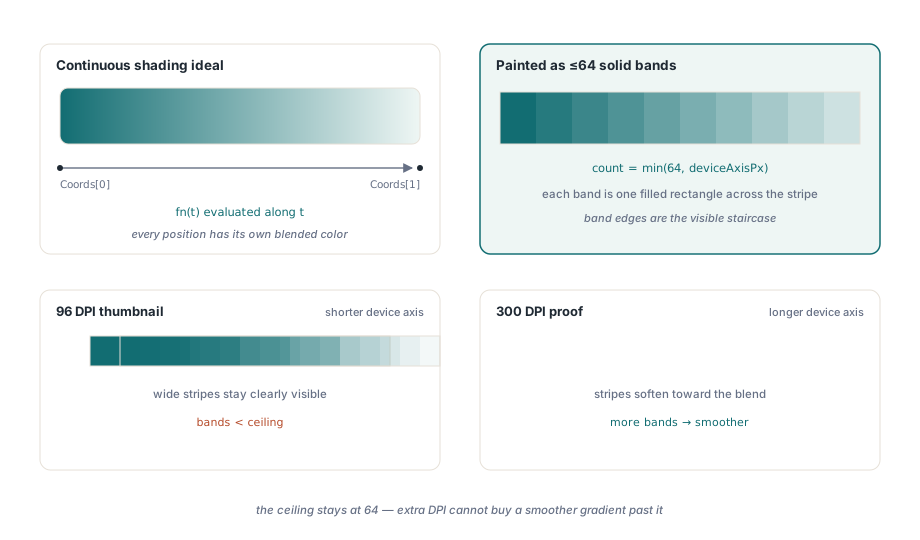
// The shading discretizer uses up to 64 color bands along the gradient
// axis, but never more than the axis is long in device pixels. Rendering
// the same page at a higher DPI lengthens that axis, so a short gradient
// gains bands and the banding softens until the 64-band ceiling is hit.
Thumb := Pdf.RenderLoadedPageToBitmap(PageIndex, 96);   // coarser bands
Proof := Pdf.RenderLoadedPageToBitmap(PageIndex, 300);  // up to 64 bands
Rendering a shaded page to a bitmap
The public entry point is unchanged: RenderLoadedPageToBitmap takes a zero-based page index and a DPI value, returns a caller-owned 24-bit bitmap, and hands back nil on failure rather than raising, so the shading support is transparent to code you already have. A page that used to render its gradient header blank now returns the same bitmap with the blend painted in, and no API change is needed to get it. The one thing worth remembering is ownership: the caller frees the returned bitmap. The full rendering pipeline — content-stream interpretation, embedded glyphs, and page caching — is covered in the guide to rendering PDF pages to a bitmap in Delphi
var
  Pdf: THotPDF;
  Bmp: TBitmap;
begin
  Pdf := THotPDF.Create(nil);
  try
    if Pdf.LoadFromFile('quarterly-report.pdf') > 0 then
    begin
      // Page 1 (zero-based) at 150 DPI. A gradient-filled header that
      // used to come back blank now carries its color blend.
      Bmp := Pdf.RenderLoadedPageToBitmap(0, 150);
      if Assigned(Bmp) then
      try
        Bmp.SaveToFile('page1.bmp');
      finally
        Bmp.Free;
      end;
    end;
  finally
    Pdf.Free;
  end;
end;
A cheap regression guard falls out of the same call. Render the page, sample a pixel where the gradient band belongs, and confirm it is no longer the paper-white the renderer used to fall back to — a one-line check that catches a silent return to the old no-op behavior
Bmp := Pdf.RenderLoadedPageToBitmap(0, 150);
if Assigned(Bmp) then
try
  // True when the sh operator painted; False if the region fell back to white.
  HeaderPainted := Bmp.Canvas.Pixels[Bmp.Width div 2, 8] <> clWhite;
finally
  Bmp.Free;
end;
What HotPDF does not paint: mesh shadings and clip edges
The four mesh shading types are out of scope, and a document should know that going in. Free-form Gouraud triangle meshes (Type 4), lattice-form Gouraud meshes (Type 5), Coons patch meshes (Type 6), and tensor-product patch meshes (Type 7), defined across ISO 32000-1 §8.7.4.5.5 through §8.7.4.5.8, are not rendered; a page that uses one still renders, only that region is left as-is. Two further edges are worth stating plainly. The band rectangles cover the shading's stripe rather than being clipped exactly to the current clip path, so a gradient masked into a rounded or irregular shape paints as its bounding stripe until precise region clipping arrives in a later round. HotPDF also assumes the function output is RGB or grayscale, so a shading authored in CMYK or an exotic color space is approximated rather than color-managed. For the documents most Delphi and C++Builder teams actually process — reports, invoices, statements, and slide decks exported to PDF — axial and radial cover essentially every gradient you will meet, and mesh-heavy design proofs are the case to treat as a preview rather than a proof
HotPDF's page renderer, the sh operator support described here, and the Type 0/2/3 function evaluator underneath it ship as part of the HotPDF Delphi Component for Delphi and C++Builder — a native VCL library with no external DLL dependencies, covering PDF creation, editing, text extraction, and page rendering in one package