HotPDF, the native Delphi and C++Builder PDF component, imports Windows EMF and WMF metafiles by interpreting each GDI record directly into PDF operators instead of flattening the file to a bitmap: gradient fills become PDF axial shading patterns, hatch brushes become PDF tiling patterns, and a centralized path-state gate blocks malformed records from corrupting the output. Every chart a TChart, a GDI+ surface, or a plain TCanvas can export as an enhanced metafile is a candidate for this path, and the difference shows up the moment someone zooms into the page or sends it to a high-resolution printer
The alternative most Delphi developers reach for by default is rasterizing the metafile to a bitmap before dropping it on the page, and the cost only shows up later: a bar chart that was crisp on screen turns visibly blocky the moment the PDF is printed at 600 DPI or projected on a boardroom screen, and a hatch-filled CAD region collapses into a single flat gray rectangle if the fill style is not carried through. Reading the metafile as a program instead of a picture is what avoids both problems, and it is the harder path to implement correctly, which is why the pitfalls below are worth knowing before a report ships
Why interpret a metafile instead of flattening it to a bitmap?
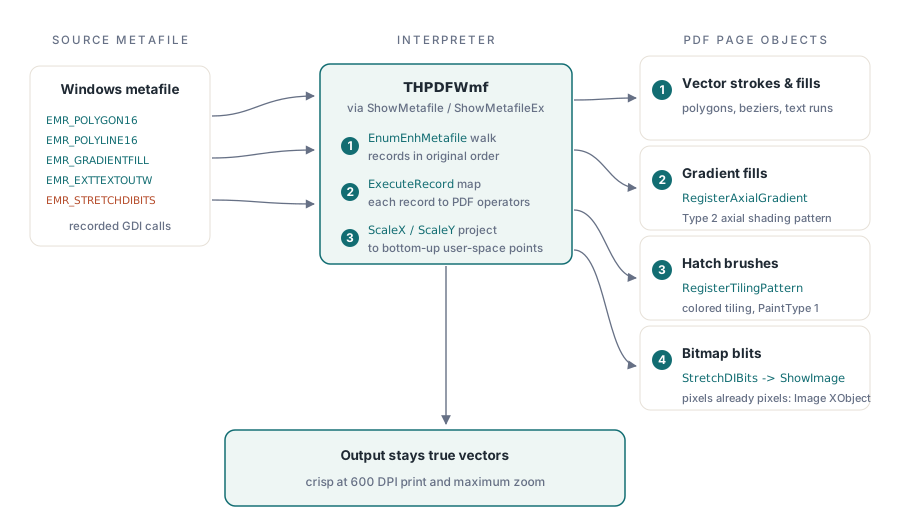
HotPDF keeps EMF and WMF import on the vector path because a Windows metafile is a recorded sequence of GDI drawing calls, not a picture, and replaying those calls as PDF path, text, and shading operators is what lets the result scale like the rest of the page. THPDFPage.ShowMetafile and its ShowMetafileEx counterpart are the entry points an application calls, and both hand the metafile to THPDFWmf, the class that walks every GDI record and translates it. The distinction is not absolute, and HotPDF does not pretend otherwise: a metafile record that is genuinely raster data, a StretchDIBits bitmap blit for example, is embedded as a real PDF Image XObject through AddImage and ShowImage, the same pair of calls any other picture on the page goes through, rather than forced into path operators that cannot express a photograph. Lines, fills, and text stay vector; pixels that were already pixels in the source stay pixels in the output. The simplest call needs nothing beyond the loaded metafile:
var
  Pdf: THotPDF;
  Chart: TMetafile;
begin
  Pdf := THotPDF.Create(nil);
  Chart := TMetafile.Create;
  try
    Chart.LoadFromFile('quarterly-revenue.emf');  // exported from TChart or GDI+
    Pdf.FileName := 'quarterly-report.pdf';
    Pdf.BeginDoc;
    Pdf.CurrentPage.ShowMetafile(Chart);
    Pdf.EndDoc;
  finally
    Chart.Free;
    Pdf.Free;
  end;
end;
How does the interpreter turn GDI coordinates into PDF page space?
HotPDF answers that with a single pass over the metafile's own record stream instead of a second implementation of GDI. THPDFWmf.Analyse reads the metafile header through the Win32 GetEnhMetaFileHeader call, resets its internal drawing state, and calls EnumEnhMetafile, the same enumeration API a metafile viewer would use, so every EMR_* record reaches THPDFWmf.ExecuteRecord in the order it was originally recorded. GDI expresses coordinates top-down in device or logical units chosen by the metafile's own mapping mode; a PDF page is bottom-up in user-space points, the coordinate system covered in HotPDF's canvas drawing model for paths and fills. Each record handler resolves that mismatch through ScaleX and ScaleY, which call ProjectX and ProjectY to replay GDI's own window-to-viewport formula for the anisotropic and isotropic mapping modes, so a shape recorded at five logical units wide lands at the correct width in PDF points regardless of what window and viewport extents the source application set
How does a GDI gradient fill become a PDF shading pattern?
An EMR_GRADIENTFILL record becomes a real PDF Type 2 axial shading pattern (ISO 32000-1 §8.7.4.5) whenever GDI recorded it in one of the two rectangle modes. THPDFWmf.VEMRGradientFill reads the record's own layout directly off the raw byte buffer, following the MS-EMF §2.3.1.6 structure: a vertex array of 16-bit RGBA corners, followed by a list of rectangles that each reference two of those vertices. For GRADIENT_FILL_RECT_H, colors sweep left-to-right along the rectangle's horizontal mid-line; for GRADIENT_FILL_RECT_V, they sweep top-to-bottom along the vertical mid-line. Either way the two corner colors and the projected rectangle coordinates go straight into THotPDF.RegisterAxialGradient, which returns a pattern name, and the page draws the rectangle and fills it through that pattern (SetFillPattern) instead of a flat SetRGBFillColor call, so a spreadsheet-style banded header or a chart's gradient plot area keeps its blend instead of collapsing to one average color
Gouraud triangle mode is the honest gap. When the record's ulMode field reports GRADIENT_FILL_TRIANGLE, VEMRGradientFill recognizes it, logs that triangle mode is not yet implemented, and skips the rectangle rather than guessing at a two-color approximation. Per-vertex, per-pixel interpolation across an arbitrary triangle mesh does not reduce to a two-stop axial or radial shading, and expressing it properly would mean emitting a PDF Type 4 or Type 5 mesh shading, the same shading family that HotPDF's page renderer also leaves unpainted when reading a PDF back. Two unrelated code paths land on the same boundary: mesh shadings are the gap on both the writing side and the reading side, and a source diagram that uses Gouraud triangles for a smooth radial glow falls back to whatever the last solid brush was, not a rendered approximation
Hatch brushes become tiling patterns, not flattened gray
A GDI hatch brush keeps its texture in the PDF because THPDFWmf.SetBrushColor checks CurrentBrush.lbStyle for BS_HATCHED before it ever falls back to a solid fill, routing that case to SetHatchBrushPattern instead. That method writes an 8-by-8-unit PDF content stream of stroked line operators, m, l, and S, chosen by the GDI hatch style: a single horizontal or vertical stroke for HS_HORIZONTAL and HS_VERTICAL, three parallel diagonals for HS_FDIAGONAL and HS_BDIAGONAL, and the horizontal-plus-vertical or both-diagonal combinations for HS_CROSS and HS_DIAGCROSS. THotPDF.RegisterTilingPattern registers that content stream as a colored tiling pattern (PaintType 1, ISO 32000-1 §8.7.3.1) with an 8-unit XStep and YStep, and the page fills through SetFillPattern the same way an axial shading does. A CAD floor plan or an engineering drawing that leans on hatch fills to distinguish materials keeps that visual language in the PDF instead of losing every region to identical gray
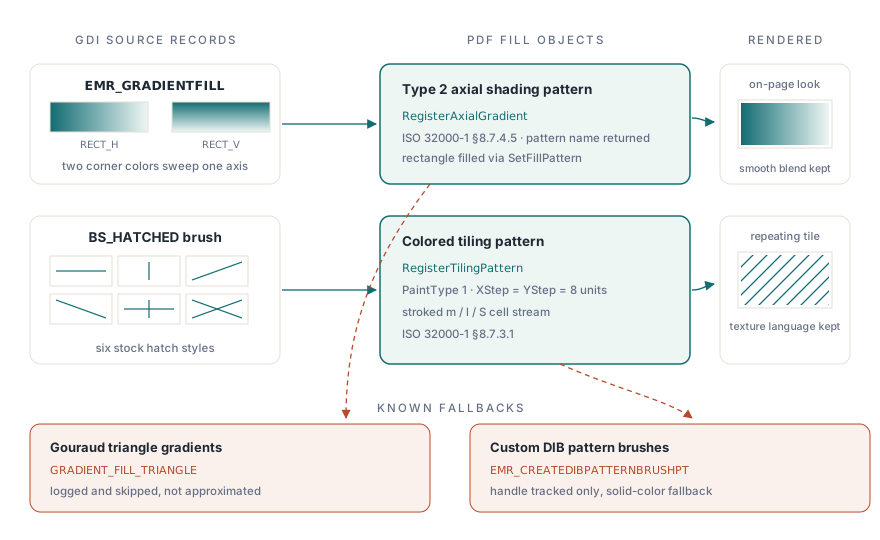
Not every brush earns that treatment, and the gap is worth knowing before a CAD import ships. EMR_CREATEDIBPATTERNBRUSHPT, the record for a custom bitmap-image pattern brush rather than one of GDI's six stock hatch styles, only registers its handle so later SELECTOBJECT and DELETEOBJECT records stay consistent; HotPDF does not yet expose a PDF Pattern resource pipeline for arbitrary tile images, so selecting that brush falls through to a solid-color fallback instead of the source texture. If a fill renders flat where the original clearly used a repeating image texture, the source brush is almost certainly a custom DIB pattern rather than a standard hatch, and that is the one case worth checking by hand first. Configuring an import for a drawing like that still goes through the same options object:
var
  Pdf: THotPDF;
  Drawing: TMetafile;
  Options: THPDFEmfOptions;
begin
  Pdf := THotPDF.Create(nil);
  Drawing := TMetafile.Create;
  Options := THPDFEmfOptions.Create;
  try
    Drawing.LoadFromFile('floor-plan.emf');
    Options.Assign(Pdf.EmfOptions);   // start from the document-wide defaults
    Options.Redraw := False;          // interpret the original EMF bytes, no GDI re-record pass
    Options.ShowNullBrush := True;    // keep explicitly unfilled CAD regions visible
    Options.UseFrame := True;         // clip output to the frame the EMF header declares
    Pdf.FileName := 'floor-plan.pdf';
    Pdf.BeginDoc;
    Pdf.CurrentPage.ShowMetafileEx(Drawing, Options);
    Pdf.EndDoc;
  finally
    Options.Free;
    Drawing.Free;
    Pdf.Free;
  end;
end;
What stops a malformed metafile from corrupting the page?
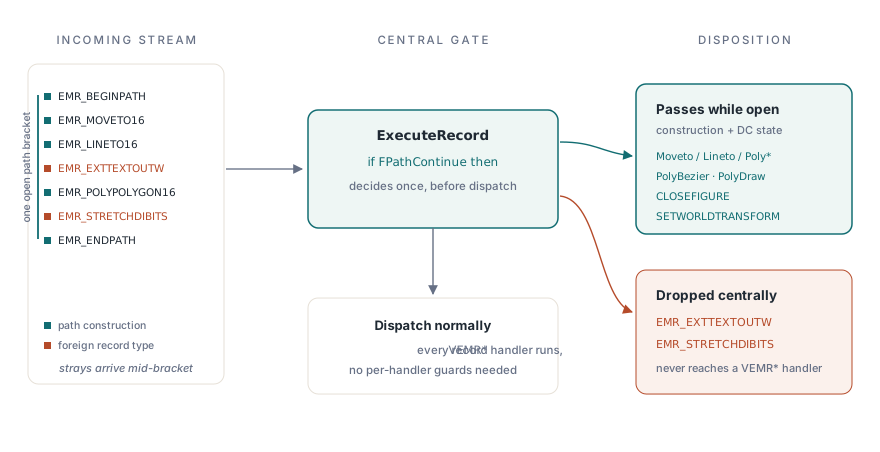
HotPDF's answer is a single gate at the top of ExecuteRecord rather than a defensive check repeated in each of its roughly eighty record handlers. A GDI path bracket, opened by EMR_BEGINPATH and closed by EMR_ENDPATH or EMR_ABORTPATH, is tracked by a private PathContinue property backed by the FPathContinue field. While that bracket is open, ExecuteRecord lets only path-construction records through, the move, line, polyline, polygon, polybezier, and polydraw variants, plus CLOSEFIGURE and a small set of transform and DC-state records such as SETWORLDTRANSFORM, SAVEDC, and RESTOREDC. Every other record type reaching ExecuteRecord while the bracket is open, a stray EXTTEXTOUT or a bitmap blit for instance, is dropped centrally with a single Exit the instant it arrives
That gate exists because a path bracket in a hand-authored, tool-generated, or simply corrupted metafile is not guaranteed to contain only what a well-formed file would put between its open and close records. A text-output record landing between EMR_BEGINPATH and EMR_ENDPATH would, without a gate, either pollute the path geometry under construction or emit a PDF text-showing operator in the middle of a sequence that is supposed to be pure path construction, and both failure modes are the kind that surface on one malformed input from a third-party tool, not on anything a normal test suite happens to cover. Centralizing the check in ExecuteRecord means the individual VEMR* handlers do not each need to defend against being called at the wrong time; the gate decides that once, before dispatch, instead of eighty times after it
Putting a vector chart next to text and images on one page
A report page rarely holds only a chart, and ShowMetafile composes with HotPDF's other page operators exactly as any other drawing call does. A heading drawn with TextOut, a hatch-filled bar chart imported as an EMF, and a logo placed with ShowImage can all land on the same page in the same content stream, each keeping its native fidelity, the composition pattern covered in HotPDF's guide to laying out text, fonts, and images in a report:
Pdf.CurrentPage.SetFont('Arial', [fsBold], 14);
Pdf.CurrentPage.TextOut(50, 760, 0, 'Q2 Regional Sales');
Pdf.CurrentPage.ShowMetafile(RegionChart);   // hatch-filled bars, still vector
Pdf.CurrentPage.ShowImage(LogoIndex, 450, 760, 90, 30, 0);
The EMF and WMF interpreter, the axial shading patterns it registers for gradient fills, and the tiling-pattern mapping for hatch brushes described here all ship as part of the standard HotPDF Delphi Component for Delphi and C++Builder, a native VCL library with no external DLL dependency for any of it