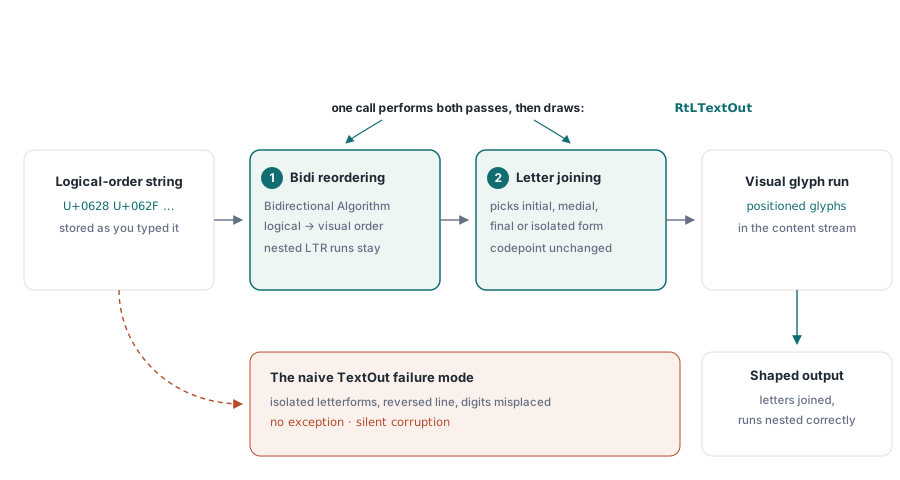
Pass the Arabic phrase يوضح ملف PDF to TextOut and open the result. The letters run the wrong way, and each one sits in its isolated form with a visible gap before the next, as if someone typed English backwards and hit space between every character. No exception fired. No warning printed. The output is simply wrong, and it is wrong because two separate transformations that Arabic depends on never happened. Knowing what those two transformations are, and which call performs them, is most of what complex-script PDF output comes down to
HotPDF is a native VCL PDF component for Delphi and C++Builder, and it does the right-to-left work for you through a distinct call. It also stops short in a few specific places that you want to know about before you commit a locale, so this piece maps the concepts and the honest boundaries; the hands-on setup for the call itself lives in the RtLTextOut reference article
Why a correct string still prints wrong
Unicode keeps text in logical order, the order you type it and read it aloud. A renderer has to put glyphs down in visual order. For left-to-right scripts those orders coincide and nobody thinks about it. For Arabic and Hebrew they do not, and when a single line mixes directions, say an Arabic sentence carrying the Latin token "PDF" or a price written in digits, the Unicode Bidirectional Algorithm (UAX #9) decides exactly how the left-to-right fragments nest inside the right-to-left line. That is the first transformation, reordering, and skipping it is what flips the line
The second is contextual shaping. An Arabic letter is drawn differently depending on where it falls in a word: initial, medial, final, or standing alone. The codepoint stays the same throughout; only the glyph changes. A pipeline that hands each codepoint straight to its default glyph produces exactly the disconnected, isolated-form output from the opening paragraph. Hebrew skips this step, since its letters do not join, but it still needs the reordering. Arabic needs both, and that is why Arabic, not Hebrew, is the string you test with
On the desktop none of this is your problem. When a VCL form paints Arabic into a TEdit, the operating system's text stack quietly reorders and shapes it, which is precisely why the string that looks perfect on screen comes out broken in a naive PDF. A content stream does not store editable text. It stores positioned glyphs, so whoever emits the stream inherits the shaping job that the OS used to handle. RtLTextOut is the call that takes that job back
What RtLTextOut shapes for you
HotPDF keeps the Latin path and the complex-script path as two different methods. TextOut prints what you give it in the order you give it. RtLTextOut performs both transformations first — bidirectional reordering across the whole line, contextual analysis for the joining scripts — and then prints. Which script's rules apply travels in through the font's charset rather than through the call itself, so direction is an explicit choice at every call site instead of a guess made from the characters. The parameter-by-parameter setup, the charset values, the font registration steps, and a complete compilable example are all in the RtLTextOut reference article; this piece stays with what the transformations mean, where they stop, and how to prove they worked
One usage rule matters even at this altitude: the input must be in logical order, because RtLTextOut performs the reversal itself, and a string you already flipped by hand comes out double-reversed — the reference article walks through that trap and its cleanup. What earns the trap a mention here is why it survives testing. A double-reversed pure-Arabic string can look perfectly correct, and only falls apart when a line carries a Latin word or a number, because those embedded runs no longer nest the way UAX #9 dictates. The bug is not in the rendering; it is in feeding the algorithm text that was already half-processed
That same mixed-direction behavior trips up reviewers more than it trips up code. Inside a right-to-left line, digits and embedded Latin words still read left to right. Someone who has not worked with bidirectional layout will look at a rendered invoice, see the account number reading the "wrong" way relative to the Arabic around it, and write it up as a bug. It is the spec-correct result. A short note in your acceptance criteria, written before the first native-speaker pass, saves that round trip
When reordering and joining are enough, and when they are not
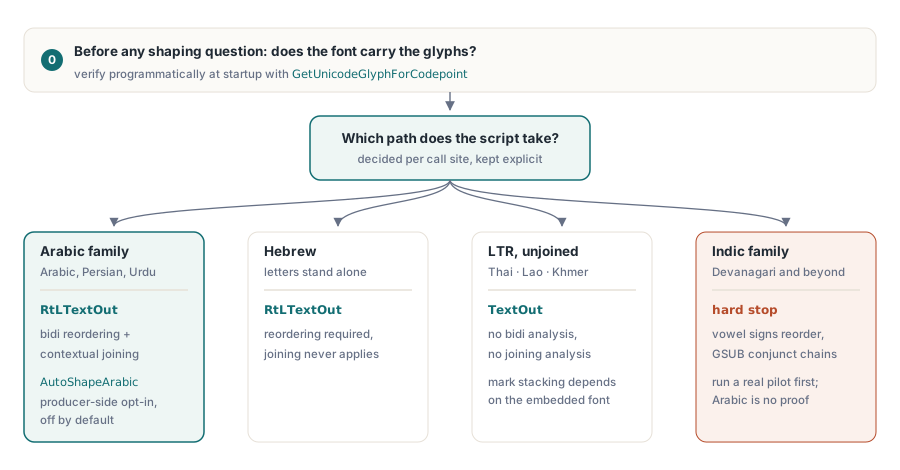
For Arabic and Hebrew running text — reports, invoices, contracts, letters — reordering plus contextual joining is the whole job, and RtLTextOut carries it alone. The boundary appears when the typography asks for more than joining. HotPDF's answer on the Arabic side is an opt-in producer-side shaper: set AutoShapeArabic := True and the component rewrites the logical-order run to Unicode Presentation Forms before the bidirectional pass, so joining forms are computed against logical neighbors and ligature folds are baked into the codepoints the PDF actually carries, rather than left for a viewer to resolve. The switch defaults to off and the output is byte-stable when it stays off, so turning it on is a deliberate decision per document pipeline, not a global upgrade. The same opt-in model extends to the other joining right-to-left scripts HotPDF shapes: Syriac, N'Ko, Adlam, and Hanifi Rohingya each have their own auto-shape flag that mirrors the Arabic one
Optional OpenType features are a different mechanism again. Discretionary ligatures and similar single-substitution features go through GetSingleSubstituteGlyph(GID, 'liga'), which resolves one substitution at a time — input glyph ID first, feature tag second — and returns the input glyph unchanged when the feature does not apply. That is enough to drive a known, finite ligature list you maintain yourself. It is not a full GSUB engine, and the difference is exactly where ambitious locale plans go wrong: a shaping pipeline that handles Arabic flawlessly has demonstrated reordering and joining, nothing more
Coverage across scripts
Arabic exercises both transformations, which is why it is the string to test with, and why an Arabic pass is the strongest single piece of evidence the pipeline works. Hebrew needs the reordering but not the joining, since its letters stand alone; if Hebrew renders correctly but Arabic comes out disconnected, the bidirectional half is fine and the contextual half never ran. Persian and Urdu ride the Arabic script and inherit its behavior, though Urdu's preference for the Nastaliq style is a font decision with legibility consequences a native reader should judge
Thai sits on the other side of the line entirely. It runs left to right, so it needs no bidirectional work, and its letters do not join, so it needs no contextual analysis; Thai strings go through the ordinary TextOut path like Latin. What Thai does have is stacked marks — vowels and tone marks above and below the base consonant — and whether those sit correctly depends on the font building its combining marks to stack without shaping-engine help. Most dedicated Thai fonts do. Test with the exact font you will embed, not a lookalike
Devanagari and the rest of the Indic family are the honest hard stop. Their vowel signs reorder around consonant clusters and their conjuncts form through chains of context-dependent substitutions, which is full GSUB territory, beyond reordering and joining. If an Indic locale is on the roadmap, run a real pilot on genuine customer strings before you promise it — Arabic working is not evidence that Devanagari will. CJK strings, Vietnamese with its stacked diacritics, and mixed European text all take the ordinary path with no bidirectional analysis, and it pays to keep the two paths physically separate in report code, one routine for RTL runs and one for everything else, so the locale logic is visible at the call site instead of hidden behind a flag someone forgets to set
Glyph coverage is decided before shaping even runs
Shaping picks glyphs out of a font. If the font does not carry them, there is nothing to pick, which is why the classic deployment failure — flawless on the developer's machine, blank boxes on the customer's server after a silent font substitution — is a coverage problem, not a shaping problem. The practical cure, registering a font you ship instead of trusting whatever a machine has installed, is walked through step by step in the reference article. The conceptual point is that coverage has to be established before any shaping question is even meaningful, and that it can be established programmatically instead of by eyeballing output
// After RegisterUnicodeTTF, audit coverage for the
// codepoints your data actually uses
GID := Pdf.GetUnicodeGlyphForCodepoint($0628);  // U+0628 ARABIC LETTER BEH
LogGlyphAudit($0628, GID);
Registration itself carries two constraints — a PDF 1.5 floor for embedded Unicode handling and the font's embedding-permission bits — both covered alongside the setup steps in the RtLTextOut reference article. What belongs here is the audit habit: GetUnicodeGlyphForCodepoint is your early-warning system. Walk the codepoint ranges your data actually uses when the service starts up and log what glyph IDs come back. A coverage gap then shows up as a line in a startup log during rollout, rather than as missing characters in an invoice that already reached a customer
Reading order belongs to the document, not the glyphs
Getting every glyph right still leaves one thing undone. ISO 32000-1 §12.2 defines a viewer preference called /Direction that states the document's overall reading order. It touches no glyphs. What it does is tell a viewer how to arrange two-up spreads, which side a facing-page layout should start from, and which way the reading UI should lean. None of that shows on a single page, which is exactly why it gets forgotten
// Declare right-to-left reading order at the document level
Pdf.Direction := RightToLeft;  // adds vpDirection to ViewerPreferences
Setting Direction is the whole job: the property setter adds vpDirection to the document's ViewerPreferences, so one line carries the preference into the file. If the text goes out through RtLTextOut you get this for free, because the call flips the document direction as a side effect — the reference article covers when a mixed document needs that undone. The case where you must set it yourself is a right-to-left document produced any other way, for instance from input you pre-shaped upstream and drew through the ordinary path. Leave it out there and the single-page proof you are staring at looks identical either way; then someone prints a duplex booklet, the spreads come out mirrored, and the cause is a missing one-liner from weeks earlier
Verifying shaped output
Verify end to end, because a page can look correct and still be useless to everything downstream. Three checks find most problems. Copy the text back out of Acrobat and compare the codepoints against your source string. Run the viewer's in-document search for a word that you can see on the page. And open the output on a machine that does not have your development fonts, the one most likely to expose a substitution. None of that replaces a native reader looking at one real document, which catches things no synthetic corpus will. Get that review on the calendar before the format ships
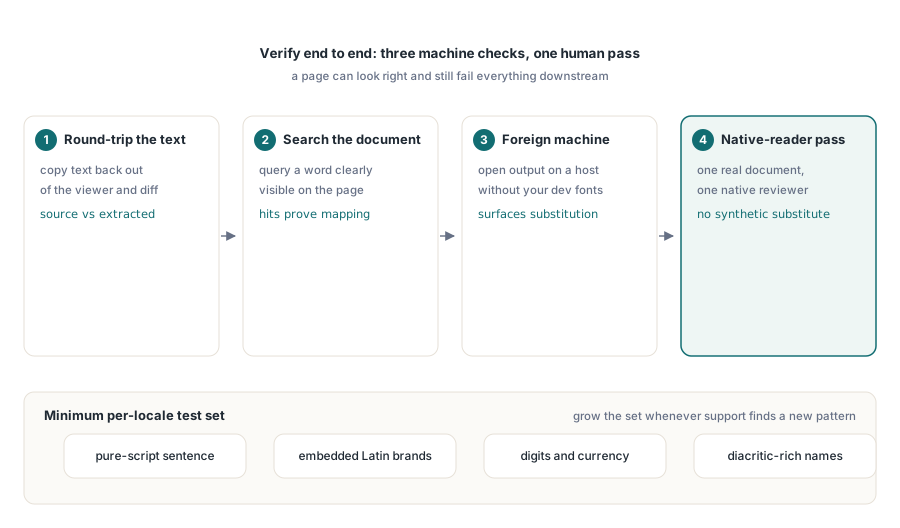
Pick test strings on purpose instead of recycling whatever a translator sent last year. A workable minimum per locale: a pure-script sentence, a sentence with embedded Latin brand names, a line carrying digits and currency, and names with diacritics or combining marks. Real customer names break assumptions that filler text leaves untouched, so let the regression set grow by one string every time a support case turns up a pattern you had not seen
Font registration, subsetting, and the everyday text-drawing API are covered in the article on report output, fonts, and images with HotPDF. When the same documents also have to meet accessibility profiles, the language tagging and structure rules in the PDF/A and PDF/UA validation article sit on top of the shaping work here
The right-to-left and Unicode font APIs described above ship with the HotPDF Delphi Component for Delphi and C++Builder; the product page links the full text-output reference