Send the Arabic sentence يوضح ملف PDF هذا to plain TextOut and the page that comes back is wrong in two ways at once. The words run left to right instead of right to left, and the letters sit apart in their isolated forms instead of joining into connected words. Nothing errors. The Delphi compiles, the file opens, and a reviewer who reads Arabic tells you the output is unusable. The fix is one call, not a library swap: HotPDF routes right-to-left text through a separate method, RtLTextOut, that handles the reordering plain TextOut will not. This page is the working reference for that method: the signature and its parameters, the charset argument that selects the script, the document-level side effect, the font setup that has to come first, and the failures that actually reach support, each with its fix
Signature and parameters
procedure RtLTextOut(X, Y: Single; angle: Extended;
  Text: WideString); overload;
procedure RtLTextOut(X, Y: Single; angle: Extended;
  Text: PWORD; TextLength: Integer); overload;
X and Y anchor the run in the page's own coordinate system, measured from the bottom-left corner with Y growing upward, the same origin every TextOut call uses; RtLTextOut changes the glyph order, not where the page measures from. angle rotates the baseline exactly as it does in TextOut, so 0 draws a horizontal line. Text is the string in logical order, the order you would type it, and the second overload takes the same UTF-16 data as a raw PWORD buffer with an explicit code-unit count, which is the form to use when the text arrives from an API rather than a Delphi string. On older Delphi versions that predate overload resolution for these types, the string form is exposed under the name RtLTextOutStr with the identical parameter list
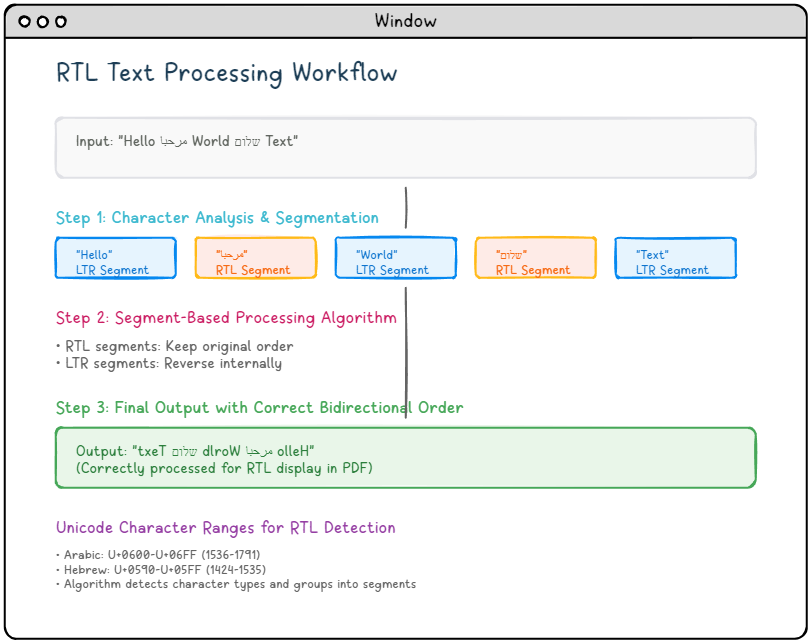
The division of labor between the two output calls is strict. TextOut draws codepoints in the order you pass them, which is correct for Latin, Cyrillic, and CJK and wrong for Arabic and Hebrew. RtLTextOut reorders each line into visual right-to-left order first, then draws, keeping embedded Latin words and digits reading left to right inside the line. HotPDF keeps the two methods deliberately separate rather than guessing direction from the characters, so the choice of which one to call is the choice of which script behavior you get; use RtLTextOut for right-to-left runs, TextOut for everything else, and never route one through the other. Why the reordering exists at all, what the Unicode Bidirectional Algorithm and Arabic contextual joining actually do, and where HotPDF's shaping stops are the subject of the companion piece on Arabic and RTL text shaping with HotPDF; everything below is the practical setup
The charset argument decides the script
What tells RtLTextOut whether it is laying out Arabic or Hebrew is not the method, it is the font. SetFont takes a Windows charset as its fourth argument, and that value carries the script rules into the right-to-left call: 178 selects Arabic, 177 selects Hebrew. Set the charset, then draw, and the two lines below come out in correct reading order without any further configuration
// Arabic: charset 178 tells RtLTextOut to apply Arabic rules
Pdf.CurrentPage.SetFont('Arial Unicode MS', [], 12, 178);
Pdf.CurrentPage.RtLTextOut(400, 700, 0, 'يوضح ملف PDF هذا');

// Hebrew: charset 177 switches the rules to Hebrew
Pdf.CurrentPage.SetFont('Arial Unicode MS', [], 12, 177);
Pdf.CurrentPage.RtLTextOut(400, 660, 0, 'קובץ PDF זה');
One sequencing detail is easy to miss: the SetFont has to come first and has to be repeated after every AddPage, because the current font, charset included, does not survive a page break. Forget the repeat and the second page falls back to whatever font was active, which for Arabic usually means empty boxes
It does not reverse text you already reversed
The single mistake that swallows the most debugging time here is feeding RtLTextOut a string you already flipped by hand. People reach this method after a first attempt with plain TextOut came out backwards, and a common stopgap is to reverse the characters in code before drawing. RtLTextOut reverses internally on its own, so a pre-reversed string gets reversed a second time and lands right back where it started. Pass the text in logical order, the order you would type it and read it aloud, and let the call do the reordering
The trap is nastier than a plain flip because a double-reversed string can look correct for one all-Arabic test phrase and then break the instant a line carries a Latin word or a number. Inside a right-to-left line those embedded runs are supposed to read left to right, and hand-reversal wrecks that nesting while the pure-Arabic case happens to survive it. So the bug sails through your first smoke test and surfaces later on a real invoice with an account number in it. Strip out every manual reversal the moment you switch to RtLTextOut
The Direction side effect worth knowing
Calling RtLTextOut changes more than the line you are drawing. It also flips the document's reading-direction preference to right-to-left, the same thing you would otherwise set yourself through the Direction property. That setter adds vpDirection to the document's ViewerPreferences, which tells a viewer how to arrange two-up spreads and which side a facing-page layout starts from. When the whole document is Arabic or Hebrew this is exactly what you want, and you get it for free
It is worth knowing about precisely because it is invisible on a single page. If the document is mostly left-to-right with one right-to-left block, the first RtLTextOut call will still tip the whole file's preference, and nothing in your one-page proof will show it. The symptom appears weeks later when someone prints a duplex booklet and the spreads come out mirrored. If that is not what you want, set Direction back explicitly after the right-to-left run:
// RtLTextOut already set the document direction to RightToLeft;
// restore left-to-right if the document is predominantly LTR
Pdf.Direction := LeftToRight;
For a document that genuinely reads right-to-left, leave it alone. The point is to know the call has a document-wide effect so the booklet surprise never happens
Register the font you ship, not the one you hope is installed
None of the reordering matters if the font has no glyphs to draw. The classic failure is a report that renders flawlessly on the developer's machine, where Arial Unicode MS happens to be present, and comes out as rows of empty boxes on a customer's server where Windows quietly substituted a font with no Arabic coverage at all. The cure is to stop trusting installed system fonts and register one you ship with the application
// Ship a known Arabic font and register it before drawing
Pdf.RegisterUnicodeTTF('C:\Fonts\NotoSansArabic.ttf');
Pdf.CurrentPage.SetFont('NotoSansArabic', [], 12, 178);
Pdf.CurrentPage.RtLTextOut(400, 700, 0, 'يوضح ملف PDF هذا');
Two boundaries ride along with registration. A font brought in through RegisterUnicodeTTF gets embedded, and HotPDF's embedded Unicode handling needs the document at PDF 1.5 or later; that only bites if something downstream insists on PDF 1.4, but when it does the failure is silent. The other is legal rather than technical: TrueType files carry embedding-permission bits, and a face that looks fine on screen can be licensed in a way that forbids shipping it inside customer documents. Confirm the license before you embed, not after a complaint
A complete console example
Putting the pieces together, here is a self-contained program that writes one page with an Arabic line, a Hebrew line, and a mixed line carrying a Latin product name. Each block sets its charset, then draws in logical order
program RtLTextOutDemo;

{$APPTYPE CONSOLE}

uses
  HPDFDoc;   // HotPDF main unit

var
  Pdf: THotPDF;
begin
  Pdf := THotPDF.Create(nil);
  try
    Pdf.FileName := 'RtLTextOut.pdf';
    Pdf.BeginDoc;

    // A Latin heading goes through the ordinary TextOut path
    Pdf.CurrentPage.SetFont('Arial', [fsBold], 16);
    Pdf.CurrentPage.TextOut(40, 780, 0, 'Right-to-left text with HotPDF');

    // Arabic: charset 178, logical order, RtLTextOut does the reordering
    Pdf.CurrentPage.SetFont('Arial Unicode MS', [], 12, 178);
    Pdf.CurrentPage.RtLTextOut(400, 720, 0,
      'يوضح ملف PDF هذا كيفية التعامل مع النص العربي.');

    // Hebrew: charset 177
    Pdf.CurrentPage.SetFont('Arial Unicode MS', [], 12, 177);
    Pdf.CurrentPage.RtLTextOut(400, 680, 0,
      'קובץ PDF זה מדגים טקסט עברי הזורם מימין לשמאל.');

    // Mixed line: the embedded Latin word still reads left to right
    Pdf.CurrentPage.SetFont('Arial Unicode MS', [], 12, 178);
    Pdf.CurrentPage.RtLTextOut(400, 640, 0,
      'مرحبا بالعالم! تم إنشاؤه بواسطة HotPDF');

    Pdf.EndDoc;
    Writeln('Wrote RtLTextOut.pdf');
  finally
    Pdf.Free;
  end;
end.
Run it and open the result. The Arabic and Hebrew lines read right to left, the letters join where the script joins them, and in the last line the token HotPDF sits left-to-right inside the Arabic run. That nesting is the correct bidirectional result, not a bug, even though first-time reviewers routinely file it as one; the shaping article linked above explains why the Unicode rules demand it and how to word your acceptance criteria so the report never gets filed
Common errors and their fixes
Every failure below has appeared in a real support thread, and each traces back to one of the sections above
- Output reads backwards or scrambles on mixed lines — the string was reversed by hand before the call, usually a leftover workaround from a
TextOutattempt. Delete every manual reversal and pass logical order;RtLTextOutreverses internally - Letters print disconnected in isolated forms — the text went through plain
TextOut, orSetFontwas called without a right-to-left charset. Draw withRtLTextOutand pass 178 for Arabic or 177 for Hebrew as the fourthSetFontargument - Empty boxes on the customer's machine — Windows substituted a font with no Arabic or Hebrew coverage. Stop naming installed fonts; register a face you ship through
RegisterUnicodeTTFandSetFontit by that name - Second page renders in the wrong font — the current font does not survive
AddPage. Repeat theSetFontcall, charset included, after every page break - Duplex spreads print mirrored on a mostly-LTR document — the first
RtLTextOutcall flipped the document'sDirectionas a side effect. SetPdf.Direction := LeftToRightafter the right-to-left run - Embedded Unicode text silently degrades downstream — something in the pipeline forces PDF 1.4, and HotPDF's embedded Unicode handling needs 1.5 or later. Raise the document version or remove the downstream constraint
Before the format ships, verify past eyeballing: copy the text back out of the viewer, run the in-document search, open the file on a machine without your development fonts, and put one genuine document in front of a native reader. The full verification checklist, the per-script coverage map, and the test-string corpus worth building all live in the companion article on Arabic and RTL text shaping with HotPDF
The RtLTextOut, SetFont, and RegisterUnicodeTTF calls shown here are part of the HotPDF Delphi Component for Delphi and C++Builder