Sesli okuma özelliğinin sesin ötesinde bir görünür işi vardır: her kelime söylenirken, o kelimeyi sayfada vurgulamalı ve görünümde tutmalıdır. Bunu yapabilmek için, konuşma motorunun okuduğu karakter akışıyla dizinlenmiş her kelimenin sınırlayıcı kutusuna ihtiyacınız vardır. Kutuları alıp dizinlemeyi kaçırırsanız vurgu, sesin bir iki kelime gerisinde kalır; dizinlemeyi alıp sayfa durumunu yanlış ele alırsanız vurgu tamamen yanlış sayfaya düşer. Bu işin konuşma tarafı – sentezleyicinin kendisi – nadiren bozulan taraftır. SAPI, karakter düzeyinde kelime sınırlarını raporlar. Bozulan, konuşma tamponundaki bir karakter ofseti ile oluşturulmuş sayfadaki bir dikdörtgen arasındaki ince eşleme katmanıdır
PDFium Component, Delphi, C++Builder ve Lazarus için bu eşlemeyi hazır olarak sunar; v1.53'ten itibaren kelime kutuları, v1.56'dan itibaren ise izleme imleci mevcuttur. Yüzey kasıtlı olarak dardır: sayfanın kelime kutularını döndüren bir çağrı, bir karakter ofsetini boyalı vurgoya dönüştüren bir izleyici ve renk ve otomatik kaydırma için birkaç özellik. Ne kadar dar olursa olsun, şeyleri çağırdığınız sıra özelliğin çalışıp çalışmamasına karar verir; aşağıdaki hataların çoğu doğru fonksiyonları yanlış sırayla çağırmaktan kaynaklanır
Karakterler kelime değildir, TTS motorları karakterler cinsinden konuşur
Bir konuşma motoru düz bir dize tüketir ve ilerlemeyi o dizedeki karakter konumları olarak raporlar. Bir PDF sayfasında glif çalıştırmaları sayfa uzayında yerleştirilmiştir; "kelime" ise gliph çalıştırmalarının sezgisel bir kümelenmesidir. Bu iki koordinat sistemi, sentezleyiciye ilettiğiniz metin, kelime kutularının hesaplandığı metinle bayt bayt aynı olmadığı sürece hiçbir şeyi paylaşmaz. Bu kural birdir ve affetmez. Konuşmadan önce çıkarılan metni normalleştirin, yumuşak kısa çizgileri çıkarın ya da başka bir şekilde "temizleyin" – her aşağı akış ofseti sessizce yanlış olacaktır. Tam olarak çıkardığınızı konuşturun ya da açık bir ofset yeniden eşleme tablosu tutun. Gerçek belgelerde hayatta kalan üçüncü bir seçenek yoktur
Yeniden eşleme tablosu varsayımsal bir uç durum değildir. Kullanıcı arayüzünüz konuşulan sayfa duyurusu ("beşinci sayfa") eklediğinde veya sentezleyici için bir kısaltmayı genişlettiğinde, konuşulan dize çıkarılandan sapıyor demektir. Her eklemenin konumunu ve uzunluğunu kaydedin, ardından her izleme çağrısından önce birikmiş ayarlamayı çıkarın. Bu, yaklaşık yirmi satır kayıt işlemidir; bir sonraki özellik isteğini atlayan ve ilk kez birisi konuşulan başlıklar istediğinde bozulan bir vurgu ile hayatta kalan bir vurgu arasındaki farktır
Kelime kutusu size ne verir
Her TPdfWordBox kaydı, kelimenin metnini, sayfa metni içindeki StartIndex ve karakter Count'unu, sayfa uzayındaki Rect'i ve 1 tabanlı Page numarasını taşır. StartIndex alanı, iki koordinat sistemi arasındaki köprüdür: SAPI'nin okurken geri ilettiği ofsettir. PageWordBoxes, etkin sayfa için tam diziyi döndürür:
procedure TReaderForm.PreparePage(PageNo: Integer);
begin
  PdfView.PageNumber := PageNo;   // görünümün sözcük kutuları görüntülenen sayfasını takip eder

  FWords := PdfView.PageWordBoxes;
  FPageText := BuildSpeechText(FWords);   // Word.Text değerlerini sırayla birleştir

  if Length(FWords) = 0 then
    HandleImageOnlyPage(PageNo);          // metin katmanı olmayan bir tarama
end;
Sıralama yorumu yük taşır. Görüntüleyicinin PageWordBoxes'ı, görünümün şu anda görüntülediği sayfanın metin katmanını belirteç haline getirir; bu nedenle önce görünümde gezinin, sonra çıkarın; herhangi bir oluşturma gerekmez, yalnızca açık bir belge gerekir. (Belge bileşeni TPdf, başsız kullanım için Pdf.PageNumber'a anahtarlanmış kendi PageWordBoxes'ını sunar. Bu iki sayfa numarası bağımsızdır; bu kendi başına bir tuzaktır.) Görünür içerik taşıyan bir sayfada boş sonuç, yalnızca taranmış bir görüntü anlamına gelir. OCR'a yönlendirin ya da en azından duyurun ("sayfa 4 okunabilir metin içermiyor"), sesin hiçbir açıklama olmadan susmasına izin vermeyin
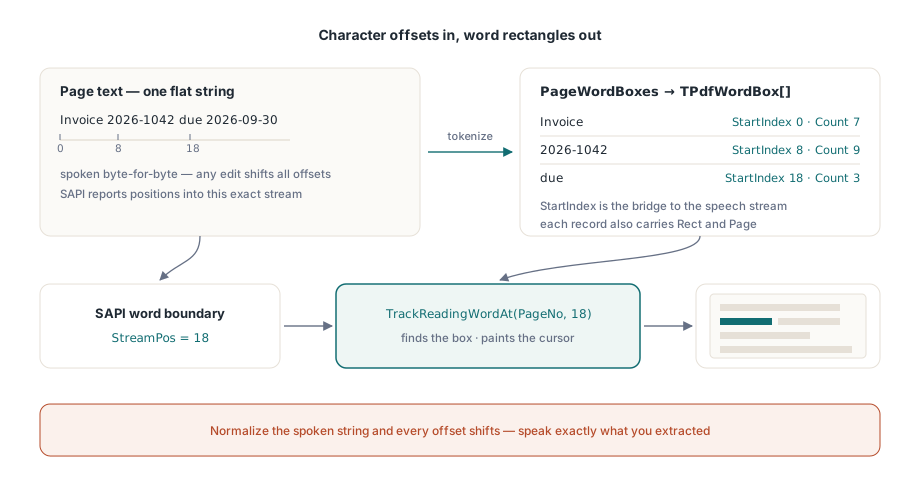
SAPI kelime sınırlarını izleyiciye bağlamak
Görüntüleyicideki TrackReadingWordAt, tüm özelliğin menteşesidir. Bir sayfa numarası ve karakter dizini verin; o karakteri içeren kelime kutusunu bulur, üzerine okuma imlecini boyar ve kelime dizinini ya da dizin kelimeler arasındaysa −1 döndürür. SAPI'nin kelime sınırı bildirimi, tam olarak istediği karakter konumunu sağlar:
procedure TReaderForm.OnSpeechWordBoundary(StreamPos: Integer);
var
  WordIdx: Integer;
begin
  // Ofseti bir sözcük kutusuna eşler ve vurguyu tek bir çağrıda taşır
  WordIdx := PdfView.TrackReadingWordAt(FPageNo, StreamPos);
  if WordIdx < 0 then
    Exit;                     // sınır herhangi bir sözcüğün dışına düştü: son vurguyu koru
end;
İki savunmacı ayrıntı burada yerini hak eder. Birincisi, TrackReadingWordAt, izlenen sayfa için kendi kelime kutusu önbelleğini tutar; sayfa değiştiğinde otomatik olarak yeniden oluşturur, bu nedenle sınırların ne kadar hızlı gelmesinden bağımsız olarak sınır başına maliyet düz kalır. İkincisi, sınır kontrolünü cömertçe yapmaz. Sayfanın karakter sayısında veya ötesinde bir dizin, son kelimeye sıkıştırmak yerine −1 döndürür. −1'i "önceki vurguyu tut" olarak ele alın, hiçbir zaman hata olarak almayın; çünkü noktalama işareti çalıştırmaları ve kelimeler arası boşluklar, hiçbir kelimeye ait olmayan sınırları meşru olarak üretir. Her −1'i günlüğe kaydetmek sizi boğar. Bunun yerine sayfa başına sayın ve oran tırmanan herhangi bir sayfaya dikkatle bakın; bu genellikle kural birde bir metin normalleştirme uyumsuzluğu anlamına gelir
İmlecin kendisi: renk, takip ve temizlik
SetReadingWord, kelime kutusunu kendiniz tuttuğunuzda vurguyu doğrudan boyar; ReadingWordColor onu biçimlendirir; ReadingWordFollow := True ise konuşulan kelimeyi görünümde tutacak kadar görünümü kaydırır. Bu son özellik yerini hak eder. Elle yazılmış "geçerli kelimeyi ortala" kaydırması, her satır sonunda sayfanın sıçramasına neden olur; harekete duyarlı okuyucular tüm özelliği bir dakika içinde kapatır. Vurgu yalnızca etkin TPdfView'da gösterilen sayfada oluşturulur; bu nedenle çok sayfalı okuma, konuşmayla birlikte PageNumber'ı ilerletmek ve ardından ilk sınır olayı gelmeden önce yeni sayfa için hazırlama adımını yeniden çalıştırmak zorundadır. Bunu atladığınızda, her sayfadaki ilk birkaç vurgu eski koordinatlara işaret eder
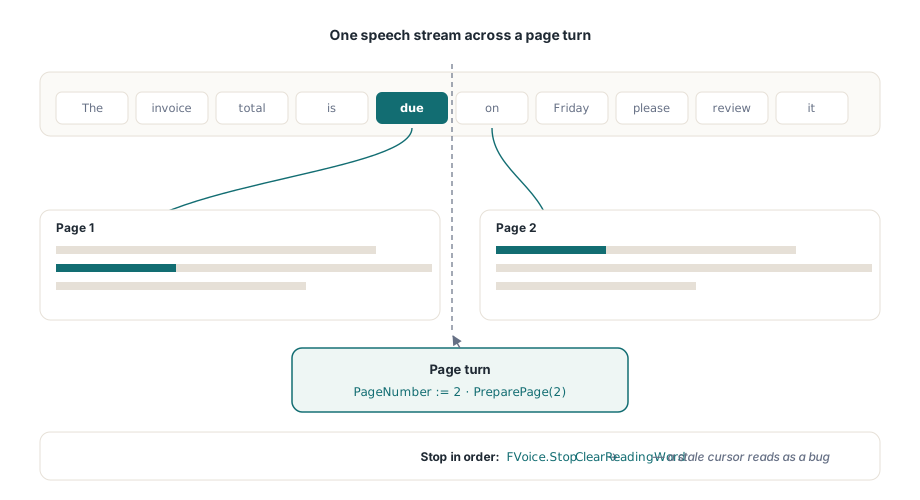
procedure TReaderForm.StopReading;
begin
  FVoice.Stop;                // önce SAPI oynatımını durdur
  PdfView.ClearReadingWord;   // ardından vurguyu kaldır; bayat bir imleç hata gibi okunur
end;
Kapatmada simetri, vurguyu dürüst tutan şeydir. Her duraklatma, durdurma ve sayfa çevirme yolu ClearReadingWord'te son bulmalıdır. Bırakırsanız, durmuş bir sayfada amber bir dikdörtgen tam bir kusur gibi görünür; her test uzmanının gerçekte hiçbir şey bozulmamış olsa da kaydedeceği türden bir şeydir
Konuşma hızı, bu ardışık düzeni belge boyutundan daha fazla zorlar. 300 kelime/dakikada sınır olayları her 200 ms'de bir gelir; en hızlı SAPI hızlarında ise gözün rahatça takip edebileceğinden daha hızlı gelir. Doğru yanıt kuyruklamak değil, birleştirmektir. Bekleyen bir vurgu güncellemesi varken yeni bir sınır gelirse eskiyi atın ve en yenisini boyayın. Her kelimeyi sırayla ziyaret eden ama yarım saniye geriden gelen bir imleç bozuk hissettirirken, sesle senkronize kalırken zaman zaman kelime atlayan bir imleç hissettirmez
Demoları ürünlerden ayıran uç durumlar
Birkaç belge kategorisi dikişleri ortaya çıkarır. Birleşik karakterler en incelikli olanıdır: temel harf artı birleştirici diyakritik gibi Unicode dizileri, görsel kelimenin önerdiğinden daha fazla karakter dizini kaplıyor olabilir; bu nedenle gliph başına bir dizin varsayan herhangi bir ofset aritmetiği yavaşça kayar. Bu, eşlemeye el ile hesaplanan kelime numaraları yerine TrackReadingWordAt'in sahip olmasının en güçlü argümanıdır. Tire ekleme daha sıradan ama daha yaygındır: satır sonunda bölünmüş bir kelime iki kutu haline gelir; eğer onu tek bir jeton olarak konuşursanız, ikinci yarısının sınır olayı ilk kutuya çözümlenir. Bu genellikle iyidir, ancak bir karardır; bu nedenle onu keşfetmek yerine bilinçli olarak yapın. Etiketleme, okuma sırasının kendisini değiştirir. Bir belge doğru yapı etiketleri taşıdığında (ISO 14289'un, PDF/UA'nın alanı), kelime sıralama mantıksal yapıyı izler; etiketsizse düzen buluşsal yöntemlerine geri döner ve iki sütunlu etiketsiz bir sayfa her iki sütunda da doğruca okuyabilir. Döndürülmüş sayfalar son yaygın olanıdır: her kelimenin Rect'i onu sayfa uzayında doğru şekilde sınırlar, ancak yatay akışa ayarlanmış görüntü alanı takip politikası, metin dikey olduğunda sarsıcı şekilde kaydırır; bu nedenle regresyon setinde en az bir döndürülmüş belge bulundurun. Okuma sırası işleme, ReadingUnits aracılığıyla cümle düzeyinde birimler ve daha geniş yardımcı yığın için Delphi'de erişilebilir bir PDF okuyucu oluşturma konusuna bakın
Bir platform kısıtlaması dağıtımı şekillendirir. SAPI yalnızca Windows'tur. Kelime kutusu ve izleme API'si Lazarus ve FPC altında bayt bayt aynıdır; ancak Linux ve macOS derlemeleri, aynı sınır olaylarının arkasına bağlı farklı bir sentezleyiciye ihtiyaç duyar; bu kurulum Lazarus ve FPC altında görüntüleyiciyi çalıştırma konusunda ele alınmaktadır. Vurgu maliyeti de konuşma hızları yükseldikçe sayfa önbelleğinizle etkileşime girer; render önbellekleme ve yakınlaştırma performansı konusundaki bütçe aritmetiği burada da değişmeden geçerlidir
Tek kelime vurgulamanın yanlış ayrıntı düzeyi olduğu durumlar
Kelime kelime karaoke her okuyucunun istediği değildir. Yüksek konuşma hızlarında imlecin kelime kelime yanıp sönmesi kendi görsel gürültüsünü yaratır; bazı dinleyiciler tek kelimeli bir stroboskop yerine bir cümleyi daha rahat takip eder. Bu durum için bileşen daha kaba bir birim sunar. ReadingUnits, kendi vurgu dikdörtgenleriyle birlikte cümle ve blok düzeyinde birimler döndürür; bunları SetReadingWord yerine SetReadingHighlight ile boyarsınız. Kablolama aynı şekildedir: bir sınır ofseti hâlâ hangi birimin aydınlandığını yönlendirir, ancak vurguladığınız birim tek bir jeton yerine bir cümle veya satır kapsar. Daha yavaş okuyucular ve yüksek hızlı oynatma her ikisi de bunu tercih etme eğilimindedir; hiçbir şey her ikisini de bir ayarın arkasına sunmanızı engellemez
Buna karşı geliştirme yapmadan önce sürüm tabanlarını sabitlemekte fayda vardır: kelime kutuları PDFium Component v1.53 veya üstü gerektirir, izleme imleci ise v1.56 gerektirir. Tam okuma API'si, cümle düzeyinde birimler ve çalışan bir sesli okuma demosu, PDFium Component ürün sayfasındadır