Delphi ve Lazarus aynı Object Pascal'ı derler ve tam da bu yüzeysel benzerlik, aralarında bir görüntüleyici taşımayı aldatıcı kılar. İki araç zinciri, PDF işi için önemli üç noktada birbirinden ayrılır: yerel string türü Delphi'de UTF-16, bir LCL uygulamasında UTF-8'dir; VCL ve LCL, kendi kontrollerine, diyaloglarına ve form akış biçimlerine sahip farklı görsel çerçevelerdir; ve bir Delphi ikili dosyası Windows'u hedeflerken bir FPC ikili dosyası Linux'a veya macOS'a yönelik olabilir. Bu farkların hiçbiri derleme zamanında ortaya çıkmaz. Tek bir kaynak ağacından VCL ve LCL sürümlerini gönderen PDFium Component üzerine kurulu bir görüntüleyici, bir avuç birim adı değişimi ve birkaç {$IFDEF FPC} bloğundan sonra Lazarus altında temiz derlenir. Başarısızlıklar daha sonra, gerçek veri ve gerçek bir dağıtım, Delphi derlemesinin sessizce yaptığı varsayımları açığa çıkardığında gelir
Bu varsayımlardan dördü kaybedilen zamanın çoğundan sorumludur: arayüz sınırındaki metin kodlaması, formun iki kopyasını sürdürme cazibesi, yerel bir motor ikilisinin çalışma zamanında nasıl çözümlendiği ve SAPI ortadan kalktığında metinden sesin platformunun tükendiği an. Her biri, geleceğini bildiğinizde ele alması ucuz, bilmediğinizde ise peşine düşmesi pahalıdır
Aynı Pascal, farklı dize yükleri
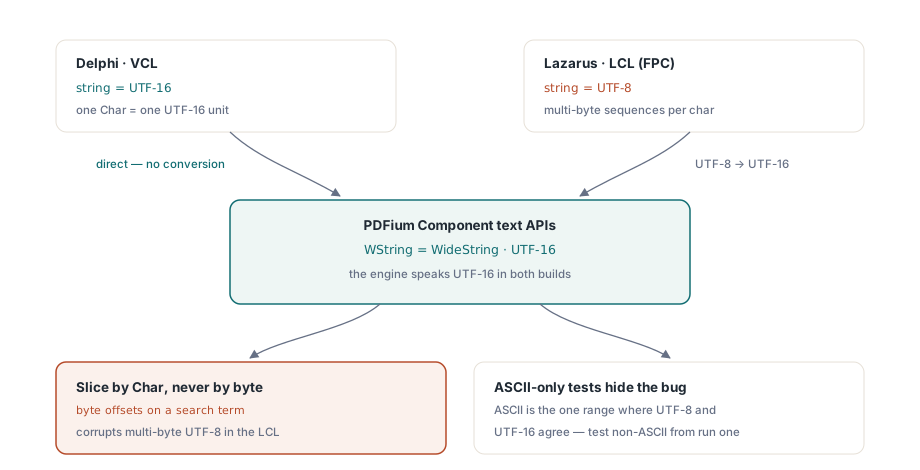
Delphi'nin yerel string'i 2009'dan beri UTF-16'dır. Lazarus ve Free Pascal, LCL uygulamalarında varsayılan olarak UTF-8 kullanır. Bileşenin metne dönük API'leri, FPC derlemesinin WideString'e takma ad verdiği WString türü üzerinden UTF-16 konuşur; bu yüzden metnin LCL arayüzünüz ile PDF motoru arasında geçtiği her sınır bir dönüşüm noktasıdır
Dönüşümler, basit atamalarda otomatik olarak gerçekleşir ve çoğu kod bunları hiç düşünmek zorunda kalmaz. İki alışkanlık, kodlama hatalarını uzak tutar. Metni bayt düzeyinde işleme olmadan doğrudan geçirin: bir arama terimini bayt ofsetine göre dilimleyen kod, bir Char'ın bir UTF-16 birimi olduğu Delphi'de çalışır ve LCL'deki çok baytlı UTF-8'i bozar. Ve ilk çalıştırmadan itibaren ASCII olmayan veriyle test edin. Bir Alman dosya adı, Kiril alfabesiyle bir arama terimi, belge meta verisinde aksanlı bir yazar adı: saf-ASCII test verisi her kodlama kusurunu gizler, çünkü ASCII, UTF-8 ile UTF-16'nın karakter başına bayt olarak uyuştuğu tek aralıktır. Hata boyunca gerçektir; ASCII onu yalnızca Münih'teki bir müşteri hiç denemediğiniz bir dosyayı açana kadar görünmez tutar
IDE başına bir çatal değil, tek bir koşullu blok
İlk düzine IFDEF'ten sonra kod tabanı, tek bir depoyu giyen iki proje gibi hissettirmeye başlar ve onu IDE başına çatallamak cazip görünür. Bu yanlış bir hamledir. Gerçek farklar tek bir paylaşılan bildirim bloğuna çöker ve bir çatal, o andan itibaren her hata düzeltmesinin maliyetini ikiye katlar. Koşullu katmanı bu kadar küçük tutun:
{$IFDEF FPC}
uses
  LCLType, Forms, Graphics, Controls;

type
  WString = WideString;   // bileşen metin API'leri UTF-16'dır
  TBytes  = array of Byte;
{$ELSE}
uses
  Winapi.Windows, Vcl.Forms, Vcl.Graphics, Vcl.Controls;
{$ENDIF}
O bloğun altındaki her şey, her iki IDE'de de özdeş biçimde derlenir. Belge işleme, sayfa gezinme, render çağrıları: TPdf ve TPdfView, VCL ve LCL sürümlerinde aynı yüzeyi sunar, bu yüzden görüntüleyicinin büyük kısmı hiç bir derleyici koşulu görmez. Bunu böyle tutmak, akıllı bir hileden çok yapısal bir disiplindir. Paylaşılan PDF mantığı, çerçeveye özgü hiçbir diyalog veya panel çekmeyen birimlerde yaşar. Kendi platform kurallarıyla yazdırma diyalogları ve dosya seçiciler gibi gerçekten farklı olan bir avuç şey, çerçeve başına bir kez uygulanan ince bir arayüzün arkasına gizlenir. IFDEF bloğu, kırk birim boyunca derleyici direktifleri sızdırmak yerine, gelecekteki platform ayrışmasının inmesine izin verilen tek yer haline gelir
Formu iki tasarımcıda değil, kodda inşa edin
Form akışı, çift IDE projelerinin sessizce çürüdüğü yerdir. Aynı formu tarif ettiğini iddia eden bir .dfm ve bir .lfm, kimsenin fark alamayacağı nedenlerle iki derleme farklı davranana kadar özellik özellik birbirinden uzaklaşır, çünkü iki dosya aynı biçimde bile değildir. Görüntüleyiciyi çalışma zamanında inşa etmek, tüm sorunu bertaraf eder. Sıradan kod olarak sürüm kontrolüne alınan tek bir kurucu dizisi vardır ve her iki platformda da aynı okunur:
procedure TViewerForm.FormCreate(Sender: TObject);
begin
  Pdf := TPdf.Create(Self);

  PdfView := TPdfView.Create(Self);
  PdfView.Parent := Self;
  PdfView.Align := alClient;
  PdfView.Pdf := Pdf;
  PdfView.FitMode := pfmFitWidth;

  if ParamCount > 0 then
  begin
    Pdf.FileName := ParamStr(1);
    Pdf.Active := True;   // belgeyi açar; bundan sonra PageCount geçerlidir
  end;
end;
Bu atamaların tam sırası, gerçek işi yapan tek satırdan daha az önemlidir. PdfView.Pdf := Pdf, görsel kontrolü belge bileşenine bağlar ve bu noktadan itibaren PageNumber üzerinden sayfa gezinme ve FitMode üzerinden sığdırma davranışı, VCL ve LCL altında özdeş biçimde yanıt verir. Bir kullanıcı bunu hata olarak bildirmeden önce bilinmeye değer bir çerçeveler arası tuhaflık vardır: Zoom'u elle atamak, her iki çerçevede de FitMode'u pfmNone'a geri döndürür. Bu yüzden araç çubuğunuz "genişliğe sığdır"ı yapışkan bir tercih olarak ele alıyorsa, herhangi bir programatik yakınlaştırmadan sonra sığdırma modunu yeniden atamanız gerekir, aksi halde tercih, kod yakınlaştırma düzeyine ilk dokunduğunda sessizce yapışmayı bırakır
IDE'nin sizi hiç uyarmadığı ikili dosya
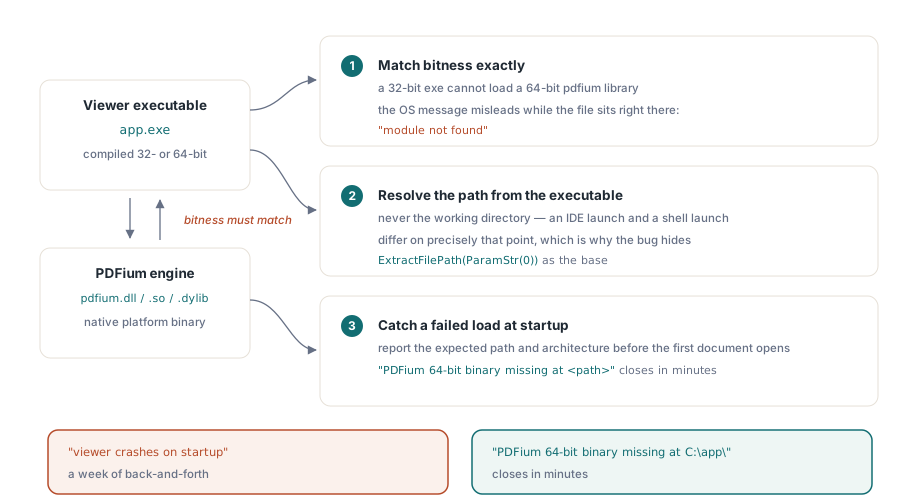
Bileşen, yerel bir platform ikili dosyası olarak gönderilen PDFium motorunu sarar ve bu ikili dosya, neredeyse her "IDE'de çalışıyor, yüklü kısayoldan başarısız oluyor" bildiriminin kaynağıdır. Üç kural bunların çoğunu açıklar. Bit sayısı tam olarak eşleşmek zorundadır. 32 bitlik bir yürütülebilir dosya 64 bitlik bir pdfium kütüphanesini yükleyemez ve işletim sisteminin geri verdiği mesaj (bazı Windows sürümlerinde "modül bulunamadı") aktif biçimde yanıltır, çünkü dosya tam olarak yürütülebilir dosyanın yanında oturmaktadır. Kütüphane yolunu çalışma dizinine göre değil, her zaman yürütülebilir dosyaya göre çözümleyin; bir IDE başlatması ile bir kabuk başlatması tam da bu noktada farklılaşır ve hatanın geliştirme sırasında gizlenmesinin nedeni de budur. Ve ilk belge açılmadan önce başarısız bir yüklemeyi yakalayın, ardından beklenen yolu ve mimariyi açıkça belirterek bildirin. "PDFium 64 bit ikili dosyası <path> konumunda eksik" diye okunan bir destek talebi dakikalar içinde kapanır. "Görüntüleyici başlangıçta çöküyor" diye okunan bir tanesi ise bir haftalık gidiş gelişe dönüşür
Bu arada motor ikili dosyasını yürütülebilir dosyayla birlikte sürümleyin. PDFium hızlı hareket eder ve uygulamayı güncelleyip diskte eski bir kütüphane bırakan bir yükleyici, ofisinizdeki hiç kimsenin yeniden üretemeyeceği çökmeler üretir; bunun basit nedeni, ofisinizdeki her makinenin tesadüfen eşleşen çifti tutmasıdır. Kütüphaneyi, yüklediği yürütülebilir dosyayla aynı yükleyiciye, aynı sürüm damgasına ve aynı geri alma yoluna sahip derleme eserinin bir parçası olarak ele alın
Bileşenleri Lazarus IDE'sinde kaydetmek
Çalışma zamanı inşası hiçbir tasarım zamanı kaydına ihtiyaç duymaz; bu, kendi arayüzünü kodda inşa eden bir görüntüleyici için en temiz kurulumdur. Bileşenleri tasarım zamanı çalışması için Lazarus paletinde gerçekten istediğinizde, paketi yükleyin ve Lib/FPC/PDFiumLaz.lpk içindeki özel kayıt biriminin, PDFiumLazReg'in bunu halletmesine izin verin. O birim kasıtlı olarak tasarım-zamanı olarak işaretlenmiştir: gönderdiğiniz yürütülebilir dosyaya asla bağlanmaması gereken IDE özellik-editörü arayüzlerine başvurur
Bunu yanlış yaparsanız belirti, IDE paketlerine açıklanamaz biçimde bağımlı olan bir uygulamadır; bu da Lazarus'un hiç kurulu olmadığı ilk müşteri makinesinde bir dağıtım hatası olarak ortaya çıkar
Windows dışında konuşma ve ekran okuyucular
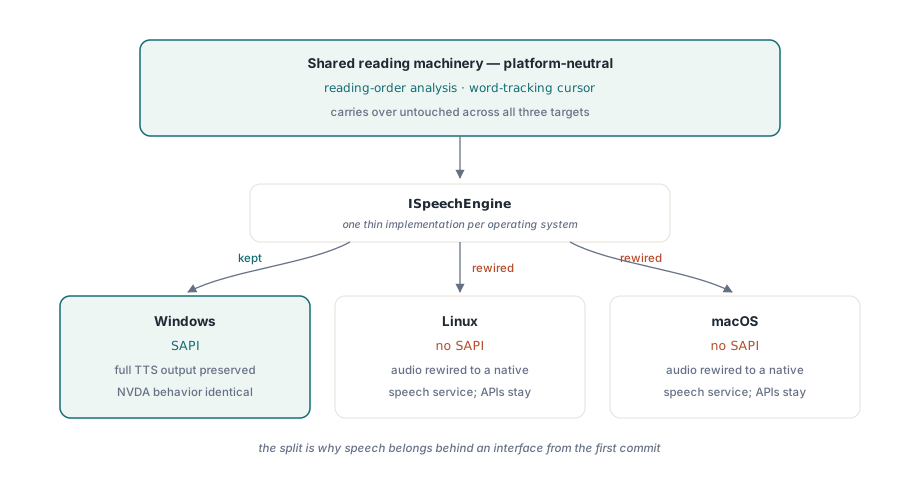
Metinden sese, platformlar arası hikayenin kırıldığı tek özelliktir ve bu kırılma bileşende değil, işletim sisteminde olur. Windows'taki olağan TTS arka ucu SAPI, yalnızca Windows'ta var olur. Hâlâ Windows'u hedefleyen bir Lazarus derlemesi, tam SAPI çıktısını ve Delphi orijinalinin sahip olduğu aynı NVDA uyumlu davranışı korur; bu yüzden Windows'tan Windows'a bir taşıma burada hiçbir şey kaybetmez ve bir NVDA kullanıcısı iki derlemeyi birbirinden ayırt edemez
Bir Linux veya macOS hedefi farklı bir meseledir. Çağrılacak bir SAPI yoktur, bu yüzden ses çıktısının, üzerindeki okuma API'leri yerinde kalırken yerel bir konuşma servisine yeniden bağlanması gerekir. Bu ayrım, konuşmayı ilk commit'ten itibaren bir arayüzün arkasına koymanın gerekçesidir: okuma sırası çözümlemesi ve kelime izleyen imleç platformdan bağımsızdır ve dokunulmadan taşınır, yalnızca sesi gerçekten üreten ince katmanın platform başına değişmesi gerekir. Erişilebilir okuyucu makalesi, bu okuma mekanizmasını derinlemesine ele alır
Taşımayı bitti ilan etmeden önce bir eşdeğerlik kontrol listesi
Aşağıdaki geçiş, kabaca başarısızlıkların ortaya çıkma eğiliminde olduğu sırayla listelenmiş, gerçek regresyonları yakalamıştır. Yolu ASCII olmayan karakterler içeren bir belge açın. ASCII olmayan karakterlerle bir terim arayın ve isabetlerin gerektiği yerde vurgulandığını doğrulayın. Gönderdiğiniz her widget kümesinde fare tekerleği kaydırmayı, sürükleyerek seçmeyi ve klavye sayfa gezinmesini deneyin, çünkü odak işleme ve tekerlek davranışı, LCL'nin widget kümesine en bağımlı köşeleridir. %100, %150 ve %200 ekran ölçeklendirmesinde render etmeyi kontrol edin. Son olarak, IDE derlemesini değil, kurulu derlemeyi, hiç IDE bulunmamış bir makinede çalıştırın, çünkü ikili dosya çözümlemesini dürüstçe deneyen tek test budur. Bu tek şey sessizce başarısız olurken geri kalan her şey geçebilir
Render verimi iki sürüm arasında değişmeden taşınır, bu yüzden render önbelleği ve yakınlaştırma performansı makalesindeki önbellekleme yaklaşımı, VCL sürümü için yazıldığı gibi tam olarak LCL görüntüleyicisine de uygulanır
Bunların hiçbiri LCL sürümünü daha aşağı bir sürüm yapmaz. Çekirdek yüzey her iki tarafta da özdeştir: TPdf, TPdfView, render etme, formlar, metin çıkarma ve erişilebilirlik API'leri, hangi IDE'nin onları derlediğinden bağımsız olarak aynı davranır. İzlemeye değer her fark, sürüme bağlı değil platforma bağlıdır. SAPI konuşması yalnızca Windows'tadır, diyaloglar her çerçevenin kendi kurallarını izler ve ikili dosya yüklendiği mimariyle eşleşmek zorundadır. Kodlama sınırlarını, çalışma zamanı formunu ve ikili dosya çözümlemesini doğru yapın, taşımanın geri kalanı derleyicinin sizin için zaten hallettiği mekanik iştir
Burada anlatılan VCL ve LCL sürümleri, Delphi, C++Builder ve Lazarus/FPC için kaynak kod ve özdeş genel API'lerle birlikte PDFium Component olarak birlikte gönderilir