Görme engelli bir kullanıcı, parlak yeni Delphi görüntüleyicinizde bir üç aylık raporu açar, NVDA'yı çalıştırır ve önce sayfa altbilgisini, ardından bir rakamlar sütununu, sonra da görebilen herhangi bir okuyucunun ilk önce okuyacağı başlığı duyar. Ya da hiçbir şey duymaz. Sayfa ekranda kusursuz görünür ve tuzak tam olarak buradadır: render etme ve okuma, farklı kodla çözülen farklı sorunlardır. Bir PDF'in glif'lerini boyama sırası, bir kişinin onları duyması gereken sırayla eşleşme zorunluluğu taşımaz; bu yüzden yalnızca render çağrıları üzerine kurulu bir görüntüleyici kusursuz bir görüntü ve kullanılmaz bir anlatım üretir. Delphi, C++Builder ve Lazarus için PDFium motorunun VCL/LCL sarmalayıcısı olan PDFium Component, tam da bu nedenle ayrı bir okuma API kümesi taşır. Çizim API'leri, kendilerine hiç verilmemiş bir okuma sırasını geri kazanamaz
Erişilebilir bir okuyucu üç şeye bağlı olarak ayakta kalır veya çöker. Bir ekran okuyucunun seslendirebileceği bir sıra çıkarmalı, sesin o an söylediği şeye sabitlenmiş görünür bir kelime imlecini korumalı ve tahmin edip numara yapmak yerine bir belgenin hiç etiketlenmediğini kabul etmelidir. Her birinin başvurulacak net bir API'si ve ayrıntıyı atlarsanız sizi ısıran bir başarısızlığı vardır
Okuma sırası, boyama sırasında değil yapı ağacında yaşar
ISO 32000-1 §14.8, mantıksal yapıyı sayfa içeriğinin üzerine katmanlanmış bir öğe ağacı olarak tanımlar. PDF/UA (ISO 14289-1) daha da ileri gider ve bu ağacı zorunlu kılar: gerçek içeriğin her parçasına, sayfa artefaktları öyle işaretlenip atlanarak, okuma sırasıyla bu ağaç üzerinden ulaşılabilmelidir. Doğru etiketlenmiş bir rapor, "Quarterly Results" ifadesinin ikinci düzey bir başlık olduğunu ve toplamlar tablosunun başlık hücreleri olan bir tablo olduğunu bilir. Etiketlenmemiş bir rapor ise tesadüfen bir belgeye benzeyen, konumlandırılmış glif dizilerinden oluşan bir yığındır
ReadablePageContent, o ağaç mevcut olduğunda onu gezer ve cfHeading ile cfParagraph gibi değerler taşıyan anlamsal bir Kind ile etiketlenmiş parçalar döndürür; böylece arayüz, kalın bir satırı sıradan gövde metni olarak okumak yerine kelimelerden önce "başlık" diyebilir. Kullanılabilir bir ağaç olmadığında aynı çağrı, buluşsal düzen çözümlemesine düşer: sütunları algılar, taban çizgilerini kümeler, soldan sağa ve yukarıdan aşağıya sıralar. Bu geri dönüş, tek sütunlu bir not için gayet iyidir ama bir bülten, çok sütunlu bir form, bir kenar çubuğu veya alıntı kutusu olan herhangi bir şey için sarsıntılıdır. Önemli olan hangi sonucu aldığınızı bilmektir ve API bunu size açıkça söyler. TPdfReadableContent kaydı, sıra etiketli ağaçtan geldiğinde rosStructure'a, geometriden çıkarsandığında ise rosHeuristic'e ayarlanmış bir Source alanı taşır. Tahmin edilen bir sırayı doğrulanmış gibi göstermek, kimsenin çalıştırmadığı bir derlemenin üzerinde geçti rozetinin erişilebilirlik versiyonunu göndermek demektir
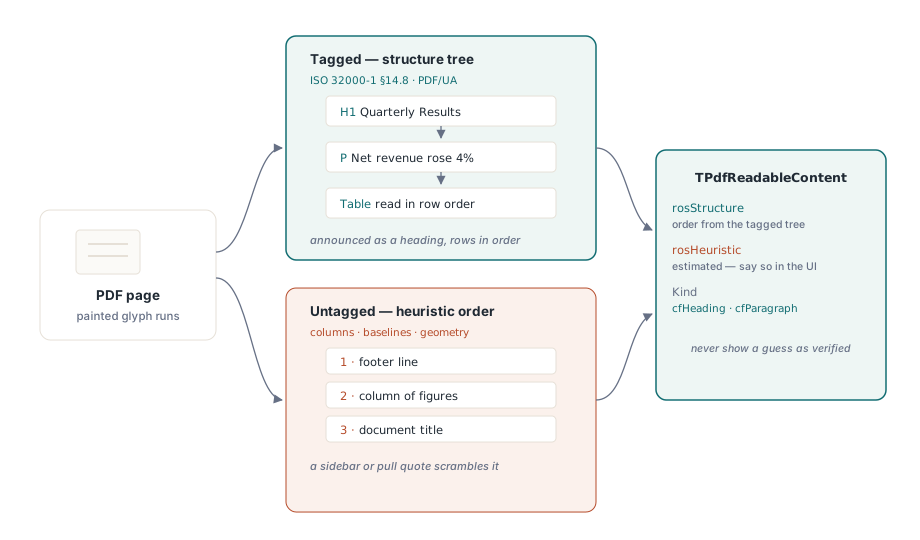
Açılış anındaki ucuz hamle, IsTagged'ı okumak ve ValidatePdfUa'yı bir kez çağırıp yanıtı önbelleğe almaktır. Başarısız bir PDF/UA kontrolü, dosyayı reddetmek için bir gerekçe değildir. Durum çubuğuna "tahmini okuma sırası" yazmak için bir gerekçedir; böylece bir müşteri, bozuk bir anlatımla ilgili şikayet gönderdiğinde, destek ekibi zaten dosyadaki bir etiketleme sorununa mı yoksa kendi kodunuzdaki bir hataya mı baktığını bilir
ReadingUnits ile sayfadan konuşma kuyruğuna
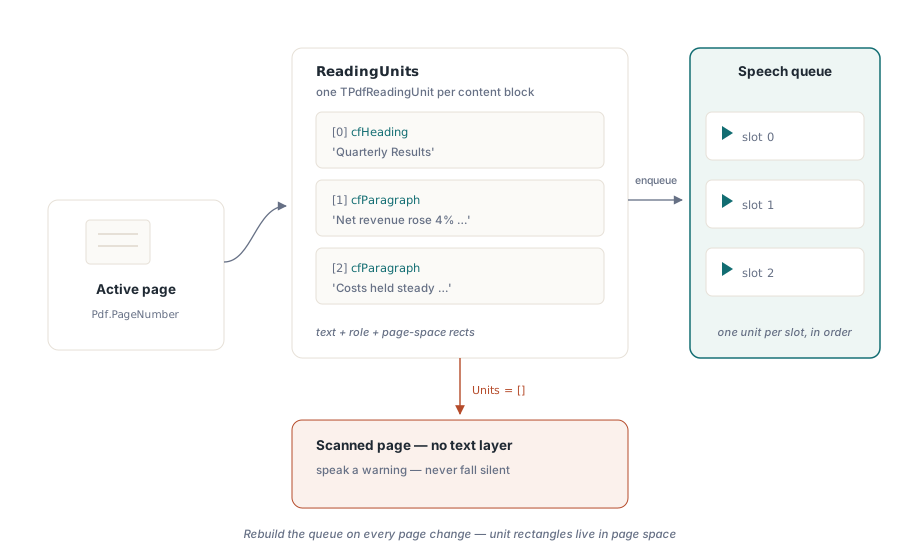
Metinden sese dönüşüm için ağır işi ReadingUnits yapar. Etkin sayfa için bir TPdfReadingUnit kayıtları dizisi döndürür; her biri seslendirilecek metni, anlamsal rolünü ve sayfada onu konumlandıran dikdörtgenleri taşır. Sayfalar arasında sürekli okuma istediğinizde, belge genelinde eşlik eden bir DocumentReadingUnits vardır. Bir birim, doğrudan bir konuşma kuyruğunun bir yuvasına düşer:
procedure TReaderForm.QueuePageSpeech(PageNumber: Integer);
var
  Units: TPdfReadingUnits;
  i: Integer;
begin
  Pdf.PageNumber := PageNumber;   // ReadingUnits etkin sayfa üzerinde çalışır
  Units := Pdf.ReadingUnits;
  FSpeechQueue.Clear;
  for i := Low(Units) to High(Units) do
    FSpeechQueue.Add(Units[i]);  // metin + anlam + vurgu dikdörtgenleri
  FCurrentPage := PageNumber;
  SpeakNextUnit;
end;
O döngüde iki şeyi yanlış yapmak kolaydır. Kuyruğu sayfa başına tutun ve kullanıcı her geçiş yaptığında yeniden kurun, çünkü okuma birimleri sayfa uzayında dikdörtgenler taşır; üçüncü sayfadan kalan bir kuyruk vurgularını dördüncü sayfaya boyar. Ve açıkça içeriği olan bir sayfada boş bir Units dizisini, yalnızca görüntüden ibaret olma dedektörünüz olarak ele alın. Taranmış bir sayfa, altında hiçbir metin katmanı olmayan piksellerdir ve doğru cevap, dinleyicinin bir donmadan ayırt edemeyeceği bir sessizliğe düşmek yerine bir uyarı seslendirmektir ("bu sayfada çıkarılabilir metin yok")
Sesi takip eden bir kelime imleci
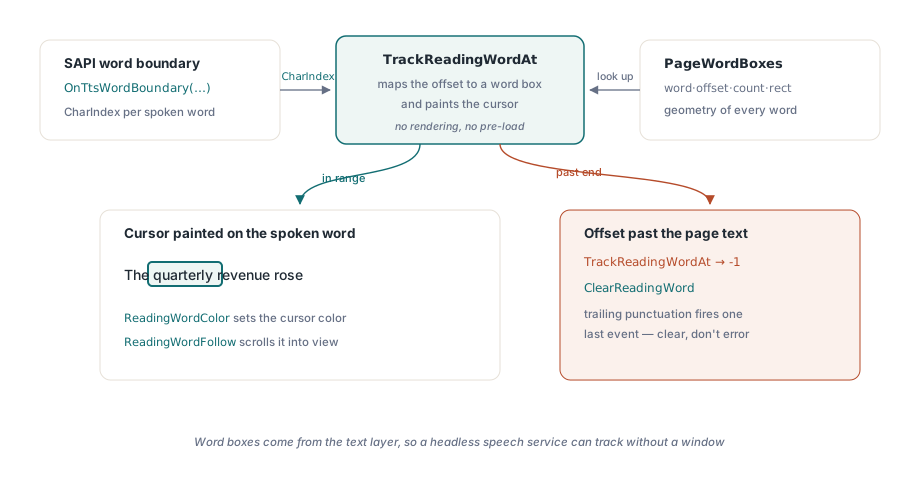
Yüksek sesle okunurken kelimeleri gözüyle takip eden az gören bir kullanıcıya, seferde bir paragrafın tamamını vurgulamak ağır gelir. Kelime düzeyinde vurgulama, yani karaoke efekti, iki parça gerektirir: her kelimenin geometrisi ve TTS motorunun ilerleme raporlarını bu geometriye eşleyecek bir yol. PageWordBoxes, size geometriyi kelime metnini, karakter ofsetini, karakter sayısını ve sayfa uzayında bir dikdörtgeni taşıyan TPdfWordBox kayıtları olarak verir. TrackReadingWordAt ise size eşlemeyi verir. SAPI'nin kelime-sınırı olayının zaten bildirdiği karakter konumunu ona verin; o da bu ofseti kelime kutusu dizisinde bir indekse çözer ve imleci tek bir çağrıda eşleşen kelimenin üzerine boyar
procedure TReaderForm.PrepareKaraoke(PageNumber: Integer);
begin
  // Görünümün kelime kutuları, görünümün gösterdiği sayfadan gelir.
  // Yalnızca Pdf.PageNumber ayarlamak görünümü hareket ettirmez
  PdfView.PageNumber := PageNumber;
  FWordBoxes := PdfView.PageWordBoxes;
end;

procedure TReaderForm.OnTtsWordBoundary(Sender: TObject; CharIndex: Integer);
var
  WordIdx: Integer;
begin
  // TrackReadingWordAt hem ofseti eşler HEM DE kelime imlecini boyar
  WordIdx := PdfView.TrackReadingWordAt(FCurrentPage, CharIndex);
  if WordIdx < 0 then
    PdfView.ClearReadingWord;  // sınır, sayfa metninin sonunu geçti
end;
Sözleşme bir noktada cömert, başka bir noktada ise affetmezdir. Cömert kısım: TrackReadingWordAt, izlediği sayfa için kendi kelime kutusu önbelleğini tutar, bu yüzden önceden yüklenecek hiçbir şey yoktur ve kelime kutuları metin katmanından geldiği için hiç render işlemi gerçekleşmez. Görünür penceresi olmayan başsız bir konuşma servisi bile konumları izleyebilir. Affetmez kısım: karakter indeksi, kendi oluşturduğunuz temizlenmiş bir dizeye değil, bileşenin çıkardığı metne işaret etmek zorundadır. CharIndex sayfa metninin sonunu geçtiğinde, fonksiyon hata fırlatmak yerine -1 döndürür; bu, bir TTS motoru sondaki noktalama için son bir sınır olayını tetiklediğinde her zaman olur. -1'i "imleci temizle" olarak okuyun, asla bir hata olarak değil
Görüntüleme tarafında, ReadingWordColor imleç rengini ayarlar. Varsayılan kehribar rengi çoğu sayfa arka planında tutarlı kalır, ama görüntüleyicinizin sunduğu her görüntüleme filtresi altında test edin. Kehribar bir imleç, renk tersine çevirme altında tamamen kaybolabilir ve konuşmayla birlikte çalışan tersine çevirme, tam olarak az gören bir kullanıcının çalışma biçimidir; bu yüzden en çok doğru yapmanız gereken kombinasyon, hızlı bir demonun hiç sınamadığı kombinasyondur. ReadingWordFollow'u True yapın, görünüm konuşulan kelimeyi kendiliğinden görünür alana kaydırır; bu, ekranlara taşan yakınlaştırılmış bir sayfada olmazsa olmazdır. Bir kapsam kuralına dikkat edin: SetReadingWord yalnızca etkin TPdfView sayfasına boyar. Elle kaydırmanın konuşmayı duraklatıp duraklatmayacağına yoksa takip davranışının bunu geçersiz mi kılacağına önceden karar verin, çünkü ikisini de seçmemek, imleç ekran dışında bir yerde otururken sesin okumaya devam etmesine yol açar
Okuyucunuzu bozan belgeler
Bir avuç girdi biçimi, saf bir uygulamayı öyle güvenilir biçimde alt eder ki bunlar, düzeltip unutacağınız tek seferlik hatalar değil, regresyon takımında kalıcı örnekler olarak yer almayı hak eder
- Etiketlenmemiş ama metin bakımından zengin dosyalar. Buluşsal sıra, doğrusal bir rapor için doğru olma eğilimindedir ve bir kenar çubuğu veya alıntı kutusu girer girmez yanlışlanır. Sırayı hem arayüzde hem de tanılama günlüğünüzde tahmini olarak işaretleyin, böylece hata daha sonra okunabilir olur
- Yalnızca görüntüden oluşan taramalar. Hiçbir metin katmanı yoktur. Bunları boş okuma birimleri üzerinden yakalayın ve okuyucunun boş bir sayfayı anlatmasına izin vermek yerine kullanıcıyı yukarı akıştaki bir OCR adımına yönlendirin
- Birleştirici karakterler ve karışık yazı sistemleri. Unicode birleştirici işaretleri her zaman görsel kelimelere bire bir çökmez, bu yüzden kelime kutusu sayısı kendi belirteçleyicinizin beklediğinden sapabilir. Kelime kutusu dizisini, metni kendiniz bölerek hesapladığınız ofsetlerle indekslemeyin; yalnızca
TrackReadingWordAt'ın döndürdüğü indeksleri kullanın
Bunu bir demo gibi değil bir denetçi gibi test edin
"Örneğimi sesli okudu" hiçbir şey kanıtlamaz. Savunabileceğiniz bir geçiş, NVDA takılı bitmiş derleme üzerinden üç dosya çalıştırır: başlıkların başlık olarak duyurulduğu ve bir tablonun satır sırasıyla okunduğu bilinen etiketli bir dosya; tahmini sıra göstergesinin görünür olduğu bilinen etiketsiz bir dosya; ve metin-yok uyarısının gerçekten seslendirildiği bir tarama. Her biri, mutlu senaryonun atladığı bir yolu sınar
Oradan, kelime imlecinin konuşma hızının iki katında ve yarısında kilitli kaldığını ve ReadingWordFollow kaydırmasının kullanıcının kendi kaydırmasıyla çekişmediğini doğrulayın. Ardından her renk filtresi arasında geçiş yaparken konuşmayı çalıştırın ve imlecin asla kaybolmadığını izleyin. Az görme renk filtreleri makalesi, bu render yolunu ayrıntılı olarak ele alır ve kelime konuşma imleci derinlemesine incelemesi TTS zamanlamasını didikler
Yukarıda kullanılan okuma birimi ve kelime kutusu API'leri, Delphi ve C++Builder (VCL) ile Lazarus/FPC (LCL) için PDFium Component ile birlikte gelir. Ürün sayfası, bu örneklerin arkasındaki okuma birimleri ve kelime kutuları için kayıt düzenleri de dahil olmak üzere tam API referansına bağlantı verir