Az gören bir okuyucu, beyaz bir sayfada varsayılan kontrastta siyah metni seçemez, bu yüzden bir koyu mod ister. Saf cevap, render edilen sayfanın her pikselini ters çevirmektir. Bir haftada gönderilir ve ertesi gün bozulur: taranmış fotoğraflar film negatifleri gibi görünerek geri döner, okuyucunun sarı fosforlu kalem işaretleri okunmaz bir mavi lekeye dönüşür ve biri neden çıktının koyu siyah çıktığını sorar. Bu özellik gerçekten inşa edilmeye değer ve gerçekten yarım yamalak yapılması kolaydır ve iki sonuç arasındaki fark tek bir fikirdir: her renk kararı render hattında belirli bir noktaya aittir ve ters çevirme, yanlış aşamada uygulanan yanlış araçtır. Buradaki kod, Delphi, C++Builder ve Lazarus için PDFium tabanlı görüntüleyici olan PDFium Component'i kullanır, ki render API'si bu aşamaları ayrı ayrı açığa çıkarır
Filtreler sunum durumudur, asla belge durumu değil
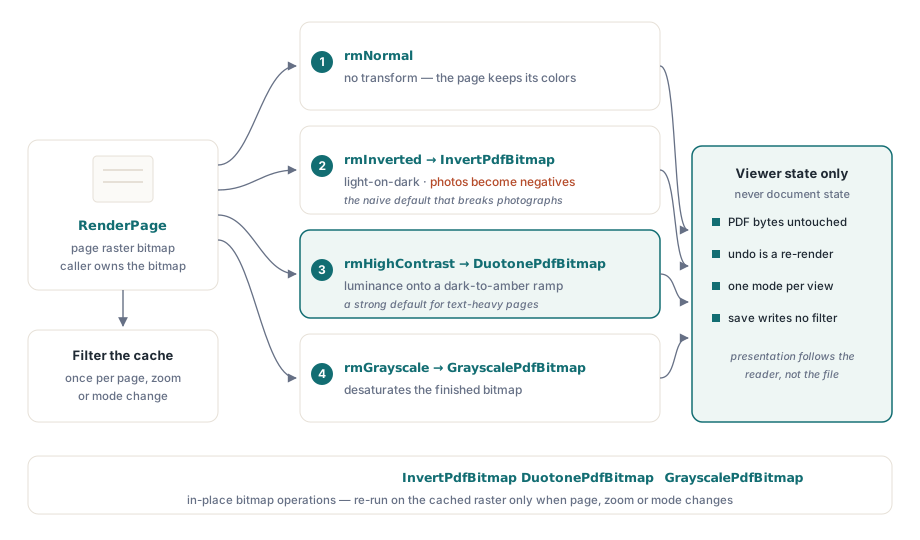
Burada en kötü hata kategorisini önleyen bir kural var: bir okuma modu, bit eşlemin nasıl üretildiğini ya da sonradan işlendiğini değiştirir, başka hiçbir şeyi değil. PDF baytları dokunulmamış kalır, her mod yeniden render ederek geri döndürülebilir ve "kaydet" hiçbir zaman filtrelenmiş bir görünümü dosyaya geri yazmaz. Bu, bir hukuk incelemecisi aktif bir filtre altında bir sözleşmeyi yazdırıp ters çevrilmiş sürümü dosyalayana kadar açık görünür. O noktada, "yazdırma belgenin kendi görünümünü mü yoksa ekranınkini mi kullanıyor" sorusu, spesifikasyonunuzda bir kod yolunun kazası değil, açık bir cevabı hak ettiğini ortaya çıkarır. Filtre ayarını görüntüleyici durumunda tutun, onu render zamanında uygulayın ve her dışa aktarma yolunun hangi görünümü kullandığını beyan etmesini sağlayın
Bu kural iki kez kendini amorti eder. Geri döndürülebilirlik bedavaya gelir, çünkü mod değiştirmek değişmemiş kaynaktan yeniden render eder: tutulacak bir geri alma yığını yoktur ve bir dizi mod değişikliğinin sayfayı bozmasının hiçbir yolu yoktur. Çoklu pencere senaryoları aynı nedenle tutarlı kalır. Bir belgenin iki görünümü farklı modlarda çalışabilir, çünkü belge nesnesi paylaşılırken her görünüm kendi sunum durumuna sahiptir
Önce render et, sonra dönüştür
Desteklenen kalıp, render sonrası bit eşlem işlemedir: RenderPage sayfanın raster'ını üretir, ardından bir dönüşüm geçişi onu ayarlar. Bileşen, yerinde bit eşlem işlemleri olarak üç dönüşüm gönderir, InvertPdfBitmap, DuotonePdfBitmap ve GrayscalePdfBitmap, ki bu mod değiştirmeyi temiz iki aşamalı bir fonksiyon yapar:
function TViewerForm.RenderWithMode(W, H: Integer): TBitmap;
begin
  Result := Pdf.RenderPage(0, 0, W, H, ro0, [reAnnotations]);
  case FReadingMode of
    rmInverted:     InvertPdfBitmap(Result);
    rmHighContrast: DuotonePdfBitmap(Result, clBlack, $0000C8FF);  // koyu arka plan, kehribar metin
    rmGrayscale:    GrayscalePdfBitmap(Result);
  end;
  // rmNormal hiçbir işlem yapmadan geçer: belge kendi renklerini korur
end;
Bu tasarımdan iki şey çıkar. Birincisi, dönüşüm maliyeti bit eşlem boyutuyla orantılıdır, bu yüzden iş, render sonuçlarınızın önbelleğe alındığı her yere aittir: önbelleğe alınmış bit eşlemi bir kez filtreleyin, her boyamada değil. İkincisi, dönüşüm bitmiş raster üzerinde çalıştığından, metni, vektör sanatını, görüntüleri ve açıklama görünümlerini aynı şekilde etkiler. Bu tekdüzelik, saf ters çevirmenin fotoğraflar için tam olarak yanlış yaptığı şeydir. Bu, duotone dönüşümünün, tonları negatife çevirmek yerine parlaklığı seçilmiş bir koyudan-açığa renk rampasına eşlediği için metin ağırlıklı belgeler için daha iyi bir varsayılan yapmasının nedenidir; ters çevirme, onu isteyen okuyucular için açık bir seçenek olarak kullanılabilir kalır. Daha keskin glif kenarları ayrı bir kaldıraçtır. reNoSmoothText render seçeneği render zamanında metin kenar yumuşatmayı kapatır ve büyük yakınlaştırmada yüksek kontrast modu ile iyi eşleşir
Anlaşmayan iki gri tonlama
Render seçenekleri, sonradan işleme adımını atlayan bir kısayol gibi görünen reGrayscale'i içerir. Aynı işlem değildir:

// Motor düzeyi: gri tonlama rasterleştirme sırasında uygulanır
GrayA := Pdf.RenderPage(0, 0, W, H, ro0, [reGrayscale]);

// Sonradan işleme: renkli render et, bitmiş bit eşlemi dönüştür
GrayB := Pdf.RenderPage(0, 0, W, H);
GrayscalePdfBitmap(GrayB);
Motor düzeyindeki seçenek, görüntü içeriğinin raster çıktısına uygulanır ama vektör dolgularına ya da metin renklerine ulaşmaz, bu yüzden renkli başlıklara sahip bir sayfa, gri fotoğraflar ve inatla mavi başlıklarla geri gelebilir. Bitmiş bit eşlem üzerindeki GrayscalePdfBitmap her şeyi koşulsuz olarak dönüştürür. Render seçeneği, bazı az gören okuyucuların özellikle tercih ettiği, görüntüleri doygunluğunu azaltırken metin rengini bir sinyal olarak korumak istediğinizde yine de yerini hak eder. Ama gereksinim "gri tonlamalı sayfa" diyorsa, sonradan işleme onu karşılayan sürümdür. Hangi yolu seçerseniz seçin, her iki RenderPage aşırı yükleme biçimini de aklınızda tutun. Fonksiyon biçimi, çağıranın sahip olduğu ve serbest bırakması gereken bir bit eşlem döndürür ve bu, filtreler uçuştaki render edilmiş bit eşlem sayısını çoğaltır çoğaltmaz önem kazanır
Arka planlar, seçim işaretleri ve PageColor tuzağı
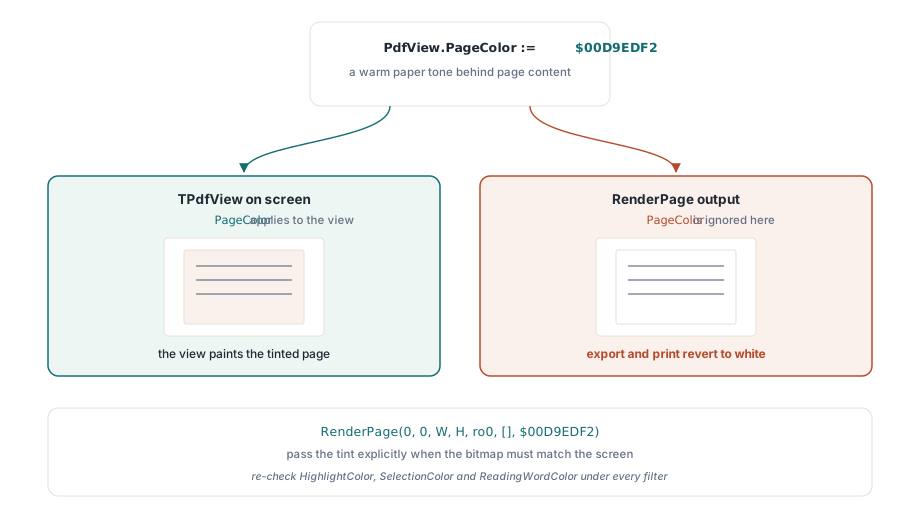
Her rahatlık ayarı bir dönüşüm değildir. Beyaz sayfa arka planını sıcak bir tonla değiştirmek, genellikle parlaklığa duyarlı okuyucular için tek başına yeterlidir ve bunun özel bir özelliği vardır. Özellik, insanları yakalayan bir kapsam kuralı taşır:
// Yalnızca ekrandaki görünümü etkiler
PdfView.PageColor := $00D9EDF2;  // sayfa içeriğinin arkasında sıcak kağıt tonu

// RenderPage çıktısı PageColor'ı görmezden gelir; rengi açıkça geçirin
Bmp := Pdf.RenderPage(0, 0, W, H, ro0, [], $00D9EDF2);PageColor, TPdfView'in gösterdiğini değiştirir, ama RenderPage aracılığıyla üretilen bit eşlemler, Color parametresi aksini söylemedikçe varsayılan beyazı korur. Belirti güvenilirdir: ekran tonlanmış sayfayı gösterir, kullanıcı dışa aktarır veya yazdırır ve çıktı beyaza geri döner. Bunu ilk bölümdeki aynı dışa aktarma politikası kararının altına dosyalayın
Kalan renk özellikleri kaplama işaretlerini tanımlar: arama sonuçları için HighlightColor, kullanıcı metin seçimi için SelectionColor, sesli okuma imleci için ReadingWordColor. Bunların her biri, sunduğunuz her filtre altında yeniden kontrol edilmelidir. Beyazda çalışan kehribar bir okuma imleci ters çevirmeden sonra kaybolur; soluk mavi bir seçim yüksek kontrastlı bir arka planın içinde yok olur. Bir küresel küme yerine mod başına kaplama paletleri sürdürün ve kombinasyonları kasıtlı olarak test edin. Filtreler artı metinden konuşmaya, bu özelliğin hizmet ettiği okuyucular için bir uç durum değil, normal bir yapılandırmadır. Kaplama mekaniğinin kendisi erişilebilir okuyucu makalesinde ele alınmıştır
Sayılar, doğrulama ve yazdırma sorusu
WCAG 2.1, bu özelliği ölçebileceğiniz bir şeye dönüştürür. Başarı kriteri 1.4.3, gövde metni için 4,5:1 kontrast oranı ister ve 1.4.6 bunu gelişmiş kontrast için 7:1'e yükseltir. Yüksek kontrast modunuzu, gerçek render edilmiş çıktı üzerinde çalıştırılan bir kontrast analizörüyle bu oranlara karşı örnekleme kontrolü yapın. Görüntülerin üzerindeki metin ve form alanlarındaki metin, gövde metni geçse bile oranların sessizce başarısız olduğu yerlerdir
Yazdırma kendi kararını hak eder ve savunulabilir varsayılan, belgenin kendi görünümüdür, "görüntülendiği gibi yazdır" açık bir kullanıcı seçeneği olarak sunulur. Basılı bir sayfa, görüntüleyici yazarlarının beklediğinden daha fazla iş akışında kanıttır ve bir sözleşmenin ters çevrilmiş bir çıktısı, hukuki tada sahip bir destek olayıdır. Performans için bir eşleştirme daha önemlidir: filtrelenmiş render, her mod değiştirmede bit eşlem işini ikiye katlar, bu yüzden her boyama mesajında bir dönüşüm uygulamayın. Filtrelenmiş bit eşlemi önbelleğe alın ve dönüşümü yalnızca sayfa, yakınlaştırma ya da mod gerçekten değiştiğinde yeniden çalıştırın. Bunu ucuz yapan önbellekleme stratejisi render önbelleği ve yakınlaştırma performansı makalesinde bulunur
Kodunuzda değil arayüzünüzde çözülmesi gereken bir şey: hangi modun doğru varsayılan olduğu. Tek bir cevap yok, bu yüzden kümeyi sunun ve okuyucunun seçmesine izin verin. Yüksek kontrast çoğu metin ağırlıklı okumaya uyar, ters çevirme özellikle açık-üzerine-koyu isteyen okuyuculara uyar, gri tonlama renk gürültüsünü keser ve bir arka plan tonu parlaklık duyarlılığını ele alır. Seçimi kullanıcı başına kalıcı hale getirin, başlangıçta geri yükleyin ve normale tek bir tuş vuruşuyla geri dönen bir yol tutun, çünkü okuyamadığı bir modda bulan bir okuyucunun hızlı bir çıkış yoluna ihtiyacı vardır
Burada kullanılan render seçenekleri, bit eşlem dönüşümleri ve görünüm renk özellikleri, dönüşüm uygulamalarının denetlenebilmesi veya genişletilebilmesi için tam kaynakla birlikte, Delphi, C++Builder ve Lazarus/FPC için PDFium Component'le birlikte gönderilir