Basit bir PDF görüntüleyicide yakınlaştırma düğmesini basılı tutun ve CPU grafiğini izleyin. Otomatik tekrarlı bir yakınlaştırma denetiminin tek bir basışı saniyede on veya daha fazla yakınlaştırma adımı tetikler, ve her adım görünen sayfanın tam kaliteli bir yeniden çizimini başlatırsa, çizimler tamamlanmalarından daha hızlı birikir. Sayfa tek başına gayet hızlı görüntülenir, bir A4 taraması için belki 180 ms, ama artık kullanıcının çoktan geçtiği bir işe karşı bir düzine 180 ms'lik çizim çalıştırıyorsunuzdur. Görüntüleyici kilitlenir, bir çekirdek %100'de sabitlenir, ve ekran yetiştiğinde kullanıcı dört çizim önceki bir yakınlaştırma seviyesinde durmuştur. Çare daha hızlı bir rasterleyici değildir. Bitmiş sayfaları anında döndüren bir önbellek ve bayatladığı anda işi terk etmeye istekli bir çizim döngüsüdür
PDFium Component size ikisinin de parçalarını verir ve politikaya karışmaz. Çağıranın sahip olduğu bitmap'ler, bir iptal jetonu alan aşamalı bir render motoru, yeniden boyutlandırmada yakınlaştırmayı yeniden hesaplayan sığdırma modları, ve bütün olarak rasterleştirilemeyecek kadar büyük sayfalar için bir döşeme çağrısı alırsınız. Kasıtlı olarak sağlamadığı şey önbelleğin kendisidir, çünkü doğru tahliye politikası görüş alanınıza, platformunuzun bellek tavanına ve kullanıcılarınızın nasıl kaydırdığına bağlıdır. Bu kararı doğru vermek size düşer, ve yanlış vermenin sonuçları tam olarak donma ve sızıntıdır
Milisaniyeler ve megabaytlar nereye gidiyor
Herhangi bir şey tasarlamadan önce maliyete rakamlar koyun. 96 DPI'da bir A4 sayfa kabaca 794 x 1123 piksel, 32-bit bir bitmap olarak yaklaşık 3.5 MB'dir. %200'e yakınlaştırın ve bu dört katına çıkar. Yüksek DPI'lı bir ekranda %400'de tek bir sayfa bitmap'i için 50 ila 60 MB ayırıyor ve dolduruyorsunuzdur, ve sürekli kaydırmalı bir görüntüleyici aynı anda birkaç sayfayı canlı tutar. Rasterleştirme maliyeti çıktı piksellerini izler, bu yüzden yakınlaştırmanın her iki katına çıkması render süresini ve belleği birlikte kabaca dört katına çıkarır
Bu aritmetikten doğrudan iki sonuç çıkar. Anahtarı yakınlaştırma seviyesini yok sayan bir önbellek değersizdir, çünkü hızlandırması gereken tam hareket, yani yakınlaştırma, her seferinde yeni bir bitmap üretir. Ve sınırsız bir önbellek, insanların en sert yakınlaştırdığı belgelerde, yoğun tapu taramalarında, mühendislik çizimlerinde, büyük ölçekli haritalarda, 32-bit bir süreci adres alanından çıkaracaktır. Önbelleğin doğru anahtarlanması ve sıkıca sınırlandırılması gerekir, ve ikisi de isteğe bağlı değildir
Önbellek anahtarına ne girer
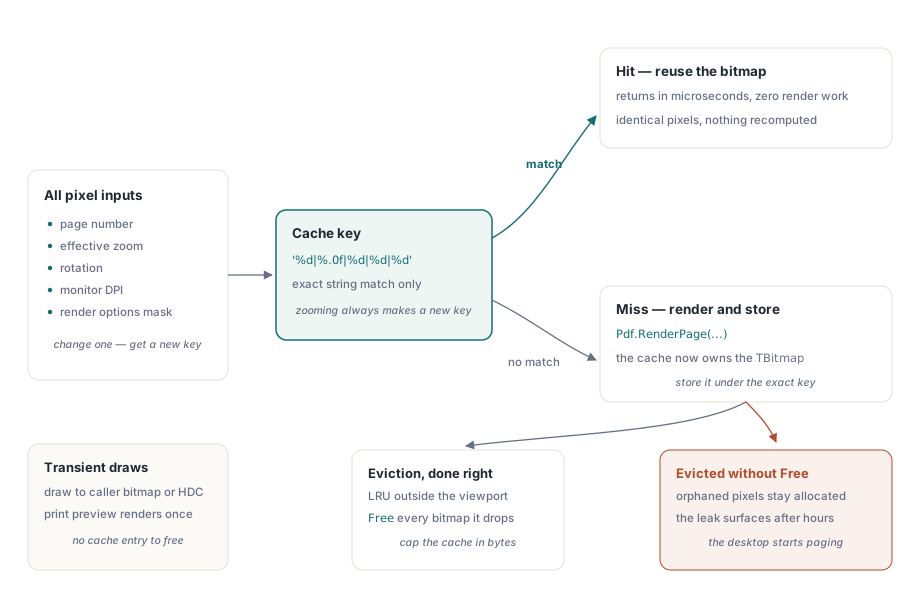
Önbelleğe alınmış bir bitmap, yalnızca piksellerini şekillendiren her girdi hâlâ eşleştiğinde yeniden kullanmak için güvenlidir. Bu, sayfa numarası, etkili yakınlaştırma (veya eşdeğer olarak çıktı piksel boyutları), döndürme, monitör DPI'sı ve üretildiği sırada geçerli olan render seçenekleri anlamına gelir. reAnnotations ile render edilmiş bir sayfa, onlar olmadan aynı sayfadan farklı bir görüntüdür, ve reGrayscale ile gri tonlama geçişi yine farklıdır. Bunlardan herhangi birini anahtardan çıkarın ve hatalar öngörülebilir hale gelir: bir incelemeci yorumu sildikten sonra kalıcılaşan bir açıklama katmanı, ya da kullanıcı pencereyi bir dizüstü panelinden harici bir 4K monitöre sürüklediği ve DPI bayat bir bitmap'in altında değiştiği anda bulanıklaşan bir sayfa
function TPageCache.Acquire(Pdf: TPdf; PageNo: Integer; ZoomPct: Single;
  Rotation: TRotation; Opts: TRenderOptions): TBitmap;
var
  Key: string;
begin
  Key := Format('%d|%.0f|%d|%d|%d',
    [PageNo, ZoomPct, Ord(Rotation), Screen.PixelsPerInch, OptionsMask(Opts)]);
  if FBitmaps.TryGetValue(Key, Result) then
    Exit;

  Pdf.PageNumber := PageNo;
  Result := Pdf.RenderPage(0, 0, OutputWidth(PageNo, ZoomPct),
    OutputHeight(PageNo, ZoomPct), Rotation, Opts);
  FBitmaps.Add(Key, Result);   // önbellek artık bu bitmap'in sahibidir
end;
Bir isabette bu mikrosaniyeler içinde döner, ve bütün mesele de bu. Daha zor soru, önbellekten düşen bitmap'lere ne olduğudur, ve bu, kimin onlara sahip olduğuna dair bir soru olduğu ortaya çıkar
Bitmap'i kim serbest bırakır
RenderPage'in fonksiyon biçimi, çağıranın sahip olduğu bir TBitmap döndürür. Tek seferlik bir dışa aktarmada bu sahiplik açıktır ve onurlandırması kolaydır. Bir önbelleğin içinde, bu Delphi PDF görüntüleyicilerindeki en yaygın tek sızıntı haline gelir, çünkü sözlük artık her bitmap'e giden tek referansı tutar, ve düz bir TDictionary yalnızca yönetilen türlerse anahtarları ve değerleri sizin için serbest bırakır. Bir TBitmap öyle değildir. Bir girdiyi Free çağırmadan tahliye edin, ve pikseller kendilerine işaret eden hiçbir şey olmadan tahsis edilmiş kalır
Bunun fark edilmeden geçmesinin sebebi zamanlamadır. On dakikalık bir duman testi hiçbir zaman fark edilecek kadar çok farklı sayfayı yakınlaştırmaz; sızıntı yalnızca birisi uzun bir belgeyi birkaç saat kaydırıp yakınlaştırdıktan sonra kendini gösterir, o noktada süreç yüzlerce sahipsiz sayfa bitmap'i tutuyordur ve makine sayfalamaya başlar. Bu yüzden tahliye önbelleğin ilk sürümüne aittir, sonraki bir sürüme değil. Önbelleği tahmini bayt sayısıyla sınırlayın, genişlik çarpı yükseklik çarpı dört olarak hesaplanır, görüş alanının ve ön yükleme penceresinin dışında kalan en uzun süredir kullanılmayan sayfaları tahliye edin, ve kaldırdıkça her bitmap'i serbest bırakın. Gerçekten geçici olan çizimler için, çağıranın sağladığı bir TBitmap'e ya da doğrudan bir HDC'ye render eden aşırı yüklemeler sahiplik dansını tamamen atlamanıza izin verir. Baskı önizlemesi bunun bariz örneğidir, çünkü her sayfayı bir kez render edersiniz ve onu önbelleğe almak hiçbir şey kazandırmaz
Aşamalı render ve dürüst iptal
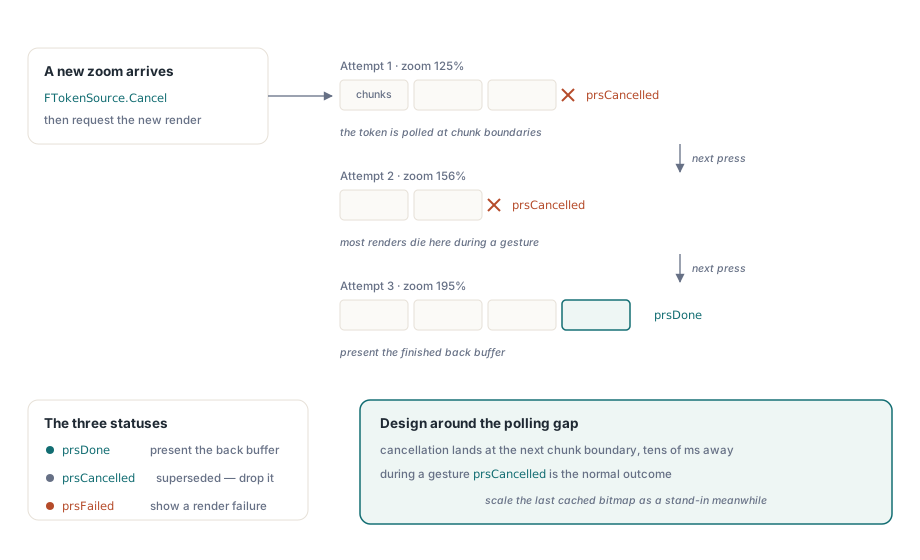
Düz RenderPage aşırı yüklemeleri sayfa bitene kadar bloke eder, ve bu tam olarak kullanıcı hâlâ yakınlaştırma denetimini hareket ettirirken istemediğiniz davranıştır. Bunun için RenderPageProgressive'e başvurursunuz. Bir IPdfCancellationToken alır ve prsDone, prsCancelled, ya da prsFailed'den birini döndürür. İnsanları yakalayan davranışsal ayrıntı, iptalin anlık olmamasıdır. Jeton, render içindeki parça sınırlarında yoklanır, bu yüzden bir parçanın ortasında sinyal verdiğiniz jeton yalnızca o parça bittiğinde etkili olur. Karmaşık bir sayfada, isteme ile durma arasındaki gecikme onlarca milisaniyeye ulaşır. Bu boşluğu yok saymak yerine ona göre tasarlayın: yeni bir yakınlaştırma değeri geldiği anda önceki jetonu iptal edin, ama eski render'ın istediğiniz anda durduğunu varsaymayın
procedure TViewerForm.RequestRender(TargetZoom: Single);
var
  Status: TPdfProgressiveStatus;
begin
  if FTokenSource <> nil then
    FTokenSource.Cancel;           // önceki devam eden oluşturmayı bırak
  FTokenSource := TPdfCancellationTokenSource.New;  // FPdfAsync unit

  Status := Pdf.RenderPageProgressive(FBackBuffer, 0, 0,
    FBackBuffer.Width, FBackBuffer.Height, FTokenSource.Token,
    ro0, [reAnnotations]);

  case Status of
    prsDone:      PresentBackBuffer;
    prsCancelled: ;                // superseded by a newer request: drop silently
    prsFailed:    ShowRenderFailure;
  end;
end;
Etkileşim sırasında prsCancelled normal sonuçtur, istisnai olan değil. Bir yakınlaştırma hareketinin başlattığı render'ların çoğu bitmeden önce yenisiyle değiştirilecektir, bu yüzden iptali rutin olarak ele alın ve sonucu sessizce bırakın. Her iptali uyarı olarak günlüğe kaydeden bir render kuyruğu, gerçekten önemli olan tek hatayı binlerce satır gürültünün altına gömer. Gerçek render çalışırken ekranın ölü görünmesini engellemek için, aşamalı yolu ucuz bir yer tutucuyla eşleştirin: önceki önbelleğe alınmış bitmap'i yeni yakınlaştırmaya ölçekleyin ve onu hemen sunun. Yüz milisaniye ya da iki kadar bulanık görünür, ama anlık gibi okunur, ve bu, tam kaliteli render'a ya bitmesi ya da bir sonraki hareketle iptal edilmesi için ihtiyaç duyduğu zamanı kazandırır
Yakınlaştırmanın sessizce kapattığı sığdırma modu
Bir görüntüleyicinin pfmFitPage ya da pfmFitWidth'e ayarlanmış FitMode özelliği, pencere değiştikçe sayfanın sığmaya devam etmesi için her yeniden boyutlandırmada yakınlaştırmayı yeniden hesaplar. Buradaki incelik, Zoom'u doğrudan atamanın FitMode'u pfmNone'a geri sıfırlamasıdır. Varsayılan olarak bu doğrudur: bilerek %150 yazan bir kullanıcı, bir sonraki pencere yeniden boyutlandırmasının bunu çöpe atmasını istemez. Ama bir yakınlaştırma düğmesini Zoom := Zoom * 1.25 olarak bağlayan ve sonra ilk tıklamadan sonra genişliğe sığdırmanın neden yanıt vermeyi kestiğini çözemeyen herkesi şaşırtır. Araç çubuğunuz hem açık yakınlaştırma hem de sığdırma modları sunuyorsa, kullanıcının son sığdırma seçimini kendiniz hatırlamanız ve kullanıcı sığdırma düğmesine tekrar bastığında onu yeniden atamanız gerekir. Bileşen, bir yakınlaştırma ataması az önce temizlediği bir modu geri getirmez, ve öyle olması da gerekmez
Savunabileceğiniz bir bellek bütçesi
Yazabileceğiniz bir bütçe, bir kod incelemesinde savunabileceğiniz bir bütçedir, bu yüzden somut bir senaryodan başlayın. Diyelim ki sürekli kaydırma, görünen sayfayı artı üstte ve altta önceden yüklenmiş birer sayfayı, bir küçük resim şeridiyle birlikte tutuyor. 96 DPI'lı bir ekranda %100'de bu üç tam boyutlu bitmap her biri yaklaşık 3.5 MB tutar, ki bu hiçbir şey değildir. 4K bir ekranda %300'de aynı üç bitmap her biri kabaca 30 MB'dir, ve bu önbellek daha tek bir geçmiş sayfa bile tutmadan öncedir. Büyüme belgede değil, hareket içindedir
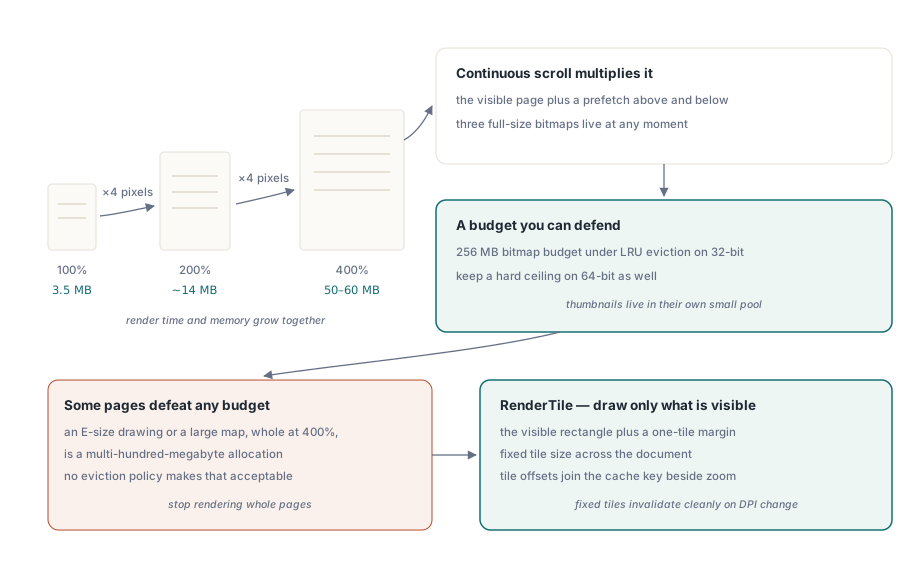
32-bit bir Delphi süreci için sağlam bir varsayılan, LRU tahliyesi altında 256 MB'lik bir bitmap bütçesidir. 64-bit'te fiziksel RAM ile ölçeklendirebilirsiniz, ama yine de kesin bir tavan koruyun, çünkü karşı korunduğunuz hata sürecinizin çökmesi değildir. Görüntüleyiciniz teknik olarak çalışmaya devam ederken ve kullanıcı diğer her şeyin neden yavaşladığını merak ederken, bütün makinenin sayfalama dosyasını çalkalamasıdır. Sabit bir tavan öngörülebilir şekilde başarısız olur; sınırsız bir önbellek masaüstünü de yanında götürerek başarısız olur. Küçük resimler kendi işlemlerini hak eder: her birini küçük hedef boyutunda bir kez render edin ve LRU mantığının hiç dokunmadığı ayrı bir havuzda tutun. 60 MB'lik bir tam sayfa bitmap'i küçülterek 120 piksellik bir küçük resmi yeniden oluşturmak, bir pul boyutunda görüntü üretmenin mümkün olan en savurgan yoludur
Bazı tekil sayfalar her bütçeyi yener. %400'de bütün olarak render edilen E boyutunda bir mühendislik çizimi ya da büyük bir harita, yüzlerce megabaytlık bir tahsistir, ve hiçbir tahliye politikası bunu kabul edilebilir kılmaz. Buradaki cevap, bütün sayfaları render etmeyi bırakmaktır. RenderTile, kavramsal olarak PageWidth ile PageHeight'a ölçeklenmiş bir sayfa içindeki (Left, Top) piksel ofsetindeki bölgeyi rasterleştirir, böylece yalnızca görünen dikdörtgeni artı yumuşak kaydırma için etrafında bir döşeme marjını render edersiniz, ve döşeme ofsetlerini yakınlaştırmanın yanında önbellek anahtarına katarsınız. Döşeme boyutlarını belge boyunca sabit tutun. Sabit döşemeler, bir DPI değişikliğinin bütün ızgarayı temizce geçersiz kılması anlamına gelir; değişken döşemeler ise sizi hafifçe farklı ölçeklerde render edilmiş bölgeler arasındaki görünür dikişleri kovalarken bırakır
İki bitişik özellik sessizce tüm bunlara eklenir. Gri tonlama ya da ters çevirme gibi renk filtresi geçişleri render'dan sonra çalışır ve her seferinde ikinci bir tam boyutlu bitmap üretir, onları kullanan herhangi bir görünümün sayfa başına ayak izini iki katına çıkarır; bu maliyet Delphi PDF görüntüleyicileri için düşük görme renk filtreleme makalesinin konusudur. Ve metinden konuşmaya sırasında kelimeleri vurgulayan bir görüntüleyici, her konuşulan kelimede render edilmiş görünümü geçersiz kılar, bu yüzden vurgu yeniden çizimleri ile konuşma hızı arasındaki etkileşim ilk göründüğünden daha fazla önem taşır, kelime kelime TTS vurgulama makalesinde ele alındığı gibi
Render aşırı yüklemeleri, aşamalı durum kodları ve görüntüleyici bileşeninin kendisi PDFium Component ürün sayfasında belgelenmiştir