1.4GB짜리 스캔 아카이브의 페이지 수를 세는 일은 원래 저렴해야 한다. 그 파일에 LoadFromFile을 호출하는 순간 더 이상 저렴하지 않게 된다: HotPDF는 교차 참조 데이터를 파싱하고 문서의 수십만 개 간접 객체 하나하나에 대해 메모리 상의 객체를 만들어 내는데, 32비트 워커는 그 파싱 도중 어딘가에서 2GB 주소 공간 한계에 부딪힌다. 정작 원했던 작업, 즉 페이지 수 세기는 그 객체들 중 어느 것도 필요로 하지 않았다. 필요했던 것은 페이지 트리뿐이었다. 작업이 요구하는 것과 전체 로드가 실제로 내주는 것 사이의 이 간극이야말로 Direct File API가 존재하는 이유 전부다
Direct File API는 Delphi와 C++Builder에게 PDF에 대한 파일 수준 접근을 제공한다: 페이지 수 세기, 복사, 복호화, 증분 추가 모두가 전체 문서 모델을 RAM에 재구성하는 대신 디스크에서 실제로 필요한 부분만 읽어 낸다. 여기서 요구되는 기술은 각 작업을 그것을 처리할 수 있는 가장 가벼운 계층에 맞추는 것이다. 이 매칭을 제대로 하면 서비스는 어떤 입력 크기에서도 평평한 메모리 사용량을 유지한다. 잘못하면 첫 번째로 들어오는 지나치게 큰 파일이 워커를 쓰러뜨린다
전체 로드가 치르는 비용
LoadFromFile이 적은 아니다. 그것은 자신이 쓰는 메모리만큼의 가치를 낸다: 트리가 일단 RAM에 있으면 모든 페이지와 모든 객체에 무작위로 접근할 수 있는데, 이는 정확히 InsertPagesFromDocument, MovePage, 그리고 SaveLoadedDocument를 통한 재직렬화가 요구하는 조건이다. 진짜 재구조화에는 지름길이 없다; 문서를 재배치하려면 그것을 통째로 붙들고 있어야 한다
문제는 입력 크기를 통제할 수 없을 때 시작된다. 고객 업로드, 스캐너 출력, 10년 전 아카이브는 테스트 문서 집합이 가정했던 것이 무엇이든 무시해 버린다. 모든 입력을 무조건 로드하면, 메모리 한계는 누군가 언젠가 제출할 단일 최대 파일에 의해 정해진다. 파싱 시간은 객체 개수를 따라가고, 상주 메모리는 객체 구조와 디코딩된 스트림까지 계산에 넣으면 파일 크기의 여러 배로 자리 잡으므로, 디스크상의 1기가바이트가 상주 메모리로는 몇 기가바이트를 의미할 수 있다
64비트로 다시 컴파일하면 주소 공간 한계는 걷어 낼 수 있지만 비용 청구서는 그대로 남는다. 파일 자체의 구조라면 밀리초 만에 답할 수 있었을 질문에 답하기 위해, 워커는 여전히 몇 초의 CPU와 파일 크기의 몇 배에 달하는 RAM을 태운다. 동시성이 걸리면 계산은 훨씬 더 적대적으로 변한다: 네 개의 대용량 로드가 동시에 실행되면 하나의 메모리 예산을 나눠 쓰게 되고, 처리량은 큐가 가장 깊어져서 가장 감당하기 힘들 바로 그 순간에 무너져 내린다
핸들을 통해 파일 읽기
읽기 전용 계층은 파일을 핸들로 열고, 그것에 관한 구조적인 질문에 답한 다음, 닫는다. 객체 트리도, 페이지 렌더링도, 입력과 함께 커지는 메모리도 없다
var
  Pdf: THotPDF;
  Handle, PageCount: Integer;
begin
  Pdf := THotPDF.Create(nil);
  try
    Handle := Pdf.DAOpenFileReadOnly('archive-2026-06.pdf', '');
    if Handle > 0 then
    try
      PageCount := Pdf.DAGetPageCount(Handle);
      RouteByPageCount('archive-2026-06.pdf', PageCount);
    finally
      Pdf.DACloseFile(Handle);
    end;
  finally
    Pdf.Free;
  end;
end;
이 계층을 정직하게 유지해 주는 습관이 세 가지 있다. 첫째, 반환값을 확인하라. 양수가 아닌 핸들은 열기가 실패했다는 뜻이며, 죽은 핸들에 DAGetPageCount를 쏘는 것은 고객이 손상된 파일을 보내는 날까지 숨어 있는 부류의 버그다. 둘째, 성공적으로 연 핸들은 반드시 finally 블록 안의 DACloseFile과 짝을 지어라; 핸들이 새는 서비스는 죽지 않고 그저 서서히 썩어 가는데, 이쪽이 더 나쁘다. 셋째, 비밀번호 매개변수가 실제로 무엇을 하는지 존중하라. DAOpenFileReadOnly는 비밀번호를 받지만, 암호화된 입력에 대해서는 페이지 수를 읽기 위해 조용히 전체 파싱으로 떨어져 버리므로, 평평한 메모리 사용 보장이 사라진다. 보호된 파일은 먼저 DecryptFile을 거치게 하면 파이프라인의 나머지는 계속 저렴하게 유지된다
같은 점검이 트리아지 게이트 역할도 겸한다. 파일들은 잘못 라벨링되었거나, 절반만 업로드되었거나, 완전히 다른 포맷에서 이름만 바뀐 채로 나타나는데, DAOpenFileReadOnly 검사는 이 모든 것을 문 앞에서 밀리초 만에 거부하며, 오류를 문제가 된 그 파일에 정확히 고정시켜 준다. 대안은 쓰레기 파일이 큐 워커 깊숙이 흘러 들어가 그곳에서 터지게 두는 것인데, 그러면 어떤 입력이 원인이었는지 풀어내는 데 오후 한나절이 걸릴 수도 있다
파일 전체를 복사, 복호화, 암호화하기
두 번째 계층은 내부를 전혀 드러내지 않은 채 완전한 파일을 이동시키고 변환한다. 수집 파이프라인이 가장 많이 의존하는 호출들이 바로 이것이다
// 구조적 복사: 객체 트리를 파싱하지 않고 검증-후-이동
Status := Pdf.DACopyFile('incoming\statement.pdf', 'verified\statement.pdf');
LogDirectFileStatus('copy', Status);

// 복사하면서 복호화: 보호된 입력을 위한 Direct File 경로
Status := Pdf.DecryptFile('incoming\protected.pdf',
  'verified\plain.pdf', 'batch-password');
LogDirectFileStatus('decrypt-copy', Status);

// 복사하면서 암호화: 전체 로드 없이 출력물을 보호
Status := Pdf.EncryptFile('verified\statement.pdf',
  'outbound\statement.pdf', 'owner-secret', '', aes256, [prPrint]);
LogDirectFileStatus('encrypt-copy', Status);
각 호출은 저마다의 자리를 갖고 있다. DACopyFile은 격리 디렉터리에서 관리형 저장소로 옮기는 검증된 복사로, 진행하면서 PDF 구조를 열고 색인하므로 잘린 입력이나 PDF가 아닌 입력은 세 단계 뒤가 아니라 바로 이 자리에서 실패한다. DecryptFile은 입력이 허용하는 한 객체 트리를 건너뛰는 직접 AES-256 재작성 경로를 따라 복호화된 사본을 기록하는데, 이는 AES-256 암호화에 관한 글에서 다룬 로드-후-재저장 복호화 흐름의 대용량 파일 버전이다. EncryptFile은 같은 동작을 반대로 실행해서, 메모리 상의 경로가 이미 쓰고 있는 것과 같은 키 타입 및 권한 매개변수로 파일 단위 복사 도중 비밀번호 보호를 적용한다
다시 쓰는 대신 변경 사항 덧붙이기
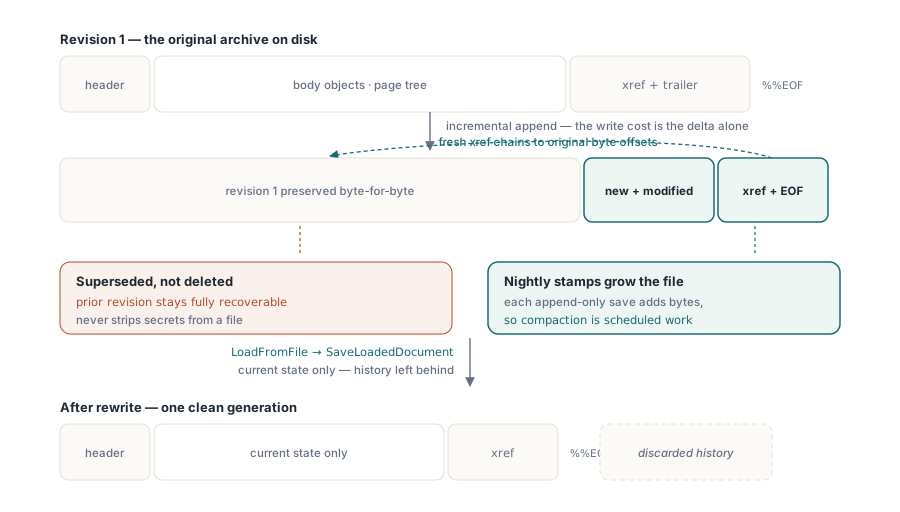
ISO 32000-1 §7.5.6에 정의된 증분 업데이트가 세 번째 계층이다. 원본 바이트는 디스크의 원래 자리에 그대로 남아 있고, 새로운 객체나 수정된 객체는 그 뒤에 덧붙여지며, 그 뒤를 원본으로 다시 연결되는 새로운 교차 참조 섹션이 따른다. 페이지 한 장만 추가하면 되는 900MB짜리 아카이브의 경우, 쓰기 비용은 파일 전체가 아니라 그 차이분(delta)뿐이다
// 대용량 아카이브를 다시 쓰지 않고 감사 페이지를 덧붙임
Pdf.BeginIncrementalUpdate('archive-2026-06.pdf');
Pdf.AddPage;
Pdf.CurrentPage.SetFont('Arial', [], 10);
Pdf.CurrentPage.TextOut(50, 760, 0, 'Processed by intake service 2026-06-11');
Pdf.SaveIncrementalUpdate('archive-2026-06-stamped.pdf');  // 원본 바이트 + delta
여기서 지켜야 할 원칙이 두 가지 있다. BeginIncrementalUpdate는 반드시 원본 파일을 가리켜야 하는데, 덧붙여지는 교차 참조 데이터가 그 안의 바이트 오프셋으로 다시 연결되기 때문이다. 그리고 이 모델은 설계상 추가 전용이다: 모든 증분 저장은 파일을 키울 뿐, 결코 줄이지 않는다. 매일 밤 도장이 찍히는 문서는, 주기적인 재직렬화(로드한 다음 SaveLoadedDocument로 다시 쓰는 것)가 압축해 주기 전까지 한없이 부풀어 오른다. 바로 이 추가 전용이라는 특성이 증분 업데이트를 디지털 서명된 문서를 건드릴 수 있는 유일하게 안전한 방법으로 만들어 주는데, 이 제약은 디지털 서명 및 PAdES에 관한 글에서 다룬다. 그 아래에 깔린 교차 참조 메커니즘은 객체 스트림과 증분 업데이트에 관한 글에서 별도로 다룬다
추가 전용 저장에는 대부분의 검토를 그냥 통과해 버리는 함정이 하나 있다. 원본 바이트는 파일 안에 그대로 남아 있어서, 보려는 마음만 있으면 누구든 읽을 수 있다. 페이지를 "교체"하는 증분 업데이트는 예전 페이지를 삭제하지 않는다; 현재 리비전에서 그것을 대체할 뿐, 이전 리비전은 완전히 복구 가능한 상태로 그 자리에 그대로 남아 있다. 그러므로 민감한 콘텐츠를 제거하는 데는 증분 업데이트가 잘못된 도구다. 수신자가 절대 봐서는 안 될 이력을 진짜로 없애려면 완전한 재직렬화가 필요하다: LoadFromFile 다음에 SaveLoadedDocument를 실행하면 현재 상태만 기록되고 파묻혀 있던 리비전들은 뒤에 남겨진다
작업에 맞는 계층 고르기
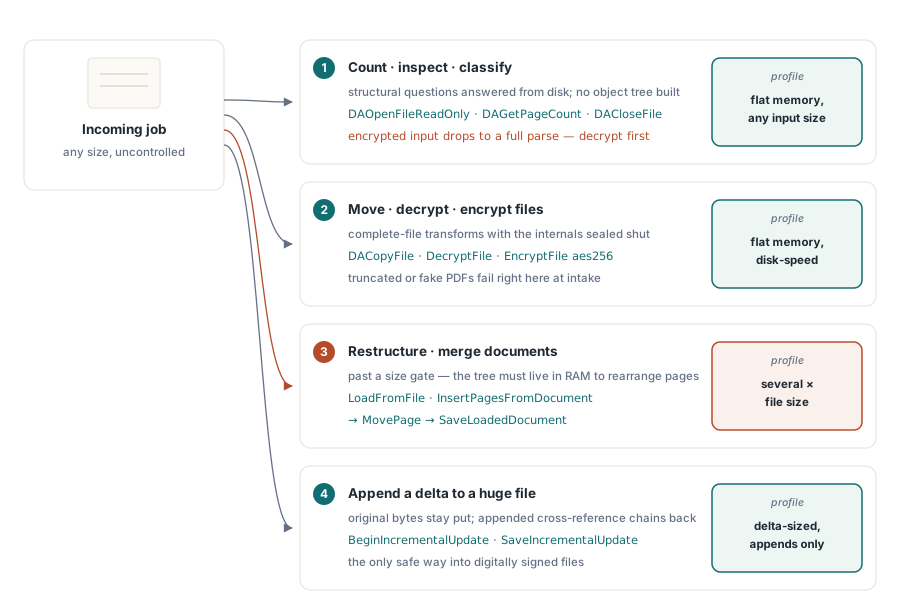
선택 로직은 머릿속에 담아 둘 수 있을 만큼 짧으며, 각 작업이 제멋대로 경로를 즉흥적으로 정하게 두는 대신 파이프라인 맨 앞에서 명시적인 라우팅 결정으로 인코딩해 둘 가치가 있다. 필요한 작업이 계층을 결정한다:
- 개수 세기, 검사, 분류는 핸들을 연다:
DAOpenFileReadOnly,DAGetPageCount,DACloseFile - 파일 전체를 이동, 복호화, 암호화하는 작업은
DACopyFile,DecryptFile,EncryptFile로 파일 수준에 머문다 - 페이지를 재구성하거나 문서를 병합하는 작업은 전체 로드가 필요하다:
LoadFromFile을 실행한 다음,InsertPagesFromDocument나MovePage를 쓰고,SaveLoadedDocument로 마무리한다 - 거대하거나 서명된 파일에 작은 변경분을 추가하는 작업은
BeginIncrementalUpdate를 호출하고 저장한다
혼합된 파이프라인은 전체 로드 경로 앞에 크기 임계값을 두는 편이 좋다. 수백 메가바이트를 넘는 것은 무엇이든 Direct File 계층으로 보내고, 전체 로드는 실제 메모리 예산을 가진 64비트 워커에서의 진짜 재구조화를 위해 남겨 두라. 이 임계값은 메모리 부족 크래시를 눈에 보이고 조정 가능한 라우팅 결정으로 바꿔 준다
어떤 계층이 작업을 처리하든, 출력물은 임시 이름으로 써 두고 결과가 검증된 뒤에야 최종 이름으로 바꾸라. 최종 이름 아래에 놓인 반쯤 쓰인 파일은 파이프라인의 다음 단계에는 정상 파일과 완전히 똑같아 보이며, Direct File 호출은 이 확인을 저렴하게 만들어 준다: 출력물을 확인하는 것은 한 줄짜리 핸들 점검으로 끝난다
Direct File API는 Delphi 및 C++Builder용 HotPDF Delphi Component의 일부로 제공된다. 제품 페이지에는 여기서 다룬 증분 업데이트 호출을 포함한 전체 함수 레퍼런스가 링크되어 있다