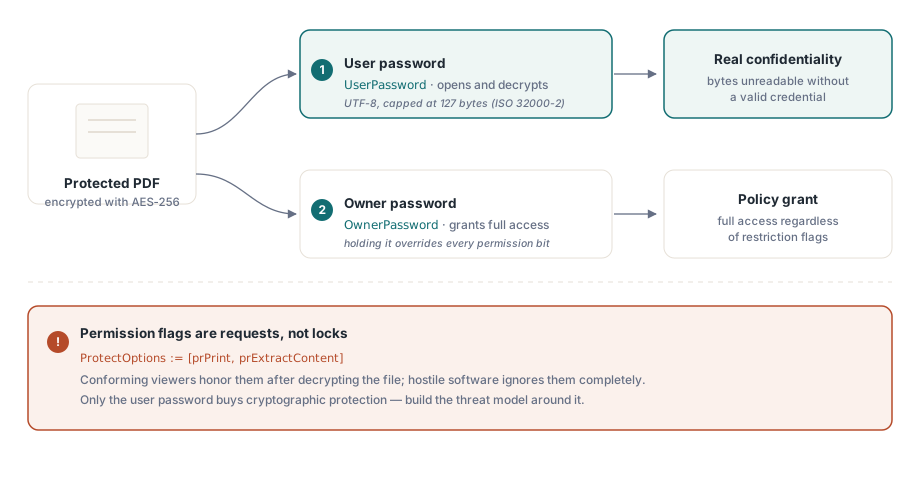
PDF 권한 플래그는 잠금장치가 아니다. 이는 파일을 여는 소프트웨어에게 던지는 요청일 뿐이며, 뷰어는 이를 얼마든지 무시할 수 있다. 이 하나의 사실이 이 페이지에서 다루는 다른 모든 선택을 어떻게 판단해야 하는지를 결정한다. 진짜 기밀성은 오직 한 곳에서만 나온다: 리더가 갖고 있지 않은 암호로 키를 파생한 AES-256 암호화다. 그 외의 모든 것, 즉 "인쇄 금지"와 "복사 금지" 체크박스는 표준을 준수하는 소프트웨어는 지키기로 동의하지만 적대적인 소프트웨어는 지키지 않는 정책일 뿐이다. 이 두 계층을 뒤섞으면 데모에서는 안전해 보이지만 실전에서는 새어 나가는 결과물을 배포하게 된다
HotPDF는 Delphi 및 C++Builder용 네이티브 VCL PDF 컴포넌트이며, ISO 32000 보호 모델을 몇 개의 속성으로 노출한다. 이 속성들 자체를 설정하는 일은 쉽다. 어려운 부분은 어떤 속성이 암호학적 보호를 사 주고 어떤 속성이 그저 정중한 제안을 사 줄 뿐인지를 아는 것, 그리고 원했던 암호화가 실제로 걸린 암호화가 되도록 값을 대입하는 순서를 맞추는 것이다
두 개의 암호가 실제로 보장해 주는 것
PDF 암호화는 서로 다른 역할을 하는 두 가지 자격 증명을 정의하며, 이 둘을 혼동하는 것이 보호된 출력물 코드에서 가장 흔한 설계 오류다. 사용자 암호는 복호화를 통제한다. 사용자 암호나 소유자 암호가 없으면 표준을 준수하는 리더는 파일 키를 재구성할 수 없고, 콘텐츠는 암호학적으로 읽을 수 없는 상태로 남는다. 소유자 암호는 대신 권한 설정을 통제한다: 소유자 암호를 받은 리더는 제한 플래그가 뭐라고 되어 있든 상관없이 완전한 접근 권한을 얻는다
권한 비트는 훨씬 약한 기반 위에 있다. 인쇄, 콘텐츠 추출, 양식 채우기 각각은 뷰어가 읽고 지킬지 말지를 선택하는 플래그일 뿐이다(ISO 32000-2 §7.6.4). 암호화는 바이트 자체를 보호한다. 권한 플래그는 표준을 준수하는 소프트웨어에게만, 그것도 이미 콘텐츠에 접근한 이후 시점에 지침을 줄 뿐이다. 사용자 암호로 문서를 연 사람은 이미 복호화된 콘텐츠를 메모리에 쥐고 있으므로, "복사 금지"와 "인쇄 금지"는 잘 동작하는 뷰어에게는 의미가 있지만 작정한 사용자에게는 아무 의미가 없다. 위협 모델은 바로 이 경계선을 중심으로 세워야 한다. 기밀성은 사용자 암호에 있다. 권한은 주류 뷰어들이 제공하는 기능의 모양을 잡아 줄 뿐이며, 그것이 권한이 하는 일의 전부다
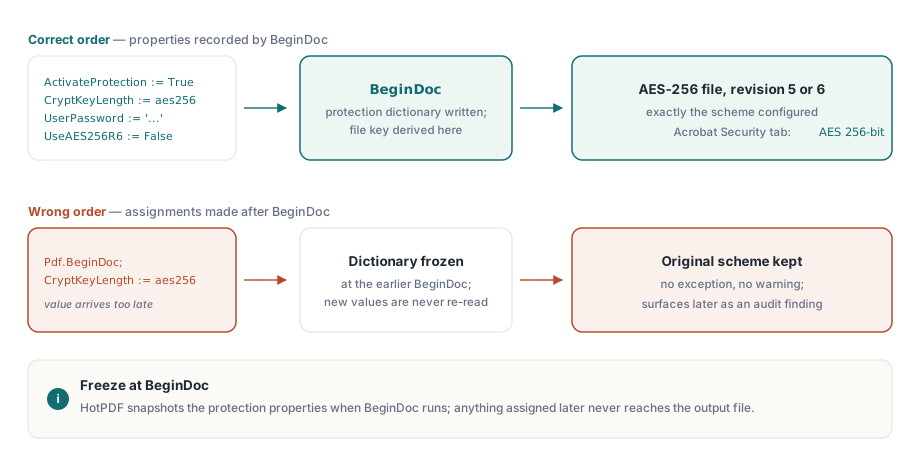
설정 순서: 모든 것은 BeginDoc 이전에
HotPDF는 BeginDoc이 실행되는 순간 암호화 딕셔너리를 만들고 파일 키를 파생한다. 그 순간 보호 속성들이 갖고 있는 값이 곧 문서가 갖게 되는 값이며, 그 이후에 값을 바꿔도 아무것도 달라지지 않는다. 여기서 가장 중요한 속성은 CryptKeyLength로, THPDFKeyType 값인 k40, k128, aes128, aes256 중에서 방식을 선택한다. BeginDoc 이후에 이 값을 대입해도 예외도, 경고도 없이 그저 처음 시작할 때 값을 조용히 유지한 파일이 나올 뿐이다. 이런 종류의 조용한 어긋남은 최악의 부류에 속한다: 로컬 테스트는 모조리 통과하고서 몇 달 뒤 고객 책상 위의 컴플라이언스 이슈로 나타난다
var
  Pdf: THotPDF;
begin
  Pdf := THotPDF.Create(nil);
  try
    Pdf.FileName := 'statement.pdf';
    Pdf.ActivateProtection := True;
    Pdf.CryptKeyLength := aes256;        // BeginDoc 이전에 설정해야 함
    Pdf.UserPassword := 'open-secret';
    Pdf.OwnerPassword := 'admin-secret';
    Pdf.UseAES256R6 := False;            // R=5: 가장 폭넓은 뷰어 지원
    Pdf.BeginDoc;
    Pdf.CurrentPage.SetFont('Arial', [], 11);
    Pdf.CurrentPage.TextOut(50, 720, 0, 'Account statement, June 2026');
    Pdf.EndDoc;
  finally
    Pdf.Free;
  end;
end;
암호는 UTF-8이며 127바이트로 제한되는데, 이는 AES-256 방식에 대한 ISO 32000-2의 제한이다. 암호 정책상 더 긴 비밀번호가 들어올 수 있다면, 어디서 잘라낼지를 정확히 통제할 수 있는 당신 쪽에서 직접 잘라내라. 이를 우연에 맡기면 라이브러리와 나중의 어떤 뷰어가 자르는 지점에 대해 서로 다르게 판단할 수 있고, 그 결과 당신에게는 열리지만 다른 곳에서는 같은 암호를 거부하는 파일이 나온다
리비전 5 또는 리비전 6: 불리언 하나, 두 개의 생태계
UseAES256R6은 두 가지 AES-256 핸드셰이크 사이에서 하나를 선택하며, 이 선택은 불리언이라는 타입이 주는 인상보다 훨씬 더 중대한 결과를 낳는다. False로 두면 HotPDF는 리비전 5를 기록하는데, 이는 PDF 1.7의 확장으로 등장했으며 대략 15년 가까이 되는 뷰어들이 열 수 있는 AES-256 방식이다. True로 설정하면 리비전 6을 얻게 되는데, 이는 PDF 2.0을 위해 ISO 32000-2에 표준화된 강화된 키 파생 방식으로, 리비전 5가 암호를 검증하는 방식에 있는 알려진 약점을 해소한다
따라서 암호학적으로는 리비전 6이 더 나은 선택이다. 하지만 무언가를 망가뜨리는 쪽도 리비전 6이다. 리비전 6 파일은 PDF 1.7 Extension Level 3 또는 PDF 2.0을 위해 만들어진 뷰어를 필요로 하는데, 실제로 배포된 소프트웨어 중 상당수는 둘 다 아니다: 기록 관리 아카이브, 다른 제품에 내장된 렌더러, 몇 년째 아무도 손대지 않은 업무용 도구들이 그렇다. 이런 소프트웨어는 파일을 아예 거부해 버리며, 그것도 당신의 컴퓨터가 아니라 고객의 컴퓨터에서 일어난다. 그래서 실무에서 기본값으로 삼을 만한 것은 리비전 5다. 리비전 6은 보안 정책이 ISO 32000-2를 리비전 단위로 명시할 때, 그리고 모든 소비 대상이 실제로 이를 읽을 수 있음을 확인했을 때만 선택하라. 어느 쪽을 선택하든 왜 그것을 선택했는지 기록해 두어야 하는데, 다음에 이 코드를 만질 사람이 궁금해할 것이기 때문이다
이전 세대의 키 타입은 건너뛰어야 한다는 것을 알려 주는 정도로만 짚고 넘어간다. THPDFKeyType에는 여전히 k40, k128, aes128이 나열되어 있지만, 이들은 새 문서를 보호하기 위한 것이 아니라 과거 아카이브를 재현하기 위해 남아 있는 것이다. 40비트 RC4는 흔한 하드웨어만으로도 뚫리며, 128비트 방식들은 현재의 어떤 보안 검토라도 요구할 AES-256 리비전들보다 앞선 세대다. 2026년에 새로 만드는 문서라면 실질적인 질문은 오직 리비전 5냐 리비전 6이냐뿐이다; 새 설계에서 레거시 키 타입에 손이 간다면 그 앞단 어딘가에서 뭔가 잘못된 것이다
열람 암호 없이 지정하는 권한 플래그
요구 사항이 오히려 비밀 유지의 정반대인 경우도 많다. 누구든 문서를 읽을 수 있어야 하지만 인쇄나 추출은 제한하고 싶은 경우다. 이럴 때는 사용자 암호를 비워 두고 소유자 암호만 채우는데, PDF에서는 이를 오픈 암호 모드라고 부르며, 허용할 작업들은 ProtectOptions에 나열한다
Pdf.ActivateProtection := True;
Pdf.CryptKeyLength := aes256;
Pdf.UserPassword := '';                      // 누구나 파일을 열 수 있음
Pdf.OwnerPassword := 'rotate-me-quarterly';  // 권한 집합을 보호함
Pdf.ProtectOptions := [prPrint, prPrint12bit, prExtractContent];
Pdf.BeginDoc;
// ... 페이지 콘텐츠 ...
Pdf.EndDoc;
THPDFProtectOptions 집합은 ISO 권한 비트에 그대로 대응한다: 고해상도 인쇄를 위한 prPrint와 prPrint12bit, 일반 복사 및 추출을 위한 prInformationCopy, 보조 기술용 추출을 위한 prExtractContent, 그리고 prModifyStructure, prEditAnnotations, prFillAnnotations, prAssemble가 있다. 이 중 둘은 특히 주의가 필요하다. 만드는 프로필 거의 전부에서 prExtractContent는 켜 두어라. 이 비트는 스크린 리더가 텍스트에 접근하기 위해 필요한 비트이며, 이를 꺼 버리면 조용히 권리에 관한 결정을 접근성 결함으로 바꿔 버리는데, 이 결함은 장애가 있는 누군가가 마주치지만 당신은 결코 보지 못한다. 또 다른 함정은 prPrint12bit 없이 prPrint만 단독으로 켜는 것이다: 여러 뷰어가 이에 대해 인쇄 품질을 낮추는 방식으로 반응하는데, 사용자들은 이를 실제로는 권한 설정 문제인데도 렌더링 버그로 신고할 것이다
검증에는 5분이면 충분하며, 릴리스 체크리스트에 포함되어야 한다. 각 프로필의 샘플을 Acrobat에서 열어 문서 속성을 열고 보안 탭을 읽어 보라. 여기에는 알고리즘("AES 256-bit")이 명시되어 있고 허용된 작업들이 하나씩 나열되어 있다. 그런 다음 같은 파일을 당신 컴퓨터의 최신 뷰어가 아니라 고객이 실제로 사용하는 가장 오래된 뷰어에서 열어 보라. 이 두 번째 확인이야말로 리비전 6 파일이 개발 과정은 무사히 통과하고서 업그레이드한 적 없는 고객의 컴퓨터에서만 죽어 버리는 사태를 막아 주는 저렴한 보험이다
기존 파일에서 보호를 해제하기
복호화는 같은 속성 모델을 거꾸로 실행하는 것이다. 유효한 자격 증명으로 문서를 로드하고, 보호를 끈 다음, 그 상태로 결과를 저장한다
var
  Pdf: THotPDF;
  PageCount: Integer;
begin
  Pdf := THotPDF.Create(nil);
  try
    PageCount := Pdf.LoadFromFile('encrypted.pdf', 'open-secret');
    if PageCount > 0 then
    begin
      Pdf.ActivateProtection := False;   // 저장 시 암호화를 제거함
      Pdf.SaveLoadedDocument('plain.pdf');
    end;
  finally
    Pdf.Free;
  end;
end;
이 방식은 문서 전체를 메모리로 파싱하는데, 일반적인 파일에는 문제없지만 거대한 파일에는 낭비다. 입력 파일이 수백 메가바이트에 달할 때는 DecryptFile이 더 저렴한 선택이다: 이 함수는 파일 단위 복사 과정에서 복호화를 수행하며, 입력이 허용하는 한 전체 객체 트리를 구성하는 과정을 건너뛰는 직접 AES-256 재작성 경로를 사용한다. 이는 Delphi에서 대용량 PDF를 처리하는 방법을 다루는 관련 글에서 설명하는 Direct File API의 일부다
암호화와 맞물리는 제약 조건
두 가지 제약은 암호화를 중심으로 설계를 시작한 이후가 아니라 그 이전에 알아 두어야 한다. 첫 번째는 아카이브 표준 준수다. ISO 19005는 PDF/A에서 암호화를 금지하므로, 문서를 암호화하면서 동시에 PDF/A 준수를 주장하는 워크플로는 구조적으로 모순이다; HotPDF는 하나의 파일 안에서 두 가지를 동시에 허용하지 않는다. 둘 다 정말로 필요하다면 답은 두 개의 산출물을 만드는 것이다: 배포용 암호화 사본과 아카이브용 별도의 비암호화 사본
두 번째 제약은 더 냉정하다. PDF 암호화에는 에스크로도 복구도 존재하지 않는다. R5나 R6 파일의 사용자 암호를 잃어버리면 선택지는 무차별 대입 아니면 포기뿐이다. 그러니 소유자와 사용자 암호는 다른 모든 운영 환경의 자격 증명을 다루듯 다루어라. 생성하고, 볼트에 저장하고, 일정에 따라 교체하라. 절대 해서는 안 되는 유일한 일은 유닛 안에 상수로 하드코딩하는 것인데, 그렇게 하면 곧장 버전 관리 시스템에 들어가서 모든 개발자의 작업 사본에 영원히 남게 된다
마지막으로 익혀 둘 만한 습관이 하나 있다. 직접 만들지 않은 파일의 보호 설정을 바꾸는 작업은 별도의 기능이 아니라 복호화와 같은 메커니즘이다: LoadFromFile로 암호와 함께 로드하고, ProtectOptions나 암호를 그 자리에서 수정한 다음, SaveLoadedDocument로 다시 저장하면 된다. 파일을 복호화할 수 있다면 권한도 다시 설정할 수 있으며, 코드는 위 예제와 거의 똑같아 보인다
여기서 다룬 보호 속성들은 Delphi 및 C++Builder용 표준 HotPDF Delphi Component의 일부이며, 제품 페이지에는 전체 권한 열거형을 포함한 완전한 암호화 레퍼런스가 있다