PDF 서명은 사실상 바이트 회계이며, 문제가 생기는 지점도 바로 그 회계다. 암호화 로직은 20년 동안 감사받아 온 코드로 동작하며, 이 부분은 거의 실패하지 않는다. 실제 운영 환경에서 실패하는 것은 훨씬 소박한 부분이다: 실제 서명보다 너무 작게 잡은 플레이스홀더, 파일의 엉뚱한 구간에 걸쳐 계산된 해시, 또는 서명 후 "저장"이 서명이 이미 고정해 둔 바이트를 조용히 다시 써 버리는 경우 등이다. 바이트를 올바르게 배치하면 녹색 체크마크는 저절로 따라온다
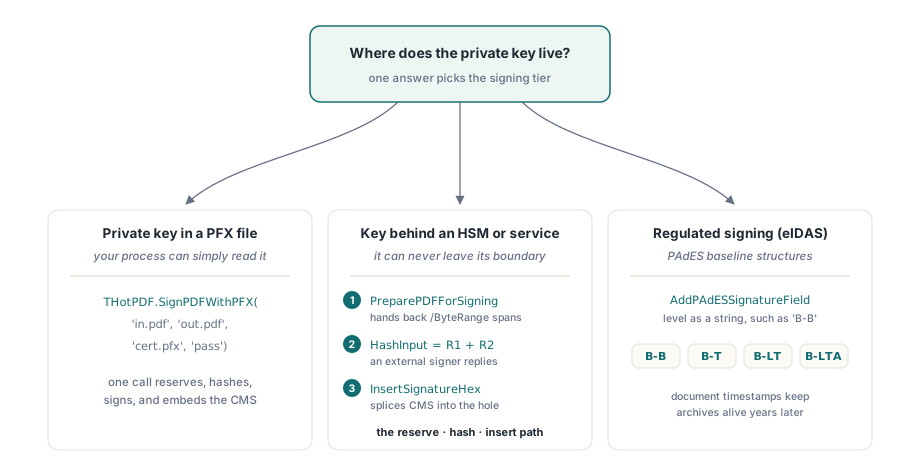
HotPDF는 Delphi와 C++Builder를 위한 서명 기능을 세 단계로 다루며, 이 셋 중 무엇을 쓸지는 질문 하나로 결정된다: 개인 키가 어디에 있는가? 디스크에 있는 PFX 파일이라면 함수 호출 한 번으로 끝난다. HSM이나 원격 서명 서비스 안에 잠겨 있는 키라면 예약-해시-삽입 시퀀스가 필요한데, 어떤 라이브러리도 토큰 안까지 손을 뻗어 키를 꺼낼 수는 없기 때문이다. 유럽 규제를 만족해야 하는 서명이라면 그 위에 PAdES 베이스라인 구조가 필요하다. 아래 절들은 이 순서를 그대로 따라간다
/ByteRange가 서명된 바이트를 고정하는 방식
서명은 자신이 서명하는 바로 그 파일 안에 존재해야 하지만, 스스로를 서명할 수는 없다. PDF는 구멍을 하나 남겨 두는 방식으로 이 역설을 피해 간다. 서명하기 전에 작성기는 0으로 채워진 고정 크기의 /Contents 항목을 예약하고, 그 양옆 두 구간을 가리키는 /ByteRange 배열을 기록한다: 구멍 이전의 모든 것, 그리고 구멍 이후의 모든 것이다. 서명자는 이 두 구간을 해시한 다음 그 결과인 CMS 블롭을 16진수로 구멍 안에 써넣는다. 함정은 고정이라는 단어에 있다. 완성된 서명이 얼마나 커질지 알기도 전에 그 구멍의 크기를 확정해야 하므로, 예약 크기는 자신 있게 넉넉히 잡은 값이어야 한다. 8킬로바이트면 짧은 인증서 체인을 가진 분리형(detached) CMS 서명을 여유 있게 담을 수 있다
HotPDF는 이 두 경우를 두 개의 호출로 나누어 두었으며, 이 둘을 혼동하는 것은 초보자가 흔히 저지르는 실수다. AddSignatureField는 사람이 나중에 뷰어에서 직접 서명할 빈 필드를 만들어 둔다. AddSignedSignatureField는 필드를 만들면서 /Contents 구멍도 함께 예약해 두는데, 사람이 아니라 코드가 서명을 완료할 때는 이쪽이 필요하다. 외부 서명자에게 빈 필드를 건네면 채울 것이 아무것도 없다
한 번의 호출로 끝나는 경로: PFX로 서명하기
인증서와 개인 키가 프로세스가 읽을 수 있는 PFX/PKCS#12 파일에 들어 있다면, 전체 파이프라인은 클래스 함수 하나로 줄어든다:
if THotPDF.SignPDFWithPFX('invoice-unsigned.pdf', 'invoice-signed.pdf',
    'company-cert.pfx', 'pfx-password') then
  Writeln('Signed: invoice-signed.pdf')
else
  raise Exception.Create('PFX signing failed');
이것이 실패할 때 문제는 PDF 쪽인 경우가 거의 없다. 문제는 PFX 쪽이다. HotPDF는 PBES2로 보호된 컨테이너, 즉 AES-256-CBC 위에 PBKDF2 키 파생을 적용한 컨테이너를 읽는다. 오래된 Windows 인증서 마법사나 3.0 이전 버전의 OpenSSL로 내보낸 PFX는 대개 그 대신 레거시 RC2나 3DES로 감싸여 있어서, 아예 파싱되지 않는다. 해결책은 컨테이너를 최신 보호 방식으로 한 번 다시 내보내는 것이다; 오늘날의 OpenSSL은 기본적으로 이렇게 동작하며, 이는 코드 변경이 아니다. 그러니 "다른 곳에서는 다 되던" 인증서에서 서명이 즉시 죽어 버린다면, 자신의 코드를 의심하기 전에 그 PFX가 어떻게 만들어졌는지부터 살펴보라
HSM과 토큰을 위한 예약-해시-삽입 경로
한 번의 호출로 끝나는 경로는 프로세스가 키를 파일로 읽을 수 있다고 가정한다. 하지만 그럴 수 없는 경우가 점점 늘고 있다. 키가 HSM에, USB 토큰에, 또는 서명 서비스의 API 뒤에 있어서, 라이브러리가 이를 직접 건드릴 방법이 없는 경우다. HotPDF는 서명을 바이트 수준의 단계들로 쪼개서 이 문제를 처리한다: 플레이스홀더 문서를 작성하고, 라이브러리에 해시 범위를 물어보고, 그 해시 입력을 키를 쥐고 있는 대상에게 넘긴 다음, 돌아온 CMS를 다시 구멍에 이어 붙인다

var
  Doc: THotPDF;
  Fs: TFileStream;
  PdfBytes, HashInput, SigHex: AnsiString;
  R1Start, R1Len, R2Start, R2Len, CStart, CLen: Integer;
begin
  // 1. 예약된 /Contents 구멍을 가진 문서를 작성함
  Doc := THotPDF.Create(nil);
  try
    Doc.FileName := 'placeholder.pdf';
    Doc.BeginDoc;
    Doc.CurrentPage.AddSignedSignatureField('Sig1',
      Rect(50, 100, 350, 150), 8192, 'adbe.pkcs7.detached',
      'Contract approval', 'Boston, MA', 'legal@example.com');
    Doc.EndDoc;
  finally
    Doc.Free;
  end;

  // 2. 저장된 바이트를 불러옴; 반환되는 오프셋은 0부터 시작함
  Fs := TFileStream.Create('placeholder.pdf', fmOpenRead);
  try
    SetLength(PdfBytes, Fs.Size);
    Fs.ReadBuffer(PdfBytes[1], Fs.Size);
  finally
    Fs.Free;
  end;
  THotPDF.PreparePDFForSigning(PdfBytes, R1Start, R1Len, R2Start, R2Len,
    CStart, CLen);

  // 3. 두 구간을 해시하고 외부(HSM, 토큰, 서비스)에서 서명함
  HashInput := Copy(PdfBytes, R1Start + 1, R1Len) +
               Copy(PdfBytes, R2Start + 1, R2Len);
  SigHex := SignWithHsm(HashInput);  // 직접 연동하는 부분: CMS를 16진수로 반환함

  // 4. 서명을 예약된 구멍에 이어 붙임
  THotPDF.InsertSignatureHex(PdfBytes, SigHex);
  Fs := TFileStream.Create('signed.pdf', fmCreate);
  try
    Fs.WriteBuffer(PdfBytes[1], Length(PdfBytes));
  finally
    Fs.Free;
  end;
end;
이 시퀀스에서 두 가지 세부 사항이 간헐적으로 발생하는 실패 대부분의 원인이다. 첫 번째는 PreparePDFForSigning이 완성된 파일의 바이트를 대상으로 동작한다는 점이다. 오프셋이 의미를 가지려면 플레이스홀더가 완전히 작성되고 저장되어 있어야 한다; 아직 조립 중인 스트림을 대상으로 오프셋을 계산하면 나중에 실제로 해시할 바이트와 맞아떨어지지 않는다. 두 번째는 다시 예약 크기 문제다. 요청한 8192바이트는 최종 CMS를 담아야 하는데, 중간 인증서를 포함하는 서명이나 서비스가 서명된 속성을 덧붙이는 서명은 그 크기를 넘어설 수 있다. InsertSignatureHex는 공간을 마련하기 위해 구멍을 늘려 주지 않는다. 이런 문제의 징후는 어떤 인증서로는 잘 서명되다가 다음 인증서에서는 실패하는 파이프라인이다; 해결책은 짐작이 아니라 실제 서명자가 만들어 낸 진짜 서명을 기준으로 측정한 예약 크기로 플레이스홀더를 다시 생성하는 것이다
PAdES 베이스라인, 그리고 서명을 계속 살아 있게 하는 타임스탬프
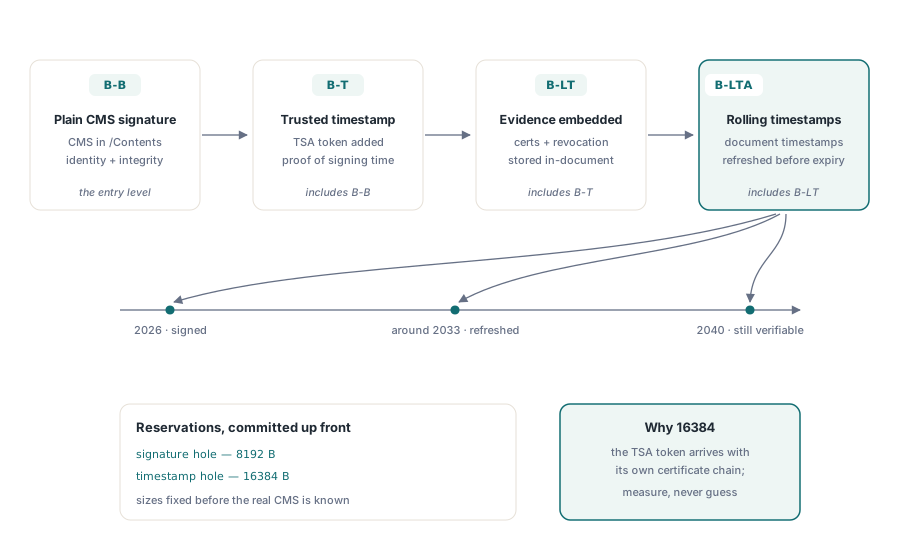
유럽 규정 아래에서 서명한다면, 적용되는 표준은 네 가지 PAdES 베이스라인 수준을 쌓아 올리는 ETSI EN 319 142-1이다. B-B는 평범한 서명이다. B-T는 언제 만들어졌는지를 증명하는 신뢰할 수 있는 타임스탬프를 추가한다. B-LT는 검증 자료, 즉 인증서와 폐기 데이터를 문서 안에 임베딩해서 몇 년 뒤에도 확인할 수 있게 한다. B-LTA는 그 위에 주기적인 문서 타임스탬프를 쌓아서, 증거가 그것을 만들어 낸 알고리즘보다 오래 살아남게 한다. HotPDF는 각 수준에 대해 문서 쪽 구조를 만들어 낸다:
// PAdES 베이스라인 서명 필드 (ETSI EN 319 142-1)
Pdf.CurrentPage.AddPAdESSignatureField(
  'ApprovalSig', Rect(50, 100, 350, 150), 'B-B',
  'Contract approval', 'Boston, MA', 'legal@example.com');

// 문서 타임스탬프: TSA 토큰과 체인을 위한 더 큰 예약 공간
Pdf.CurrentPage.AddDocumentTimestampSignature('ArchiveTS', 16384);
타임스탬프에 16384바이트를 예약해 둔 것은 의도적인 선택이다. 타임스탬프 기관은 자신의 인증서 체인까지 딸려 오는 토큰을 반환하므로, 평범한 서명이 만족하는 8KB보다 더 많은 공간이 일상적으로 필요하다. 이러한 문서 타임스탬프는 B-LTA를 떠받치는 메커니즘이기도 하다: 아카이브된 서명에 여전히 최신인 알고리즘으로 몇 년마다 다시 타임스탬프를 찍는 것이야말로, 2026년에 서명한 문서를 2040년에도 검증 가능한 상태로 유지해 주는 힘이다
두 필드 호출 모두가 받는 사유, 위치, 연락처 문자열에 대해 한마디 해 두자면: 이는 편의를 위한 메타데이터일 뿐, 그 이상은 아니다. HotPDF는 이를 평범한 딕셔너리 항목으로 저장하고 눈에 보이는 서명 모양에 그려 넣지만, 어떤 검증기도 이를 대조 확인하지 않는다. 감사자들은 실제로 이를 읽으므로 워크플로 데이터에 맞춰 일관되게 채워 넣되, 이를 결코 증거로 착각하지는 말라. 실제 암호학적 주장은 전적으로 CMS와 그 인증서 체인 안에 있으며, 검증기는 눈에 보이는 텍스트를 완전히 무시한다
서명 이후에는 파일이 커질 수만 있다
서명이 존재하는 순간, 그 범위 안의 바이트는 고정된다. 이후 파일을 바꿀 수 있는 유일하게 정당한 방법은 ISO 32000-1 §7.5.6 증분 업데이트로, 이는 원본 바이트 뒤에 새로운 객체와 변경된 객체를 덧붙이고 그것들을 가리키는 새로운 교차 참조 섹션을 연결한다. 이렇게 하면 서명은 자신의 리비전에 대해 계속 유효한 상태로 남고, 뷰어는 정직한 상태를 보고한다: 서명된 리비전은 손상되지 않았고, 문서는 이후에 확장되었다는 상태다. 대신 파일 전체를 다시 직렬화하면 서명된 구간을 다시 써 버리게 되는데, 이는 눈에 보이는 변화가 전혀 없더라도 서명을 파괴한다. 같은 리비전 메커니즘은 하나의 문서가 여러 서명을 담는 방식이기도 하다: 각각의 새 서명은 자신만의 증분 업데이트 안에 자리 잡으며, 그 범위는 이전 서명들을 포함해 그 앞의 모든 것을 포괄한다. 추가 전용(append-only) 메커니즘과 이를 안전하게 압축할 수 있는 시점에 대해서는 객체 스트림과 증분 업데이트에 관한 글에서 다룬다
설계하는 동안 염두에 둘 만한 경계가 두 가지 있다. HotPDF의 PDF/A 출력 모드는 서명 필드를 아예 거부하므로, 아카이브 적합성과 임베딩된 서명은 별도의 파일로 나누어 배포해야 한다. 그리고 서명은 비밀 유지에 대해서는 아무것도 말해 주지 않는다: 서명은 누가 문서를 만들었는지와 이후 변경되지 않았음을 증명할 뿐, 누구든 여전히 그 내용을 읽을 수 있다. 내용을 숨기는 것은 별개의 작업이며, AES-256 암호화 및 권한 정책이 이를 담당한다
무엇을 만들든, 파일을 작성한 그 코드가 아닌 다른 무언가로 테스트하라. 출력물을 Acrobat의 서명 패널에서 열어 세 가지를 확인하라: 서명이 유효한지, 신원이 기대했던 루트까지 체인으로 이어지는지, 그리고 패널이 서명 이후 변경 사항이 없다고 보고하는지다. 그런 다음 버려도 되는 사본의 서명된 범위 안에서 바이트 하나를 뒤집어 보고, 이제 패널이 문서가 변조되었다고 보고하는지 확인하라. 변조된 파일을 거부하는 모습을 한 번도 본 적 없는 서명 파이프라인은 검증이 실제로는 테스트되지 않은 파이프라인이다
이 세 가지 서명 단계는 모두 Delphi 및 C++Builder용 HotPDF Delphi Component에 포함되어 있으며, 제품 페이지에는 전체 서명 API 레퍼런스가 링크되어 있다