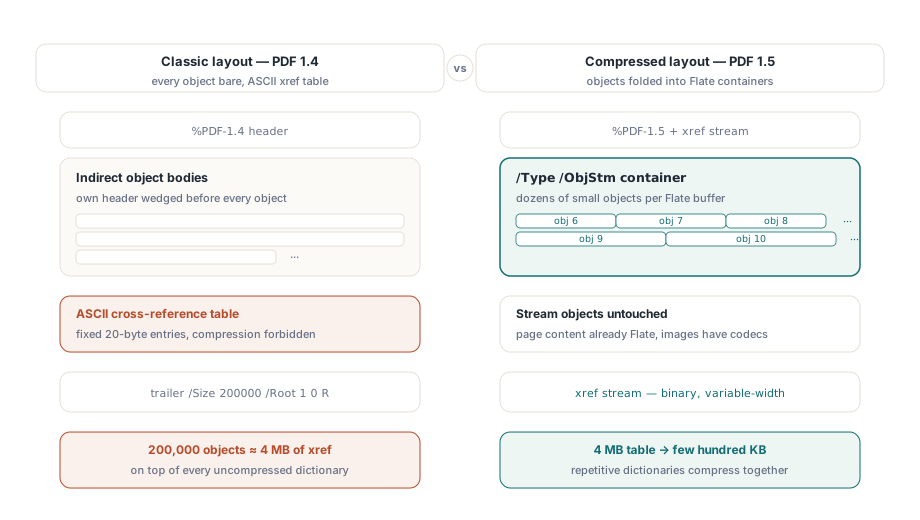
PDF 1.5는 그 이전 파일 형식으로는 표현할 길이 없던 저장 구조 둘을 도입했습니다. 객체 스트림과 상호 참조 스트림입니다. 객체 스트림은 /Type /ObjStm으로 표시된 Flate 압축 컨테이너 하나로, 작은 간접 객체 여럿을 파일 본문 여기저기에 흩뿌리는 대신 끝과 끝을 붙여 담습니다. 상호 참조 스트림은 파일의 조회 표를 가변 폭 필드의 압축 이진으로 다시 쓴 것으로, 버전 1.4까지 모든 PDF를 마무리하던 고정 폭 ASCII 표를 대신합니다. 이 둘은 함께 다닙니다. 객체가 스트림 안으로 접혀 들어가는 순간 옛 텍스트 표로는 더 이상 그것을 지목할 수 없으므로, 이진 xref가 따라와야 합니다
고전적인 배치와 견주어 보면 이것이 없애는 비용이 쉽게 보입니다. PDF 1.4 파일에서 모든 간접 객체는 자기 obj 헤더 뒤에 압축되지 않은 채 놓이고, 꼬리의 표는 항목마다 정확히 20바이트의 ASCII를 쓰며 압축은 금지되어 있습니다. 객체가 20만 개인 문서는 글리프 하나 그리기 전에 이미 약 4 MB의 상호 참조 데이터를 짊어지고, 그 위에 압축되지 않은 딕셔너리 본문이 통째로 쌓입니다. PDF 1.5는 두 숫자를 한꺼번에 공격합니다. 딕셔너리는 Flate 컨테이너로 접히고, 4 MB짜리 표는 수백 킬로바이트의 이진으로 줄어듭니다. ISO 32000-1은 이 두 구조를 §7.5.7과 §7.5.8에서 정의합니다
절감이 실제로 일어나는 지점
객체 스트림은 스트림이 아닌 객체만 건드리므로 픽셀이 아니라 구조를 압축합니다. 페이지 콘텐츠는 1.5 이전에도 이미 Flate로 압축되어 있었고 이미지 데이터는 자기 코덱을 지니고 있으니, 이미지가 많은 브로슈어가 거의 줄지 않는 이유가 그것입니다. 확 줄어드는 것은 구조가 무거운 파일들입니다. 필드 딕셔너리가 수천 개인 AcroForm, 깊은 아웃라인 트리, 태그드 PDF 구조 요소 같은 것들입니다. 그런 객체는 작고, 많고, 서로 거의 똑같습니다. 그리고 그 반복이야말로, 헤더가 사이사이 박힌 채 본문에 흩어져 있는 대신 하나의 버퍼에 모여 앉는 순간 Flate가 파고드는 지점입니다
오래된 파일에서 오버헤드가 차지하는 몫은 과소평가하기 쉽습니다. 여러 해의 편집을 흡수한 폼 아카이브는 딕셔너리 헤더, xref 여백, 그리고 어떤 리더도 결코 보지 않을 리비전에 바이트의 절반을 훌쩍 넘겨 쓸 수 있습니다. 여기서 다루는 두 기능은 그중 앞의 둘을 되찾아 옵니다. 세 번째인 누적된 리비전은 파일이 더 이상 자기 이력을 기억하지 않아도 될 때 압축 정리에만 굴복합니다
HotPDF에서는 속성 한 쌍으로 둘을 켜며, 어떤 순서로 쓰느냐보다 이 둘이 서로에게 어떻게 의존하는지가 더 중요합니다:
var
  Pdf: THotPDF;
begin
  Pdf := THotPDF.Create(nil);
  try
    Pdf.FileName := 'catalog-2026.pdf';
    Pdf.UseXRefStream := True;      // 이진 xref, ObjStm의 선행 조건
    Pdf.UseObjectStreams := True;   // 객체를 /Type /ObjStm으로 묶습니다
    Pdf.BeginDoc;
    Pdf.CurrentPage.SetFont('Arial', [], 11);
    Pdf.CurrentPage.TextOut(50, 760, 0, 'Compressed structure demo');
    Pdf.EndDoc;                     // XRefStm + ObjStm 컨테이너를 내보냅니다
  finally
    Pdf.Free;
  end;
end;UseObjectStreams는 UseXRefStream이 True여야 합니다. 압축된 객체는 객체 스트림 번호와 인덱스를 기록하는 타입 2 xref 항목으로 닿게 되는데, 고전적인 20바이트 텍스트 행에는 그 쌍을 담을 자리가 없습니다. 그래서 UseObjectStreams만 켜면 눈에 보이는 변화가 없습니다. 두 플래그를 모두, BeginDoc 앞에서 설정하는 것이 제대로 동작하는 구성입니다. BeginDoc 뒤에 설정하면 HotPDF는 이미 옛 배치를 확정한 뒤입니다
둘 다 기본이 꺼짐인 이유
HotPDF는 두 속성을 기본값 False로 둡니다. 그 이유는 오래된 하류 코드와의 통합에서 드러납니다. PDF 1.4만 이해하는 리더는 압축된 객체를 다룰 수 없다고 알려 주지 않습니다. xref 스트림을 만나고, 기대하던 트레일러 키워드를 하나도 찾지 못한 뒤, 상호 참조 표가 손상되었다고 보고하거나 그냥 파일 열기를 거부합니다. 출력물이 낡은 팩스 게이트웨이, 임베디드 인터프리터로 도는 하드웨어 프린터, 혹은 십 년 전 누군가 1.4 명세에 맞춰 쓴 파서로 흘러간다면, 그 경로에서는 두 플래그를 끈 채로 두고 큰 파일을 감수하십시오. 주요 뷰어가 모두 20년째 PDF 1.5를 읽어 온 보관 저장과 웹 배포라면, 이를 켜는 것은 거의 공짜로 얻는 압축입니다
지원팀에 알려 둘 만한 2차 효과도 있습니다. 딕셔너리가 객체 스트림에 묶이고 나면, 생성된 두 파일을 바이트 단위로 비교하는 일이 아무 의미도 없어집니다. 필드 하나만 바뀌어도 컨테이너 전체가 다시 Flate 압축되어 그 뒤의 모든 것이 어긋나기 때문입니다. 그런 파일은 이진 비교가 아니라 객체 내용으로 비교하십시오
증분 업데이트와 그것이 지키는 바이트 오프셋
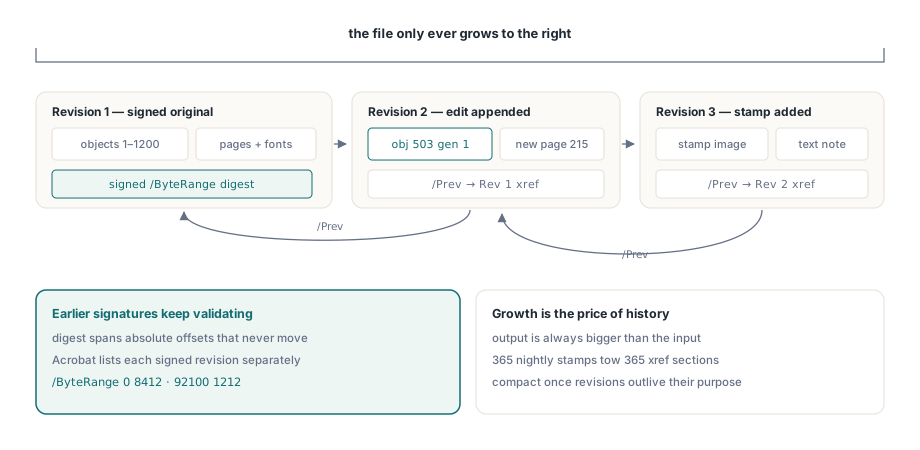
전자 서명은 명시적인 /ByteRange를 덮습니다. CMS 다이제스트가 취해진, 절대 바이트 오프셋으로 주어진 물리 파일의 두 구간입니다. 화면상으로는 똑같아 보이는 것으로 다시 쓰더라도 그 오프셋은 전부 움직입니다. 다이제스트는 더 이상 맞지 않고 서명은 깨진 것으로 읽힙니다. ISO 32000-1 §7.5.6이 증분 업데이트로 해결하는 문제가 정확히 그것입니다. 새 객체와 변경된 객체는 기존 %%EOF 뒤에 덧붙여지고, 이어서 /Prev 항목이 앞선 것을 가리키는 새 상호 참조 섹션이 쓰입니다. 원본 바이트는 결코 흐트러지지 않으므로 서명된 리비전은 계속 검증 가능하고, Acrobat은 서명 패널에서 서명된 각 리비전을 따로 보여 줄 수 있습니다
HotPDF는 이를 자체 진입점으로 노출합니다:
Pdf.BeginIncrementalUpdate('contract-signed.pdf');
Pdf.AddPage;
Pdf.CurrentPage.SetFont('Arial', [], 10);
Pdf.CurrentPage.TextOut(50, 760, 0, 'Addendum recorded 2026-06-11');
Pdf.SaveIncrementalUpdate('contract-updated.pdf');  // 델타만 덧붙입니다
사람들이 걸려 넘어지는 지점이 둘 있습니다. BeginIncrementalUpdate는 원본 파일 이름을 받아야 합니다. 덧붙여지는 xref 섹션이 기록하는 오프셋은 바로 그 원본 바이트에 대해서만 의미가 있기 때문입니다. 이름을 바꾸었거나 다시 저장한 사본을 가리키면 그 오프셋은 더 이상 존재하지 않는 파일을 서술하게 됩니다. 그리고 저장은 구조상 덧붙이기 전용이므로 출력은 언제나 입력보다 큽니다. 그 증가는 깎아 내야 할 낭비가 아닙니다. 앞서 서명된 리비전을 온전히 남겨 두는 바로 그 성질입니다
로드된 파일 수정은 LoadFromFile을 거칩니다
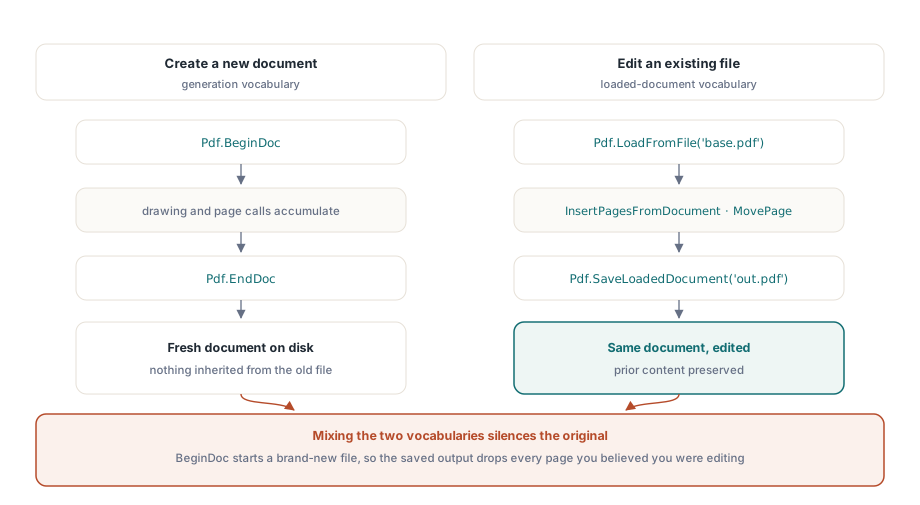
HotPDF를 생성 API로 처음 접한 개발자는 특정한 벽에 부딪히곤 합니다. BeginDoc은 완전히 새 문서를 여는데, 이미 있는 문서를 바꾸려는 상황에서는 잘못된 도구입니다. 기존 파일 편집은 대신 로드된 문서용 호출을 거칩니다:
PageCount := Pdf.LoadFromFile('base.pdf');
Pdf.InsertPagesFromDocument(OtherDoc, '1-3', 5);  // 5페이지 뒤에 1-3페이지
Pdf.MovePage(2, 5);
Pdf.SaveLoadedDocument('modified.pdf');
둘을 섞으면 새로 넣은 내용만 담기고 원본은 하나도 남지 않은 출력 파일이 증상으로 나타납니다. BeginDoc이 여러분이 편집하고 있다고 믿었던 문서 옆에 새 문서를 흔쾌히 만들어 버렸기 때문입니다. LoadFromFile과 SaveLoadedDocument를 한 어휘로, BeginDoc과 EndDoc을 다른 어휘로 읽으십시오. 같은 파일에 대해 두 어휘를 모두 집어 드는 루틴은 거의 언제나 잘못된 코드입니다
덧붙여진 파일을 언제 압축 정리할까
덧붙이기 전용 저장에는 서서히 쌓이는 비용이 따릅니다. 같은 PDF에 상태 줄 하나를 찍는 야간 작업은 한 해 동안 365개의 리비전을 만들어 내고, 리비전마다 새 xref 섹션을 뒤에 매답니다. 그 이력이 쓸모를 다했고 파일 안의 어떤 서명도 살아남을 필요가 없다면, 로드 문서 경로로 다시 직렬화해 전체를 평탄화할 수 있습니다:
Pdf.LoadFromFile('stamped.pdf');
Pdf.SaveLoadedDocument('compacted.pdf');
이 재저장은 전체 재작성입니다. 앞선 리비전을 일부러 버리고 파일에 남아 있던 서명을 깨뜨리므로, 다른 파괴적 단계에 적용하는 것과 같은 정책 관문 뒤에 두십시오. 실전에서 잘 버티는 규칙 하나. 리비전 수가 임계값을 넘거나 덧붙은 오버헤드가 기본 파일의 일정 비율을 넘어설 때 압축 정리하고, 서명 패널에 무언가 들어 있는 문서는 결코 압축 정리하지 마십시오
출고 전 출력 확인하기
이 두 기능의 검증은 시원할 만큼 구체적입니다. 결과를 Adobe Acrobat에서 열어 세 가지를 확인하십시오. 객체 스트림이 켜져 있으면 문서 속성이 PDF 1.5 이상을 보고하는지, 증분 업데이트 뒤에도 서명 패널이 앞서 서명된 모든 리비전을 여전히 유효하다고 판정하는지, 로드하고 수정하고 저장하는 주기를 거친 뒤에도 페이지 수와 북마크가 온전한지입니다. 보관용 출력이라면 veraPDF에도 파일을 통과시키십시오. 압축된 xref야말로 너그러운 뷰어보다 엄격한 검증기가 훨씬 꼼꼼히 뜯어보는 종류의 구조이기 때문입니다. 아주 큰 입력을 함께 다루는 작업이라면 대용량 PDF 워크플로를 위한 Direct File API 안내의 점검 방법이 증분 저장과 자연스럽게 어울리고, 위의 바이트 범위 뒤에 있는 서명 원리는 HotPDF 전자 서명과 PAdES 글에서 깊이 다룹니다
두 기능 모두 이 블로그의 다른 글에서 다루는 생성, 폼, 암호화, 서명 API와 나란히 Delphi 및 C++Builder용 HotPDF Delphi Component의 일부로 제공됩니다. 위의 호출들을 여러분의 문서 파이프라인과 맞춰 보고 싶다면 제품 페이지에 전체 API 레퍼런스가 연결되어 있습니다