PDF/A と PDF/UA は互いにまったく関係のない 2 つの問いに答えるものであり、これらを 1 つの「アクセシビリティとアーカイブ」チェック項目として扱うことこそが、コンプライアンスのラベルをまとった壊れたファイルがアーカイブに紛れ込む原因になる。PDF/A が問うのは、20 年後もそのファイルが忠実にレンダリングされ続けるかどうかである。PDF/UA が問うのは、支援技術が今日それを読めるかどうかである。ある文書は一方には完璧に合格しながらもう一方には完全に失敗することがあり得るため、誠実な判定はその両方を実行することからしか得られない。しかも、下流のシステムがメタデータに焼き込まれた適合性識別子を信頼してしまう前、ファイルが書き出される前にその両方を実行しなければならない。その識別子は自己申告にすぎない。フォーマットの側は、それが真実であることを何も強制しておらず、規格に照らして検証せずに XMP へ「PDF/A-1b」と書き込むアプリケーションは、ラベルしか読まないすべての利用者にとっては準拠して見えるファイルを作り出してしまう。losLab PDF Library(PDF Library for Delphi)は、両方のバリデータをライブラリ自体に組み込むことで、Delphi と C++Builder に対してその隙間を埋める。チェックは外部サービスを立てる必要もなく、同一プロセス内で完結する
正反対の理由でファイルを不合格にする 2 つの規格
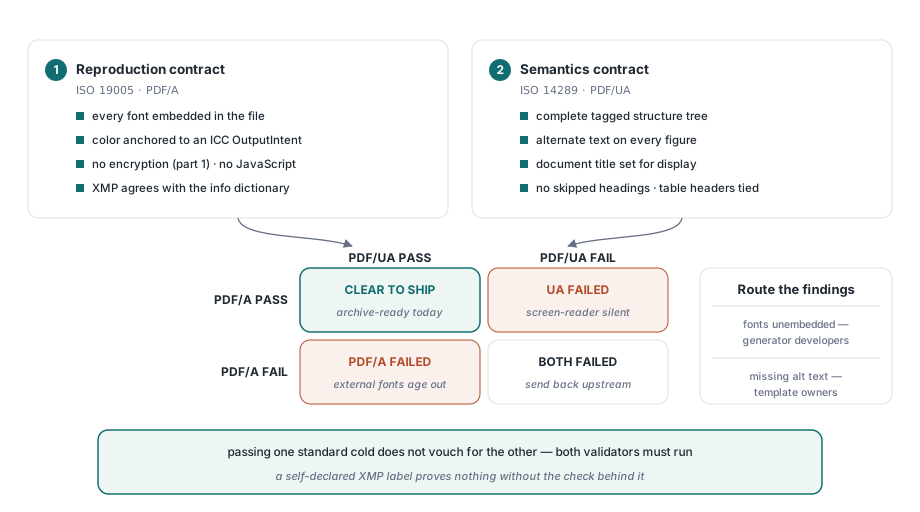
ISO 19005(PDF/A)は再現性に関する契約である。準拠したファイルは、それを生成したシステムを一度も見たことのないソフトウェアの上で、何十年後も同一にレンダリングされなければならず、そのためこの規格は外部依存を攻撃対象にする。すべてのフォントを埋め込むこと、色は埋め込まれた ICC の OutputIntent に固定するかデバイスに依存しない空間で表現すること、PDF/A-1 では暗号化を禁じること、JavaScript を禁じること、XMP メタデータが文書情報辞書と一致していること。これに対して ISO 14289(PDF/UA)は意味論に関する契約である。支援技術は文書をたどり、そこから意味を取り出せなければならず、それはまったく別の層に宿っている。完全な構造ツリー、図に対する代替テキスト、表示用に設定された文書タイトル、飛び級のない見出しレベル、ページが画面から消えた後も生き残る表のヘッダー関係である
この 2 つの規格は異なる層を取り締まっているため、実際に噛みついてくるファイルは両者の間に落ちるものである。アーカイブとしては完璧な文書がスクリーンリーダーには沈黙したままということもあれば、見事にタグ付けされた文書が 10 年後には存在しないデスクトップフォントを参照していることもある。公共セクターの出版物は、両方の要件が同時に課される典型的な場であり、そこでのパイプラインはこの 2 つを 1 つのゲートに押し込めることはできない。指摘事項は別々の担当者に届く。フォントの未埋め込みは PDF を生成するコード側の欠陥だが、代替テキストの欠落はコンテンツテンプレートを所有する側の問題であり、この 2 つを混ぜたレポートは結局 2 回転送されるだけになる
PDF/A のどの版を目標にするかは、それを満たしているかどうかと同じくらい重要である。PDF/A-1 は PDF 1.4 に凍結されており、透過とJPEG2000 のどちらも拒否するが、現代のレポート出力はどちらも深く考えずに使ってしまいがちなものである。PDF/A-2(ISO 32000-1 の上に構築された ISO 19005-2)はその両方を受け入れており、新しいアーカイブにとって理にかなった既定の選択肢になる。PDF/A-3 はさらに踏み込み、任意の種類の埋め込みファイルを許可しており、これは規制対象の電子請求書フォーマットが依拠しているものである。2026 年になってもなお PDF/A-1b を標準としているチームは、たいてい 15 年前に誰かが書いた要件をそのまま引きずっているだけであり、目標とする版を再交渉するほうが、システムが出力するすべてのチャートから透過を取り除くより安上がりであることが多い
取り込み時点での構造化された指摘
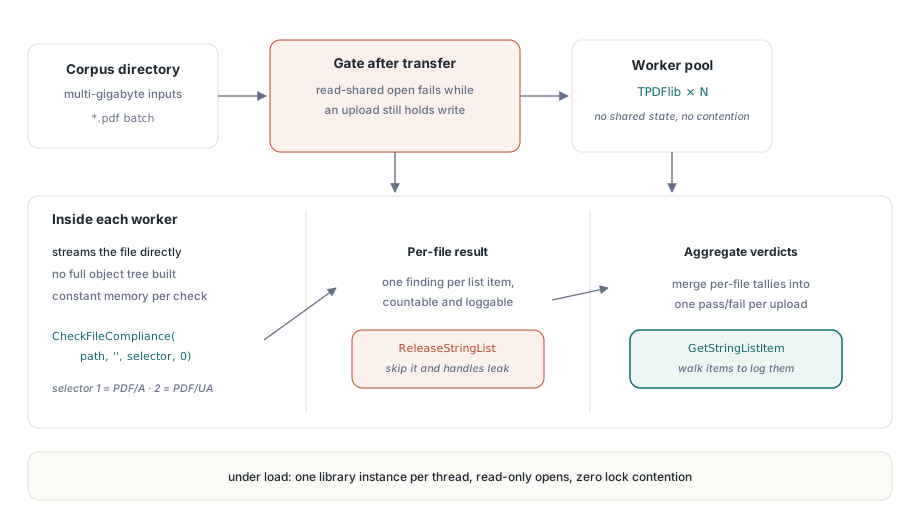
フラット API のエントリポイントは CheckFileCompliance であり、テストセレクタは PDF/A が 1、PDF/UA が 2 である。これは文字列リストのハンドルを返し、その各項目は 1 行に 1 件の指摘であり、まさに自動ゲートがたどるのにふさわしい形をしている
function GateArchiveUpload(Pdf: TPDFlib; const FileName: string): Boolean;
var
  ListId, I: Integer;
begin
  ListId := Pdf.CheckFileCompliance(FileName, '', 1, 0);  // 1 = PDF/A
  if ListId = 0 then
  begin
    // 0はfindingなしまたはfileが読めないの意なので、渡す前に切り分ける
    Result := Pdf.LastErrorCode = 0;
    Exit;
  end;
  for I := 0 to Pdf.GetStringListCount(ListId) - 1 do
    LogFinding(FileName, Pdf.GetStringListItem(ListId, I));
  Pdf.ReleaseStringList(ListId);
  Result := False;
end;
これを無人で運用できるかどうかは、2 つの細部で決まる。1 つ目は、2 つの正反対の意味を持つ戻り値である。CheckFileCompliance は、ファイルが完全に準拠している場合にも、ファイルをそもそも開けなかった場合にも 0 を返す。内部的には、どちらの場合も結果リストが空になって 0 に折りたたまれるからである。0 を合格として読み取るゲートは、破損したアップロードをそのままアーカイブへ通してしまうため、上のゲートがそうしているように、ゼロを信頼する前に LastErrorCode で切り分けること。2 つ目は、ファイルがそのライフサイクルのどの段階にあるかに関わる。このチェッカーは完全な文書モデルではなくライブラリのストリーミングリーダー上で動作し、LoadFromFile を一度も呼ばずに読み取り共有でファイルを直接開く。これにより、オブジェクトツリーを構築することなく数ギガバイトの入力を処理できる。しかし、その同じストリーミングオープンは、別のプロセスがまだそのファイルを書き込み用に保持している間は失敗する。アップロードの最中はまさにその状態である。ゲートは転送が完了してから実行すること
このストリーミング設計は、負荷がかかったときにも報われる。各チェックは入力を読み取り専用で開き、読み取りのために共有するため、ワーカーごとに 1 つの TPDFlib インスタンスを用意すれば、ワーカースレッドやプロセス間で競合することなくファイル群の監査をスケールアウトできる。規律が必要なリソースはハンドルそのものである。CheckFileCompliance から返る 0 以外のあらゆる結果は、ReleaseStringList を呼ぶまで確保されたままになる。長時間動き続けるゲートがそれを解放し忘れてもクラッシュはしないが、誰かが原因を探しに来るまでゆっくりとメモリを失血させ続ける
人間向けのレポートとビルドゲート向けの差分
指摘のリストはゲートには適した形だが、テンプレートチームへのメールには不向きな形である。CreatePreflightReport は同じ分析結果を読みやすい文章としてレンダリングし、CreatePreflightReportEx はレポート形式のセレクタを追加し、SavePreflightReport はそれをディスクへ書き出すため、そのレポートを納品する文書パッケージの中に同梱して運ぶこともできる。多くのアーカイブ契約では、このレポート自体が単なる内部成果物ではなく、それ自体で 1 つの納品物として扱われている
このファミリーの中で、静かに存在価値を発揮するのが ComparePreflightReports である。コンプライアンスも、ほかの挙動と同じように回帰の対象になり得る。テンプレートの微調整、新しくライセンスした企業フォント、ライブラリのアップグレードのいずれもが、前回のリリースにはなかった指摘を持ち込みかねないが、そのどれも自分からそれを告げてはくれない。代表的な文書一式についてゴールデンレポートをバージョン管理下に保存し、変更のたびに再生成して、ComparePreflightReports で差分を計算すること。空の差分はそれ自体、保存しておく価値のあるリリース成果物である。予期しない指摘があればビルドを失敗させればよく、それは監査の場で見つかるよりもはるかに安上がりな発見場所である
初回で合格する出力を生成する
プリフライトは、よそから届くファイルに対してこそ真価を発揮する。自分のコードが生成する文書については、生成後に違反を見つけて後から継ぎ接ぎするのは遠回りである。PDF Library for Delphi は各規格に対応する生成側モードを備えており、同じ文書に対して両方を同時に有効化できる
var
  Pdf: TPDFlib;
  Diag: WideString;
begin
  Pdf := TPDFlib.Create;
  try
    Pdf.NewDocument;
    Pdf.SetPDFAMode(1);
    Pdf.LoadOutputIntentProfile('sRGB-IEC61966-2.1.icc', 'RGB');
    Pdf.SetPDFUAMode('en-US');
    Pdf.SetInformation(1, 'Quarterly Statement');  // /Title:PDF/UAに必須
    // ... ここにtagged contentを描画 ...
    Diag := Pdf.GetPDFUADiagnostics;
    if Diag <> '' then
      Writeln('fix before shipping: ', Diag);
    Pdf.SaveToFile('statement.pdf');
    // 保存fileに対してpreflightを実行して件数を取る箇所
    Writeln(Pdf.CreatePreflightReport('statement.pdf', '', 1, 0));
  finally
    Pdf.Free;
  end;
end;
落とし穴は保存の瞬間に潜んでいる。適合性のための修復のいくつかは、モードを有効にした時点ではなく、文書がシリアライズされている最中に行われる。注釈の印刷フラグを強制すること、PDF/A-3 の埋め込みファイルに既定の AFRelationship を書き込むこと、PDF/UA のためにタブ順序とフォームフィールドの説明を正規化することなどである。メモリ上にある文書は、ディスクに書き出されるものとバイト単位で同一ではない。したがって意味のあるプリフライトの判定は、保存済みファイルから計算されたものだけである。statement.pdf そのものを検証すること。メモリ上にまだ残っているオブジェクトから適合性を推測してはならない。そこで判断しようとしているバイト列は、実際に出荷したバイト列ではないからである

視覚的な文書と並んで機械可読な XML を伴う請求書のシナリオは、PDF/A-3 の上に構築された ZUGFeRD や Factur-X のパターンに従う。そうしたファイルでは、SetPDFA3DefaultAFRelationship で添付ファイルの関係を明示的に設定しておくべきである。ISO 19005-3 は、埋め込まれるすべてのファイルが文書に対する自らの役割を宣言することを求めているからである。これを未設定のままにしておくと、埋め込まれた XML は明言された目的を持たないただのデータの塊になり、バリデータはそれを見逃さない
独立した審判: veraPDF と Acrobat
生成側が、自分自身の出力の唯一の審判であってはならない。PDF Library for Delphi のチェッカーは同一プロセス内で高速かつ構造化された判定を返してくれる。ホットパス上ではまさにそれが欲しいものだが、アーカイブ用バッチのリリースゲートは、それでも自分のチームの誰も書いていないバリデータに出力を通すべきである。veraPDF は PDF/A のコミュニティ主導によるリファレンス実装であり、多くのアーカイブが受け入れ基準の中で名指しするツールでもあるため、これを基準に据えるべきである。veraPDF と自前のインプロセスチェックが食い違ったときには、Acrobat のプリフライトプロファイルが有用な決定打になる。保存するレポートには、必ずバリデータの名前とバージョンを添えて記録すること。あるファイルが veraPDF に合格したという主張は、その合格を出したビルド番号がなければほとんど意味を持たない。ツールはリリースのたびにルールを厳格化していくからである
バリデータ同士は、規格の境界付近では実際に見解が分かれることがあり、そうなったときの答えは自分の好きなツールを選ぶことではない。その不一致を再現できる最小限のサンプルまでファイルを縮小し、規格の本文と照らし合わせて読むこと。1 時間ほどそれに費やせば、たいてい 2 つのうちどちらかが見えてくる。上流に報告する価値のある本物のツールのバグか、あるいは自分のチームがずっと誤読していた条項であり、次の担当者が同じ議論を蒸し返さずに済むよう、コンプライアンスノートに書き留めておくべきものである
暗号化された入力には近道がある。どちらのチェッカーもパスワード引数を受け取るが、暗号化辞書を持つ PDF/A-1 ファイルはその時点ですでに非準拠である。ISO 19005-1 は暗号化そのものを禁じているため、暗号化された提出物はそれ以上深い分析を実行する前に差し戻せる。暗号化辞書が実際に何を許可しているのかを解き明かす作業自体は別の仕事であり、PDF の暗号化と権限の監査で扱っている
PDF/UA の指摘は、ほとんど常に構造ツリーがそもそもどう作られたかにまで遡ることができ、その裏側にあるタグ付けの技法はDelphi でタグ付き PDF 構造ツリーを構築する記事で扱っている。デジタル署名も要求するアーカイブでは、このゲートをPAdES 署名と検証のワークフローと組み合わせるべきである。完全なプリフライト API リファレンスはlosLab PDF Library for Delphi製品ページに掲載している