権限フラグはセキュリティ機構ではありません。「コピー禁止」を示すビットは暗号処理と同じ/Encrypt辞書の中に置かれており、そのせいで実際には持っていない強制力があるかのような雰囲気をまといます。そして両者を1つのものとして扱った瞬間から、監査は誤った答えを出し始めます。PDFに対して問う価値があるのは「暗号化されているか」ではありません。もっと具体的で厄介な問いです。どのアルゴリズムか、セキュリティハンドラのどのリビジョンか、2つのパスワードのどちらが設定されているか、どの権限ビットが主張されているか、そして暗号化がファイルのどの部分に実際に及んでいるか、です。形式上は暗号化されていながら実質的には開かれているファイルがあり得ます。読み取りを拒みながらメタデータを平文のまま残すこともあり得ます。どのビューアも自由に無視できるフラグの中で印刷を封じることもあり得ます。PDFを監査するとは、これらすべてを別々に確定させることであり、losLabがDelphiとC++Builder向けに提供するPDFエンジンであるPDF Library for Delphiは、そのそれぞれをフラットな整数ハンドルAPIと型付きクラス層の双方から公開しています
/Encrypt辞書が実際に記録しているもの
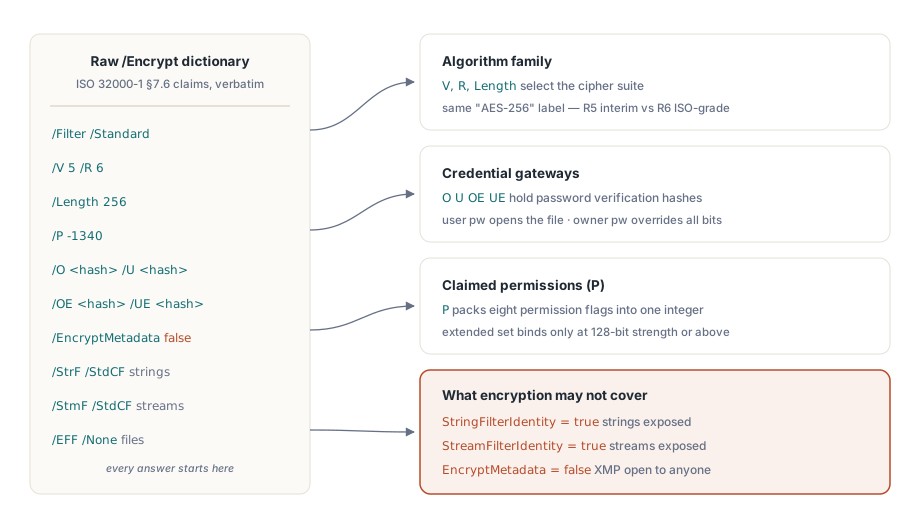
ISO 32000-1 §7.6はドキュメントのセキュリティをいくつかの辞書エントリで定義しており、PDF Library for DelphiはそれらをTPDFEncryptionレコードに1対1で対応させています。フィルタのバージョンVとリビジョンRがアルゴリズムのファミリーを選び、Lengthが鍵長を保持します。権限ビットはPに収まり、オーナーパスワードとユーザーパスワードの検証文字列はOとUに置かれ(AES-256ではOEとUEが加わります)、EncryptMetadataフラグがそれに並び、さらに3つのフィールドが文字列、ストリーム、埋め込みファイルにそれぞれ適用されるcryptフィルタを指名します
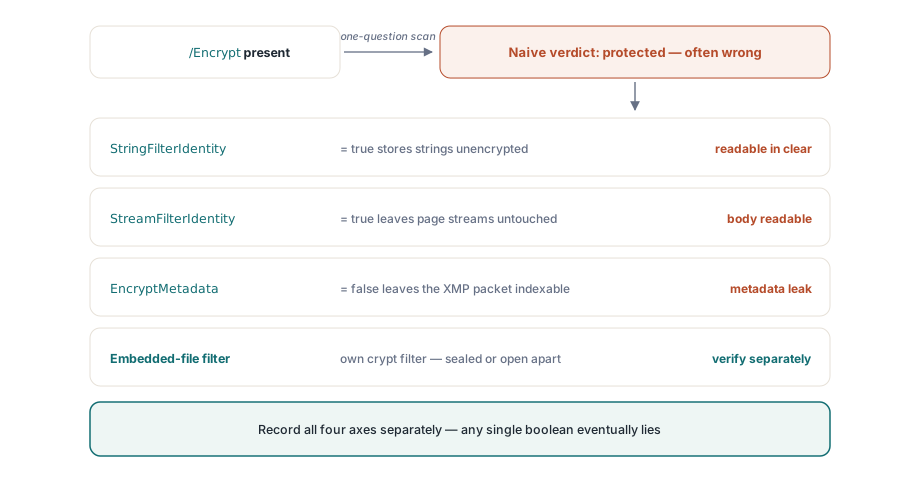
このレコードの価値は、何ひとつ解釈してくれないところにあります。生の辞書をそのまま返し、結論を導くのは読み手に委ねます。それこそが監査に必要なことです。暗号化されたファイルの中に平文が残るケースはStringFilterIdentityとStreamFilterIdentityに現れます。どちらかがtrueなら、そのデータはドキュメントの暗号化状態が何を報告していようと、Identityフィルタを素通りして手つかずのまま残っています。「/Encrypt辞書が存在する」で判定を止めるスキャナは、文字列とストリームが平文で置かれているファイルを保護済みと呼んでしまいます。同じ機微はメタデータにも及びます。EncryptMetadataがfalseのとき、ページの内容は読めないのにXMPパケットはどのインデクサからも読める状態のままです。ルーティング規則がタイトルや著者のフィールドを手がかりにしているなら、これは即座に知っておく価値があります
フラットAPIによる短いセキュリティ調査
たいていのパイプラインでは、4つのフラットな呼び出しが日々の疑問に答えます。LoadFromFileは成功時に1を返し、ドキュメントが開いたあとは暗号化のインスペクタが復号後の状態に照らして報告します:
var
  PDF: TPDFlib;
begin
  PDF := TPDFlib.Create;
  try
    if PDF.LoadFromFile('contract.pdf', UserPassword) <> 1 then
      raise Exception.Create('Open failed: wrong password or damaged file');
    Writeln('status    : ', PDF.EncryptionStatus);     // 復号済み / 暗号化 / 不明
    Writeln('algorithm : ', PDF.EncryptionAlgorithm);  // RC4かAESのファミリーか
    Writeln('strength  : ', PDF.EncryptionStrength);   // 鍵長のクラス
    Writeln('owner pw? : ', PDF.CheckPassword(CandidatePassword));
  finally
    PDF.Free;
  end;
end;CheckPasswordは、その1行のシグネチャから想像されるより重要です。PDFは力の異なる2つのパスワードを定義しています。ユーザーパスワードはそもそもファイルを開くために必要です。オーナーパスワードは完全な権利を与え、あらゆる権限ビットを上書きします。ディスク上のバイト列はどちらでも同一ですが、オーナーパスワードで開いたセッションはユーザーパスワードのセッションにできないことができます。したがって、どちらの資格情報が提示されたかを記録しない監査は、真実の半分しか記録していません。クラス層はこの区別を照会可能にします。TPDFDocument.HasUserPasswordとHasOwnerPasswordはファイルが何を要求するかを報告し、IsUserPasswordとIsOwnerPasswordは現在のセッションを実際に開いたのがどちらのパスワードかを報告します。その事実は記録してください。パスワードの値そのものは決して記録しないでください
Strengthの階梯、そこでは「AES-256」が2つのものを指す
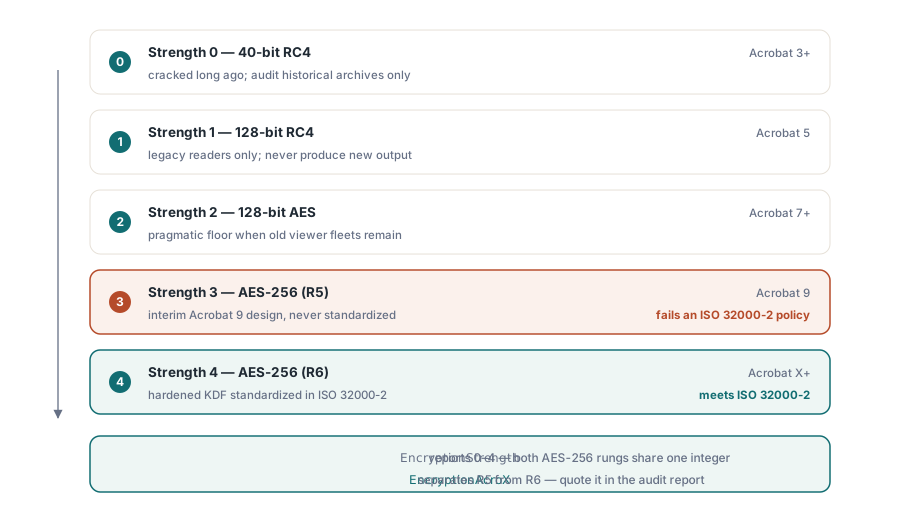
フラットなEncryptとEncryptFileの関数は、意味のある値を5つ取る整数のStrengthを受け取ります。0は40ビットRC4、1は128ビットRC4、2はAcrobat 7から読める128ビットAES、3はAcrobat 9で導入された256ビットAES、4はAcrobat X以降が要求する256ビットAESです
興味深いのは、3と4がどちらもAES-256と名乗りながら同じ方式ではないという点です。Strength 3はセキュリティハンドラのリビジョン5に対応します。これはAcrobat 9が出荷した暫定的な設計で、ISOは採用しませんでした。Strength 4はリビジョン6に対応し、その鍵導出関数はISO 32000-2で強化され標準化されています。今日これから作るドキュメントで、4ではなく3を選ぶ理由はありません。監査においてこの差は決定的です。「ISO 32000-2に沿ったAES-256」と書かれた方針を満たすのはR6だけであり、AES-256を名乗るR5のファイルは、素朴な強度チェックを通過してもその方針には適合しません。クラス層は両者を名前で区別しており、R5にはesAES256Bit、R6にはesAES256BitAcroXを用い、EncryptionAcroXプロパティが真偽値1つでリビジョンの問いに答えます
権限ビットと鍵長にまつわる但し書き
EncodePermissionsは8つのフラグを、EncryptとEncryptFileが期待する整数へ詰め込みます。印刷、コピー、変更、注釈追加が基本セットを構成し、フィールド入力、アクセシビリティ目的のコピー、組み立て、フルクオリティ印刷が拡張セットを構成します。ライブラリ自身の暗号化デモが明言している但し書きは、拡張側の4つが128ビット以上の強度でしか効かないというものです。フルクオリティ印刷のフラグも同じ規則に従います。低解像度印刷を強制しようとこれをクリアしても、40ビットのドキュメントは無視します。その格下げにも128ビット以上の暗号化が必要だからです。「低解像度印刷のみ」という方針を40ビットのファイルへ書き込んでも、どのビューアも結局フルクオリティで印刷します
より深い問いは、これらのビットを誰が強制するのかであり、答えは、信頼できる相手は誰もいない、です。権限は準拠リーダーへの指示であって、暗号による制限ではありません。コピーが許可されていようと拒否されていようと復号鍵は同一なので、締め上げた権限セットは正直なビューアを正直なままに保つだけです。ビットを無視すると決めたリーダーには、暗号上の障害は何ひとつありません。抽出を思いとどまらせるのではなく防ぐことが義務なら、そのファイルにはユーザーパスワードが必要であり、ワークフローにはその周囲にプロセスレベルの統制が必要です。監査レポートは、権限フラグを錠前のように扱うのではなく、各ファイルが実際にどちらの体制の下にあるのかを明示すべきです
方針を適用し、それが定着したことを証明する
既存のファイルへ暗号化を適用するのに、オブジェクトツリーへの読み込みは要りません。EncryptFileは入力から出力までを1回の呼び出しで処理し、監査ループは結果を開き直してディスク上に何が書かれたかを確認します。同梱の暗号化デモも、同じ「書いてから読み戻す」形をとっています:
var
  PDF: TPDFlib;
  R: Integer;
begin
  PDF := TPDFlib.Create;
  try
    R := PDF.EncryptFile('in.pdf', 'out.pdf', 'owner-secret', 'user-secret', 4,
      PDF.EncodePermissions(1, 0, 0, 0,    // 印刷は許可。コピー / 変更 / 注釈は拒否
                            0, 0, 0, 1));  // 拡張セット:フルクオリティ印刷のみ
    if (R = 1) and (PDF.LoadFromFile('out.pdf', 'user-secret') = 1) then
    begin
      Writeln('algorithm = ', PDF.EncryptionAlgorithm);
      Writeln('strength  = ', PDF.EncryptionStrength);
      Writeln('owner pw accepted: ', PDF.CheckPassword('owner-secret'));
    end;
  finally
    PDF.Free;
  end;
end;
ドキュメント層で作業するチームは、ビットの詰め込みの代わりに型付きの集合を使って同じ操作を行えます。こちらのほうが目を凝らさずにコードレビューを通せます:
if not Doc.Encrypt('owner-secret', 'user-secret', esAES256BitAcroX,
  [ppCanPrint], [ppCanPrintFull]) then
raise Exception.Create('Encryption failed');いずれにせよ、読み戻しの手順は省いてよい儀式ではありません。放っておけば数か月後に顧客のマシン上で表面化する配置ミスを、ここで捕まえられます。要求した強度を黙って格下げする古いライブラリビルド、ディレクトリが読み取り専用だったせいで一度も書かれなかった出力パス、引数の順序を取り違えた権限用の整数などです。3つとも手元のスモークテストは通過し、現場で失敗します。出力を開き直せば、そのどれもが、ファイルを作った実行の最中に見える例外へと変わります。GetEncryptionFingerprintはジョブの記録と一緒に保存できるコンパクトな値を返すので、後から比較すれば、2つの出力が同じ暗号化構成を共有しているかどうかをどちらも開き直さずに判定できます
コードで手当てする価値のある監査の偽陽性
いくつかのパターンは、セキュリティスキャナを確実に誤った結論へ導きます。いずれも、複数の要素からなる問いをはい・いいえの答えへ畳み込んだことに由来します。Identity cryptフィルタが最も分かりやすい例です。/Encrypt辞書は存在し、ファイルは暗号化済みと報告するのに、文字列とストリームはIdentityフィルタを変更されずに通り抜けるので、実際の内容は平文です。何かを保護済みと宣言する前にStringFilterIdentityとStreamFilterIdentityを読むことが、その対処になります
メタデータの分裂はもっと分かりにくいものです。EncryptMetadataはドキュメントの残りと双方向に食い違い得るため、暗号化されたファイルにXMPパケットが読める状態で残ることも、頻度は低いものの逆のことも起こります。「このファイルは暗号化されている」という言明は、そのメタデータが暗号化されているかについては何も語りません。インデクサやルーティング規則がタイトルを取りに来た瞬間に、それが問題になります。埋め込みファイルは第3の軸を加えます。PDFは添付ファイル専用のcryptフィルタを許しているので、その他は開かれたドキュメントの中で添付だけが暗号化されている、あるいは暗号化されたドキュメントの中で添付だけが平文である、ということが起こり得ます。3つのフィルタ割り当てを文字列、ストリーム、埋め込みファイルの別々のフィールドとして取り込んでおけば、これらの罠のどれにも捕まりません。真偽値を1つだけ保存するなら、判断を誤るのは時間の問題です
暗号化を解除する、そして新しいファイルのために選ぶ
監査は保護を剥がすという判断で終わることも多く、そこでは仕組みが障害になることはありません。DecryptFile(InputFileName, OutputFileName, Password)は完全な読み込みなしに復号済みのコピーを書き出し、ロード済みドキュメントのDecryptは、すでに開いているファイルに対して同じことをメモリ上で行います。どちらも有効なパスワードを必要とし、暗号処理を迂回するものではありません。本当の関門はコードではなく方針なので、受け入れ規則には解除が許される場面をはっきり書き、それを承認したパスワードの種別を記録してください。技術的な手順そのものは何の痕跡も残さないからです
新しい出力のための選択肢は、5つのStrength値が示唆するよりも狭いものです。Acrobat Xより古いビューアでファイルを開く必要がない限り、Strength 4、すなわちAES-256のリビジョン6を使ってください。Strength 2のAES-128は、更新できない古いビューア群を抱える現場にとって現実的な下限です。0と1のRC4の選択肢は、過去のアーカイブを読んで監査するために用意されているのであって、それで新しいものを作るためではありません。2026年の設計でそれらへ手を伸ばすのは、上流の要件が古びている兆候です
暗号化の状態は署名の判断へ直結します。ドキュメントを検証して署名するワークベンチには、この監査が依拠しているのと同じ読み戻しの規律が必要だからです。その領域はコンプライアンスと署名のワークベンチの記事で扱っています。バッチが何千もの大きなドキュメントへEncryptFileを適用する場合は、大きなPDFのためのダイレクトアクセス入門が、実行中もメモリを平らに保つ方法を示しています。暗号化APIの完全なリファレンスはPDF Library for Delphiの製品ページにあります