1 つの PAdES 署名を検証するということは、3 つの独立した項目を確認するということであり、ビューアの緑色のチェックマークが教えてくれるのはそのうち 3 番目についてだけである。まず、/ByteRange 配列が正しいバイトをカバーしていなければならない。そこに記された各スパンは、CMS ダイジェストの計算対象となった入力を正確に再構成でき、署名済みのバイトがその外側に取り残されていてはならない。次に、CMS の内部にある証明書は信頼するルートへとチェーンし、PAdES が要求する署名済みの signing-certificate 属性を保持していなければならない。そして、プロファイルがタイムスタンプを主張している場合は、RFC 3161 トークンが証明書の失効前のある時点に署名値を結び付けていなければならない。Acrobat はこの 3 つを 1 つのアイコンにまとめてしまうが、適合性チェッカーはそれらを個別に扱う。これらのファイルを生成するコードもそうあるべきである。losLab PDF Library(PDF Library for Delphi)は、その署名側の処理、タイムスタンプの再埋め込み、そして信頼する前に ByteRange を検査するための監査用呼び出しを提供する
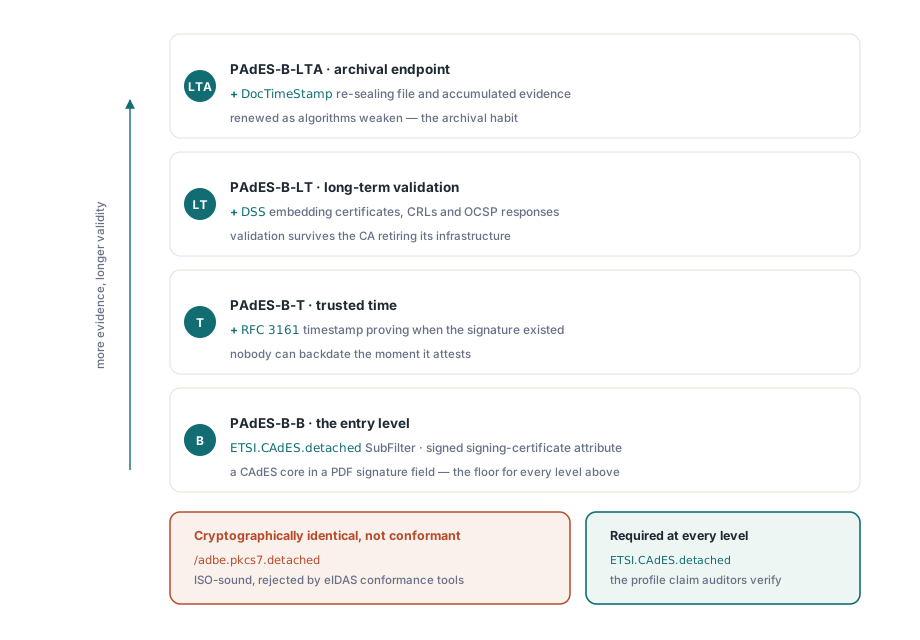
最初の PAdES 実装のほぼすべてがつまずく区別が 1 つあるので、コードの前に述べておく価値がある。/SubFilter /adbe.pkcs7.detached で書かれた署名は、Acrobat が有効だと報告する、まったく健全な ISO 32000-1 §12.8 準拠の署名である。しかしそれは PAdES 署名ではない。ETSI EN 319 142-1 は、どのベースラインレベルであっても ETSI.CAdES.detached を要求するからである。eIDAS の適合性チェッカーは、暗号技術としては同一であるにもかかわらず、前者を拒否し後者を受理する。プロファイルは文書が自らについて行う申告であり、その申告を正しくすることが PDF Library for Delphi での 1 回の呼び出しに集約されている
何が PDF 署名を PAdES 署名に変えるのか
ETSI EN 319 142-1 は、CMS フォーマットの上に積み重なる 4 つのベースラインレベルを定義している。PAdES-B-B は入り口であり、ETSI.CAdES.detached SubFilter と署名済みの signing-certificate 属性を持つ、PDF 署名フィールド内の CAdES 署名である。PAdES-B-T は、署名値に対する RFC 3161 タイムスタンプを追加し、誰にも遡って日付を偽ることのできないある時点より前にその署名が存在していたことを証明する。PAdES-B-LT は、検証に必要な証明書、CRL、OCSP レスポンスを Document Security Store に埋め込み、発行元の CA がインフラを廃止した後でもファイルが検証可能な状態を保てるようにする。PAdES-B-LTA は、アルゴリズムが弱体化していく中でも積み上がった証拠を再保護するドキュメントタイムスタンプでこの積み重ねの最上段を締めくくる
PDF Library for Delphi はこれらの概念を SignProcess API 上にマッピングしている。プロファイルの目印になるのは SetSignProcessCustomSubFilter である。ポリシー上コミットメントタイプの表示(発信元証明、承認証明、あるいは 1 から 6 まで番号付けされたほかの ETSI 識別子のいずれか)が必要な場合は、SetSignProcessCommitmentType を通す。明示的な署名ポリシーは SetSignProcessSignaturePolicy で付加し、これはポリシー OID とそのダイジェストを受け取る。1 つだけ注意すべき既定値がある。ダイジェストアルゴリズムを自動のままにしておくと、ライブラリは ETSI と adbe.pkcs7.detached の署名には SHA-256 を選び、レガシーな adbe.pkcs7.sha1 経路のときだけ SHA-1 にフォールバックする。それでも明示的に設定しておくこと。監査人はどのハッシュを使ったかを尋ねてくるものであり、コード中の明示的な値のほうが、マニュアルを読み直さないと説明できない既定値よりも弁明しやすい
ベースライン署名を生成する
フラット API は署名処理を単発のステートマシンとして駆動する。ソースファイルに対してプロセスを開き、設定し、出力ファイルへ完了させ、結果コードを読み取る。以下の一連の流れは、SHA-256 を使った PAdES-B-B 署名を生成する。最も重要な行は署名そのものとは無関係であり、意図的に大きく確保された /Contents の予約である。なぜなら、後からこの署名にタイムスタンプを追加する必要が生じたとき、それだけは後から変更できないからである
var
  Pdf: TPDFlib;
  SignId: Integer;
begin
  Pdf := TPDFlib.Create;
  try
    SignId := Pdf.NewSignProcessFromFile('invoice.pdf', '');
    if SignId = 0 then
      raise Exception.Create('cannot open source PDF');
    Pdf.SetSignProcessField(SignId, 'Sig1');
    Pdf.SetSignProcessPFXFromFile(SignId, 'company.pfx', PfxPassword);
    Pdf.SetSignProcessInfo(SignId, 'Approved', 'Vienna', 'billing@example.com');
    Pdf.SetSignProcessCustomSubFilter(SignId, 'ETSI.CAdES.detached');
    Pdf.SetSignProcessDigestAlgorithm(SignId, 2);          // SHA-256
    Pdf.SetSignProcessReserveContentsBytes(SignId, 8192);  // room for a timestamp later
    Pdf.EndSignProcessToFile(SignId, 'invoice-signed.pdf');
    if Pdf.GetSignProcessResult(SignId) <> 1 then
      raise Exception.CreateFmt('signing failed, code %d',
        [Pdf.GetSignProcessResult(SignId)]);
    Pdf.ReleaseSignProcess(SignId);
  finally
    Pdf.Free;
  end;
end;
NewSignProcessFromFile は、ソースをそもそも開けなかった場合に 0 を返す。その後は GetSignProcessResult が、実運用で実際に起こる失敗のパターンを切り分けてくれる。4 は誤った PDF パスワード、7 は誤った PFX パスワード、9 は秘密鍵を含まない証明書ファイル、10 は書き込み不能な出力パス、11 は署名バイトの適用中の失敗である。この数値コードを入力ファイル名の隣にログとして残しておけば、あいまいなサポートチケットが 1 分で診断できるものに変わる
ライブラリが取得してくれない RFC 3161 タイムスタンプを追加する
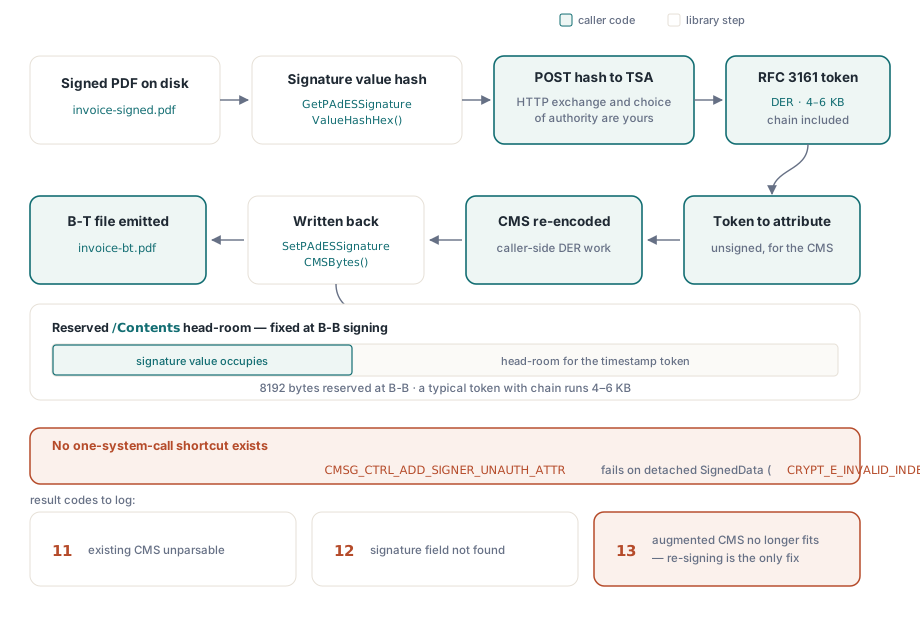
PDF Library for Delphi は TSA クライアントを一切同梱していないが、これは欠落ではなく意図的な境界である。ライブラリはタイムスタンプ局が対署名すべきハッシュを計算し、その後で拡張済みの CMS を再埋め込みする。その間の HTTP 通信と CMS への手術は呼び出し側の仕事になる。この分離には確かな技術的理由がある。未署名属性を追加するとされている Windows CryptoAPI の制御機能 CMSG_CTRL_ADD_SIGNER_UNAUTH_ATTR は、PAdES が使う分離型の SignedData レイアウトに対しては CRYPT_E_INVALID_INDEX で失敗する。したがって、拡張された CMS は自分自身で制御する CMS エンコーダーから作らなければならない。1 回のシステム呼び出しでトークンを静かに組み込めるライブラリなど存在せず、そう謳っているものがあれば、見えないどこかでこの手術を行っているだけである
var
  Pdf: TPDFlib;
  StsId: Integer;
  HashHex, TstDer, TsAttr, AugmentedCms: AnsiString;
begin
  Pdf := TPDFlib.Create;
  try
    StsId := Pdf.NewPAdESSignatureTimeStampProcessFromFile('invoice-signed.pdf', '');
    Pdf.SetPAdESSignatureTimeStampField(StsId, 'Sig1');
    Pdf.SetPAdESSignatureTimeStampDigestAlgorithm(StsId, 2);
    HashHex := Pdf.GetPAdESSignatureValueHashHex(StsId);
    // 下の2つのcallはapplication code:TSAへのHTTP POST、
    // およびtokenをunsigned attributeとして付けるCMS re-encode
    TstDer := RequestTimeStampToken(HashHex);
    TsAttr := Pdf.BuildPAdESSignatureTimeStampAttribute(TstDer);
    AugmentedCms := AttachUnsignedAttribute(Pdf.GetPAdESSignatureCMSBytes(StsId), TsAttr);
    Pdf.SetPAdESSignatureCMSBytes(StsId, AugmentedCms);
    Pdf.EndPAdESSignatureTimeStampProcessToFile(StsId, 'invoice-bt.pdf');
    if Pdf.GetPAdESSignatureTimeStampProcessResult(StsId) <> 1 then
      raise Exception.Create('timestamp embedding failed');
    Pdf.ReleasePAdESSignatureTimeStampProcess(StsId);
  finally
    Pdf.Free;
  end;
end;
ここでは結果コードに注意すること。12 は指定した署名フィールドが存在しないこと、11 は既存の CMS を解析できなかったこと、13 は拡張済みの CMS が予約済みの /Contents プレースホルダーにもう収まらないことを意味する。コード 13 が特に痛いのは、唯一の修正方法が再署名だからである。証明書チェーンを含む典型的なタイムスタンプトークンは 4 から 6 キロバイトに達し、B-B のステップで確保しておいた 8192 バイトの予約は、まさにこのステップのための余地としてそこにある
検証は証明書チェーンではなく ByteRange から始まる
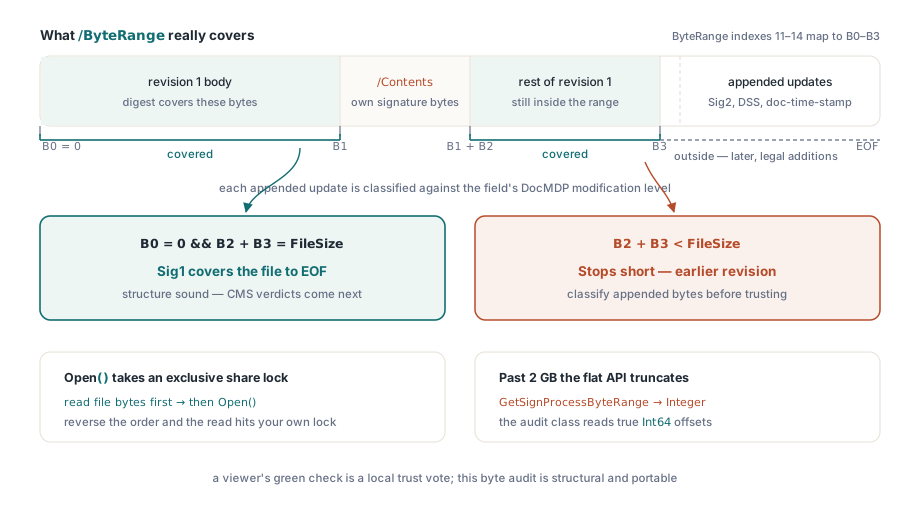
ビューアの緑色のチェックマークは、そのマシンの証明書ストアに対する信頼の判断であって、ファイルに関する構造的な判定ではない。プログラムによる検証はもっと低い層、増分更新によって見えにくくなる問いから始めるべきである。各署名は実際にはどのバイトをカバーしているのか。2 つ目の署名であれ、DSS 辞書であれ、ドキュメントタイムスタンプであれ、ここで扱うすべての拡張は増分更新を通じて到着し、それぞれの更新は以前の署名の /ByteRange の外側にバイトを追記する。それらの追記されたバイト自体は正当なものである。バリデータはそれでも、文書の変更ポリシーに照らしてそれらを分類しなければならない。そのポリシーが宿るフィールドごとの DocMDP レベルは、GetSignatureDocMDPLevelByName で読み取れる
var
  Doc: TPDFlibSignDoc;
  Names: TStringList;
  I: Integer;
  B0, B1, B2, B3, FileSize: Int64;
begin
  FileSize := TFile.GetSize('invoice-bt.pdf');  // before Open: SignDoc holds a share lock
  Doc := TPDFlibSignDoc.Create;
  try
    if not Doc.Open('invoice-bt.pdf', '', False) then
      raise Exception.Create('cannot open for audit');
    Names := TStringList.Create;
    try
      Doc.GetSignatureFieldNames(Names);
      for I := 0 to Names.Count - 1 do
        if Doc.GetSignatureValueObjNum(Names[I]) > 0 then   // >0なら実際に署名済み
        begin
          B0 := StrToInt64(string(Doc.GetSignatureValueByName(Names[I], 11)));
          B1 := StrToInt64(string(Doc.GetSignatureValueByName(Names[I], 12)));
          B2 := StrToInt64(string(Doc.GetSignatureValueByName(Names[I], 13)));
          B3 := StrToInt64(string(Doc.GetSignatureValueByName(Names[I], 14)));
          if (B0 = 0) and (B2 + B3 = FileSize) then
            Writeln(Names[I], ': covers the file to EOF')
          else
            Writeln(Names[I], ': earlier revision, or unexpected ByteRange layout');
        end;
    finally
      Names.Free;
    end;
    Doc.Close;
  finally
    Doc.Free;
  end;
end;
この監査経路には 2 つの落とし穴がある。TPDFlibSignDoc.Open はファイルを排他的な共有ロックのもとに置くため、CMS 検証のために生のファイルバイトもハッシュしたいバリデータは、監査用に開く前にファイルをメモリへ読み込んでおかなければならない。この順序を逆にすると、自分自身が設定したロックのせいで読み取りが失敗する。2 つ目の落とし穴は、はっきりとは表に出ない。フラット API 側の対応物である GetSignProcessByteRange は Integer を返すが、内部のオフセットは Int64 であるため、2 GB を超えるとフラット呼び出しは何の警告もなく値を切り捨ててしまう。この例が監査用クラスを通じてオフセットを取得しているのはそのためである。もう 1 つ、存在しないものについても述べておく価値がある。フラット層には VerifySignature のラッパーが一切存在しない。暗号学的な判定は、vsValid、vsInvalid、vsUnknown のいずれかを返すクラス層の TPDFlibSignatureVerifier から得るか、コンプライアンスポリシーがすでに信頼している外部バリデータから得ることになる
長期検証: DSS、VRI、そしてドキュメントタイムスタンプ
PAdES-B-LT が存在するのは、失効情報を扱うインフラにも寿命があるからである。ETSI EN 319 142-1 §5.4.2.2 は Document Security Store を規定している。証明書、CRL、OCSP レスポンスを保持する文書レベルの辞書であり、任意で、各署名の /Contents のハッシュをキーとする VRI エントリを通じて署名ごとに索引付けできる。PDF Library for Delphi のフローはタイムスタンプの設計をなぞっている。NewPAdESDSSProcessFromFile でプロセスを開き、AddPAdESDSSCertificate、AddPAdESDSSCRL、AddPAdESDSSOCSP が DER 形式のデータを受け取り、AddPAdESDSSVRI が選択した素材を 1 つの署名に結び付け、EndPAdESDSSProcessToFile がすべてを増分更新として書き出す。難しい部分は依然として自分の側に残る。失効情報を取得し、それを埋め込むだけの新しさがあるかどうかを判断するのは呼び出し側の仕事である。ライブラリが保証するのは辞書が構造的に適合していることだけであり、自分の OCSP レスポンダが真実を語っているかどうかまでは保証できない
アーカイブの終着点である B-LTA は、ドキュメントタイムスタンプを追加する。これは、Sig ではなく DocTimeStamp というタイプを持つ独立した署名フィールドであり、予約された署名長を伴う SetSignProcessDocTimeStamp を通じて生成する。これは B-T ステップの署名タイムスタンプを置き換えるものではない。署名タイムスタンプは、ある特定の署名がいつ存在していたかを証明するものであり、ドキュメントタイムスタンプは DSS の証拠も含めたファイル全体を保護するもので、アルゴリズムが弱体化していく中で長期アーカイブが数年ごとに更新していく要素である。成熟したアーカイブ用プロファイルは両方を備えている。これらの構造が登場する前に作られたリーダー向けには、TPDFlibSignDoc.EnsurePAdESExtensions が文書カタログに ESIC 開発者拡張を記録し、そのファイルが ETSI 定義の機能を使っていることを告知する
ここまでの内容に対して 1 つの反応をあらかじめ潰しておく価値がある。バグのように見えるが、実はそうではないからである。PAdES の構造としては完全に正しいファイルに対して、ビューアが「有効性不明」と報告することはよくある。信頼と構造は独立した軸である。ByteRange の監査と CMS の検証がどちらも通っていても、ビューアはそのマシン上で署名者を信頼するルートへ単純にチェーンできないだけであり、これはプライベート CA やテスト用証明書ではごくありふれたことである。この場合の対処法は、署名側のコードに手を加えることではなく、ルート証明書を適切に配布すること、あるいは適格な eIDAS ステータスが本来の目標であるなら EU の信頼リストに照らして評価することである
監査側の視点、つまり多数のファイル群にわたって署名フィールドを列挙し、ByteRange のレイアウトをダンプし、DocMDP レベルを一括で読み取るといった作業については、コンプライアンスと署名のワークベンチに関する関連記事を参照してほしい。アーカイブポリシーも同時に満たさなければならない署名済み文書は、Delphi における PDF/A と PDF/UA プリフライトで説明しているワークフローに沿うことになる。完全な API ドキュメントと評価版のダウンロードはlosLab PDF Library for Delphi製品ページで公開している