アクセシブルなPDFは、目に見えるページには決して現れない1つの構造の上に成り立っています。ISO 32000-1 §14.7が定義する構造ツリーです。これは見出し、段落、表、図版からなる論理階層で、描画された内容の上に重ねられ、ロールマップを通じて標準ロールへ対応づけられます。スクリーンリーダーが読むのはこのツリーであって、ページ上の描画ではありません。これが無ければ、見た目は完璧に生成された請求書も意味論的には空っぽです。コンテンツストリームは描画順序しか記録しないからです。合計額が明細より先に読み上げられることもあり、フッターが段落に割り込むこともあり、明細の表が区別のつかない語の羅列に崩れることもあります。それを防ぐコストは、圧倒的にこちら側に有利です。描画しながら構造を出力するのは数分のコードですが、完成した文書に後から組み込むのは改修プロジェクトになります。losLab PDF Library(PDF Library for Delphi)は、各描画操作をその論理的なロールで包む少数の呼び出しを通じて、DelphiとC++Builderにこのツリーを公開します
マークコンテンツが構造ツリーに結び付く仕組み
2つの層が協調します。コンテンツストリーム側では、描画操作がマークコンテンツシーケンスで囲まれ、それぞれが整数のMCIDを持ちます。ドキュメントカタログ側では、構造ツリーがそれらのMCIDを型付き要素(H1、P、Table、Figure)の階層へ対応づけ、代替テキストや言語といった属性を添えます。独自の要素型も規格上は認められますが、その1つ1つがロールマップを介して標準ロールへ解決されなければなりません(ISO 32000-1 §14.8.4)。罫線、背景、繰り返されるページ装飾のように何の意味も持たない内容はアーティファクトとしてマークし、支援技術が文の途中で読み上げてしまわずに読み飛ばせるようにします
PDF Library for Delphiは、この2つの層を1組のブラケットの背後でまとめて管理します。BeginTagが構造要素を開いてマークコンテンツシーケンスを開始し、描画呼び出しがその内側に入り、EndTagが両方を閉じます。手書きのタグ付けでつまずくお決まりの帳簿仕事、つまりMCIDと親ツリーとページ参照は、こちらが間違えようのない内部で処理されます
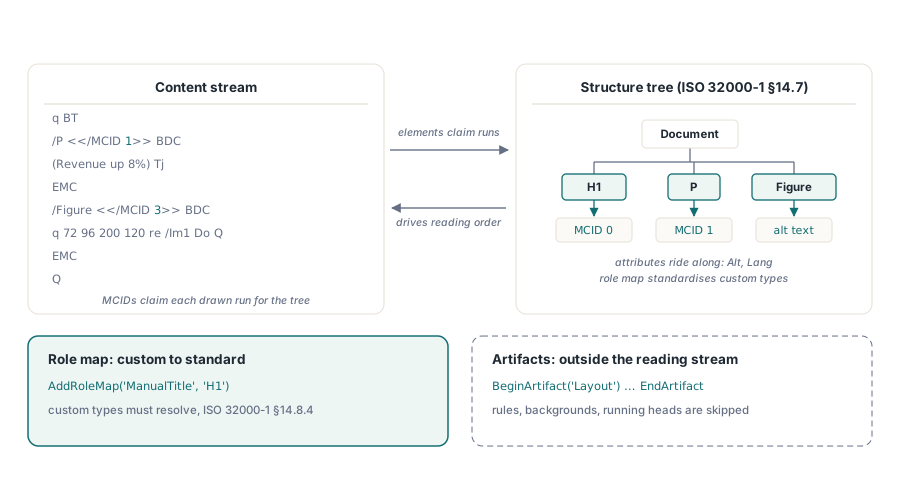
文書レベルの2つのスイッチが、タグを開く前に作業の枠組みを決めます。SetMarkInfoは文書がタグ付きであることを宣言するカタログのフラグを書き込み、IsTaggedPDFはそれを読み戻します。受け取ったファイルに保存する価値のある構造があるかを判断するとき、これが最も安価な最初の探りになります。言語には入り口が2つあります。SetDocumentLanguageは文書既定の言語だけを設定し、SetPDFUAModeは完全なPDF/UA出力を有効化する一環としてそれを設定します。PDF/UA準拠を主張しなくても有用にタグ付けされたファイルはあり得ますし、段階的な導入はまさにそこから始まることが多いのです
後付けではなく描画しながらタグを付ける
実際に機能する生成パターンは、タグのブラケットをすべての描画呼び出しのシグネチャの一部として扱い、後工程として扱わないことです:
var
  Lib: TPDFlib;
begin
  Lib := TPDFlib.Create;
  try
    Lib.SetOrigin(1);                          // 左上を原点にする
    Lib.SetPDFUAMode('en-US');                 // 保存バージョンをPDF 1.7へ引き上げる
    Lib.SetInformation(1, 'Service Manual');   // PDF/UAでは/Titleが必須
    Lib.AddRoleMap('ManualTitle', 'H1');       // カスタム型 -> 標準ロール
    Lib.AddStandardFont(4);
    Lib.SetTextSize(18);
    Lib.BeginTagEx2('ManualTitle', '', '', 'en-US', '', 'h1-cover', '');
    Lib.DrawText(72, 96, 'Service Manual');
    Lib.EndTag;
    Lib.BeginTag('Figure', 'Exploded view of the gearbox assembly', '');
    Lib.AddImageFromFile('gearbox.png', 0);
    Lib.EndTag;
    Lib.BeginArtifact('Layout');               // ページ装飾:読み上げから除外される
    // ... 罫線と背景の色を描画 ...
    Lib.EndArtifact;
    Lib.SaveToFile('manual.pdf');
  finally
    Lib.Free;
  end;
end;そのシーケンスの中で3つの呼び出しが準拠上の重みを持ちます。SetPDFUAModeはPDF/UA出力を有効にし、文書バージョンを黙ってPDF 1.7へ引き上げるため、バージョンの固定と衝突します。LockSaveVersionでPDF 1.4に固定した文書は、UAモードが有効になった時点で保存を拒否し、エラーコード602を返します。これは、アーカイブ用プロファイルとアクセシビリティ要件を別々のチームが設定しているときに表面化しがちな衝突です。SetInformation(1, ...)は文書タイトルを書き込みます。ISO 14289はビューアがファイル名の代わりにこれを表示することを期待しており、その欠落は実運用で最も多いPDF/UAの指摘の1つです。AddRoleMapはカスタムのManualTitle型をH1として登録するもので、これを飛ばすと後述の診断が未対応のロールを指摘し続けます
見出しレベルには、ページの見栄えで場当たり的に決めるのではなく、意図的な方針が必要です。スクリーンリーダーの利用者は見出しのショートカットでセクション間を移動するので、視覚デザイン上で中間のレベルが大きすぎたという理由からH1の次にH3へ飛ぶテンプレートは、そのナビゲーションを静かに壊します。しかも目視のレビューでは決して見つかりません。まさにHEADING-LEVEL-SKIP診断が名指しするために存在する不具合です。各テンプレートの視覚スタイルを固定の見出し階層へ一度、一箇所で対応づけておけば、ずれはそもそも始まりません
スクリーンリーダーが実際にたどれる表
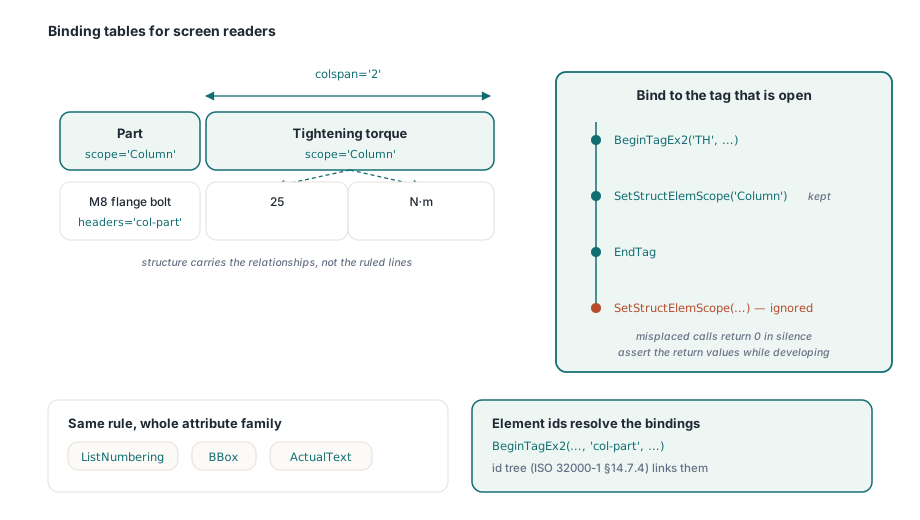
描かれた罫線は画面の外では何の意味も持ちません。スクリーンリーダーがたどるのは構造的な関係です。どのセルがヘッダーか、各ヘッダーが何を統べるか、不規則なレイアウトでデータセルがどのヘッダーに結び付くか。構造要素の属性呼び出しがこの3つすべてを扱います:
Lib.BeginTag('Table', '', '');
Lib.BeginTag('TR', '', '');
Lib.BeginTagEx2('TH', '', '', '', '', 'col-part', '');
Lib.SetStructElemScope('Column');          // このTHが開いている間だけ有効
Lib.DrawText(72, 120, 'Part');
Lib.EndTag;
Lib.BeginTagEx2('TH', '', '', '', '', 'col-torque', '');
Lib.SetStructElemScope('Column');
Lib.SetStructElemColSpan(2);               // ヘッダーが値と単位の2列にまたがる
Lib.DrawText(200, 120, 'Tightening torque');
Lib.EndTag;
Lib.EndTag;
Lib.BeginTag('TR', '', '');
Lib.BeginTag('TD', '', '');
Lib.SetStructElemHeaders('col-part');      // 不規則な表のための明示的な結び付け
Lib.DrawText(72, 140, 'M8 flange bolt');
Lib.EndTag;
Lib.EndTag;
Lib.EndTag; // Table順序の規則は厳格で、しかも黙って強制されます。SetStructElem*系の呼び出しはすべて、その瞬間に開いているタグ、つまりBeginTagとEndTagの間にあるタグに適用され、タグが開いていない場合や属性が現在のタグに当てはまらない場合は、何も例外を出さずに0を返します。置き場所を誤った呼び出しは、ただ消えます。開発中に戻り値をアサーションで包んでおけば、まだ目に見えるうちにずれを捕まえられます。放置すれば、抜け落ちたスコープはアクセシビリティ監査が実際のスクリーンリーダーで表を読ませたときにしか現れません。BeginTagEx2に渡す要素IDはIDツリー(ISO 32000-1 §14.7.4)に入り、そもそもSetStructElemHeadersの結び付けが解決できるのはそのおかげです
同じ属性のファミリーが、支援技術の頼る残りの部分もカバーします。SetStructElemListNumberingはリスト項目のラベルの付き方を宣言するので、スクリーンリーダーは箇条書きの記号を読み上げる代わりにリスト内の位置を伝えます。SetStructElemBBoxは図や表の境界ボックスを記録し、リフロー表示がコンテンツの配置に使います。SetStructElemActualTextは、ベクター画像で組まれたドロップキャップのように、グリフが読める文字へ対応しない範囲に置き換えテキストを与えます。どれも同じ規則に従います。開いているタグに結び付くか、さもなくば消えるか、です
アーティファクト、言語、そして保存前の診断ゲート
繰り返されるページ装飾、つまりページ上部の繰り返しヘッダー、折り目の印、透かし、背景の色は、BeginArtifactとEndArtifactのブラケットの内側に置き、読み上げの流れに決して入らないようにします。言語は継承されます。文書既定はSetPDFUAModeの引数から来て、別の言語の範囲はBeginTagExまたはSetStructElemLangで要素ごとに上書きします。英語のマニュアルの中にあるフランス語の引用が発音可能なまま保たれるのは、これがあるからです
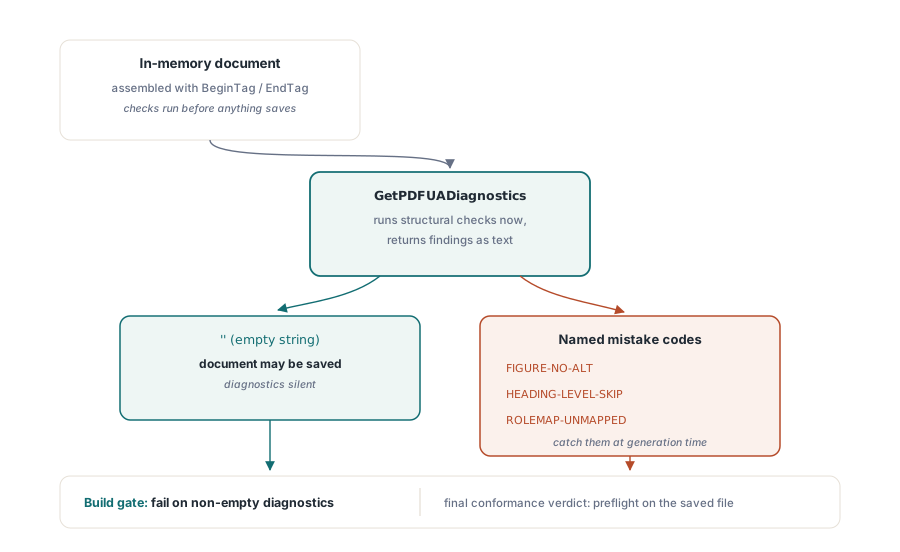
保存の前に、GetPDFUADiagnosticsがメモリ上の文書に対してライブラリの構造チェックを走らせ、指摘をテキストで返します。空文字列は何も見つからなかったことを意味します。コードは古典的な作成ミスをそのまま名指しします。代替テキストのない画像にはFIGURE-NO-ALT、H1の次にH3が来た場合にはHEADING-LEVEL-SKIP、一度も登録されていないカスタム型にはROLEMAP-UNMAPPEDです。これをビルドに組み込めば(文書一式を生成し、診断が空でなければそのステップを失敗させる)、アクセシビリティのリグレッションは数か月後の監査での指摘ではなく、コンパイルエラーのような失敗になります。準拠の最終的な判定は依然として保存後のファイルに対するプリフライトの仕事であり、それはDelphiでのPDF/AとPDF/UAプリフライトで扱っています。正規化の一部はシリアライズ時にしか適用されないからです
注釈のナビゲーションには専用のつまみがあります。PDF/UAはフォームフィールドとリンクのキーボード移動が構造の順序に従うことを期待しており、SetTabOrderModeがビューアの尊重するページレベルのタブ順序エントリを書き込みます。受け取ったファイルの監査用にはGetTabOrderModeが用意されています。キーボードだけを使う利用者がバグを報告するまで誰も気づかない種類の要件で、正しくするのに要するのは文書あたり1回の呼び出しだけです
構造ツリーはすべてのマージを生き延びるわけではない
タグ付き文書がタグ付きのままでいられるのは、後続のすべての処理がツリーを保つ場合だけで、PDF Library for Delphiの中で鋭い刃になっているのはマージリストの一族です。MergeFileListFastは構造ツリーの保存を速度と引き換えにします。スキャン画像のバッチにはそれが正しい取引ですが、タグ付きのレポートには誤った取引です。出力は問題なく開き、同じように描画され、そして静かにアクセシビリティ層を失っているからです。入力のどれかがタグ付きなら既定のMergeFileListか厳格な変種を使い、IsTaggedPDFを組み立て後のアサーションに含めて、平坦化されたバッチが誰にも気づかれないまま出荷されないようにしてください。大規模な文書一式の組み立てパイプラインには、この種のトレードオフがさらにあり、大きなPDFのマージ、分割、直接アクセスで掘り下げています
検証のループはライブラリの外で閉じます。出力をAcrobatで開いてタグのパネルを確認し、テンプレートの系統ごとに少なくとも1つの文書を実際のスクリーンリーダーで読ませてください。診断は構造上の誤りを捕まえますが、技術的には妥当なのに実際には意味の通らない読み上げ順序を捕まえられるのは人間の耳だけです。評価版のビルドとタグ付けAPIの完全なリファレンスはlosLab PDF Library for Delphi製品ページにあります