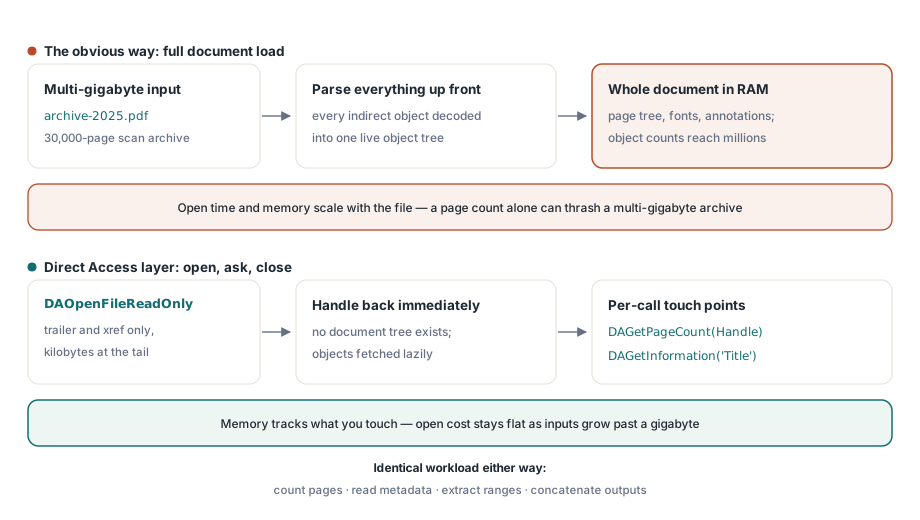
2 ギガバイトの PDF を分かりやすい方法でマージまたは分割すると、一度に 2 つのコストがかかります。実行時間とアドレス空間です。分かりやすい方法とは、各入力を読み込み、作業を行い、出力を書き出すというものです。壊れるのは読み込みの部分です。300 DPI から 600 DPI に移行したスキャンアーカイブは線形解像度が倍になり、ディスク上ではおおよそ 4 倍になります。そのため、1 年間ずっと 400 MB のファイルを扱ってきたのと同じ組み立てジョブが、入力が 1 ギガバイトを超えた瞬間、ページ数を数えるだけの作業であってもスラッシングを起こし始めます。タスクそのものが難しくなったわけではありません。開いて、数えて、範囲を選び、連結する。それがすべてです。そのサイズになると、ツリー全体を読み込むことは単に理にかなった既定の動作ではなくなります。losLab の Delphi/C++Builder 向け PDF ライブラリである PDF Library for Delphi は、これに Direct Access レイヤーで応えます。文書全体をメモリ上に構築する代わりに、その場でクロスリファレンステーブルを歩くストリーミングリーダーに支えられた、DA プレフィックスの関数群です
フルロードでメモリはどこへ消えるのか
PDF を「通常どおり」読み込むということは、xref をパースし、すべての間接オブジェクトをメモリ上のツリーに解決し、オブジェクトストリームをデコードし、ページツリー、フォント、注釈を操作可能なオブジェクトへと配線することを意味します。編集ワークフローにとっては、それが正しいトレードオフです。マージ、分割、検査の作業にとっては、ほとんどが無駄です。3万ページのスキャンアーカイブは数百万の間接オブジェクトを保持していることがありますが、分割ジョブが読む必要があるのはそのうちの数百個、つまり要求された範囲内のページノードと、そのノードが参照するものだけです
Direct Access レイヤーはそのモデルを反転させます。DAOpenFile と DAOpenFileReadOnly は、ファイルの末尾にある数キロバイトのトレーラーと xref をパースし、ファイルハンドルを返します。オブジェクトは、呼び出しがそれを必要としたときに遅延して取得されます。実務上の結果として、数ギガバイトのファイルを開くのにかかる時間は小さなファイルを開くのとほぼ同じになり、メモリはファイルが含む内容ではなく、あなたが触れたものに追従します
巨大なファイルを読み込まずに探る
以下のパターンは、ライブラリ自身の大容量ファイルベンチマークから採ったものです。読み取り専用で開き、質問し、閉じる。文書ツリーは一度も存在しません
var
  Lib: TPDFlib;
  Handle, Pages: Integer;
begin
  Lib := TPDFlib.Create;
  try
    Handle := Lib.DAOpenFileReadOnly('archive-2025.pdf', '');
    if Handle = 0 then
      raise Exception.Create('Direct access open failed');
    Pages := Lib.DAGetPageCount(Handle);
    Writeln('pages : ', Pages);
    Writeln('title : ', Lib.DAGetInformation(Handle, 'Title'));
    Lib.DACloseFile(Handle);
  finally
    Lib.Free;
  end;
end;
読み取り専用モードは、可能な限り選ぶ価値があります。他のプロセスがファイルを保持している間にも取り込みステージを実行できるようになり、意図を明示することにもなります。誤って変更を伴う関数を呼び出してしまう探索ステージは、アーカイブを破損させるのではなく即座に失敗します
PageRef はオブジェクトハンドルであり、ページ番号ではない
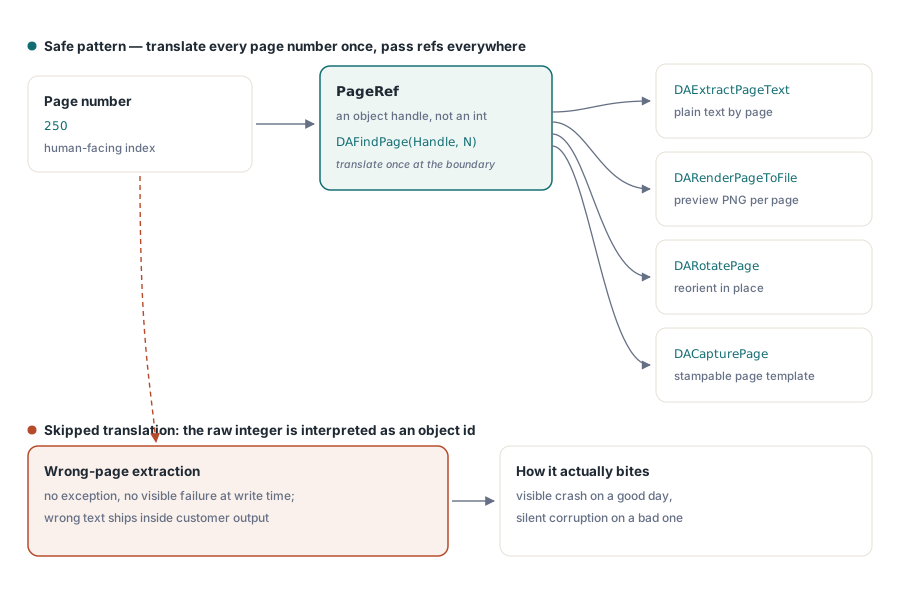
DA API で最もよくある間違いは、関数が PageRef を期待している場所にページ番号を渡してしまうことです。ページ単位のほぼすべての DA 呼び出しは、ページ番号ではなくページオブジェクトへの参照ハンドルを受け取ります。DAExtractPageText、DARenderPageToFile、DARotatePage、DACapturePage はすべて ref を期待します。人間向けの番号を DAFindPage に通すことで、それを手に入れます
PageRef := Lib.DAFindPage(Handle, 250);          // ページ番号 -> オブジェクトハンドル
if PageRef <> 0 then
begin
  Text := Lib.DAExtractPageText(Handle, PageRef, 0);
  Lib.DARenderPageToFile(Handle, PageRef, 5, 150, 'page250.png');
end;
生の数値 250 をそのまま渡しても、エラーは発生しません。そのハンドル値の背後にたまたま存在するオブジェクトが何であれ、それを対象にしてしまいます。運が良ければ目に見える形で失敗しますが、運が悪ければ間違ったページからテキストを抽出し、顧客向けの文書に紛れ込ませてしまいます。DA レイヤーを自前のサービスコードでラップするなら、この変換をスキップできないようにしてください。境界ではページ番号を受け取り、直ちに DAFindPage を呼び出し、内部では ref だけを渡すようにします
名前付きリストで数百のファイルをマージする
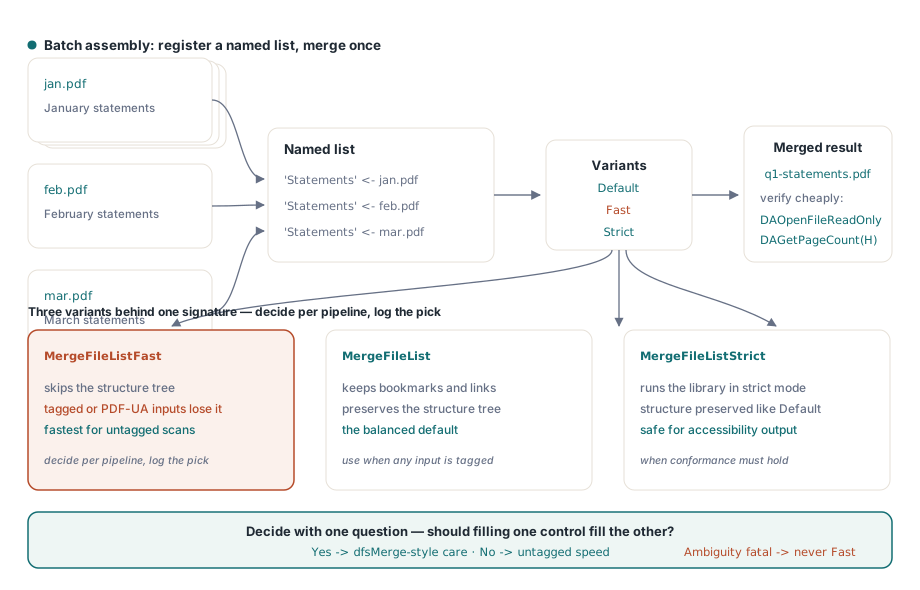
2 つのファイルであれば、MergeFiles(First, Second, Output) で十分です。バッチ組み立てはファイルリストを通じてよりよくスケールします。入力をリスト名のもとに登録し、そのリストを 1 回のパスでマージします
Lib.AddToFileList('Statements', 'jan.pdf');
Lib.AddToFileList('Statements', 'feb.pdf');
Lib.AddToFileList('Statements', 'mar.pdf');
Lib.MergeFileList('Statements', 'q1-statements.pdf');

// 安上がりな方法で結果を検証する: 再び direct access を使う
Handle := Lib.DAOpenFileReadOnly('q1-statements.pdf', '');
Writeln('merged pages: ', Lib.DAGetPageCount(Handle));
Lib.DACloseFile(Handle);
マージ系の関数には 3 つのバリエーションがあり、その違いは速度だけではありません。MergeFileListFast は構造ツリーの保存を省略します。MergeFileListStrict は厳格モードを強制します。接尾辞のないバージョンはバランスの取れた既定です。ここから導かれる運用上のルールは、アクセシビリティ構造を生き延びさせなければならないタグ付き PDF が入力に含まれる場合、PDF/UA 向けに生成されるものが分かりやすい例ですが、その場合は既定または Strict のバリアントを使うべきだということです。Fast は構造ツリーを静かに落としてしまうからです。タグ付けのない単純なスキャンアーカイブであれば、Fast は無料の性能向上です。開発者の気分ではなくパイプラインごとに決め、使用したバリアントをジョブログに記録してください
読み込まずに分割する: 範囲抽出
分割も同じ「読み込まない」という哲学に従います。ExtractFilePages(InputFileName, Password, OutputFileName, RangeList) は、'1-500'、'501-1000'、あるいはカンマ区切りの選択のような範囲リストを使って、ページ範囲をファイルからファイルへ直接引き出します。ソースが文書ツリーになることは決してありません。文書が他の理由ですでに読み込まれている場合、ExtractPageRanges は現在の文書から新しいメモリ上の文書を生成し、CopyPageRanges は ID によって別の読み込み済み文書から範囲を引き出します。統合された印刷ストリームを明細書単位で分割する場合、ファイルからファイルへの形式が、4 GB の入力が RAM 上に膨れ上がることを防いでくれる形式です
ジオメトリについて嘘をつくファイル
大容量ファイルのパイプラインは、小規模ファイルのパイプラインでは決して目にしないような頻度で破損ファイルに出会います。単に、入力がより多くのシステムを通過するからです。明示的な対処に値する 2 つの破損パターンがあります
1 つ目はヘッダーのずれです。メールゲートウェイや印刷スプーラーは、PDF の先頭にバイトを付け足すことがあり、その結果 %PDF マーカーはオフセット 0 に存在しなくなり、ファイル内のすべての xref オフセットが同じ量だけずれてしまいます。ストリーミングリーダーはこれを検出して公開し(フラットなレベルでは DAShiftedHeader、TSmartPDFReader 上では ShiftedHeader)、読み取りの際にそれを補正します。自前のオフセット演算は通常そうしないため、「自分たちが生成するすべてのファイルでは動くのに、顧客 X のファイルでは失敗する」というのが典型的な症状になります
2 つ目は壊れたクロスリファレンステーブルです。DACopyFile(InputFileName, OutputFileName, PageCount) は、xref を再構築しながらファイル全体を新しいコピーへとストリーミングし、副産物としてページ数を返します。これを、うるさい下流の消費者の手前で正規化ステージとして実行すれば、断続的なパース失敗の一種を、1 つの予測可能な修復ステップに変えることができます。そして自分自身の編集を保存する必要があるときは、DAAppendFile がそれをインクリメンタルな更新として書き込み、数ギガバイトを書き直すのではなく新しいリビジョンを追加するため、保存コストはファイルのサイズではなく変更の量に比例したままになります
配信の細部: 線形化と合成
大容量ファイルのパイプラインを仕上げる、隣り合う 2 つの機能があります。組み立てられた出力がブラウザ内表示のために HTTP 経由で配信される場合、LinearizeFile はそれをバイト範囲ストリーミング向けに再編成し、500 MB のパケットの残りがダウンロードし終える前に最初のページが表示されるようにします。これはすべてのマージが終わった後、最終ステージとして実行してください。それより後の変更は、ファイルを再び非線形化してしまうからです。そしてパケットが単純な連結ではなく合成を必要とするとき、たとえばすべての明細書の裏に表紙を焼き込む、あるいは 2 つのソースページを 1 つの出力シートに割り付けるといった場合、DACapturePage は任意のページを再利用可能なテンプレートに変え、DADrawCapturedPage はそれを任意の矩形で宛先ページに配置します。数ギガバイトのソースに対してフルの文書読み込みを行うことなくです
制限と読み取り専用のまま残るもの
Direct Access 自身が枯渇するよりずっと前に、フォーマットそのものの容量が尽きます。オフセットは DA レイヤーの全域で Int64 であるため、実際の上限は利用可能なディスク容量と、クラシック(非ストリーム)クロスリファレンステーブルの 10 桁の xref オフセットフィールドです。実務上、数ギガバイトのスキャンアーカイブは何ら特別なものではなく、オブジェクトは呼び出しが要求したときにのみ読み込まれるため、メモリはファイルサイズにかかわらず有界のままです
十分によく出てくるため直接答えておく価値のある質問が 2 つあります。既定の経路を通したマージは文書構造を運ぶため、ブックマークとリンクは生き延びます。構造ツリーを速度と引き換えにするのは Fast バリアントであり、それこそがタグ付けされていない入力向けにこれを取っておく理由のすべてです。安全な習慣は、マージされた出力を開き、そのアウトラインを歩き、出荷前にいくつかの内部リンクを抜き打ちでチェックすることです。編集については、読み取り専用の探索とフルロードの間に有用な中間地点があります。ページレベルの操作はハンドルに対して直接動作し、DARotatePage、DAMovePage、DAHidePage がその代表であり、フォームフィールドの読み取りも含まれます。DAAppendFile はそれらの編集をインクリメンタルなリビジョンとして永続化します。ページ内のマーキング演算子を書き換えるような、コンテンツレベルの編集は、依然としてフル文書レイヤーの領分です
関連記事
マージした出力がアクセシブルなままである必要がある場合、構造ツリーの背景についてはタグ付き PDF アクセシビリティの記事で扱っており、Fast マージバリアントが正確に何を破棄するのかを説明しています。分割した範囲からコンテンツを取り出すことについては、テキスト、画像、フォント抽出ガイドを参照してください
Direct Access の完全な関数一覧はライブラリに同梱されています。エディションとトライアルダウンロードは PDF Library for Delphi 製品ページにあります