既存の PDF からテキスト、画像、フォントを取り出す問題は、実際のコーパスを通すまでは解決済みに思えます。検索インデクサーを 4 万件の顧客ファイルに向けると、破損はいくつかの見慣れたパターンに分類されていきます。単語同士がくっついてしまうのは、どのくらいの幅の隙間をスペースと数えるのかを、誰も抽出側に教えていないからです。別のページが文字化けして返ってくるのは、サブセット化されたフォントがグリフコードから実際の文字へのマップを保持していないからです。そして「会社のロゴ」は、ソフトマスクの背後に積み重なった 9 つの独立した画像オブジェクトだったりします。これらはいずれもライブラリのバグではありません。抽出関数を呼ぶことと、その関数がディスク上のバイトから何を回復できて何ができないのかを理解することの、その差なのです
losLab PDF Library の Pascal エディションは、Delphi と C++Builder のコードに、これら 3 つのストリームを読み取る方法を複数提供しており、レベルごとに保証内容が異なります。こつは、レベルを仕事に合わせることです。検索インデックス、黒塗りレビュー、PDF/A プリフライトは同じページから異なるものを求めるため、間違った呼び出しに手を伸ばすと、労力を浪費するか信頼できない出力が得られることになります
テキスト抽出のレベルと、それぞれが保証するもの
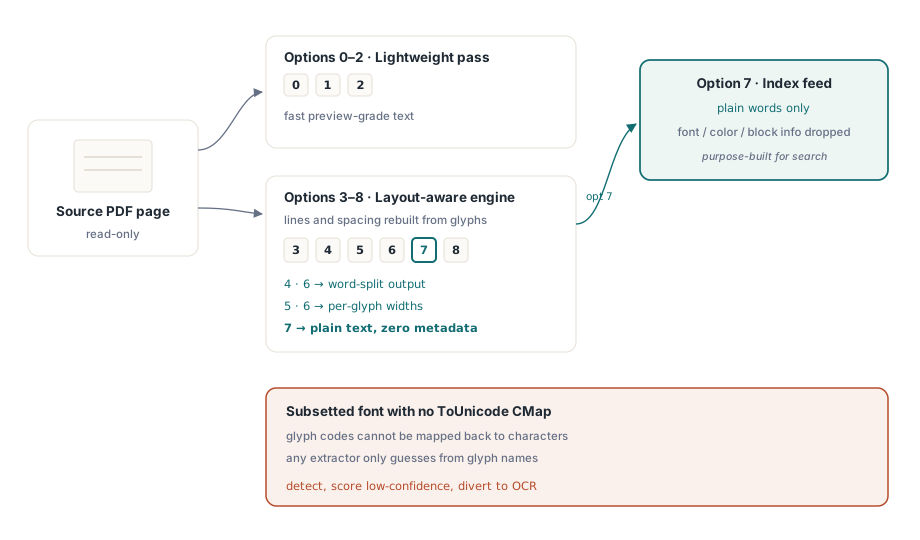
GetPageText は 0 から 8 のオプション値を取ります。この数値が選ぶのは書式ではなくエンジンです。0 から 2 は軽量なパスを実行し、手早いプレビューには十分です。3 から 8 はレイアウト認識エンジンを経由し、グリフがページ上に実際に置かれている位置から行と字間を再構築します。この範囲内でもバリエーションが効きます。4 と 6 は出力を単語に分割し、5 と 6 はグリフごとの幅を出力し、7 はフォント・色・ブロックのメタデータを意図的に落としたプレーンテキストを返します。インデックスが求めるのは単語だけで他には何もないため、検索インデックスに与えるべきはオプション 7 です
そもそも情報を持っていない文書は、どんなオプション設定でも救えません。PDF は文字コードをグリフの形状へマップし、そのコードを読めるテキストへ戻す唯一の存在は、フォントの ToUnicode CMap(ISO 32000-1 §9.10)です。サブセット化されたフォントがそれを持たずに出荷されてくると、すべての抽出器が手詰まりになります。このライブラリも、ビューア内のコピー&ペーストも、競合するツールキットも、グリフ名からの推測か、何も返さないことへと追い込まれます。実務的な対応は、無理な修正ではなく検出です。ページを低信頼度と採点して OCR へ回します。ゴミを黙ってインデックスする方が、読めないと認めるよりも悪いためです
フラットなオプションではカバーしきれないケース、つまりカスタムトークン化、コンテンツストリームの調査、独自ルールで組み上げるテキストファネルのために、デコーダーは 1 階層下で利用できます。TPDFExtractor はページのリソース辞書とフォントコレクションの上に構築されます。その ExtractTextW メソッドは、生のコンテンツストリームのテキスト演算を同じフォント機構に通し直して Unicode を復元し、OnFindObject イベントは、ストリームを流れていく各オブジェクトをその場で渡します。ほとんどのコードはここまで深く降りる必要はありません。降りることになるアプリケーションこそ、この階層が埋もれずに公開されていることを喜ぶ側です
位置付きブロック:検索ヒットと黒塗りレビューの単位
プレーンテキストは、ページが何を言っているかを教えてくれます。しかし遅かれ早かれ、製品はそれをどこで言っているかも知る必要が出てきます。検索ヒットをハイライトし、黒塗り候補の周囲に枠を描き、注釈を正しい位置に固定するためです。ExtractPageTextBlocks はテキストランのリストへのハンドルを返し、各ランはそのテキスト、バウンディングボックス、設定時のフォント名とサイズを運んできます:
var
  Pdf: TPDFlib;
  Blocks, I: Integer;
begin
  Pdf := TPDFlib.Create;
  try
    if Pdf.LoadFromFile('contract.pdf', '') <> 1 then
      raise Exception.Create('load failed');
    Pdf.SelectPage(1);
    Blocks := Pdf.ExtractPageTextBlocks(0);
    for I := 0 to Pdf.GetTextBlockCount(Blocks) - 1 do
      Writeln(Format('%s  [%s %.1f pt at %.0f,%.0f]',
        [Pdf.GetTextBlockText(Blocks, I),
         Pdf.GetTextBlockFontName(Blocks, I),
         Pdf.GetTextBlockFontSize(Blocks, I),
         Pdf.GetTextBlockBound(Blocks, I, 0),
         Pdf.GetTextBlockBound(Blocks, I, 1)]));
    Pdf.ReleaseTextBlocks(Blocks);
  finally
    Pdf.Free;
  end;
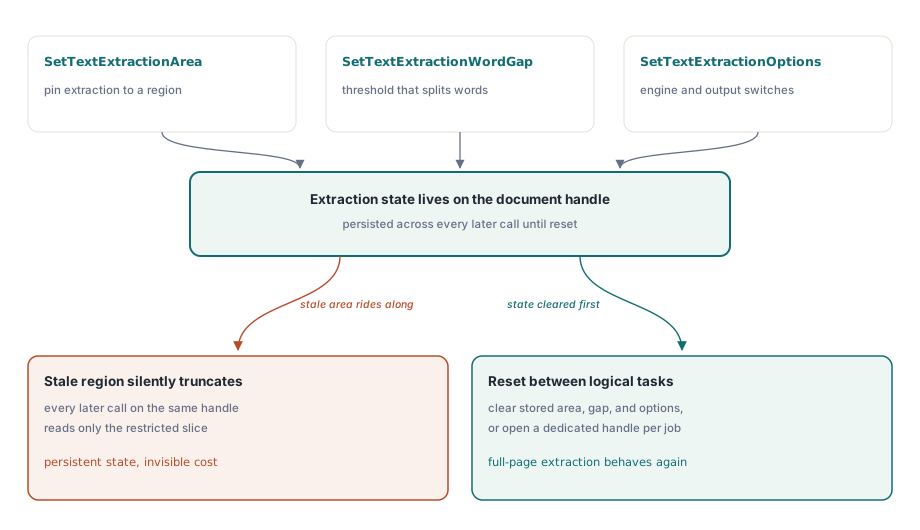
end;この領域で統合をつまずかせる他のどの問題よりも多いのが、次の細部です。SetTextExtractionArea、SetTextExtractionWordGap、SetTextExtractionOptions は、呼び出しごとに渡す引数ではなく、残存し続けるドキュメントレベルの状態です。ある機能のために領域制限を設定すると、たとえば文書を分類するためにヘッダー帯だけを読む設定にすると、後で手に取るレイアウト認識付き GetPageText レベルも含め、同じハンドル上でその後に続くすべての抽出を黙って切り詰めます。論理タスクの間で抽出状態をリセットするか、タスクごとに独自のドキュメントハンドルを与えるか、どちらかにしてください
単語ギャップのしきい値は、最初の故障パターン、つまり単語の連結を解決するためのレバーです。SetTextExtractionWordGap は、ページ自身のグリフ間隔を基準に測って、どれだけの水平距離が次の単語との区切りと数えられるかをレイアウトエンジンに伝えます。密度の高い表は、ゆったりと組まれたマーケティングページよりも小さなギャップを求めるため、文書クラスごとに調整したしきい値は、単一のグローバル定数に勝ります。他の抽出状態と同じくドキュメント上に残存するため、一度設定して忘れるのではなく、意図的に設定する計画を立ててください
画像:スクリーンショットではなくオリジナルストリーム
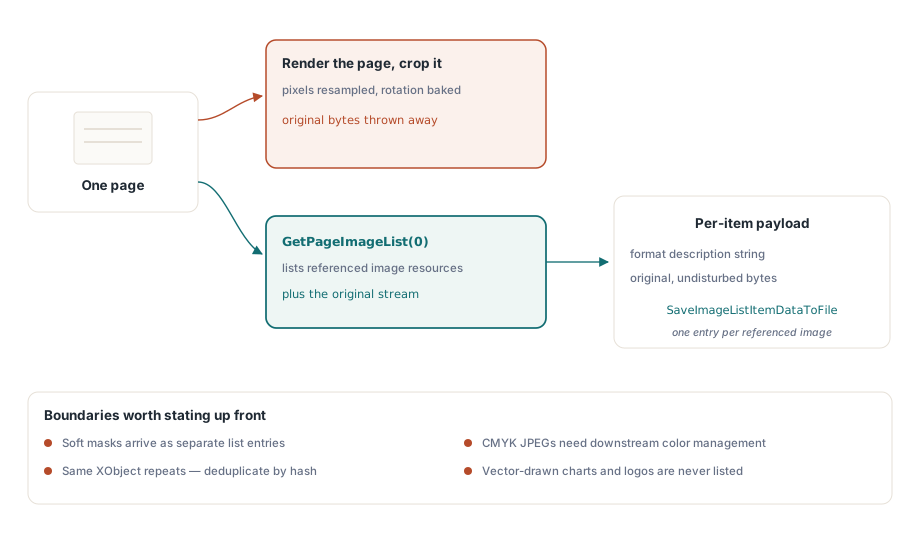
PDF から画像を取り出す間違った方法は、ページをレンダリングして切り抜くことです。それではピクセルが再サンプリングされ、回転が焼き込まれ、オリジナルが何であったかは捨てられます。GetPageImageList はその代わりに、ページが参照する実際の画像リソースを列挙します。各項目は、そのプロパティと、手つかずのオリジナルデータを返します:
var
  ImgList, I: Integer;
begin
  Pdf.SelectPage(1);
  ImgList := Pdf.GetPageImageList(0);
  for I := 0 to Pdf.GetImageListCount(ImgList) - 1 do
  begin
    Writeln(Pdf.GetImageListItemFormatDesc(ImgList, I, 0));
    Pdf.SaveImageListItemDataToFile(ImgList, I, 0,
      Format('page1-img%.2d.bin', [I]));
  end;
  Pdf.ReleaseImageList(ImgList);
end;
項目について何かを想定する前に GetImageListItemFormatDesc を確認してください。ページが参照しているものが、可視画像 1 つにつき整った 1 枚の絵であることはまれだからです。ソフトマスクは、それ自身の独立したエントリとして現れます。同じ XObject が多くのページで繰り返されることはよくあるため、「全画像」エクスポートをアーカイブする前にコンテンツハッシュで重複排除しないと、同じロゴを 100 回書き出すことになります。CMYK JPEG は下流でカラーマネジメントを適用する必要があり、適用しなければ、チャンネルを額面どおりに受け取るビューアで反転して描画されます。1 ページずつではなく文書全体のインベントリが必要なときは、FindImages と SetFindImagesMode の組み合わせで、ファイル全体を 1 パスで走査できます
受け入れ基準が書かれる前にステークホルダーと確認しておく価値のある境界が 1 つあります。画像抽出が返すのはラスターのリソースだけだということです。ベクターパスとして描かれたロゴやグラフは、リソースという意味での画像ではなく、画面上でどれだけはっきりと絵として読めても、どんな画像リストにも決して現れません。そのグラフをファイルとして納品することが本当に要件なら、正直なアプローチはページ領域をビットマップへレンダリングすることであり、それは異なる忠実度を持つ異なる操作です。この 2 種類の出力を、どちらがどちらかを示すラベルなしに同じエクスポートフォルダへ置くべきではありません
フォント:エクスポート機能ではなく監査のための面
フォント API は、フォントについての質問に答えます。フォントファイルそのものを手渡すわけではなく、この区別が、その上に構築できるすべてを形作ります。FindFonts が文書を走査した後、列挙はフォントを ID で渡り歩き、プロパティ呼び出しは現在選択されているフォントについて報告します:
var
  I: Integer;
begin
  Pdf.FindFonts;
  for I := 1 to Pdf.FontCount do        // フォントのインデックスは 0 ではなく 1 から始まる
    if Pdf.SelectFont(Pdf.GetFontID(I)) = 1 then
      Writeln(Format('%s  type=%d  embedded=%d  subset=%d',
        [Pdf.FontName, Pdf.FontType,
         Pdf.GetFontIsEmbedded, Pdf.GetFontIsSubsetted]));
end;
ループの境界に注意してください。フォントのインデックスは 1 から FontCount まで走りますが、数段落上のテキストブロックと画像リストのインデックスは 0 起点です。一方の慣習を他方へ持ち込むと、最初のフォントを飛ばすか末尾を越えて走るオフバイワンが発生します。多くの文書は複数のフォントを持ち、間違った値でもそれらしく見えるため、軽いテストでは通過してしまいます。スコープについても明確にしてください。この API にバイトレベルのフォントエクスポートはありません。埋め込みフォントプログラムを TTF や OTF ファイルとして返す呼び出しは存在せず、列挙とメタデータ検査が意図されたモデルのすべてです。そのモデルでも、本番業務がフォントに実際に求めるものはカバーできます。名前パターンによるサブセット検出、アーカイブ変換前の埋め込み監査(埋め込まれていないフォントは PDF/A のハードブロッカーです。Delphi での PDF/A と PDF/UA プリフライトで詳しく扱います)、そして抽出信頼度が下がったときのためのエンコーディング診断です。境界がここにあることには、ライセンス上の理由もあります。サブセットフォントのプログラムはライセンスされた素材であり、グリフの大半を欠いた状態では、インストール可能なフォントとしてもどうせ役に立ちません。抽出可能なアセットではなく監査メタデータとして扱う立場こそ、擁護できる立場です
この最後の呼び出しは、トリアージで重い仕事を担います。各フォントに GetFontEncoding を実行し、サブセットフラグと並べて読めば、一文字も取り出す前に抽出品質を予測できます。フォントがすべてサブセット化され非標準エンコーディングのページは、検査だけで OCR 候補と分かります。これによりバッチパイプラインは、無駄な失敗抽出パスを先に消費することなく、正しくルーティングできます
文書をロードしない大規模抽出
バッチパイプラインでは、1 ページを読むために文書全体をロードするのは無駄な I/O であり、コーパス全体ですぐに積み上がります。単一呼び出し版の ExtractFilePageText と ExtractFilePageTextBlocks は、ファイル名、パスワード、ページ番号を直接受け取り、フルロードを省略します。ギガバイト級のファイルには、さらに低いギアがあります。ダイレクトアクセスパスはストリーミング xref 読み取りでファイルを開くため、DAOpenFileReadOnly に続く DAExtractPageText は、その 1 ページが実際に必要とするオブジェクトだけに触れます。ここには記憶する価値のある慣習の切り替えが伴います。DA 関数はページを PageRef、つまり DAFindPage から得られるオブジェクト参照ハンドルで指定し、生のページ番号では決して指定しません。ハンドルがあるべき場所に番号を渡すと、呼び出しはエラーを上げずに間違ったオブジェクトを操作します。これはデバッグする上で最悪の種類の間違いです。ダイレクトアクセスツールキットの残りは、PDF の大規模マージ、分割、ダイレクトアクセスで解説されています
実コーパスを生き延びる抽出コードと、足を引きずるコードを分ける習慣が 1 つあるとすれば、それはページを、クリーンなデータソースではなく信頼できない入力として扱うことです。ビューアの描画と食い違うテキストは、ほぼ常にエンコーディングの問題、合字が 1 グリフへ潰れる問題、あるいは ToUnicode エントリを欠くサブセットフォントであり、修正はバイトと戦うことではなく、信頼度を測定して悪いページを OCR へ迂回させることです。フォント API は設計上、決して TTF や OTF を生成しないため、フォントのワークフローは監査の質問の周りに構築してください。そして永続する抽出状態、とりわけ領域矩形は、1 回の呼び出しの後に忘れるパラメータではなく、ドキュメントハンドルの寿命の間あなたが所有し続ける設定です。この 3 つの反射を正しくすれば、API の残りは素直に振る舞います
評価ビルド、デモプロジェクト、抽出 API の完全なリファレンスは、losLab PDF Library for Delphi の製品ページにあります