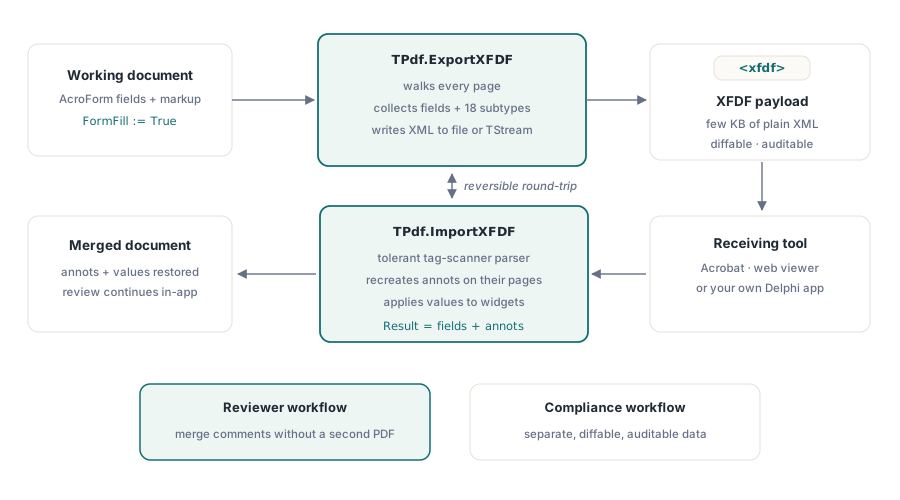
The PDFium Component for Delphi and Lazarus exchanges form data and annotations through XFDF, the XML interchange format defined by ISO 19444-1. TPdf.ExportXFDF serializes every form field value and every supported annotation in the loaded document to an XFDF file or TStream; TPdf.ImportXFDF reads an XFDF document back, re-creating annotations on their pages and applying field values. That one round-trip covers two workflows every document application eventually needs: a reviewer marks up a PDF in Acrobat and mails you the comments to merge, or a compliance rule says form data must live in a separate, diffable, auditable file rather than baked into the PDF itself
Does PDFium support XFDF import and export?
The PDFium library itself does not. The native C API has no XFDF or FDF functions at all — nothing in its public headers reads or writes either format, so no amount of wrapping gets you there. The PDFium Component therefore implements the entire XFDF engine in Pascal, in a dedicated unit that builds and parses the XML directly on top of the existing TPdf annotation and form-field data model. The writer emits the XML by hand and the reader is a hand-written state-machine parser, so the feature adds no dependency on Delphi XMLDoc or the FPC DOM units and behaves identically on Delphi and Lazarus
That design choice matters when you evaluate alternatives. If you have been calling raw FPDF_* functions from Pascal, XFDF is a wall: the capability simply is not in the DLL. The component crosses that wall by treating XFDF as a pure serialization problem — collect the field values and annotation records the wrapper already knows how to read, write them out as standard XML, and reverse the process on import
What does an XFDF file contain?
ISO 19444-1 defines XFDF as the XML representation of FDF, and its payload splits into two top-level blocks. The <fields> element carries hierarchical form field names and their values — everything a user typed, picked, or checked in an AcroForm. The <annots> element carries the annotations: TPdf.ExportXFDF emits 18 subtypes — text, highlight, underline, strikeout, squiggly, line, circle, square, caret, polygon, polyline, stamp, ink, freetext, fileattachment, sound, link, and redact. Widget annotations are deliberately absent from <annots> because their data travels in <fields>, and viewer-internal subtypes such as Popup are not part of the XFDF vocabulary

To make the round-trip faithful, the TPdfAnnotation record was extended with the metadata XFDF expects: Name (the NM unique identifier), Subject, ModificationDate, CreationDate, Icon, Opacity, line endpoints, polygon and polyline vertices, and ink gesture paths. Each new field pairs with a Has* boolean sentinel, so code that built annotations against earlier versions keeps compiling and keeps producing the same dictionaries — an unset field is never written. If you already create markup programmatically, the same record you use for text markup annotations with quad points now carries everything XFDF needs
How do you export form data and annotations to XFDF?
One call does the whole document. Load the PDF with form-fill enabled, call ExportXFDF, and the component walks every page, collects field values and annotations, and writes the XML. The return value is the number of UTF-8 bytes written, which makes a cheap sanity check in logs
var
  Pdf: TPdf;
  Bytes: Integer;
begin
  Pdf := TPdf.Create(Self);
  Pdf.FormFill := True;            // needed so field values are live
  Pdf.FileName := 'expense-report.pdf';
  Pdf.Active := True;
  Bytes := Pdf.ExportXFDF('expense-report.xfdf');
  ShowMessage(Format('%d bytes of XFDF written', [Bytes]));
end;
Both directions have a TStream overload, so nothing forces a temporary file on disk. Exporting into a TMemoryStream is the natural shape when the XFDF is headed for an HTTP response, a database blob, or a signed archive entry
var
  Buffer: TMemoryStream;
begin
  Buffer := TMemoryStream.Create;
  try
    Pdf.ExportXFDF(Buffer);        // same XML, no file involved
    Buffer.Position := 0;
    // hand the stream to a web response, blob column, or zip entry
  finally
    Buffer.Free;
  end;
end;
How does ImportXFDF merge comments back into the document?
The import side is where the reviewer workflow closes. A colleague annotates the contract in Acrobat, exports comments as XFDF, and sends you a few kilobytes of XML instead of a second copy of the PDF. TPdf.ImportXFDF parses that file, creates each annotation on the page its page attribute names, and writes field values into the matching widget annotations. The function returns the combined count of fields plus annotations applied, so the UI can confirm exactly how much arrived
var
  Applied: Integer;
begin
  Applied := Pdf.ImportXFDF('review-comments.xfdf');
  StatusBar.SimpleText :=
    Format('%d fields and annotations merged', [Applied]);
end;
The parser is a hand-written tag scanner built for tolerance rather than strictness: unknown elements are skipped, processing instructions, DOCTYPE declarations and comments are ignored, unrecognized flag names are dropped, and attribute values are unescaped through the full set of XML entity and numeric character references, including UTF-16 surrogate pairs. XFDF produced by Acrobat, by a web viewer, or by another tool merges without ceremony. Once the annotations are in the document, the review cycle continues with the reply and status machinery described in building an annotation review workflow with the PDFium Component, and imported field values participate in normal tab-order logic covered in form field navigation
Why do decimal separators matter for XFDF?
Every annotation in XFDF is positioned by coordinate strings — rect="70.5,540,200,560" and friends — and ISO 19444-1 requires the period as the decimal separator. Delphi default float formatting follows the Windows locale, so on a German or French system a naive FloatToStr turns 70.5 into 70,5, which corrupts a comma-separated coordinate list into garbage that other processors reject or misread. The PDFium Component normalizes every number it writes: the locale decimal separator is rewritten to a period and trailing zeros are trimmed, so the exported file is byte-identical whether it was produced on an en-US or a de-DE machine. If you have ever debugged a PDF tool that worked in the office and failed at a European customer site, you have met this exact bug class — worth knowing the component handles it for you
What are the limits of the round-trip?
Two boundaries are worth stating plainly. First, XFDF transports annotation data, not rendered appearances — appearance streams are not part of the format, so the receiving viewer regenerates each annotation look from its properties. A highlight or square will render correctly everywhere; a stamp with a custom appearance will fall back to what the target viewer draws for that stamp name. Second, the underlying PDFium API has setters for strings but none for annotation numbers or path geometry, so Opacity, line endpoints, vertices, and ink gestures are export-only: the component preserves them faithfully when writing XFDF, but cannot write them back into a PDF on import. Field values, contents, colors, rects, quad points, dates, and identity metadata all round-trip in both directions

For a hands-on start, the XfdfLab sample ships in the Delphi, C++Builder, and Lazarus demo sets and wires both calls to buttons over any PDF you open. XFDF support is included in the current release of the PDFium Component, alongside the annotation and form APIs it builds on