A PDF annotation is a dictionary attached to a page, not a mark drawn on it. ISO 32000-1 §12.5 defines roughly two dozen subtypes, and each carries a /Subtype, a rectangle in page coordinates, a set of flags, and usually an appearance stream that decides what a viewer actually paints. The subtypes do not all mean the same thing to a person reviewing a document. A Highlight and an Ink stroke are comments; a Link is navigation; a Popup is the little window that opens when you click a sticky note, stored as its own object and pointed at by a parent. Replies are full Text annotations that reference the comment they answer through an in-reply-to entry. So the page-level annotation array is not the reviewer's list of comments. It is a flat bag containing comments, the plumbing that connects them, and several things no reviewer would call a comment at all. A panel that treats the array as the comment list will disagree with every other viewer the customer runs
Building an annotation review workflow on PDFium Component, the PDFium-based VCL/LCL component for Delphi, C++Builder, and Lazarus, means concentrating on the points where that gap between the raw array and the human view causes trouble: counting, indexing, recoloring marks the engine has already frozen, deleting without leaving ghosts, and adding marks of your own
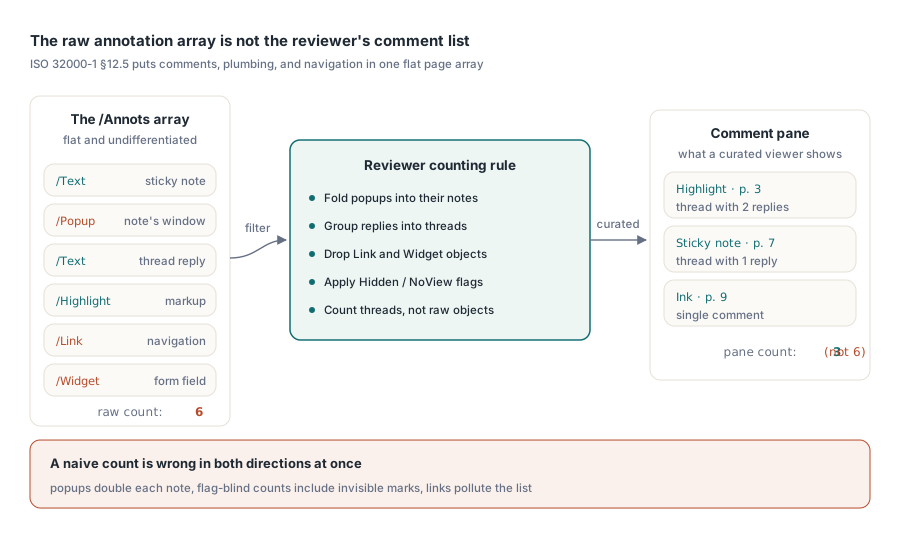
Why your count never matches Acrobat's comment pane
Open a marked-up contract in your viewer and in Acrobat side by side and the totals rarely agree. Acrobat shows a curated view: markup grouped into reply threads, popups folded into the notes they belong to, links and form widgets left out. The raw array holds all of it undifferentiated, so a naive count runs high in some ways and low in others at the same time
Popups inflate the total, because each sticky note ships with a separate Popup object and counting both doubles the note. Replies deflate it if you filter on visible marks, since a reply is a Text annotation with nothing painted until someone expands the thread, and dropping it loses the discussion. The Hidden and NoView flags take an annotation off the screen without taking it out of the array, so a flag-blind count includes marks the user cannot see. Link annotations sit in the same array as the comments and belong in neither the count nor the list. Decide the counting rule before you write the loop, and write the decision down, because "why does your panel show a different number than Acrobat" is the first ticket a review feature earns
Index everything once, then never re-parse a page
One design rule drives everything that follows: filtering by author, type, or page must never re-parse page objects. On a 300-page document with heavy markup, re-parsing on each dropdown change turns the panel into something that stutters for seconds at a time. The component exposes AnnotationCount and the indexed Annotation[] property, both scoped to the currently loaded page, and the TPdfAnnotation record they hand back carries what a list view needs: Subtype, Flags, Color, Rectangle, ContentsText, AuthorText. The right move is to sweep every page once at open time and keep your own flat index:
procedure TReviewPanel.BuildIndex;
var
  PageNo, i: Integer;
  A: TPdfAnnotation;
begin
  FItems.Clear;
  for PageNo := 1 to Pdf.PageCount do
  begin
    Pdf.PageNumber := PageNo;
    for i := 0 to Pdf.AnnotationCount - 1 do
    begin
      A := Pdf.Annotation[i];
      // Keep reviewer-relevant subtypes only; record the page and
      // index pair because all later edits are addressed by it
      if A.Subtype in [anText, anHighlight, anInk] then
        FItems.Add(TReviewItem.Create(PageNo, i,
          A.AuthorText, A.ContentsText, A.Rectangle, A.Color));
    end;
  end;
end;
The pair worth underlining is (PageNo, i). Every later mutation, whether a recolor or a delete, is addressed by page number plus annotation index, and the index is fragile: removing an annotation renumbers everything after it on that page. So plan to rebuild the affected page's entries after any deletion instead of patching index numbers in place. The rebuild costs a millisecond. A stale index, by contrast, deletes the wrong reviewer's comment, which is the kind of bug that erodes trust in the whole feature
Threading deserves a slot in the index even if your first release only counts replies rather than showing them. Group items by their parent reference while you have the page open, so the panel can later fold a thread the way Acrobat does. Reconstructing that grouping lazily during scrolling defeats the entire point of indexing once, because it re-opens pages you already paid to parse. Geometry wants the same discipline. The Rectangle in each record is page-space, and converting it to view coordinates belongs in one shared helper, not scattered through the code. Panels grow coordinate bugs when selection, hit-testing, and painting each invent their own zoom and rotation math; route all three through a single conversion and a highlight, its row in the list, and its click target stay pinned to the same ink
Recoloring markup and the appearance-stream veto
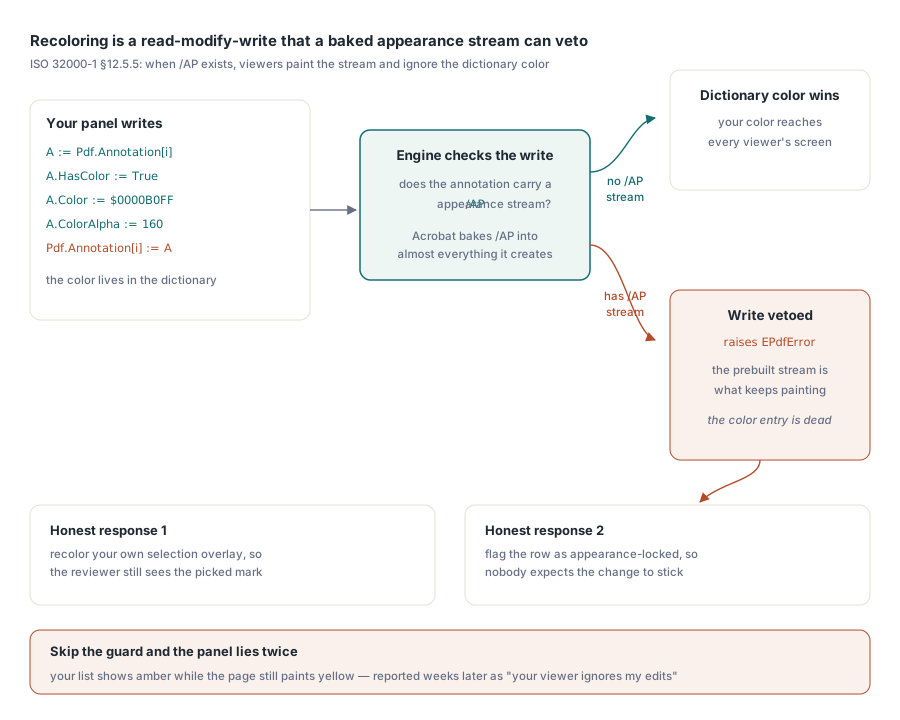
Changing a highlight from yellow to amber sounds like a one-liner, and sometimes it is. The catch is ISO 32000-1 §12.5.5. When an annotation carries an /AP appearance stream, a conforming viewer paints that pre-built stream and treats the color entry in the dictionary as dead metadata. Acrobat writes appearance streams for essentially everything it creates, so most annotations arriving from customers are already in this state, and the color you so confidently set never reaches the screen. Recoloring is a read-modify-write through the Annotation[] property, and the component is honest about the conflict: when the engine refuses to let a dictionary color override a baked-in appearance, the write raises EPdfError
A := Pdf.Annotation[Item.Index];
A.HasColor := True;
A.Color := $0000B0FF;       // amber
A.ColorAlpha := 160;
try
  Pdf.Annotation[Item.Index] := A;
except
  on EPdfError do
  begin
    // The annotation owns a pre-rendered /AP stream; the dictionary
    // color alone cannot change what viewers paint
    Item.AppearanceLocked := True;
    StatusBar.SimpleText := 'Color is fixed by the annotation appearance';
  end;
end;
Catch that exception every time, and treat it as information rather than failure. Skip the guard and your panel cheerfully shows amber in its own list while the page keeps painting yellow; the user files it weeks later as "your viewer ignores my edits," and you spend an afternoon failing to reproduce it on a file that happens to have no appearance stream. Once you know the appearance is locked, you have two honest responses: recolor your own selection overlay instead of the annotation, so the reviewer at least sees the highlight they picked, or mark the row as appearance-locked so nobody expects the change to stick
Deleting annotations without leaving ghosts
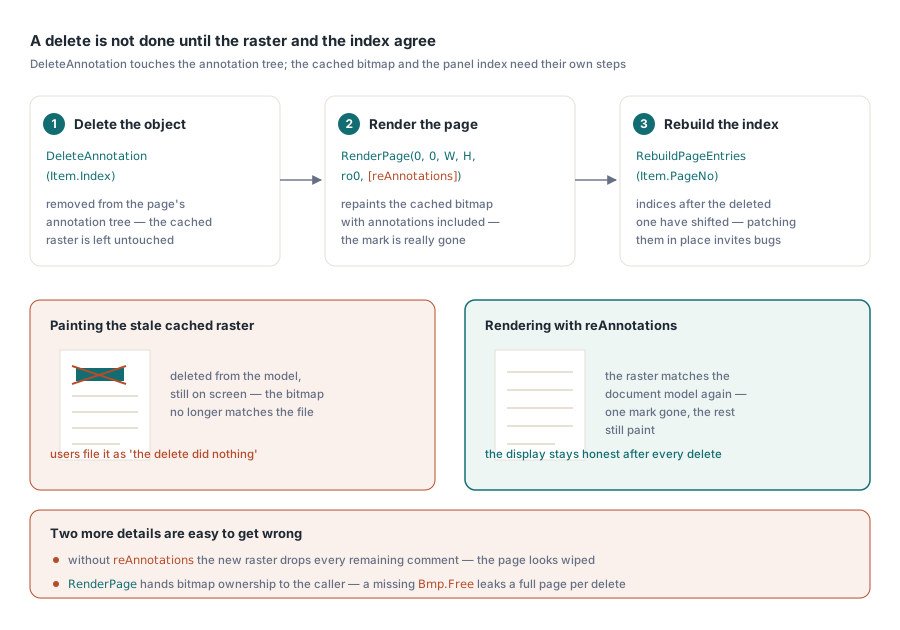
DeleteAnnotation removes the object from the current page's annotation tree, but it leaves the cached page raster alone. Paint immediately after the call and the deleted highlight is still on screen, sitting in a bitmap that no longer matches the document model behind it. The fix is to treat the re-render as part of the delete, not a step the caller might forget:
Pdf.PageNumber := Item.PageNo;
Pdf.DeleteAnnotation(Item.Index);   // raises EPdfError on failure
Bmp := Pdf.RenderPage(0, 0, ViewWidth, ViewHeight, ro0, [reAnnotations]);
try
  PaintPageBitmap(Bmp);
finally
  Bmp.Free;  // RenderPage hands bitmap ownership to the caller
end;
RebuildPageEntries(Item.PageNo);  // indices after Item.Index shifted
Two details in that block are easy to get wrong. The reAnnotations option has to be present, or the new raster drops every remaining annotation and the page looks like you wiped the whole comment set instead of one mark. And the Bmp.Free is not optional: the function-style RenderPage overload hands bitmap ownership to the caller, so a missing free leaks a full-page raster on every single delete, which a reviewer working through a long document will turn into real memory pressure within minutes
Adding reviewer marks from your own UI
Creating annotations goes through CreateAnnotation, which takes a filled TPdfAnnotation record (subtype, rectangle, color, contents, author) and attaches it to the current page. A sticky note, subtype anText, is the easy case: set the position, the contents, and the author and you are done. Ink annotations are where people get caught. The record's rectangle only bounds the drawing; the strokes themselves are arrays of points that have to be attached separately through the engine's ink-stroke call, FPDFAnnot_AddInkStroke fed FS_POINTF data, captured from mouse or pen input one stroke at a time. Build an ink annotation from a rectangle and nothing else and you get an empty scribble that renders as blank space, which looks like a bug in the engine and is really a half-finished annotation
Settle the authorship policy in the same breath. Every mark your UI creates should carry a consistent AuthorText, because the reviewer filter you build next month is only as good as the names you stamp onto comments today. Blank or inconsistent author strings cannot be repaired retroactively without reopening every file
Getting the review out of the viewer
Review data earns its keep once it can leave the viewer, as a summary the project lead reads without opening the file or a CSV that feeds a tracking sheet. Export from the index you already built, never from a fresh parse, and pick a stable way to refer back to each mark. A page number paired with the annotation's rectangle survives round-trips that an array index does not, because the next deletion quietly renumbers the indices and your CSV starts pointing at the wrong comments
A row worth keeping carries the page, the subtype, the author, the creation timestamp when the file records one, the contents text, and a status column you own rather than one the PDF supplies. The same indexing pass is useful earlier, during intake, when a document arrives from outside the team and you want to know what is in it before anyone reviews it. The PDF intake workbench article walks through that triage, and form-field navigation covers the mirror-image problem: reviewing documents built to collect data rather than comments
One case the array will not show you
One failure mode deserves a flag because it looks like a defect in your code and is not. A customer reports visible highlights all over a page, but your panel lists nothing, and AnnotationCount comes back zero. The usual explanation is that the marks were flattened somewhere upstream. Flattening bakes annotation appearances into ordinary page content, so the highlights become part of the page graphics and stop existing as annotation objects entirely. There is nothing left for an annotation API to enumerate, recolor, or delete. When you see painted markup with a zero count, stop looking for the bug in your enumeration loop and ask how the file was produced
The annotation surface used here, from enumeration and creation through recoloring, deletion, and the render options that keep the display honest, ships with PDFium Component for Delphi, C++Builder, and Lazarus/FPC