The PDFium Component creates text markup annotations, meaning highlight, underline, strikeout, and squiggly, through TPdf.CreateAnnotation: you set HasAttachmentPoints := True on the TPdfAnnotation record and fill its AttachmentPoints quadrilateral, and the component writes the QuadPoints entry defined in ISO 32000-1 §12.5.6.10. That is the whole API surface. The reason this article exists is what happens underneath it, because the raw PDFium call chain has a failure mode that produces the least helpful symptom in the toolkit: FPDFAnnot_SetAttachmentPoints returns false on a freshly created annotation, every time, with no error code and no hint. This is the creation-side companion to our article on reading and reviewing existing annotations, which walks the other direction through the same structures
The debugging scene is always the same. You create a highlight annotation, you call the attachment-points setter with index 0, the function returns false, and you start second-guessing your coordinates. You transpose the points, flip the Y axis, swap page space for device space. None of it helps, because the coordinates were never the problem. The problem is the index semantics of the C API, and once you see them, the fix is two lines
What QuadPoints mean in ISO 32000-1
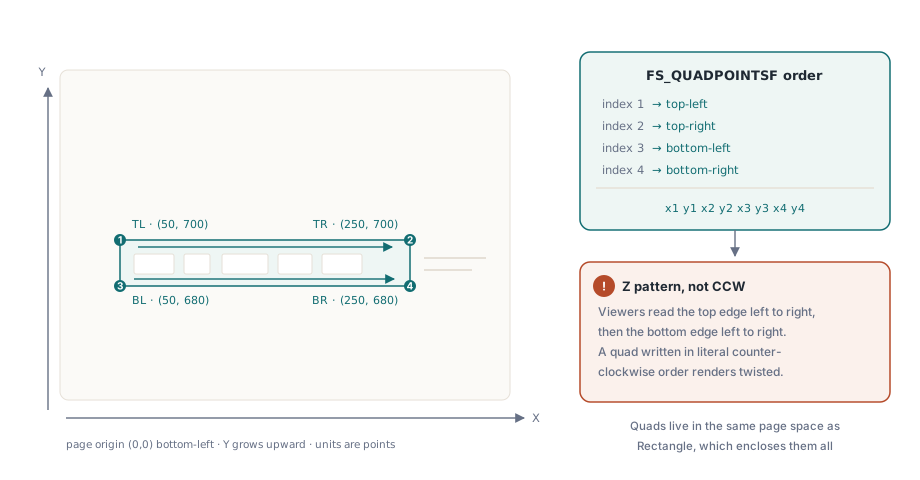
QuadPoints is an array of 8×n numbers describing n quadrilaterals, and ISO 32000-1 §12.5.6.10 requires it on every text markup annotation: each quadrilateral marks a word or group of contiguous words that the highlight, underline, or strikeout applies to. The annotation's Rect entry still exists, but for markup subtypes it only bounds the region; the quads are what the renderer actually paints. A quadrilateral rather than a rectangle because text can be rotated or sheared, so the four corners are stored as four independent points: x1 y1 x2 y2 x3 y3 x4 y4
The order of those four points is where the specification and the installed base part ways. The spec text describes the points as tracing the quadrilateral counterclockwise, but Adobe's own renderer has always interpreted them in a Z pattern instead: first the top edge left to right, then the bottom edge left to right. Because every author tested against Acrobat, effectively every renderer, PDFium included, follows the Z pattern, and files that follow the spec's literal wording render as collapsed or twisted highlights in some viewers. PDFium's FS_QUADPOINTSF struct encodes exactly this convention: (x1,y1) is the top-left corner, (x2,y2) top-right, (x3,y3) bottom-left, (x4,y4) bottom-right, in page coordinates where Y grows upward. Follow that order and be done; renderers are lenient about many things, but a scrambled quad is not one of them
Why does FPDFAnnot_SetAttachmentPoints return false?
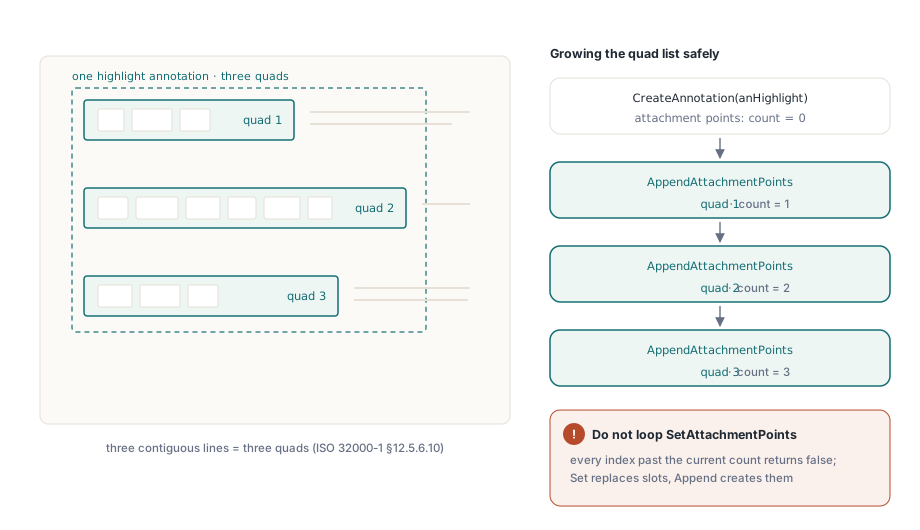
FPDFAnnot_SetAttachmentPoints fails on a new annotation because its contract is to replace the quadrilateral at a given index, and a freshly created annotation has zero quadrilaterals to replace. The signature takes an annotation handle, a quad_index, and the points; index 0 does not mean "the first slot, creating it if needed", it means "the existing quad number 0", and when FPDFAnnot_CountAttachmentPoints reports 0, there is no such quad and the call returns false. The function that creates a slot is FPDFAnnot_AppendAttachmentPoints. Every annotation created through FPDFPage_CreateAnnot starts with a count of zero, so the creation path must call Append first, and only subsequent updates may call Set
This bit the PDFium Component itself. Through v1.79.0 the internal routine shared by CreateAnnotation and SetAnnotation hardcoded FPDFAnnot_SetAttachmentPoints(Annotation, 0, ...), which was correct for updating an existing markup annotation and guaranteed to fail for a new one, surfacing as an EPdfException with the message 'Cannot set attachment points'. The fix, shipped in v1.79.1, branches on the count
// Inside the component's annotation writer (v1.79.1+):
// a new annotation has no quad slots yet, so Append creates
// the first one; Set only replaces a slot that already exists
if FPDFAnnot_CountAttachmentPoints(Annotation) = 0 then
  Check(FPDFAnnot_AppendAttachmentPoints(Annotation, QuadPoints) <> 0,
    'Cannot set attachment points')
else
  Check(FPDFAnnot_SetAttachmentPoints(Annotation, 0, QuadPoints) <> 0,
    'Cannot set attachment points');
The same pattern applies if you call the exported C functions directly, which the component lets you do since all FPDFAnnot_* entry points are surfaced in PDFium.pas. Whenever you hold an FPDF_ANNOTATION handle and want to write quads, ask FPDFAnnot_CountAttachmentPoints first and route accordingly. If you are searching for "FPDFAnnot_SetAttachmentPoints returns false", this count-then-append branch is almost certainly your answer
Creating a highlight with TPdf.CreateAnnotation
With the component doing the Append-versus-Set routing for you, creating a highlight reduces to filling a record. The example below creates an A4 page and drops a semi-transparent yellow highlight over a 200×20 point region; note that the quad follows the Z order described above, and that Rectangle is set to enclose the quad, which keeps viewers that hit-test against Rect behaving sensibly
var
  Pdf: TPdf;
  A: TPdfAnnotation;
begin
  Pdf := TPdf.Create(nil);
  try
    Pdf.CreateDocument;
    Pdf.AddPage(0, 595, 842);

    FillChar(A, SizeOf(A), 0);
    A.Subtype := anHighlight;
    A.HasColor := True;
    A.Color := clYellow;
    A.ColorAlpha := $80;                     // 50% opacity
    A.HasAttachmentPoints := True;
    A.AttachmentPoints[1].X := 50;  A.AttachmentPoints[1].Y := 700; // top-left
    A.AttachmentPoints[2].X := 250; A.AttachmentPoints[2].Y := 700; // top-right
    A.AttachmentPoints[3].X := 50;  A.AttachmentPoints[3].Y := 680; // bottom-left
    A.AttachmentPoints[4].X := 250; A.AttachmentPoints[4].Y := 680; // bottom-right
    A.Rectangle.Left := 50;  A.Rectangle.Top := 700;
    A.Rectangle.Right := 250; A.Rectangle.Bottom := 680;
    A.ContentsText := 'Highlighted region';
    Pdf.CreateAnnotation(A);

    Pdf.SaveAs('highlighted.pdf');
  finally
    Pdf.Free;
  end;
end;
Switching subtypes costs one line. anUnderline, anStrikeout, and anSquiggly take the identical record shape, quads and all, because ISO 32000-1 treats all four as the same annotation family distinguished only by how the quad region is decorated. Subtypes that are not text markup, such as anSquare, anCircle, and anText, position themselves from Rectangle alone; leave HasAttachmentPoints at False for those, and the quad machinery never runs
Why does AttachmentPoints[0] compile in Delphi but fail in FPC?
TQuadrilateralPoint is declared as array [1..4] of TPdfPoint, a 1-based array, and that trips up anyone whose fingers default to zero-based indexing. Write A.AttachmentPoints[0] and Delphi's dcc32 will compile it without complaint, because range checking is off by default; at runtime the expression silently reads or writes the memory just before the array, which in a TPdfAnnotation record is an adjacent field. Your highlight gets one garbage corner, or a neighboring field gets corrupted, and nothing raises. Free Pascal caught this exact bug in our own demo sources during the Lazarus port: fpc performs compile-time range checking on constant indices and rejected AttachmentPoints[0..3] outright, which is how the off-by-one and the Set-versus-Append library bug were unearthed together
Two habits follow. Index the quad 1 through 4, matching the corner order in the code above, and build your annotation code at least once with range checking enabled, either {$R+} in Delphi or any fpc build, before trusting it. A default dcc32 build passing is not evidence that the indices are right; it is only evidence that nothing crashed on the memory that happened to be there
Getting quad coordinates from real text
Hardcoded rectangles are fine for a demo, but production highlights trace actual glyphs, and the coordinates should come from PDFium's text page geometry rather than guesswork. The routines covered in our guide to text extraction with the PDFium Component give you per-character bounding boxes in the same page coordinate space the quads use, so a search hit converts directly into corner points: left of the first character, right of the last, top and bottom from the line's extents. If you are generating the text yourself and need to know where lines will fall before they exist, the text measurement and word wrap article covers computing those extents up front
One honest boundary: the TPdfAnnotation record carries a single TQuadrilateralPoint, so one CreateAnnotation call writes one quadrilateral. A selection spanning three lines needs three quads, one per line, per §12.5.6.10, and you have two ways to get there. The simple way is one annotation per line, which renders correctly everywhere and keeps the component-level API. The compact way, one annotation carrying three quads, means creating the annotation through the component and then calling the exported FPDFAnnot_AppendAttachmentPoints yourself for the second and third quads, which works precisely because Append creates slots rather than replacing them. Do not try to reach multi-quad through repeated SetAttachmentPoints calls; every index past the current count just returns false, for the same reason index 0 did on the fresh annotation
After writing, verify in a real viewer rather than trusting the return codes: open the file in Acrobat or any PDFium-based viewer and confirm the markup lands on the text, reads at the intended opacity, and survives a save-and-reload round trip. The annotation types, the quad handling, and the count-aware writer shown here are all part of the standard PDFium Component for Delphi, C++Builder, and Lazarus; the product page carries the full annotation API reference alongside the rest of the library