Object number 1 is not page 1. That single fact trips up more PDF processing code than any other aspect of the format, and understanding why requires looking past what a viewer shows you and into the object graph the viewer actually reads
A PDF file is a collection of numbered indirect objects. Each object carries an object number and a generation number, and other objects point to it with a reference written as N G R: 3 0 R means the current version of object 3. Pages are among those objects, but their display sequence has nothing to do with where they sit in the file or what numbers they carry. Display order is determined entirely by the /Pages tree, a linked structure rooted at the document catalog. If you ignore the tree and scan objects numerically, you will assemble pages in the wrong order for a significant fraction of real-world files
The page tree: what actually sets the order
Every PDF begins with a document catalog (ISO 32000-2 §7.7.2). The catalog holds a /Pages entry that points to the root node of the page tree. That root node is a dictionary with /Type /Pages, a /Kids array of indirect references, and a /Count giving the total leaf-page count beneath it. Display order is the depth-first left-to-right traversal of that tree, full stop
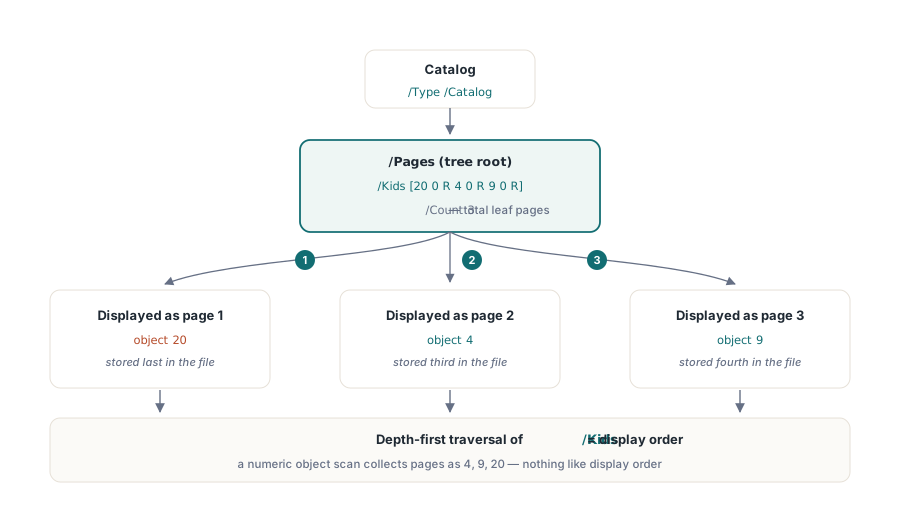
A minimal three-page file makes this concrete:
%PDF-1.7

1 0 obj
<< /Type /Catalog /Pages 2 0 R >>
endobj

2 0 obj
<< /Type /Pages /Kids [20 0 R  4 0 R  9 0 R] /Count 3 >>
endobj

% Object 4 is stored third in the file but is page 2 in display order
4 0 obj
<< /Type /Page /Parent 2 0 R /MediaBox [0 0 612 792]
   /Contents 5 0 R /Resources << /Font << /F1 6 0 R >> >> >>
endobj

% Object 9 is stored fourth but is page 3
9 0 obj
<< /Type /Page /Parent 2 0 R /MediaBox [0 0 612 792]
   /Contents 10 0 R /Resources << /Font << /F1 6 0 R >> >> >>
endobj

% Object 20 is stored last but is page 1; Kids[0] decides, not object number
20 0 obj
<< /Type /Page /Parent 2 0 R /MediaBox [0 0 612 792]
   /Contents 21 0 R /Resources << /Font << /F1 6 0 R >> >> >>
endobj
The /Kids array reads [20 0 R 4 0 R 9 0 R], so object 20 is page 1, object 4 is page 2, and object 9 is page 3. Object numbering is irrelevant. Any code that iterates objects in numeric order and collects those with /Type /Page will produce the wrong sequence on this file
Why do generators produce non-sequential layouts? Several reasons. A library that pre-allocates object numbers for all pages before writing their content will number them in creation order, then write actual bytes in whatever order suits the serializer. A merge tool that stitches documents together renumbers objects from each source document to avoid collisions; the renumbered page objects end up scattered across the combined object table while the new root /Kids array holds the correct display sequence. Incremental updates append new objects at the end of the file with fresh numbers, so a page added as a revision lives near the end of the byte stream even if it belongs at position 1 of the display order
Flat trees and nested subtrees
The spec permits two shapes for the page tree. Simple generators produce a flat structure: one root /Pages node whose /Kids array contains nothing but /Page leaf objects. That is easy to traverse: one level deep, one pass
Large documents routinely use a balanced tree instead. The root /Pages node's /Kids array contains intermediate /Pages nodes, each of which in turn holds a /Kids array of its own. The /Count on each intermediate node reports the total number of leaf pages in its subtree, so a viewer can skip entire subtrees when jumping to a page by index without parsing every object. A 1 000-page document structured as a balanced tree with 10 pages per leaf node can locate page 750 by binary search through three or four dictionary lookups rather than scanning 750 /Kids entries
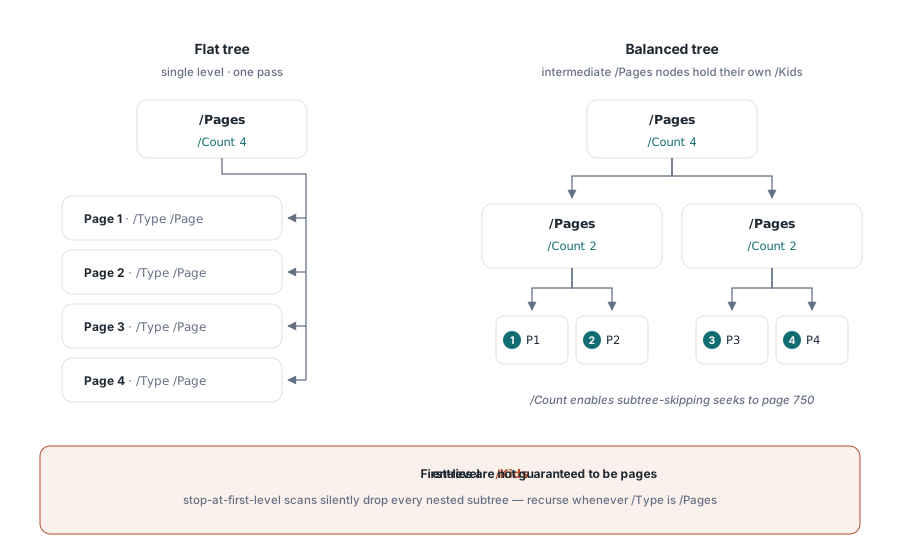
The consequence for processing code: you cannot assume the first level of /Kids contains /Page objects. Each child must be checked. If its /Type is /Pages, recurse into it. If its /Type is /Page, it is a leaf. Stopping at the first level silently drops entire subtrees on any document where the generator chose to nest. Why writers choose deep trees in the first place, what flattening tools give up, and how /Count corruption plays out in practice is covered in our companion piece on page tree shape, fan-out, and /Count integrity
Inherited page attributes
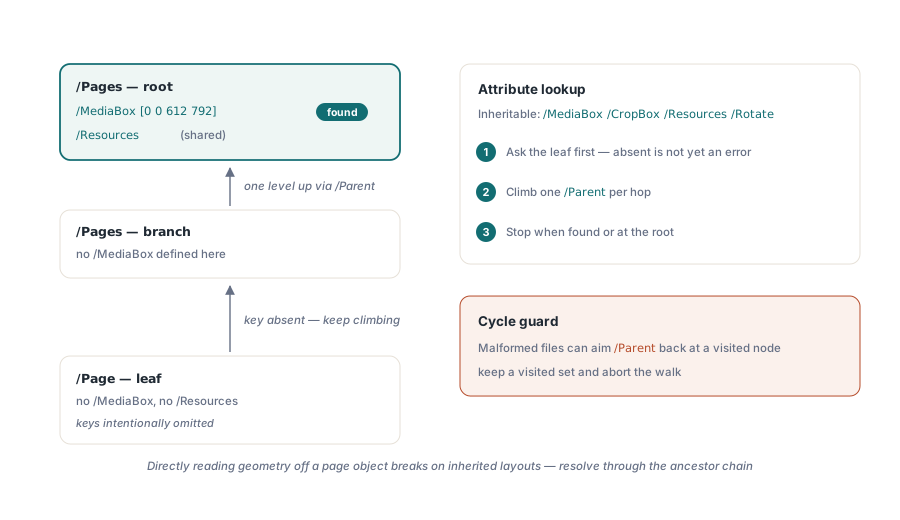
The page tree also carries a resource-sharing mechanism. Certain page attributes: /MediaBox, /CropBox, /Resources, and /Rotate are inheritable (ISO 32000-2 §7.7.3.4). If a /Page dictionary omits one of them, a reader walks up the /Parent chain until it finds the attribute or reaches the root. Placing a shared font dictionary in the root /Pages node rather than copying it into every leaf page can reduce file size noticeably for documents that use the same typefaces throughout
The inheritance rule creates a subtlety for code that reads page properties. Reading /MediaBox directly from a /Page object and treating a missing key as an error is wrong; the key may simply be inherited. Code that correctly resolves page geometry must follow the parent chain. It also needs a cycle guard: a corrupted file can have a /Parent reference that points back to a node already visited, which would loop forever without a visited-object check
The xref table and cross-reference streams
Indirect object lookup goes through the cross-reference table (or its successor, the cross-reference stream introduced in PDF 1.5). The xref maps each object number to a byte offset within the file. A conforming reader uses the xref to jump directly to any object; it does not scan the file sequentially. That random-access design is what makes fast page jumping possible: the viewer reads the catalog, resolves the /Pages reference via the xref, reads the root /Pages node, resolves a /Kids entry, and so on, touching only the objects it needs
Incremental updates add a new xref section at the end of the file with a trailer that chains back to the previous one. An object updated in a revision gets a new entry in the appended xref section; the original bytes stay in place but are superseded. This is how digitally signed PDFs remain verifiable even after annotation or form-fill revisions are added: the signed byte range is never touched, and the new content lives in the appended section. The page tree can be updated too, so page additions or deletions in a revision produce a new /Pages root with a revised /Kids array, while the old root object still occupies its original position in the file. Linearized (web-optimized) files add a byte-layout twist: the objects for page 1 are physically moved to the front of the file so a viewer can display the first page while the rest is still downloading, yet the page tree remains the sole authority on order — only the offsets recorded in the xref change
What goes wrong without tree traversal
The failure mode for object-scan approaches is quiet. The output document looks plausible: it has the right number of pages and each page contains recognizable content. The order is just wrong, and wrong in a way that depends on the generator, the number of revisions, and whether any pages were merged from outside sources. A test corpus of files produced by a single tool may pass completely; files from a different tool or a merge workflow will fail. That inconsistency is why heuristic fixes never hold. For a walkthrough of exactly this failure in a real customer document — symptom, misdiagnosis, and the traversal fix — see our page-order debugging case study
Incremental-update files are especially prone to this because pages added or rearranged in later revisions carry high object numbers while the display order is controlled by the updated /Kids array. A scan that processes objects in numeric order will place those late-numbered pages at the end regardless of where the tree says they belong
The fix is not complicated. Start at the catalog, resolve the /Pages reference, walk the /Kids array recursively, and emit leaves in the order you encounter them. That is the display order by definition, regardless of object numbers, byte offsets, or file structure. Most mature PDF libraries expose a page count and an indexed page accessor that already do this correctly; the risk is in code that bypasses the library's page model and touches the object layer directly
One structural anomaly worth handling explicitly: the /Count value on an intermediate /Pages node can be wrong in malformed files. Trusting /Count for bounds checking and then stopping short of a full traversal will silently omit pages when the count is understated. Using /Count only as a performance hint for capacity pre-allocation or binary search, and deriving the actual count from traversal is the safer pattern for important documents