Our companion explainer on PDF page ordering covers the ground rule: display order comes from a depth-first, left-to-right walk of the /Kids arrays in the /Pages tree, never from object numbers. This article looks at the tree from a different angle — its shape. Why do mature PDF writers emit hierarchies of intermediate nodes when a single flat array would be perfectly legal? What actually changes when a tool flattens or rebuilds the tree? And what happens when the /Count bookkeeping that makes the whole structure fast stops telling the truth
Fan-out is a performance decision
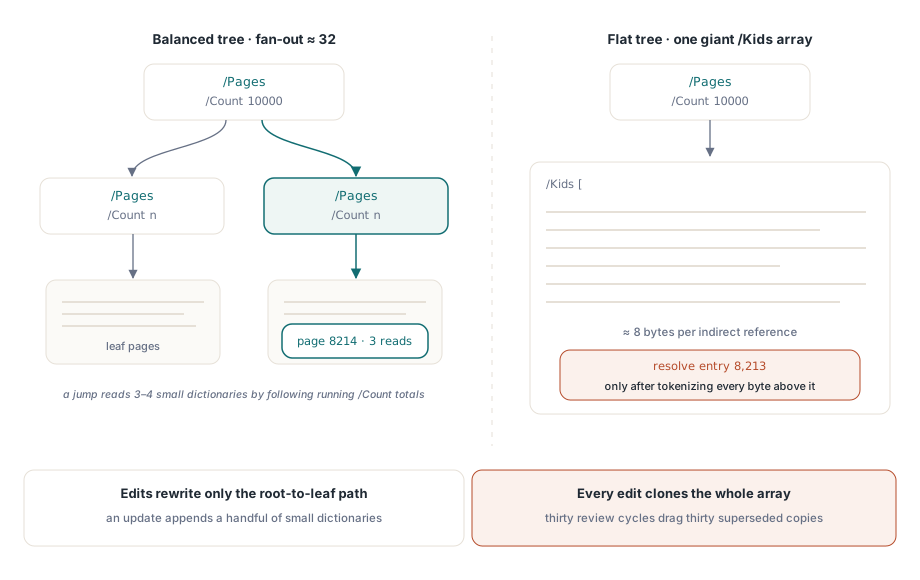
Nothing forces a writer to nest. A 10,000-page document with one root /Pages node and 10,000 leaf references in a single /Kids array conforms to the spec. The PDF Reference nevertheless recommends a balanced tree for large documents, and mainstream generators follow that advice with a modest fan-out, typically a few dozen kids per intermediate node
The reason is what a viewer must read before it can show anything. Consider a jump straight to page 8,214 of that 10,000-page file. With a flat tree, the viewer first has to parse the root node, and that root node is one enormous array: at roughly eight bytes per indirect reference, an 80 KB object that must be tokenized end to end before entry 8,213 can be resolved. With a balanced tree of fan-out 32, the same jump reads the root, compares running /Count totals to pick the correct child, and descends — three or four small dictionaries in total, each a few hundred bytes. That is the O(log n) random access the tree was designed to provide, and it is the entire reason /Count exists on intermediate nodes: it lets a reader skip a whole subtree without opening a single object inside it
Tree shape also sets the cost of editing. An incremental update that inserts one page must rewrite every node whose /Kids or /Count changed, meaning the path from the new leaf's parent up to the root. In a balanced tree that path is a handful of small dictionaries appended to the file. In a flat tree the "path" is the single giant root array, duplicated in full on every revision. A contract that goes through thirty review-and-annotate cycles can end up hauling thirty superseded copies of the same 80 KB array in its byte stream
Interior nodes carry inherited attributes
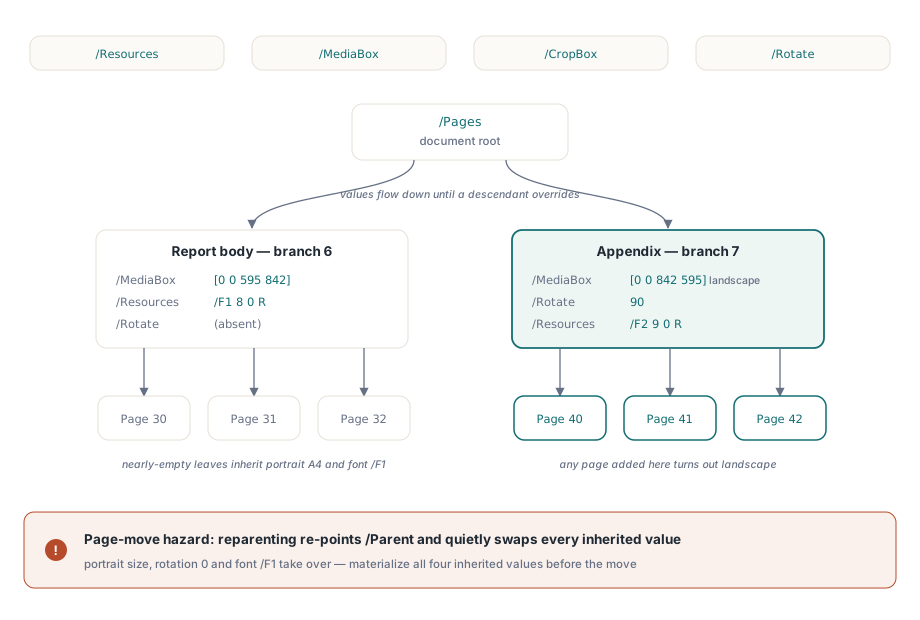
Intermediate nodes are not just routing. The four inheritable page attributes — /Resources, /MediaBox, /CropBox, and /Rotate — may be hoisted onto any /Pages node, where they apply to every leaf beneath it unless a descendant overrides them. A writer producing a report with a landscape appendix can express that layout in the tree itself:
5 0 obj   % document root
<< /Type /Pages /Count 6 /Kids [6 0 R  7 0 R] >>
endobj

6 0 obj   % report body: portrait A4, body font
<< /Type /Pages /Parent 5 0 R /Count 3
   /Kids [30 0 R  31 0 R  32 0 R]
   /MediaBox [0 0 595 842]
   /Resources << /Font << /F1 8 0 R >> >> >>
endobj

7 0 obj   % appendix: landscape A4, rotated, its own font
<< /Type /Pages /Parent 5 0 R /Count 3
   /Kids [40 0 R  41 0 R  42 0 R]
   /MediaBox [0 0 842 595] /Rotate 90
   /Resources << /Font << /F2 9 0 R >> >> >>
endobj

40 0 obj  % appendix page: inherits size, rotation, fonts
<< /Type /Page /Parent 7 0 R /Contents 43 0 R >>
endobj
Objects 40 through 42 are nearly empty. Their page size, rotation, and font resources all arrive by inheritance from node 7, which keeps the file compact and self-maintaining: add a fourth page under the appendix node and it comes out landscape automatically
The same mechanism creates the classic page-move hazard. Suppose a tool moves object 40 into the report body by editing the two /Kids arrays and repointing /Parent to node 6. The move is structurally valid, yet object 40 now inherits the portrait /MediaBox, no rotation, and font /F1 — while its content stream still selects /F2, which no longer resolves. The page shrinks, un-rotates, and loses its text in a single edit. Robust reordering code therefore materializes the resolved values of all four inheritable attributes onto the page dictionary before reparenting it. If you have ever dragged a page in an editor and watched it change size or orientation, this is the mechanism you witnessed
Flattening: legal, common, occasionally expensive
Plenty of tools go the other way. Minimal writers emit a single-level tree because it is simple, and many merge and split utilities rebuild whatever tree they read into one flat /Kids array, because generating balanced structure is extra work and flat output is always conforming. A correct rebuild must resolve inheritance at the same time: every attribute a leaf was inheriting has to be copied onto the leaf, or hoisted to the new root if it is uniform across the document — otherwise the output changes geometry exactly the way the page-move case does
For typical documents flattening is harmless. It hurts at scale, in the two ways already described: the root array becomes one large object that every open and every page jump must parse in full, and every structural edit rewrites it whole. What flattening does not destroy is sharing through indirect references — a flat tree in which all 10,000 pages point at the same /Resources dictionary object is still deduplicated. What is lost is only the option to leave the entry off the page and let an ancestor supply it
When /Count lies
/Count is pure bookkeeping: it must equal the number of leaf pages in the node's subtree, and nothing in the file format enforces that. Two corruption patterns account for most of the lying counts seen in the wild
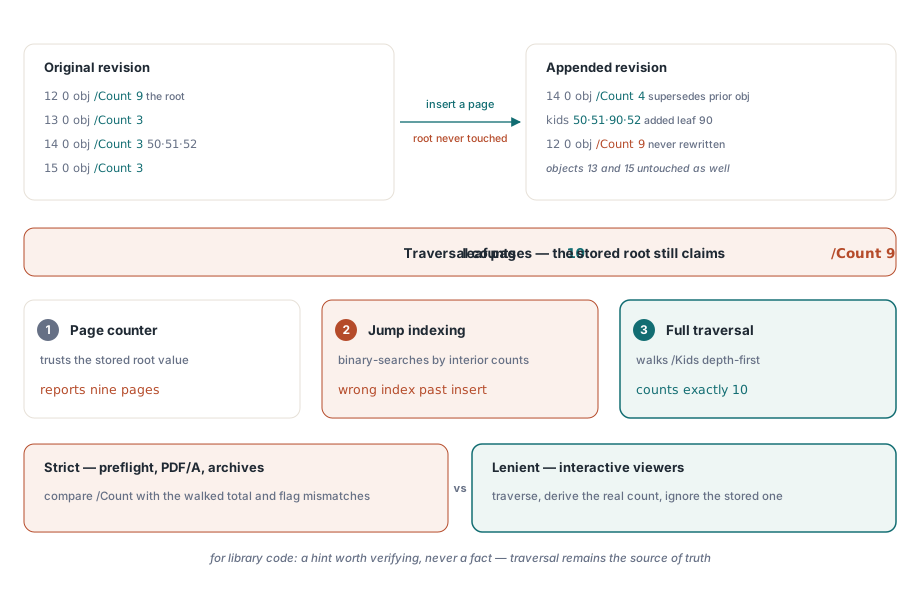
The first is the stale count left behind by an incremental update. An editor inserts a page, rewrites the immediate parent with a new /Kids and an updated /Count, appends both to the file — and never touches the ancestors:
% Original revision
12 0 obj
<< /Type /Pages /Count 9 /Kids [13 0 R  14 0 R  15 0 R] >>
endobj

14 0 obj
<< /Type /Pages /Parent 12 0 R /Count 3
   /Kids [50 0 R  51 0 R  52 0 R] >>
endobj

% Appended revision: one page inserted into the middle branch.
% Object 14 is superseded; object 12 is never rewritten
14 0 obj
<< /Type /Pages /Parent 12 0 R /Count 4
   /Kids [50 0 R  51 0 R  90 0 R  52 0 R] >>
endobj
The tree now holds ten leaves, but the root still says nine. A viewer that trusts the root reports nine pages in its page counter. One that uses interior counts to binary-search a page jump computes a wrong index for every page after the insertion point. A full traversal finds ten. Three different answers, one file
The second pattern is the count that could never be right: negative, zero on a populated node, or absurdly huge. These come from fuzzing, from transmission damage, and occasionally from arithmetic bugs in editors. They are dangerous specifically to code that trusts /Count for allocation — sizing an array from a /Count of -3 raises a range error at best, and doing so from a /Count of two billion is a denial-of-service allocation. The value is untrusted input, like every other number in the file
Parsers split into two camps over all of this. Strict consumers — preflight tools, PDF/A validators, archival pipelines — compare /Count against the traversal result and reject or flag the file. Interactive viewers are almost universally lenient: they traverse, derive the real count, and silently ignore the stored one, which is exactly why a stale-count file can circulate for years without complaint until it meets a stricter parser inside some automated workflow. The defensive middle ground for library code is to treat /Count as a hint — useful for preallocation, and for subtree skipping once verified — while letting traversal remain the source of truth
For the traversal algorithm itself, the inheritance lookup rules, and the catalog-to-leaf walk, start with the page ordering explainer. For what these failure modes look like when a real customer document reaches production code, read the page-order debugging case study, which follows a shuffled-pages incident from symptom to root cause
The HotPDF Delphi Component deals with all of this internally: it traverses nested trees of any depth, resolves inherited attributes when pages are copied or moved, and verifies /Count against actual leaf counts instead of trusting it, so page indices in its API always mean logical pages