The symptom showed up in a page-copying utility built on top of HotPDF Delphi Component: asking for page 1 of a three-page document consistently produced page 2. Checking the indexing logic found nothing wrong. The call was using a 0-based logical index, arithmetic was correct, boundary conditions were fine. Yet the wrong page came out every time
The bug was not in the copying code at all. It was in how HotPDF was building its internal page array when loading the file
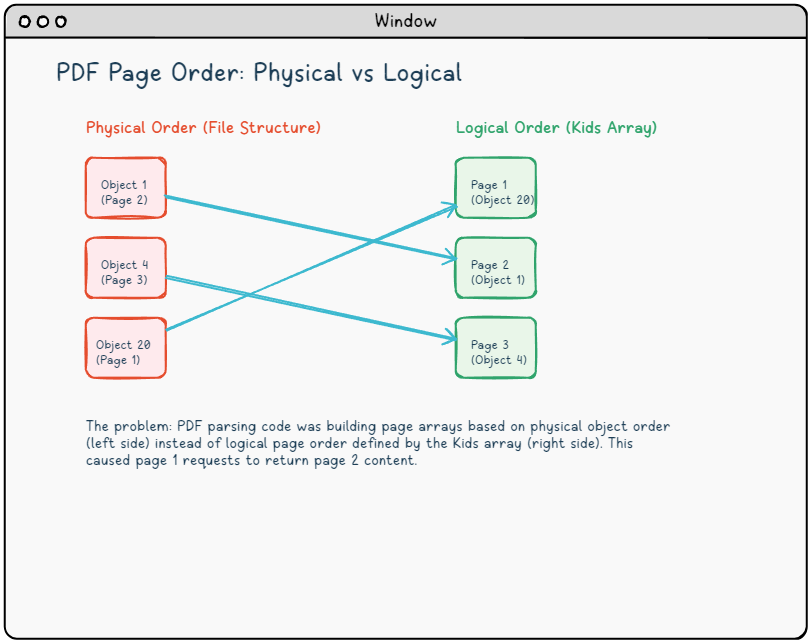
Two orderings, one source of confusion
A PDF file is a collection of indirect objects, each identified by an object number. The file structure imposes no obligation on those numbers to reflect reading order. Object 1 can hold page 2; object 20 can hold page 1. What actually defines the reading order is the page tree: a hierarchy of /Pages dictionaries whose /Kids arrays list page references in the sequence a viewer should display them (ISO 32000-1 §7.7.3)
The document triggering the bug had this page tree structure:
{ Pages tree root, object 16 }
16 0 obj
<<
  /Type /Pages
  /Count 3
  /Kids [20 0 R   { logical page 1 }
         1 0 R    { logical page 2 }
         4 0 R]   { logical page 3 }
>>
endobj
The file happened to list object 1 and object 4 before object 20 in the byte stream. Any parser that iterated through indirect objects in file order and stamped them into a PageArr as it found page-type dictionaries would end up with object 1 at index 0, object 4 at index 1, and object 20 at index 2. Logical page 1 sits at PageArr[2]. Asking for page index 0 fetches logical page 2 instead
That is exactly what both of HotPDF's internal parsing paths were doing. The traditional path, used for PDF 1.3/1.4 files, and the modern path, used for object-stream documents (PDF 1.5+), each built PageArr by walking indirect objects in physical file order rather than following the /Kids chain
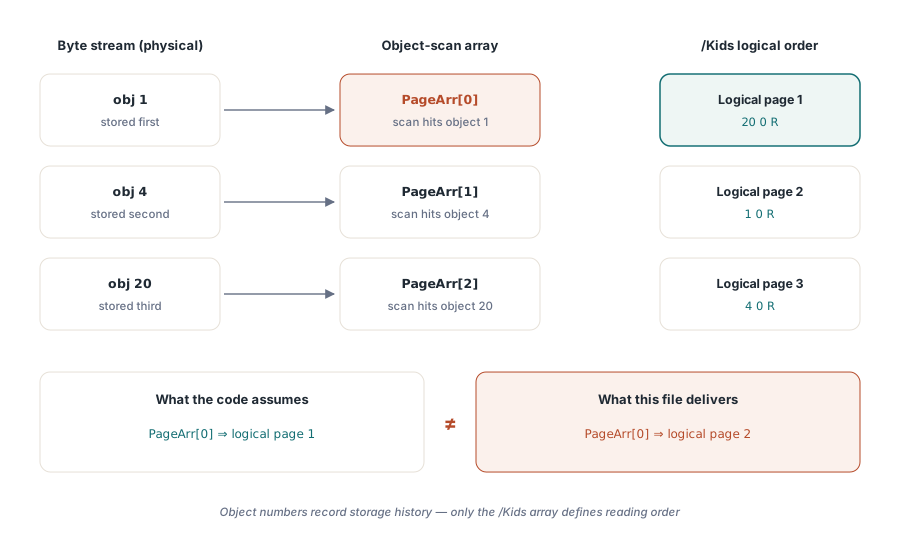
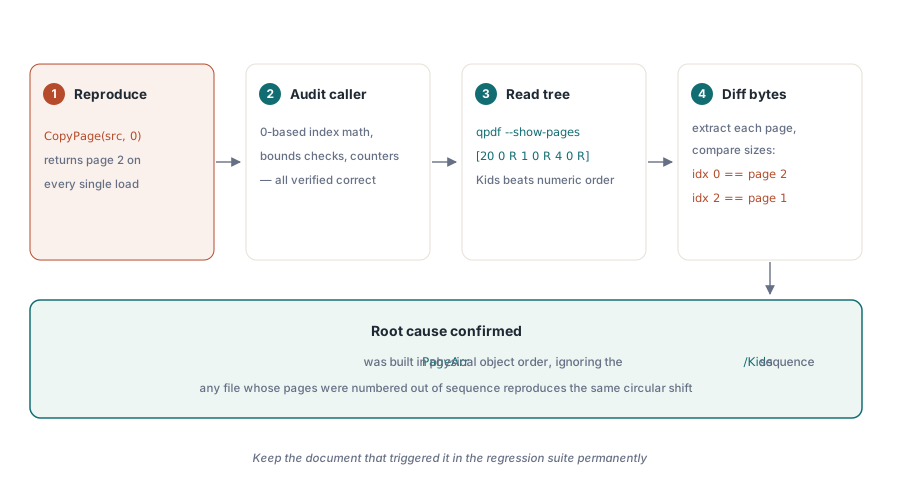
Confirming the hypothesis
Before touching any fix, the mismatch needed to be proven rather than assumed. The qpdf command-line tool makes this straightforward:
{ shell }
qpdf --show-pages input.pdf
{ Output reveals Kids order: 20 0 R, then 1 0 R, then 4 0 R }

qpdf --show-object="16 0 R" input.pdf
{ Shows the Pages dictionary with /Kids in reading order }
Extracting each page individually and checking file sizes confirmed the mapping: what PageArr[0] produced was the content belonging to logical page 2, and PageArr[2] held logical page 1. The circular shift was the smoking gun. This also explained why the problem appeared across multiple different source documents: any PDF where page objects happened to have lower object numbers than an earlier logical page would trigger it
There is a straightforward reason PDFs end up in this state. Incremental saves append updated objects with new object numbers, leaving the old slots in the cross-reference table pointing nowhere. Editors that add a cover page insert it with a high object number regardless of its position in the Kids array. Some generators simply write pages in an order convenient for content streaming rather than logical page sequence. The PDF format does not require them to do otherwise
The fix: follow the Kids array
The correct approach is to build PageArr by walking the /Kids chain from the catalog root, not by scanning indirect objects. After both parsing paths complete their initial pass, a post-processing step resolves the logical order:
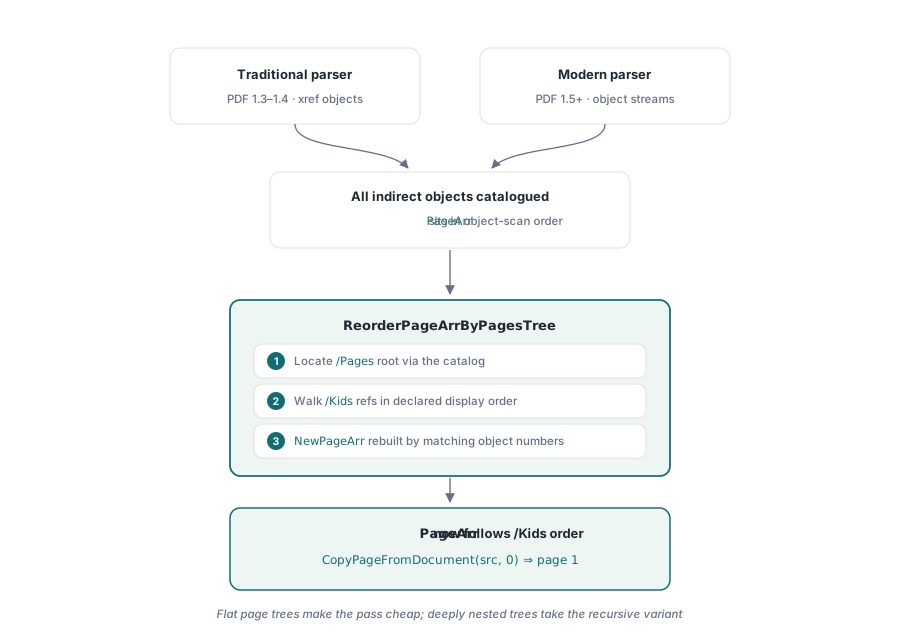
procedure THotPDF.ReorderPageArrByPagesTree;
var
  PagesObj  : THPDFDictionaryObject;
  KidsArray : THPDFArrayObject;
  NewPageArr: array of THPDFDictArrItem;
  I, J, PageIndex, KidsIndex: Integer;
  RefObj    : THPDFLink;
  PageObjNum: Integer;
  Found     : Boolean;
begin
  { Locate root /Pages dictionary via FRootIndex }
  PagesObj := FindPagesRootFromCatalog;
  if PagesObj = nil then Exit;

  KidsIndex := PagesObj.FindValue('Kids');
  if KidsIndex < 0 then Exit;
  KidsArray := THPDFArrayObject(PagesObj.GetIndexedItem(KidsIndex));

  SetLength(NewPageArr, KidsArray.Items.Count);
  PageIndex := 0;

  for I := 0 to KidsArray.Items.Count - 1 do
  begin
    RefObj     := THPDFLink(KidsArray.GetIndexedItem(I));
    PageObjNum := RefObj.Value.ObjectNumber;

    Found := False;
    for J := 0 to Length(PageArr) - 1 do
    begin
      if PageArr[J].PageLink.ObjectNumber = PageObjNum then
      begin
        NewPageArr[PageIndex] := PageArr[J];
        Inc(PageIndex);
        Found := True;
        Break;
      end;
    end;
    { Non-page Kids (intermediate /Pages nodes) produce no match; skip }
  end;

  if PageIndex > 0 then
  begin
    SetLength(PageArr, PageIndex);
    for I := 0 to PageIndex - 1 do
      PageArr[I] := NewPageArr[I];
  end;
end;
The call goes in at the end of each parsing path, after all objects have been cataloged but before any page operation is serviced:
{ Traditional path }
ListExtDictionary(THPDFDictionaryObject(IndirectObjects.Items[I]), FPageslink);
ReorderPageArrByPagesTree;
Break;

{ Modern path (object streams) }
if TryParseModernPDF then
begin
  Result := ModernPageCount;
  ReorderPageArrByPagesTree;
  Exit;
end;
The reorder step is O(n * m) where n is the Kids count and m is the current PageArr length, but for any document with a flat page tree (all leaves at depth 1, which covers the overwhelming majority of real-world PDFs) both are the same value and the cost is negligible. Deeply nested page trees require a recursive walk rather than the single-level approach shown here; the production implementation handles that case separately
Using CopyPageFromDocument after the fix
With ReorderPageArrByPagesTree in place, logical page indices work as expected. The higher-level CopyPageFromDocument takes a 0-based logical index and copies the correct page into the destination document:
var
  Source, Dest: THotPDF;
begin
  Source := THotPDF.Create(nil);
  Dest   := THotPDF.Create(nil);
  try
    Source.LoadFromFile('source.pdf');

    Dest.FileName := 'extracted.pdf';
    Dest.BeginDoc;

    { Copy logical page 0 (first page the user sees) }
    Dest.CopyPageFromDocument(Source, 0, 0);

    Dest.EndDoc;
  finally
    Source.Free;
    Dest.Free;
  end;
end;
CopyPageFromDocument internally queries the page tree order rather than relying on the raw PageArr index, so it behaves correctly even against documents where physical and logical order diverge. For batch operations, InsertPagesFromDocument accepts an array of logical indices and copies them in one pass
What this reveals about PDF parsing
The PDF specification is explicit: logical page order is defined by the /Kids array of the page tree, not by object numbers or byte offsets (ISO 32000-1 §7.7.3.2). Any parser that uses a different ordering as a shortcut will produce correct results on the majority of documents it sees, because most generators write pages in the natural order and assign sequential object numbers. The bug hides until someone loads a PDF that was incrementally edited, reorganized by another tool, or generated by software that chose a different layout
Testing only against self-generated PDFs misses this class of problem entirely. The fix for a page ordering regression therefore needs a corpus of documents from varied sources: incremental saves, scanned documents with inserted cover pages, PDFs produced by tools that linearize or optimize the object graph differently. A document that triggered the original bug should stay in the regression suite permanently
The HotPDF Delphi Component page covers the full API for page operations, including CopyPageFromDocument, InsertPagesFromDocument, and MovePage