Open a workbook saved by LibreOffice Calc and a column written as hidden="false" can come back hidden, although nothing in the file is wrong. Under xsd:boolean, the type behind that attribute, true, false, 1 and 0 are all legal, with or without surrounding blanks; HotXLS for Delphi reads every one of those spellings wherever an XLSX schema declares a boolean
The half of xsd:boolean that Excel never writes
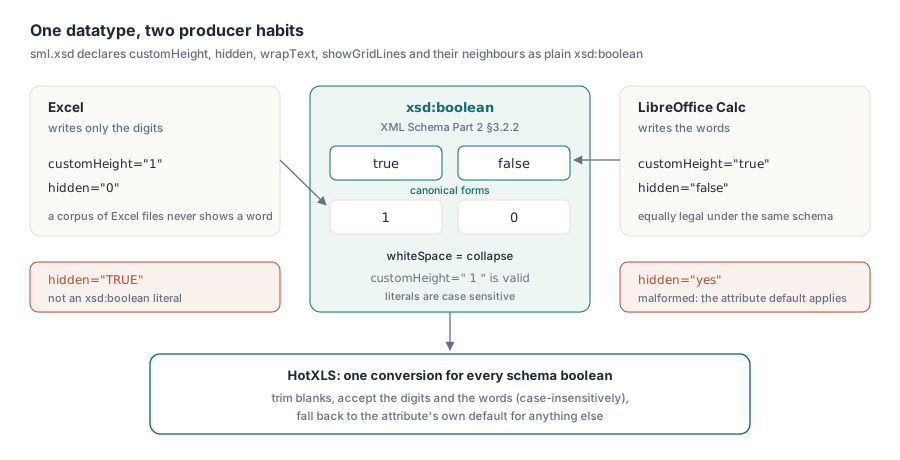
W3C XML Schema Part 2 §3.2.2 defines boolean with four legal literals, true, false, 1 and 0, and fixes its whiteSpace facet at collapse, which means customHeight=" 1 " is as valid as customHeight="1". The same section names true and false as the canonical forms. SpreadsheetML does nothing to narrow that: sml.xsd declares customHeight, hidden, collapsed, showGridLines, wrapText, quotePrefix and dozens of their neighbors as plain xsd:boolean, most with an explicit default of false and a few, such as showGridLines, defaulting to true. Excel happens to write only the non-canonical digits. LibreOffice and some other producers write the words, so a package from Calc carries <sheetFormatPr defaultRowHeight="12.8" customHeight="true"/> where Excel would have written customHeight="1"
That asymmetry is why one-digit comparisons survive for years in OOXML readers. Build a test corpus out of Excel output and every boolean you will ever see is 0 or 1. The comparison passes every test. Then a Calc file reaches a user. Put at least a few LibreOffice-saved packages into any XLSX corpus that drives reader tests — its spelling of booleans is one of several places where the two producers differ, the same gap that shows up in formulas and rules when you move workbooks between Excel and LibreOffice through ODS. One more detail of the datatype matters for parser design: the literals are case sensitive, so TRUE is not a valid xsd:boolean at all, a point that comes back when you decide how lenient your own reader should be
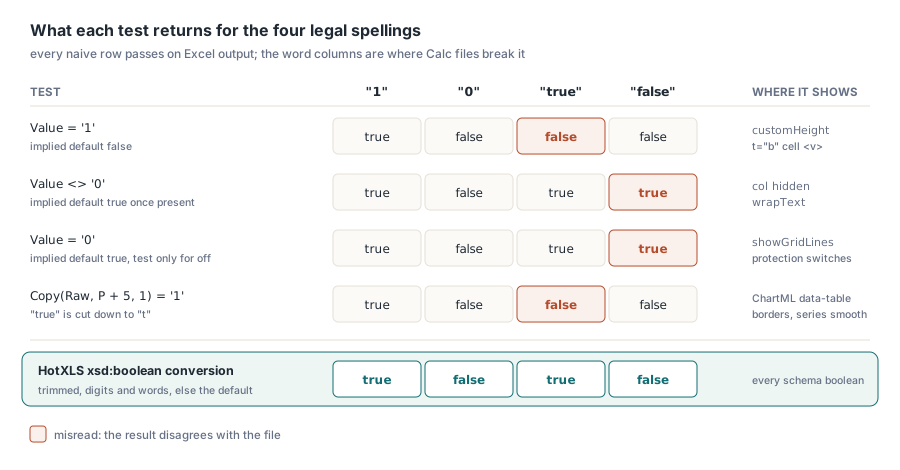
What a one-character comparison gets wrong
A reader that compares an attribute against a single digit fails in one direction or the other. Which direction depends on the default the comparison quietly encodes. The table lists the shapes that turn up in hand-written OOXML code, what each does to the word spellings and a few attributes where the damage shows. It leaves out showDropDown, whose problem is its name rather than its spelling: the schema default is false, yet showDropDown="1" on a list validation hides the in-cell arrow, so TXLSXDataValidation.ShowDropDown exposes the user-facing meaning (True shows the arrow) and stores the inverted OOXML flag
| Naive test | Implied default | Misreads | Where it shows |
|---|---|---|---|
Value = '1' | false | true becomes false | sheetFormatPr customHeight, the <v> of a t="b" cell |
Value <> '0' | true once present | false becomes true | column hidden, definedName hidden, alignment wrapText |
Value = '0' | true | false is ignored, the default stays on | sheetView showGridLines, sheetProtection permission switches |
Copy(Raw, P + 5, 1) = '1' | false | true is cut down to t | ChartML data-table borders, series smooth |
The middle row produces the most visible damage, because hidden="false" on a <col> element is a perfectly normal thing for a producer to write when it records a width for a visible column, and a reader that treats any non-zero text as set hides that column on load. HotXLS routes every one of these attributes through a single xsd:boolean conversion that trims surrounding blanks, accepts the digits and the words, and returns the attribute's own default for anything else. That last branch reflects a design choice worth stating: a value such as yes is a malformed file — but refusing to open a workbook over one bad visibility flag would punish the user for the producer's mistake, so the reader keeps a fixed per-attribute fallback and moves on
Reading a LibreOffice-style worksheet with HotXLS
The worksheet-level flags surface as ordinary properties on TXLSXWorksheet: CustomHeight, ThickTop and ThickBottom come from <sheetFormatPr>, while ColHidden[], RowHidden[], RowThickTop[] and RowThickBottom[] take 1-based column and row numbers. A boolean cell arrives as a Boolean variant in TXLSXCell.Value, whatever spelling the <v> element used. The routine below prints all of them for the first sheet, and the list after it gives the expected output for Calc-style markup
uses
  SysUtils, Variants, lxHandleX;

procedure DumpSheetBooleans(const FileName: string);
var
  Book: TXLSXWorkbook;
  Sheet: TXLSXWorksheet;
  Flag: Variant;
  Col, Row: Integer;
begin
  Book := TXLSXWorkbook.Create;
  try
    if Book.Open(FileName) <> 1 then
      raise Exception.CreateFmt('Cannot open %s', [FileName]);
    if Book.Sheets.Count = 0 then
      raise Exception.Create('Workbook has no sheets');
    Sheet := Book.Sheets[1];   // the Sheets indexer is 1-based

    Writeln('Default row height is custom: ', Sheet.CustomHeight);
    Writeln('Rows default to thick top / bottom: ',
      Sheet.ThickTop, ' / ', Sheet.ThickBottom);

    for Col := 1 to 8 do
      if Sheet.ColHidden[Col] then
        Writeln('Column ', Col, ' is hidden');

    for Row := 1 to 20 do
      if Sheet.RowHidden[Row] or Sheet.RowThickTop[Row] or
         Sheet.RowThickBottom[Row] then
        Writeln('Row ', Row, ': hidden=', Sheet.RowHidden[Row],
          ' thickTop=', Sheet.RowThickTop[Row],
          ' thickBot=', Sheet.RowThickBottom[Row]);

    Flag := Sheet.Cells[2, 1].Value;
    if VarType(Flag) = varBoolean then
      Writeln('A2 holds the boolean ', Boolean(Flag));
  finally
    Book.Free;
  end;
end;
<sheetFormatPr defaultRowHeight="12.8" customHeight="true"/>:CustomHeightprints TRUE<col min="3" max="3" width="20" hidden="false"/>: column 3 is not listed<row r="5" thickBot="true">: row 5 reportsthickBot=TRUE<c r="A2" t="b"><v>true</v></c>: A2 holds TRUE
The row hint is where the schema itself gets awkward. One idea, two spellings — CT_SheetFormatPr names its attributes thickTop and thickBottom, while CT_Row uses thickTop and thickBot, so a reader that looks for thickBottom on a row finds nothing. HotXLS writes each form back on its own element, and the hints survive a save along with the rest of the package, much as untouched parts do in a lossless XLSX round trip
How should a chart read an element with no val?
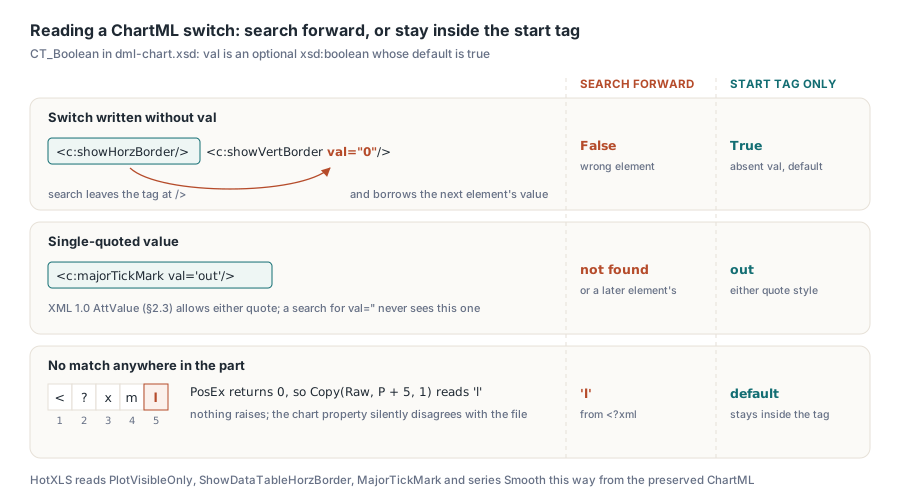
A ChartML switch with no val attribute is on. DrawingML Charts declares those switches with CT_Boolean in dml-chart.xsd, whose val is an optional xsd:boolean defaulting to true, so <c:plotVisOnly/> and <c:showHorzBorder/> mean the same as writing val="1". That default is the reverse of most SpreadsheetML attributes, and it breaks the common shortcut for reading chart XML as text: find the element by name, then search forward for the next val=". When the element omits val, that search runs past the end of the start tag and borrows the value of whatever element comes later in the part, perhaps a val="0" two siblings down. When nothing matches at all, PosEx returns 0, and code that slices at P + 5 ends up reading from character 5 of the part, which is the l of <?xml. Neither failure raises anything; the chart property just disagrees with the file
Quotes are the other half of the problem. XML 1.0 allows an attribute value to be delimited by either double or single quotes (the AttValue production in §2.3), so <c:majorTickMark val='out'/> is as legitimate as the double-quoted form, and a search for val=" skips it entirely. HotXLS preserves the original ChartML so that it can edit Excel charts without losing markup it does not model, and the switches read from that text are looked up inside the element's own start tag only, with either quote style accepted and an absent val read as the CT_Boolean default. The public chart properties reflect that reading
procedure DumpChartSwitches(Sheet: TXLSXWorksheet);
const
  TickNames: array[TXLSXChartTickMark] of string =
    ('none', 'in', 'out', 'cross');
var
  I: Integer;
  Chart: TXLSXChart;
begin
  for I := 0 to Sheet.Charts.Count - 1 do   // Charts is 0-based
  begin
    Chart := Sheet.Charts[I];
    Writeln(Chart.Name, ': plotVisOnly=', Chart.PlotVisibleOnly,
      ' dTable showHorzBorder=', Chart.ShowDataTableHorzBorder);
    if Chart.ValueAxis <> nil then
      Writeln('  value axis majorTickMark=',
        TickNames[Chart.ValueAxis.MajorTickMark]);
    if Chart.SeriesCount > 0 then
      Writeln('  first series smooth=', Chart.Series[0].Smooth);
  end;
end;
Expected for a chart part containing <c:plotVisOnly/> followed later by an element with val="0", a data table with <c:showHorzBorder/><c:showVertBorder val="0"/>, and a value axis with <c:majorTickMark val='out'/>: PlotVisibleOnly and ShowDataTableHorzBorder are both TRUE, and the tick mark prints out
A bounded xsd:boolean reader for your own OOXML code
When you post-process a package yourself, say a custom part your application adds or a quick scan of chart XML in a build step, the same two rules apply: convert with the full lexical space, and never let an attribute lookup leave the start tag of the element it belongs to. The functions below do both. ChartSwitch expects TagStart to point at the < of the element and applies the CT_Boolean default when val is missing
uses
  SysUtils, StrUtils;

function TryParseXsdBoolean(const Literal: string; out Value: Boolean): Boolean;
var
  S: string;
begin
  S := Trim(Literal);            // whiteSpace=collapse: padding is legal
  Result := True;
  if (S = '1') or (S = 'true') then
    Value := True
  else if (S = '0') or (S = 'false') then
    Value := False
  else
    Result := False;             // TRUE, yes, on: not xsd:boolean
end;

function ReadXsdBoolean(const Literal: string; Default: Boolean): Boolean;
begin
  if not TryParseXsdBoolean(Literal, Result) then
    Result := Default;
end;

function AttrInStartTag(const Xml: string; TagStart: Integer;
  const AttrName: string; out Value: string): Boolean;
var
  TagEnd, P, Q: Integer;
  Quote: Char;
begin
  Result := False;
  Value := '';
  TagEnd := PosEx('>', Xml, TagStart);
  if TagEnd = 0 then
    Exit;
  // the name must start a token, not end another attribute name
  P := PosEx(AttrName + '=', Xml, TagStart);
  while (P > 0) and (P < TagEnd) and
        not CharInSet(Xml[P - 1], [' ', #9, #10, #13]) do
    P := PosEx(AttrName + '=', Xml, P + 1);
  if (P = 0) or (P >= TagEnd) then
    Exit;
  Q := P + Length(AttrName) + 1;
  Quote := Xml[Q];
  if (Quote <> '"') and (Quote <> '''') then
    Exit;
  P := PosEx(Quote, Xml, Q + 1);
  if (P = 0) or (P > TagEnd) then
    Exit;
  Value := Copy(Xml, Q + 1, P - Q - 1);
  Result := True;
end;

function ChartSwitch(const Xml: string; TagStart: Integer): Boolean;
var
  V: string;
begin
  if not AttrInStartTag(Xml, TagStart, 'val', V) then
    Exit(True);                  // CT_Boolean: an absent val means true
  Result := ReadXsdBoolean(V, True);
end;
The strict branch in TryParseXsdBoolean follows the datatype to the letter, and that is where your reader and HotXLS part ways a little: the HotXLS conversion compares the words without regard to case, so TRUE reads as true. We would rather accept a spelling the schema forbids than turn a flag off because some producer capitalized it, since no producer writes TRUE to mean false; a validator, by contrast, should keep the strict branch and report the value. The text scanner also takes two shortcuts that are safe for ChartML switches and wrong for XML in general. A > is legal inside an attribute value, so stopping at the earliest one can truncate a tag whose values contain it, and XML permits whitespace around the =, which the AttrName + '=' search does not see. ChartML switch values are short tokens with no > in them, and skipping blanks around the equals sign is a two-line extension, but for anything beyond a handful of known switches an XML reader that hands you the attributes of one element at a time removes both problems, and it is what HotXLS uses for worksheet parts
When a Calc workbook loads with different hidden columns or row heights than its Excel twin, unzip both and look at how the flags are spelled; hidden="false" against hidden="0" usually explains the gap within a minute. Mapping both spellings, padded or bare, onto one set of worksheet, cell and chart properties is the work the HotXLS Delphi spreadsheet component does on every load