HotXLS, the native Delphi and C++Builder Excel library, is built for lossless XLSX round-trips: open a workbook, change one cell, save, and the customer's custom theme, foreign extLst extension blocks, and calculation chain all survive. Three mechanisms make that work — verbatim caching of xl/theme/theme1.xml, event-based re-serialization of unknown <ext> blocks, and a fresh, spec-valid xl/calcChain.xml on every save of a formula workbook
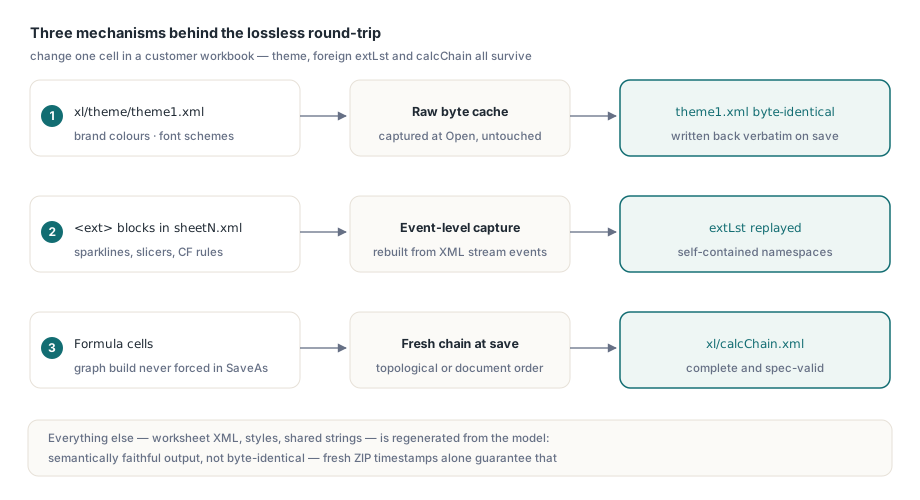
The scenario that motivates all three is depressingly common. A billing service loads a template the customer designed in Excel — corporate color theme, sparklines in a KPI column, a conditional-format rule added by a newer Excel build — writes one invoice total into cell B3, and saves. The customer opens the result and the brand colors have snapped back to stock Office blue, the sparklines are gone, and Excel offers to "repair" the file. Nothing in the code touched any of those features. The library did, simply by saving
Why do Excel files lose formatting after library edits?
Excel files lose formatting after library edits because most libraries do not edit the file — they rebuild it. An .xlsx package is a ZIP of XML parts: xl/workbook.xml, one xl/worksheets/sheetN.xml per sheet, xl/styles.xml, xl/theme/theme1.xml, xl/calcChain.xml, and more. A typical library parses those parts into an object model on open and regenerates every part from that model on save. Any feature the model does not represent — a theme it never parsed, an extension block from a newer Excel — has nowhere to live in memory, so the regenerated part silently omits it
ECMA-376 anticipated half of this problem. SpreadsheetML defines extLst (ECMA-376 Part 1, the "Future Feature Data Storage Area", §18.2.10 for the workbook-level element) as a designated extension point: newer producers park features there, each wrapped in an <ext> element carrying a uri attribute that identifies the feature, and older consumers are expected to preserve what they do not understand. Sparklines, slicers, and newer conditional-format types all travel this way. A library that drops unknown <ext> blocks is therefore not merely lossy — it violates the forward-compatibility contract the format was designed around. The question to put to any spreadsheet library you are evaluating is blunt: if I change one cell, what else changes
How does HotXLS keep a custom theme byte-for-byte?
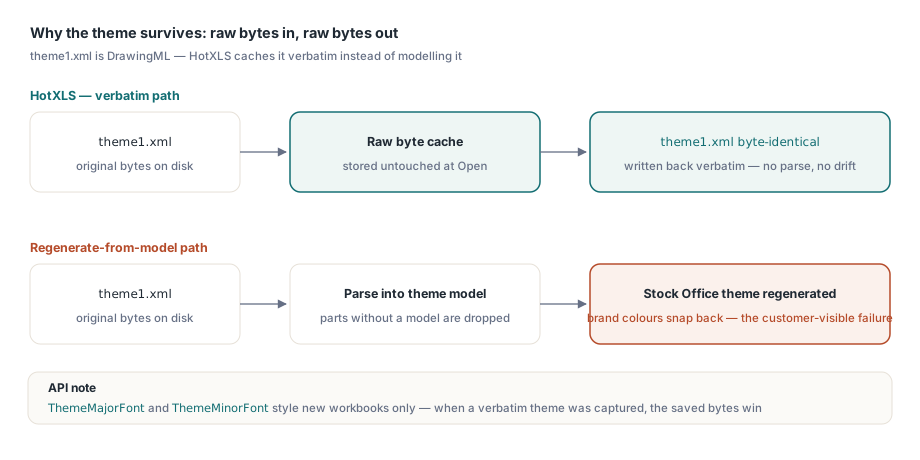
HotXLS preserves a workbook's theme by caching the original bytes of xl/theme/theme1.xml at open time and writing them back verbatim at save time. The theme part (ECMA-376 Part 1, §14.2.7) is DrawingML, not SpreadsheetML — color schemes, font schemes, format schemes — and a spreadsheet engine has no reason to model it deeply. Earlier HotXLS versions regenerated a fixed Office theme on every save, which is exactly the "brand colors snapped back" failure above; since v2.89.46 the opened package's theme is stored raw and re-emitted untouched, and the built-in Office theme is generated only for workbooks created from scratch. Raw bytes are the strongest possible fidelity guarantee: no parse, no re-serialize, no chance of drift
The verbatim copy deliberately wins over programmatic theme access. TXLSXWorkbook exposes ThemeMajorFont and ThemeMinorFont so you can pick heading and body typefaces for new workbooks, but when a verbatim theme was captured on open those setters have no effect on the saved file — the round-trip takes priority. If you genuinely need to alter an existing workbook's theme, that is a signal to edit the template in Excel itself rather than through a data-oriented API. The everyday case needs no API at all:
var
  Book: TXLSXWorkbook;
begin
  Book := TXLSXWorkbook.Create;
  try
    Book.Open('branded-invoice.xlsx');
    Book.Sheets[0].Cells[3, 2].Value := 42750.00;  // the one edit
    Book.SaveAs('branded-invoice-out.xlsx');
    // theme1.xml in the output is byte-identical to the input
  finally
    Book.Free;
  end;
end;
What happens to unknown extLst blocks on save?
HotXLS captures every worksheet-level <ext> block it does not natively model and replays it into the saved worksheet's extLst, so features written by newer Excel builds survive the round-trip intact. Since v2.131.0 the captured fragments are visible through the read-only RawWorksheetExts property, a TStringList on each XLSX worksheet, which makes the guarantee auditable from test code rather than an act of faith:
var
  Book: TXLSXWorkbook;
  Sheet: TXLSXWorksheet;
  i: Integer;
begin
  Book := TXLSXWorkbook.Create;
  try
    Book.Open('from-newer-excel.xlsx');
    Sheet := Book.Sheets[0];
    WriteLn(Format('%d foreign ext block(s) captured',
      [Sheet.RawWorksheetExts.Count]));
    for i := 0 to Sheet.RawWorksheetExts.Count - 1 do
      WriteLn(Copy(Sheet.RawWorksheetExts[i], 1, 100)); // peek at each uri
  finally
    Book.Free;
  end;
end;
The implementation detail worth knowing is that the capture is an event-level re-serialization, not a raw byte copy. HotXLS's streaming XML reader exposes no source offsets, so the unknown subtree is rebuilt from Element, Text, and EndElement events as they stream past. That approach hides one classic trap: a self-closing element such as <a/> fires only an Element event flagged empty and never an EndElement, so any depth counter that decrements solely on EndElement will never see the subtree close. Handle it, and the rebuilt fragment is semantically equivalent to the original — attribute quoting and self-closing forms are normalized, so it is not byte-identical, but Excel reads meaning, not bytes. Two properties of Excel's own output make the replay safe: Excel declares the necessary xmlns attributes on the <ext> element or inside it, so each captured fragment is namespace-self-contained, and that same self-containment is why duplicating a worksheet within or across workbooks can carry the foreign blocks along with a plain string-list assign
Writing calcChain.xml so Excel trusts your formulas
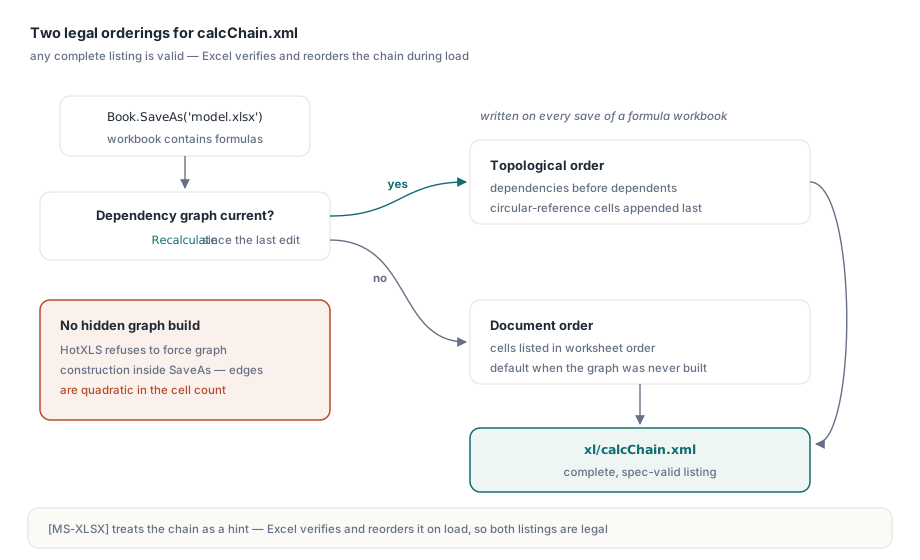
HotXLS writes xl/calcChain.xml (the Calculation Chain part, ECMA-376 Part 1, §12.3.1) whenever the saved workbook contains formulas, and it chooses between two orderings. If the formula dependency graph has already been built and is current — you called Recalculate after your last edit — the chain is emitted in full topological order, dependencies before dependents, with any circular-reference members appended at the end. Otherwise cells are listed in document order. Both are correct: Microsoft's implementation notes for the format, [MS-XLSX], treat the calculation chain as a hint that Excel verifies and reorders during load, so any complete listing is legal, and HotXLS deliberately refuses to force a graph build inside SaveAs — edge construction is quadratic in cell count, an unacceptable hidden cost on a million-cell save
Book.Open('model.xlsx');
Book.Sheets[0].Cells[10, 4].Formula := '=SUM(D2:D9)';
// Saved now, calcChain.xml lists formula cells in document order.
// After Recalculate the dependency graph exists, so the same save
// emits a full topological order instead:
Book.Recalculate;
Book.SaveAs('model-out.xlsx');
Why care about a part Excel treats as advisory? Because its absence is a signal. Some consumers — repair heuristics, third-party viewers, diff tools — expect a formula workbook to carry a calculation chain, and a library that silently drops the part on save produces files that are subtly unlike anything Excel writes. Emitting a valid chain keeps the output inside the envelope of what the rest of the ecosystem has been tested against, which is the quiet, unglamorous core of round-trip engineering
Where lossless round-trip ends
Honesty matters more than a marketing checkbox here, so the boundaries deserve equal billing. HotXLS does not copy the whole package byte-for-byte: worksheet XML, styles, shared strings, and workbook parts are regenerated from the parsed model, so the output is semantically faithful but not binary-identical — ZIP local headers alone carry fresh DOS timestamps. Captured <ext> fragments come back normalized, as described above. Programmatic theme-font overrides are ignored when a verbatim theme is present. And the preservation net has a defined mesh: features HotXLS models natively (sparklines, for instance, are parsed and rewritten rather than blindly copied) plus foreign extLst content plus the verbatim-cached parts. A part that is neither modeled nor inside an extension point — an exotic add-in's custom part, say — falls outside the three mechanisms this article covers, so test your actual templates rather than assuming
Adjacent preservation work rounds out the picture. VBA projects and external workbook references ride through save on the same keep-what-you-do-not-model philosophy, covered in the companion article on VBA and external-link preservation, and document properties in docProps have their own read-write API rather than being silently dropped. When you evaluate any spreadsheet library, run the one-cell test: open a feature-rich production workbook, change a single value, save, and diff the unzipped parts against the original. What changed beyond the sheet you touched tells you more about the library than any feature matrix
The round-trip mechanisms described here — verbatim theme retention since v2.89.46, foreign extLst capture and calcChain.xml emission since v2.131.0 — ship in the current HotXLS Delphi Excel Component, whose product page documents the full XLSX read-write feature set for Delphi and C++Builder