You have built one sheet exactly right. The header band is merged, the column widths fit the data, the top two rows are frozen, the print area and margins are set for a clean A4 export, and the tab is colored so finance can find it. Now the report needs twelve of these, one per region, each starting from the same layout. Rebuilding that sheet in code twelve times is how subtle drift creeps in: region 7 gets a column one point narrower, region 11 loses the freeze, and nobody notices until the PDF lands on a manager's desk. What you actually want is the programmatic version of Excel's right-click, Move or Copy, Create a copy: take the finished sheet and stamp out independent duplicates
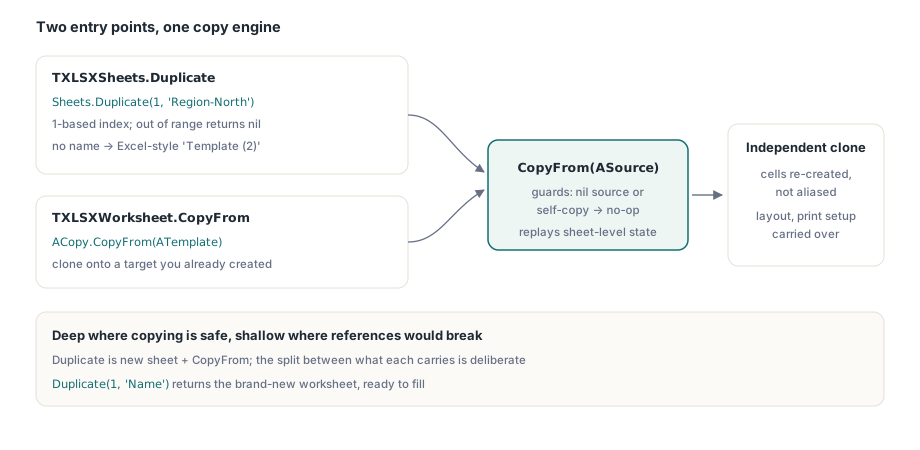
The XLSX engine in HotXLS, a native Delphi and C++Builder library that reads and writes Excel files without automating Excel itself, could already move sheets, delete sheets, and copy cell ranges across sheets. What it could not do until v2.91.0 was clone a whole worksheet in one call. That release adds two entry points: TXLSXWorksheet.CopyFrom, which copies sheet-level state from one worksheet onto another, and TXLSXSheets.Duplicate, which adds a new sheet and runs CopyFrom for you. The interesting part is not that it copies things. It is the deliberate line drawn between what gets deep-copied and what does not, and why that line is where it is
One call to clone a finished sheet
The high-level operation is Duplicate. Hand it the 1-based index of the source sheet and it returns a brand-new worksheet that mirrors the original's layout and data. The index convention matches Items[] on the XLSX side, so sheet one is index 1, not 0; pass an index out of range and you get nil rather than an exception, the same failure contract the rest of the XLSX sheet collection uses
var
  Book: TXLSXWorkbook;
  Template, Copy: TXLSXWorksheet;
begin
  Book := TXLSXWorkbook.Create;
  try
    Template := Book.Sheets.Add('Template');
    Template.Cells[1, 1].Value := 'Quarterly Statement';
    Template.Range['A1:C1'].Merge;
    Template.ColWidth[1] := 18;
    Template.FreezePanes(2, 1);          // freeze top row + first column
    Template.TabColorIsAuto := False;
    Template.TabColor := $FF1F4E79;

    // Clone with an explicit name...
    Copy := Book.Sheets.Duplicate(1, 'Region-North');
    // ...or let it pick the Excel-style default name.
    Copy := Book.Sheets.Duplicate(1);    // -> "Template (2)"

    Book.SaveAs('regions.xlsx');
  finally
    Book.Free;
  end;
end;
Two things in that snippet are worth slowing down on. First, FreezePanes takes its arguments row-first, FreezePanes(ARow, ACol), so it lines up with Cells[Row, Col] indexing; the duplicate inherits the exact freeze split. Second, the method is named Duplicate and not the more obvious Copy, and that is not a style preference. Copy is a standard routine in the System unit, used constantly for strings and dynamic arrays. A method called Copy on a class would shadow it inside method bodies and create exactly the kind of resolution ambiguity that bites you six months later. Duplicate sidesteps the whole problem and reads correctly at the call site
The default name follows Excel's own rule
When you call the one-argument overload, or pass an empty name string, the new sheet is named after the source with a (2) suffix, and the suffix bumps until the name is unique. Duplicate the Template sheet once and you get Template (2); duplicate it again and you get Template (3), because Template (2) is already taken. This mirrors the names Excel generates from its own Create a copy command, so a workbook your code produces looks the way a user would expect a hand-duplicated one to look. The uniqueness check runs against the live sheet collection, which means it also steps over names you created manually, not just ones from earlier duplications
If you are generating one sheet per region or per month, lean on the explicit-name overload instead. A predictable Region-North, Region-South scheme is easier to address later than a string of (2), (3) suffixes, and it keeps your defined names and cross-sheet formulas legible
What CopyFrom deep-copies
Under the hood, Duplicate adds the sheet and then calls CopyFrom(ASource), which you can also call directly when you want to clone onto a sheet you have already created. CopyFrom guards against the two degenerate cases up front: copying from nil, or copying a sheet onto itself, both return immediately and do nothing. Everything after that is the copy itself, and it is deliberately broad
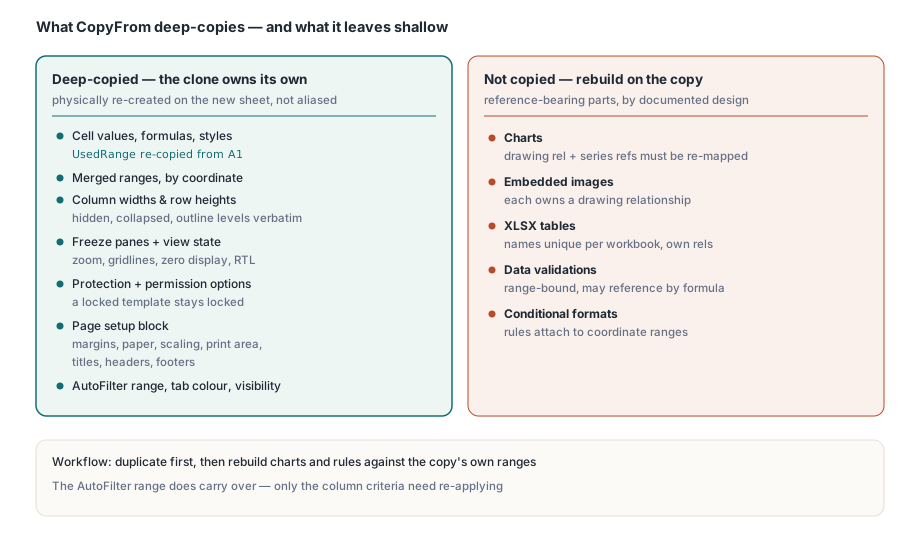
The cell data comes first. CopyFrom asks the source for its UsedRange, the tight bounding box of populated cells and merged regions, and reuses the existing CopyRangeTo machinery to carry every value, formula, and per-cell style index into the target starting at A1. On top of the cells, it replays the full layer of sheet-level state that makes a template look finished:
- Merged ranges, re-created by coordinate so the banner spans the same rectangle
- Column widths and row heights, plus the hidden, collapsed, and outline-level lists, copied verbatim so non-default rows and columns line up exactly
- Freeze panes and the view state: zoom level, gridline and zero-value display, right-to-left direction, and the view type
- Protection state with its per-action permission options, so a locked template stays locked the same way
- The entire page-setup block: margins, orientation, paper size, scaling and fit-to-page, print area, print titles, headers and footers, and the print-gridlines and print-headings flags
- The AutoFilter range, the tab color, and the sheet's visibility
The result is a sheet that prints, filters, and presents identically to its source. And because the cells, merges, and dimension lists are physically re-created on the new sheet rather than aliased, the duplicate is fully independent. Write 999 into a cell on the copy and the source keeps its original value; that independence is the single most important property of a clone meant for parallel regional reports, and the shipped SheetCopy demo asserts it explicitly
What it leaves shallow, and why
Now the honest part. Charts, embedded images, XLSX tables, data validations, and conditional-formatting rules are not copied. This is a documented, deliberate boundary, not an oversight, and it is worth understanding the reasoning so you can plan around it rather than be surprised by it
Each of those collections carries identity and references that do not survive a naive field copy. A chart points at a source data range and owns a drawing relationship in the OOXML package; cloning the object without remapping the relationship and the series references produces a chart that renders against the wrong data, or a package that Excel flags as needing repair. A table has a name that must be unique within the workbook, a header row tied to specific columns, and its own auto-generated relationship. Conditional formats and data validations attach to coordinate ranges and, in the validation case, can reference other ranges by formula. Deep-copying any of these correctly means rewriting references and minting fresh identities, which is real work with real failure modes. Doing it halfway, by copying the object but not its references, is worse than not copying at all: it yields a file that opens with a repair prompt and silently drops content. So the engine copies the things it can copy cleanly and leaves the reference-bearing collections to the caller, who knows what the target should point at
In practice that means the workflow for a richer template is: duplicate the sheet to get the cells, layout, and print setup, then rebuild the chart, table, validations, or conditional formats on the copy with the same API you used to create them the first time. Because you are recreating them against the duplicate's own ranges, the references come out correct by construction. For a chart that reads A1:C10, add a new chart on the copy pointing at the copy's A1:C10; for an AutoFilter you want live, note that the filter range does carry over, so you only re-apply the column criteria. The conditional-formatting and data-validation rules you would re-add through the same calls described in the article on merged cells and report-template layout, which walks the merge table and range model the copy inherits
Where duplication fits a reporting pipeline
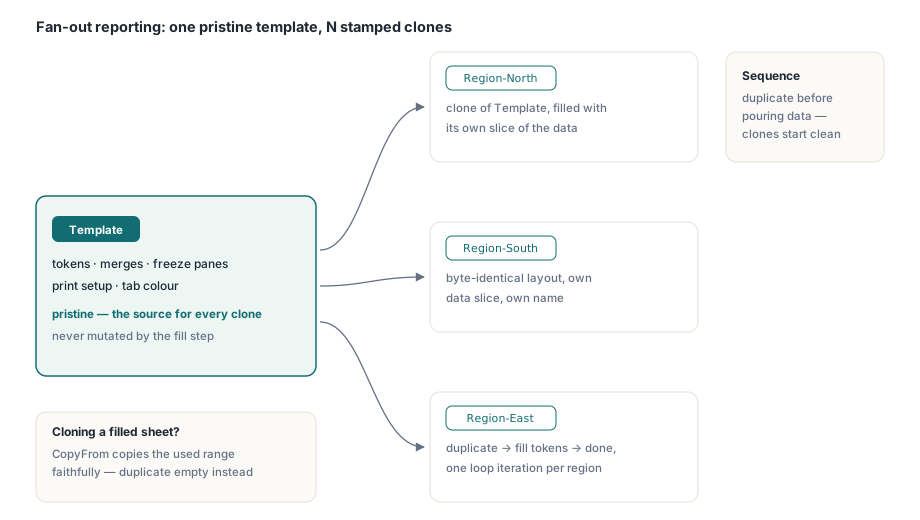
Worksheet duplication is the natural companion to placeholder-driven generation. The token-anchored approach in the guide to template-driven report generation in Delphi solves the problem of writing data into a layout other people edit; duplication solves the problem of needing that layout many times in one workbook. Combine them and the pattern is clean: keep one pristine Template sheet with its tokens, merges, and print setup, then for each region or period call Duplicate, fill the clone's tokens with that slice of data, and move on. The pristine template never gets mutated, so it stays a reliable source for the next clone, and every output sheet starts from a byte-for-byte identical layout
One sequencing note saves a class of confusion. Duplicate the sheet before you pour data into it, not after. A template should hold structure and formatting, not last quarter's numbers, and cloning an empty styled sheet means each duplicate starts clean. If you duplicate a sheet that already carries data, that data comes along, because CopyFrom copies the used range faithfully; that is occasionally what you want, but for a fan-out report it usually is not
A quick verification habit
Because the deep-copy versus shallow-copy split is invisible until you look for it, build a five-line check into the job rather than trusting that everything came across. After duplicating, read back the structural signals the clone is supposed to inherit and assert they match the source
Copy := Book.Sheets.Duplicate(1, 'Region-North');
WriteLn(Format('merged=%d  colA=%.1f  freezeRow=%d  tabAuto=%d',
  [Copy.MergedCells.Count, Copy.ColWidth[1],
   Copy.FreezeRow, Integer(Copy.TabColorIsAuto)]));
// Prove independence: mutate the copy, confirm the source is untouched.
Copy.Cells[2, 2].Value := 999;
// Template.Cells[2, 2].Value is still whatever it was.
The merge count, a column width, the freeze row, and the tab-color flag tell you the layer that is copied actually made it. Separately, in any sheet that carried a chart, a table, validations, or conditional formats, treat those as a to-rebuild list on the copy: their absence is by design, and the fix is a few calls, not a bug report. That mental model, deep where it is safe and shallow where references would break, is the whole story of how to use this feature well
Worksheet duplication and the CopyFrom sheet-state copy described here ship in v2.91.0 of the native HotXLS Delphi spreadsheet component, alongside a runnable SheetCopy sample that exercises the clone-and-mutate cycle end to end