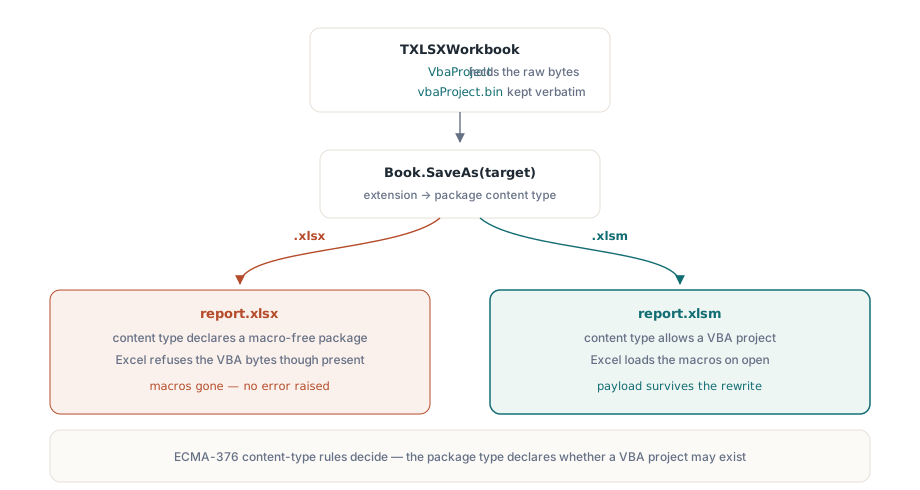
Consider a job that does almost nothing: open a monthly workbook, write today's date into one cell, save it back. Run that through a service often enough and a complaint arrives anyway. The macros are gone, or the linked exchange rates now read #REF!, and the operations team is convinced your code deleted them. It did not delete anything. What usually happened is that a macro-enabled workbook went out under a plain .xlsx name, and Excel obeyed the ECMA-376 content-type rules: a package whose content type declares no VBA cannot load a VBA project, regardless of whether the bytes are sitting right there. The file did not break. It was renamed into a state where Excel is required to ignore part of it
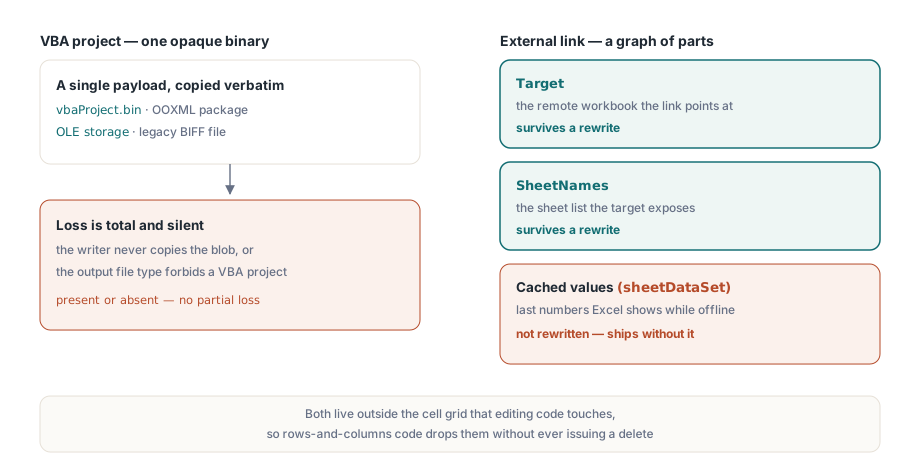
Macros and external workbook links are the two things automation loses most reliably, for the same underlying reason. Both live outside the cell grid that editing code actually touches, so code reasoning in terms of rows and columns will drop them without ever issuing a delete. HotXLS is a native Delphi and C++Builder library that reads and writes XLS and XLSX without Excel installed, and it treats both assets as payloads it carries deliberately rather than data it happens to copy. What follows is what each one needs from your save path, and where the guarantees stop
Why these two assets behave differently under a rewrite
A VBA project is one opaque binary. In an OOXML package it is the file vbaProject.bin; in a legacy BIFF file it is an OLE storage. There are exactly two ways to lose it: the writer never copies it into the output, or the output gets a file type that forbids it. Either failure is total and silent. The project is present or it is not
An external link is not a blob at all. It is a small graph of relationships: a target path or URL pointing at another workbook, the list of sheet names that target exposes, and an optional cache of the values last seen in those sheets so Excel can show something when the target is offline. Those three parts have different lifetimes under a rewrite, and a library can faithfully preserve some while quietly dropping others. That asymmetry is the part worth getting precise about, because nothing in the cell-editing code will surface it
Carrying a VBA project through an XLSX rewrite
On the XLSX side, TXLSXWorkbook keeps the macro payload verbatim. The VbaProject property holds the raw vbaProject.bin bytes inside an AnsiString, and an empty string is how the model says there are no macros. Around it sit three operations: HasVbaProject answers whether a project is present, ClearVbaProject removes it on purpose, and LoadVbaProjectFromFile injects one extracted from a template. That last call is worth more than it looks. It lets generated workbooks pick up a standard macro project without dragging a full template file through the pipeline
var
  Book: TXLSXWorkbook;
  Sheet: TXLSXWorksheet;
begin
  Book := TXLSXWorkbook.Create;
  try
    Sheet := Book.Sheets.Add('Data');
    Sheet.Cells[1, 1].Value := 'Refreshed ' + DateTimeToStr(Now);

    Book.LoadVbaProjectFromFile('macros\vbaProject.bin');
    if not Book.HasVbaProject then
      raise Exception.Create('VBA payload failed to load');

    // The .xlsm extension is not cosmetic: it selects the
    // macro-enabled content type inside the package.
    Book.SaveAs('monthly-report.xlsm');
  finally
    Book.Free;
  end;
end;
The save line is where the whole problem turns. A workbook holding a VBA project has to be written with macro-enabled semantics, and HotXLS applies them when the target name ends in .xlsm. Hand it .xlsx instead and Excel refuses the macros, even though the bytes are physically present in the package and would deserialize fine. The extension is not decoration; it selects the content type that tells Excel a VBA project is allowed to exist. Most of the time you only need to carry the payload through. When you need to read into it, say to list module names for an audit report, ParsedVBAProject exposes a parsed module model while VbaProject stays the original untouched bytes
Reusing macros from legacy XLS workbooks
The BIFF facade mirrors that tool set with one extra step. HasVBAProject probes a loaded file, SaveVBAProjectToFile writes the project storage out to disk, and LoadVBAProjectFromFile reads one back into another workbook. The detour through a file makes a common modernization chore straightforward: lift the macros out of a 2003-era model and plant them into freshly generated XLS output, no original template required at run time
var
  Src, Dst: IXLSWorkbook;   // interface references: no manual Free
begin
  Src := TXLSWorkbook.Create;
  if Src.Open('legacy-model.xls') <= 0 then
    raise Exception.Create('Cannot open legacy model');
  if Src.HasVBAProject then
    Src.SaveVBAProjectToFile('extracted-vba.bin');

  Dst := TXLSWorkbook.Create;
  Dst.Sheets.Add.Name := 'Report2026';
  Dst.LoadVBAProjectFromFile('extracted-vba.bin');
  Dst.SaveAs('report-with-macros.xls');
end;
The memory model is the trap here, and it runs opposite to the XLSX class. TXLSWorkbook is held through the reference-counted IXLSWorkbook interface, so you never free it by hand; the XLSX TXLSXWorkbook is a plain object you must wrap in try..finally and free. Mix the two conventions in one unit and double-free crashes follow. One more boundary worth respecting: keep extraction and injection inside a single file format. The BIFF project storage and the OOXML vbaProject.bin are cousins, not the same container, and a pipeline that has to emit macros in both formats should keep a separate macro template for each
External links: the map survives, the cached values do not
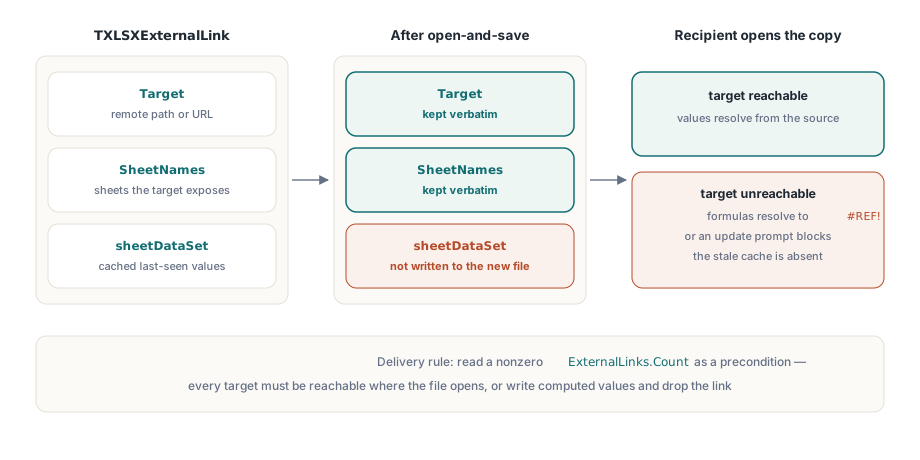
For XLSX workbooks, HotXLS exposes external links through the ExternalLinks collection. Each TXLSXExternalLink carries a Target, the path or URL of the remote workbook, plus a SheetNames list naming the sheets it references. Both survive an open-and-save cycle intact, and you can also build a link from scratch:
var
  Link: TXLSXExternalLink;
begin
  Link := Book.ExternalLinks.Add('\\fileserver\finance\fx-rates-2026.xlsx');
  Link.SheetNames.Add('FX');

  if Book.ExternalLinks.Count > 0 then
    Writeln(Format('%d external link(s): delivery requires reachable targets',
      [Book.ExternalLinks.Count]));
end;
The boundary sits one level deeper than the target list. HotXLS round-trips the link map, meaning the target and the sheet names, but it does not parse or rewrite the cached cell values that OOXML keeps in the link's sheetDataSet element. That cache is what lets Excel show a last-known number when the source file is offline, and a generated workbook ships without it. The consequence lands on the recipient, not on you. Open such a file where the target is unreachable, a laptop off the VPN or a share that got renamed, and the formulas that depend on the link resolve to #REF! or stall behind an update prompt. So two rules fall out of this. Do not promise that a generated workbook will display its externally linked values offline. And read a nonzero ExternalLinks.Count as a delivery precondition rather than a feature: every target has to be reachable from wherever the file will actually be opened
What the XLS reader preserves byte-for-byte
For structures it does not model, the BIFF side has a different answer: leave them exactly as found. Pivot caches and pivot views (the SX* record family), QueryTable definitions, external data connections, custom views, header pictures, and theme records all pass through an open-and-save cycle as raw record blocks, unparsed and unmodified. External references themselves round-trip through the underlying EXTERNSHEET and SupBook records. There is no typed creation API for them on the XLS side, but an existing link survives editing untouched
Byte-for-byte preservation is a genuine guarantee with a sharp edge. Because nothing reads a preserved structure, your edits cannot corrupt it. For the same reason, nothing updates it either. Insert rows through a region that a preserved pivot cache or query table points at, and the structure holds its original coordinates while the data underneath shifts. The file is still valid XML or BIFF; the meaning has quietly drifted out of alignment, and no error fires to tell you. The defensible layout is to keep generated edits on sheets that hold no preserved structures, which is the same discipline that protects locked and print-configured sheets in our article on worksheet protection and page setup
Verifying the file you actually wrote
Both failure modes are silent at write time, so the assertion that matters is made by reopening the output rather than trusting the code that produced it. Three checks cover nearly everything. Reopen the file and confirm HasVbaProject still returns true whenever macros were expected, which catches a dropped payload and a wrong extension in a single test. Read ExternalLinks.Count and compare it against the count from before the rewrite. Then open the file once in Excel with macros disabled, because Excel's content-type validation is stricter than any library's, and Excel is the program your customers will judge the file by
None of that requires a full parse on the way in. When workbooks arrive in volume and you only need to triage which ones carry governed content, the lightweight probing in our article on sheet listing and lightweight workbook inspection lets you route macro-bearing and linked files into a stricter pipeline before the first rewrite ever runs
A few questions come up often enough to answer directly. HotXLS never executes the macros it preserves: there is no VBA runtime in the library, only the machinery to store, copy, extract, and inject the project as data. On a server that is a security property worth stating, since a hostile macro passing through the pipeline stays inert until a desktop Excel opens the file and a user enables content. Converting an .xlsm to .xlsx and keeping the macros is not possible, and that is the format's rule rather than a library limitation: the .xlsx content type declares a macro-free workbook, so the only honest outcomes are staying .xlsm or calling ClearVbaProject and shipping a file that genuinely has none. The silent rename is the one choice that satisfies nobody. And when linked cells show #REF! after a rewrite, the cause is the missing value cache discussed above: the new file carries the target but not the cached numbers, so Excel must resolve the source at open time, and an unreachable or environment-relative path defeats it. Either guarantee the target is reachable or write computed values into the cells before delivery and drop the dependency entirely
Editing other people's workbooks is mostly the work of preserving things you did not write and do not fully understand. The VBA and external-link round-trip facilities described here ship with the HotXLS Delphi Component for Delphi and C++Builder, together with the audit properties that let you detect governed content the moment a file arrives