Sometimes the only question an intake routine needs answered is structural: does this workbook have a sheet called "Mapping", or how many tabs does it carry. Answering that by calling Open is the expensive way to do it. A full open inflates the shared string table, decodes every style record, and walks each worksheet's cells, because it has no way to know you only wanted the table of contents. On a large file that is hundreds of megabytes of allocations and several seconds of CPU spent to read a list that occupies a few kilobytes. HotXLS, the native Delphi spreadsheet library from losLab, gives you that list on its own: GetSheetNames hands back the worksheet names, in workbook order, without materializing a single cell
Why the catalog is cheap to read
Both spreadsheet formats put their table of contents near the front, which is what makes a listing call fast rather than clever. An OOXML package keeps the sheet catalog in xl/workbook.xml, a part that stays small whether the workbook holds ten rows or ten million. A BIFF8 .xls stores its BoundSheet records at the start of the workbook globals stream, ahead of any cell data. So the work a listing call avoids is not a rounding error against a full open. It is most of the file. Reading the catalog costs the same handful of kilobytes regardless of row count, while a full open scales with the data, and on a multi-megabyte workbook that gap runs to several orders of magnitude in both bytes touched and memory allocated
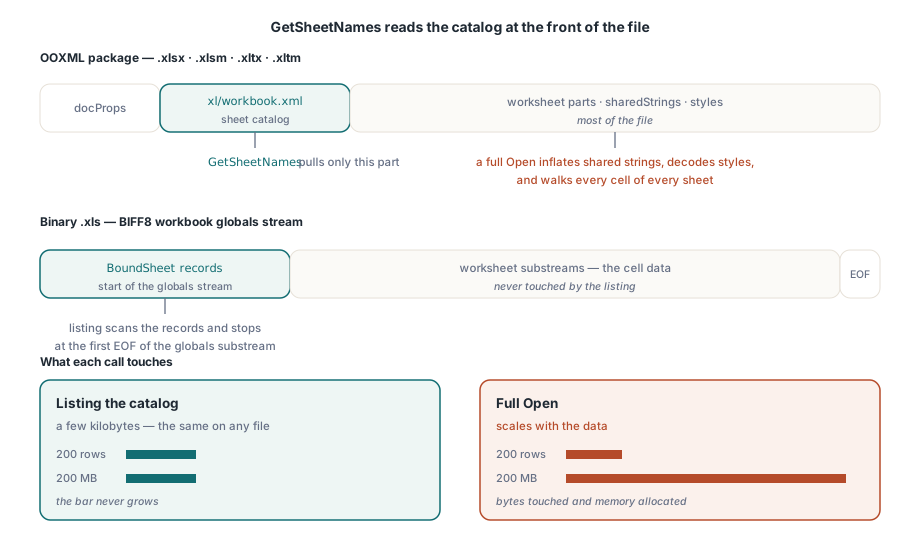
That flat cost is the property worth designing around. An intake gate built on GetSheetNames behaves the same on a 200-row file and a 200-MB one, so the slowest file in a batch no longer sets the pace for deciding whether a file is even worth processing
One call across .xls, .xlsx, and the template formats
On the XLS facade, TXLSWorkbook.GetSheetNames reads more than .xls. It also accepts the zip-based .xlsx, .xlsm, .xltx, and .xltm, pulling only workbook.xml out of the archive. For genuine .xls input it scans BoundSheet records and stops at the first EOF record of the globals substream, so a large binary file still costs only its opening kilobytes. The XLSX facade carries a guarantee that matters more for long-running service code than it first appears: TXLSXWorkbook.GetSheetNames leaves the workbook instance neither reset nor populated, so an instance already holding an open document can probe other files without disturbing the one in hand. GetODSSheetNames applies the same approach to OpenDocument packages, and every one of these calls has a stream overload, which lets you inspect an upload that never lands on disk
var
  Book: TXLSXWorkbook;
  Names: TStringList;
  I: Integer;
begin
  Names := TStringList.Create;
  Book := TXLSXWorkbook.Create;
  try
    if Book.GetSheetNames('upload-7f3a.xlsx', Names) <= 0 then
      raise Exception.Create('unreadable workbook package');
    if Names.IndexOf('Mapping') < 0 then
      raise Exception.Create('required Mapping sheet is missing');
    for I := 0 to Names.Count - 1 do
      Writeln(Format('sheet %d: %s', [I, Names[I]]));
  finally
    Book.Free;
    Names.Free;
  end;
end;
The same call makes a good desktop import dialog. List the sheets, let the user choose one, and pay for the full open only after the choice is made. With a fifty-sheet workbook the difference is visible: a picker that appears at once versus one that stalls while the whole file loads behind it
Macro-enabled .xlsm files and the template formats list exactly like a plain .xlsx, since the catalog sits in the same workbook.xml whether or not a vbaProject.bin is riding along in the package. An intake pipeline can therefore enumerate the sheets of a macro workbook for routing, never touching the macro payload and never doing anything that would run it, and leave the macro policy call to the stage that actually opens the file
Reading the return value without fooling yourself
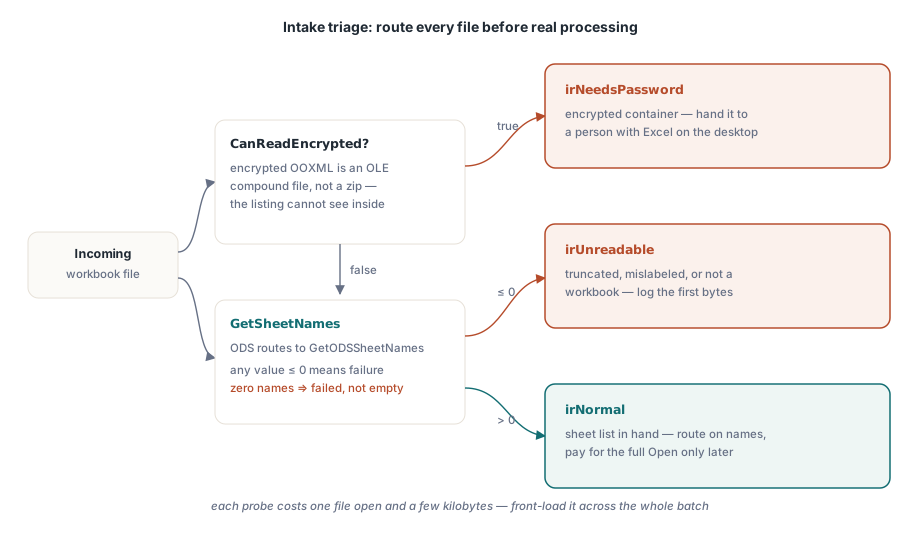
Return conventions are not uniform across HotXLS. Some calls return 1 on success, others return a count, so for the listing functions the only check that holds up is treating any value of zero or below as failure, with the string list cleared. Resist the temptation to read an empty list as "a workbook with no sheets." Both ECMA-376 and the BIFF8 specification require at least one sheet in a valid workbook, so zero names always means the read failed, never that the file is legitimately empty
A failed listing is itself a signal worth keeping. An .xlsx file that fails the call is one of a few specific things: truncated, not really an OOXML package at all (mislabeled CSV exports from other systems show up here constantly), or an encrypted container. Telling those apart is the job of the next check. Logging the first bytes of the rejected file alongside the failure usually turns a support thread into a single message
Detecting encrypted containers before you route
An encrypted .xlsx is not a zip. It is an OLE compound file wrapping EncryptionInfo and EncryptedPackage streams, so GetSheetNames cannot see into it and returns failure like any other unreadable file. CanReadEncrypted tests for that container shape, which lets intake route an encrypted file on purpose rather than swallowing a generic read error from somewhere deep in a worker:
type
  TIntakeRoute = (irNormal, irNeedsPassword, irUnreadable);

function ClassifyUpload(const FileName: string; Names: TStrings): TIntakeRoute;
var
  Book: TXLSXWorkbook;
begin
  Book := TXLSXWorkbook.Create;
  try
    // Encrypted OOXML is an OLE container, not a zip: check first,
    // because the listing calls cannot look inside it.
    if Book.CanReadEncrypted(FileName) then
      Exit(irNeedsPassword);
    if SameText(ExtractFileExt(FileName), '.ods') then
    begin
      if Book.GetODSSheetNames(FileName, Names) <= 0 then
        Exit(irUnreadable);
    end
    else if Book.GetSheetNames(FileName, Names) <= 0 then
      Exit(irUnreadable);
    Result := irNormal;
  finally
    Book.Free;
  end;
end;
Encryption is where HotXLS is deliberately asymmetric, so the routing has to respect that. Legacy .xls encryption (RC4, RC4 CryptoAPI, XOR) is readable: TXLSWorkbook.Open(FileName, Password) decrypts with a stored password, and those files can stay on the automated path. Encrypted OOXML packages go the other way. HotXLS can write one with SaveAsEncrypted, but it cannot read one back. OpenEncrypted raises EXlsxEncryptionNotImplemented when handed an encrypted package, which is why an honest intake design sends encrypted .xlsx to a person with Excel and keeps the password-bearing .xls in code
For batch work this classifier earns its place by running over an entire incoming directory before any worker starts real processing, since each probe costs about one file open and a few kilobytes of reads. Front-loading it changes the failure mode that operations actually cares about. Instead of a 3 a.m. job dying on file 412 of 600, you get 412 files queued and 5 rejected at intake with a reason attached to each. Same library calls, far better operational story
The questions a listing call cannot answer
Names and order are the whole of what you get. The listing calls say nothing about visibility, so hidden and very-hidden sheets arrive in the list looking like any other. They report no used-range dimensions, no cell counts, and no document properties. The docProps/core.xml part is small too, but there is no properties-only probe today, so author and title metadata still cost a full Open. The clean way to live with that is to let the cheap facts route every file and reserve the expensive ones for files that survive routing. For the files that do proceed into a deep read, a read-only scan of a large .xls runs noticeably faster with _DisableGraphics := True, which skips OfficeArt parsing. Just never save from that instance: the drawing layer it skipped is gone from the model, and saving would drop it from the file
Files that clear triage usually head into deeper analysis. The workbook audit and conversion workbench covers the per-sheet counters worth collecting once a full open is justified, and the large-workbook performance guide covers keeping that full open fast
HotXLS is a native Object Pascal spreadsheet library for Delphi and C++Builder; the complete API surface, including the inspection calls shown here, is documented on the HotXLS Delphi Component product page