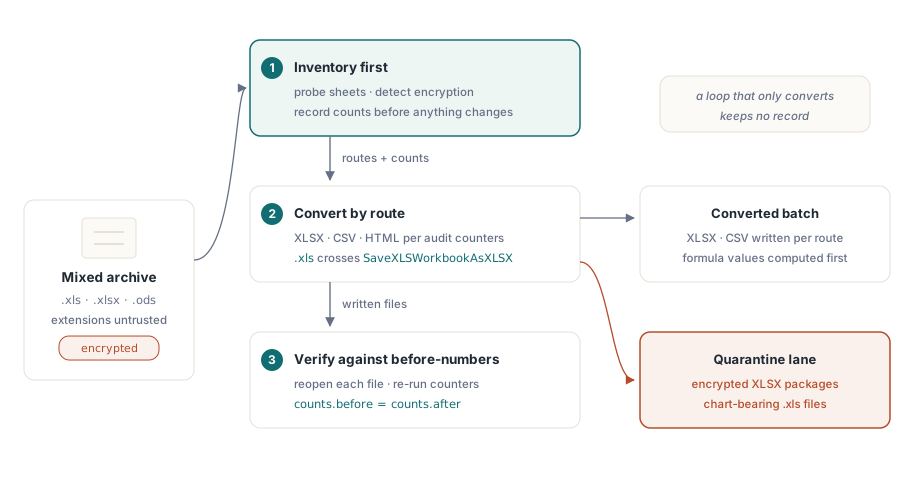
A bulk spreadsheet normalization job is three problems wearing one coat. You have an archive of mixed formats: BIFF-era .xls, modern .xlsx, a scattering of .ods from some LibreOffice experiment, and a handful of files nobody can open because the password walked out with a former employee. The goal is to convert everything to XLSX and CSV. The version of that job most people write is a loop that opens each file and saves it under a new extension, and it works right up until someone asks which files lost their charts, dropped their macros, or never opened at all. The loop has no answer, because conversion alone keeps no record. A workbench does: it inventories first, converts second, and verifies third, and the three stages have to share information for any of it to be trustworthy
Assembling that workbench in Delphi or C++Builder means wiring together four HotXLS capabilities, none of which needs Excel installed anywhere in the pipeline. There are two native engines, a BIFF8 facade for .xls and an OOXML facade for .xlsx and .ods. There are cheap probing calls that read metadata without parsing the whole file. There are per-sheet audit counters that tell you what a workbook actually holds. And there is a conversion matrix with a documented fidelity profile for each route. The work is in knowing where each of those has a sharp edge, because every one of them does, and the edges are exactly the things that turn a clean overnight batch into a Monday-morning incident
Probe before you load: sheet names and encryption detection
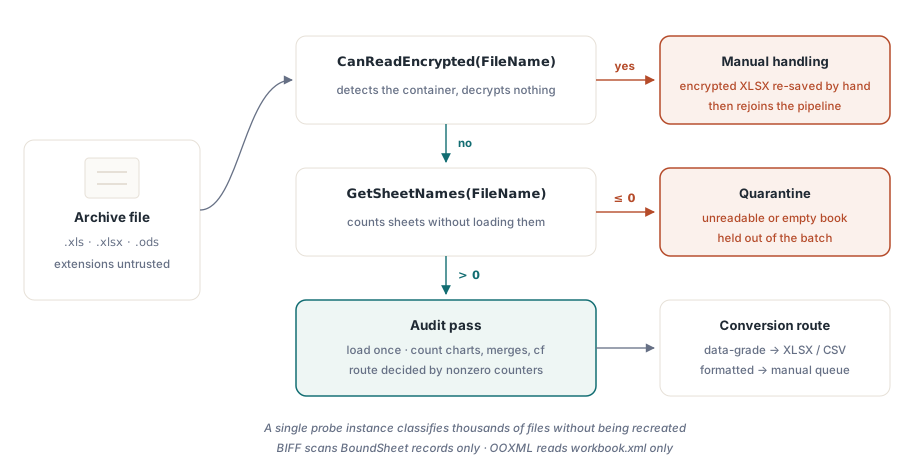
Opening a 200 MB workbook only to discover it is encrypted wastes minutes per file, and multiplied across a large archive it wastes days. Both facades expose GetSheetNames, which reads sheet metadata without populating the workbook. The BIFF implementation scans only the BoundSheet records at the front of the stream; the OOXML implementation reads only workbook.xml inside the zip. Alongside it, CanReadEncrypted detects an encryption container without attempting decryption:
var
  Probe: TXLSXWorkbook;
  Names: TStringList;
begin
  Names := TStringList.Create;
  Probe := TXLSXWorkbook.Create;
  try
    if Probe.CanReadEncrypted(FileName) then
    begin
      Writeln(FileName + ': encrypted container - route to manual handling');
      Exit;
    end;
    if Probe.GetSheetNames(FileName, Names) <= 0 then
      Writeln(FileName + ': unreadable - quarantine')
    else
      Writeln(Format('%s: %d sheet(s), first "%s"',
        [FileName, Names.Count, Names[0]]));
  finally
    Probe.Free;
    Names.Free;
  end;
end;
Two operational details make this loop cheap. GetSheetNames does not reset or populate the workbook instance, so a single probe object can classify thousands of files without being recreated. And the XLS-facade version of the same call also understands .xlsx packages, which makes it a convenient single probe when file extensions cannot be trusted, as they rarely can in an archive that old. Triage before load is worth its own treatment; the mechanics of lightweight inspection are in our article on sheet listing and lightweight workbook inspection
Counting what a workbook really contains
Once a file passes triage, the audit pass decides its conversion route. The XLSX facade exposes a counter for every feature family that bears on a fidelity decision: merged cells, charts, images, conditional formats, data validations, tables, hyperlinks, and comments, plus workbook-level flags for macros, protection, and source format. The conversion route for a file depends almost entirely on which of these come back nonzero
var
  Book: TXLSXWorkbook;
  Sheet: TXLSXWorksheet;
  I: Integer;
begin
  Book := TXLSXWorkbook.Create;
  try
    if Book.Open(FileName) <> 1 then Exit;
    for I := 0 to Book.Sheets.Count - 1 do
    begin
      Sheet := Book.Sheets[I];
      Writeln(Format('%s: cells=%d merges=%d charts=%d cf=%d dv=%d protected=%s',
        [Sheet.Name, Sheet.Cells.Count, Sheet.MergedCells.Count,
         Sheet.Charts.Count, Sheet.ConditionalFormats.Count,
         Sheet.DataValidations.Count, BoolToStr(Sheet.IsProtected, True)]));
    end;
    if Book.HasVbaProject then
      Writeln('  contains VBA project - macro policy applies');
    if Book.ExternalLinks.Count > 0 then
      Writeln(Format('  %d external link(s)', [Book.ExternalLinks.Count]));
  finally
    Book.Free;
  end;
end;
Read Cells.Count with one caveat in mind. The cell store is sparse, so the number counts instantiated cells, not the rectangular area of the used range. A sheet with one value in A1 and another in ZZ9999 reports two cells, not the million-odd that lie between them. The equivalent scan on the BIFF side uses UsedRange bounds together with ForEachCell, and it carries the off-by-one that trips up nearly everyone the first time: UsedRange.FirstRow and its siblings are 0-based, while Cells.Item[Row, Col] is 1-based. A traversal that forgets to add one to each bound audits the wrong rectangle and never says so
Two levers cut the cost of an audit-only pass over large legacy files. Setting _DisableGraphics to true before opening an .xls skips the OfficeArt drawing-layer parse entirely, which saves real time on workbooks dense with shapes. It is strictly a read-only optimization, though: saving from an instance opened that way would drop the drawings it never parsed, so the flag belongs only on paths that will never write the file back. When the audit needs per-cell content rather than counts, the ForEachCell callback walks the populated cells directly and sidesteps the per-access Variant overhead that indexed cell properties pay on every read, which adds up fast across millions of cells
Normalize the inconsistent return codes early
HotXLS I/O calls report errors through integer results rather than exceptions, and the conventions are not uniform across the API. Most open and save calls return 1 on success and -1 on failure. GetSheetNames returns the sheet count, or -1 with the list cleared. XLSX SaveAsHTML breaks the pattern again and returns 0 for success, -1 for a sheet index out of range. A workbench that tests = 1 everywhere will quietly misclassify the calls that signal success some other way, and one that tests <> -1 will swallow the ones that fail with a different code
The rule that survives contact with the whole API is narrower than it looks: treat <= 0 as failure for count-returning calls, check the documented success value for each save routine you actually use, and put both behind one small result-checking function so the convention lives in exactly one place. Batch pipelines fail far more often from a slow pile-up of unchecked return codes than from any exotic parser bug, and the cost of getting this wrong is forty thousand files later, when nobody remembers which conversions actually took
The conversion matrix and where each road loses data
The two facades divide the conversion work between them. TXLSXWorkbook opens XLSX, ODS, and CSV, and saves XLSX, ODS, CSV, HTML, RTF, and AES-encrypted XLSX. TXLSWorkbook opens and saves BIFF, and exports HTML, RTF, and CSV. The useful thing is that each path comes with a documented fidelity profile, not a vague promise of correctness, so you can decide ahead of time which routes are safe for which files
CSV export writes UTF-8 with a BOM, CRLF line ends, and RFC 4180 quoting. What it does not do is evaluate formulas: a cell holding =SUM(...) exports as the literal formula text, so a sheet of formulas turns into a sheet of strings unless you compute the values first. HTML export produces a single table, with colspan and rowspan standing in for merged cells and base styles inlined. RTF export has a sharper limit: it cannot span merged cells across columns, so the continuation cells of a merge come out empty. ODS import is lightweight on purpose, by the library's own documentation. Scalar values and cached formula results come through; styles, live ODF formula expressions, and drawings do not. That matters the moment the archive contains real OpenDocument files governed by OASIS ODF 1.3, where anything close to a visually faithful conversion needs more than this import path was built to carry, and the audit pass is what tells you those files exist before the batch silently flattens them
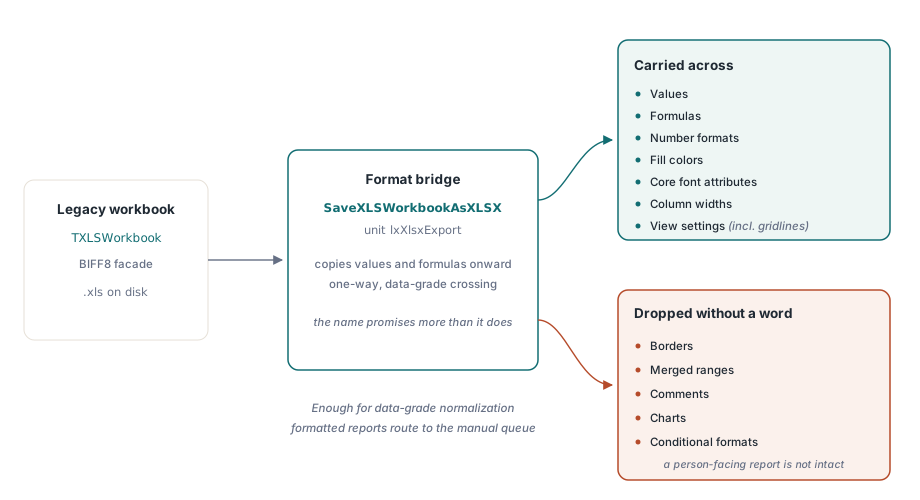
SaveXLSWorkbookAsXLSX is a data bridge, not a layout bridge
The BIFF facade cannot write OOXML directly, so the crossing from .xls to .xlsx runs through the SaveXLSWorkbookAsXLSX function in the lxXlsxExport unit. The fidelity of that bridge is worth stating plainly, because the name suggests more than it does. It copies values, formulas, number formats, fill colors, core font attributes, column widths, and view settings such as gridlines. It does not copy borders, merged ranges, comments, charts, or conditional formats. For data-grade normalization, where downstream systems will parse the result and nobody looks at the formatting, that is exactly enough and nothing is lost that anyone needs. For a formatted board report meant to be read by a person, it is not enough, and this is precisely where the audit counters earn their place: a file the audit flagged as carrying charts and conditional formats should route to a manual queue, not through a bridge that will drop both without a word
var
  Legacy: IXLSWorkbook;        // interface reference: do not Free
  Modern: TXLSXWorkbook;
begin
  if SameText(ExtractFileExt(FileName), '.xls') then
  begin
    Legacy := TXLSWorkbook.Create;
    if Legacy.Open(FileName) <= 0 then Exit;
    if SaveXLSWorkbookAsXLSX(Legacy,
         ChangeFileExt(FileName, '.xlsx')) <= 0 then
      Writeln('bridge failed: ' + FileName);
  end
  else
  begin
    Modern := TXLSXWorkbook.Create;
    try
      Modern.StreamingWrite := True;     // stream sheet XML into the zip
      if Modern.Open(FileName) = 1 then
        Modern.SaveAsCSV(ChangeFileExt(FileName, '.csv'), 0, ',');
    finally
      Modern.Free;
    end;
  end;
end;
The loop above also shows the throughput lever on the OOXML side. Setting StreamingWrite to true streams worksheet XML directly into the output package rather than staging it as one giant string in memory, which is the difference between a comfortable run and an out-of-memory crash once files reach hundreds of thousands of rows. Sizing and memory behavior for that mode get their own treatment in our article on streaming writes for server batch jobs. One more property matters for a batch that wants to use every core: neither facade is thread-safe, but neither shares global state either, so the supported pattern for parallel conversion is one workbook instance per worker thread, with no locking between them
The password files, and what to do with them
The archive's locked files split cleanly by format, and the split decides where they go. Legacy .xls encryption, whether RC4, RC4 over CryptoAPI, or the old XOR obfuscation, is readable: pass the password to Open and the file converts like any other. Encrypted .xlsx packages are a different story. HotXLS detects them with CanReadEncrypted but cannot decrypt them, so the only honest move is to route them to a queue where a human opens and re-saves each one in Excel before it rejoins the pipeline. That asymmetry is worth designing for up front, because the encrypted XLSX files are the ones most likely to be the records someone actually cares about
Closing the loop with verification
The third stage is the one that gets skipped, and skipping it is what turns a bulk conversion into a liability. No save path in HotXLS evaluates formulas. Excel recalculates when it opens a file, so an XLSX-to-XLSX conversion stays correct, but a CSV target receives the formula text verbatim unless the pipeline first runs Calculate on the cells and writes the results back. Knowing that in advance is the difference between a CSV full of numbers and a CSV full of =SUM(...) strings that nobody notices until a downstream import chokes on them
Verification itself is cheap enough that there is no excuse for leaving it out. Reopen every converted file with the same library, re-run the audit counters, and compare them against the pre-conversion numbers the inventory pass already recorded. A sheet count that dropped, a chart count that went to zero where the source had three, a cell count that fell off a cliff: each is a silent loss caught for the cost of a second open. Spot-check a sample by eye in Excel or LibreOffice on top of that, and the combination catches the overwhelming majority of conversion damage before it ships. This is the whole reason the inventory stage feeds the verify stage. Without the before-numbers, the after-numbers prove nothing
An audit-first workbench turns a risky bulk conversion into a measurable process with a quarantine lane for the files that cannot pass cleanly. All of the probing, counting, and conversion calls shown here are part of the HotXLS Delphi Component, which runs them natively in-process without Excel automation