Say a nightly Delphi service generates one XLSX per customer, a few hundred files, some of them 400,000 rows wide. Profile it and the surprise is rarely the cell-filling loop. It is the SaveAs call. With the default writer, each worksheet is serialized into a single in-memory XML string before that string is compressed into the OOXML zip, and for a wide sheet the transient string can dwarf the cell model it was built from. So a job that comfortably builds its data and sits at 800 MB will spike past a 2 GB container limit during the save, and the OOM killer files the bug report at 03:00 when nobody is watching. HotXLS, losLab's native spreadsheet library for Delphi and C++Builder, has a property aimed squarely at that spike: StreamingWrite. Around it sit two further levers that decide whether a batch worker stays inside its memory and time budget, namely row-level write callbacks and the way the style pool behaves inside a tight loop
What the default save path buffers, and what StreamingWrite changes
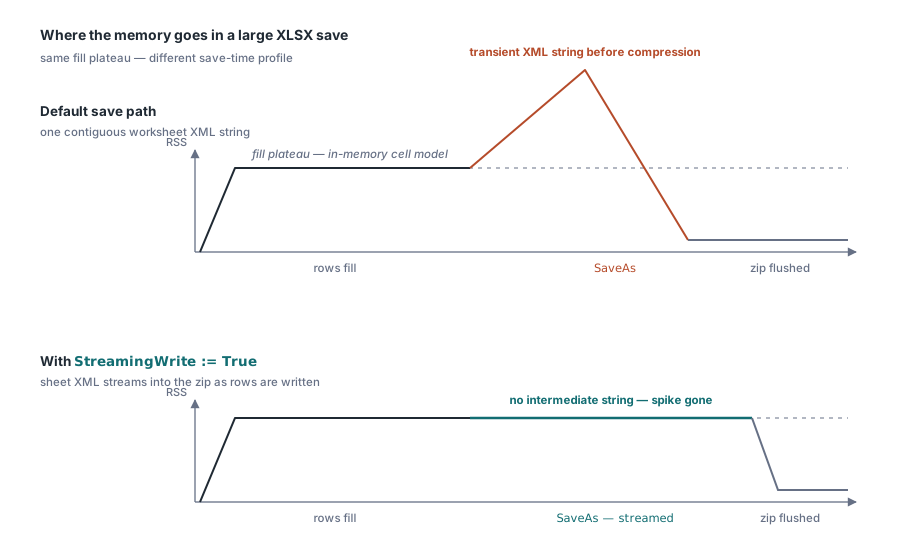
The default XLSX writer favors simplicity. It renders the worksheet XML completely, then hands the finished string to the zip compressor. That is the right trade for the overwhelming majority of workbooks, where the whole sheet's XML fits in a few megabytes. It stops being right when one sheet's serialized form runs to hundreds of megabytes. Spreadsheet XML is verbose: every numeric cell costs tens of characters of markup, and the string holding all of it has to be contiguous. On a memory graph the signature is hard to miss. A long flat plateau while the rows fill, then a sharp triangular spike during SaveAs, then the collapse once the zip is flushed
Setting Book.StreamingWrite := True switches SaveAs to a worksheet writer that emits sheet XML directly into the zip stream as it is generated. The intermediate string never gets allocated, and the triangular spike flattens into the noise
Be precise about what that actually buys you, because overselling it leads to wrong capacity plans. The flag changes only the save path. Building the workbook still allocates the full in-memory cell model, so the plateau during the fill phase is exactly as tall as before. What disappears is the serialization spike that used to stack on top of that plateau at save time, and for a job filling 400k rows that spike is routinely the whole difference between fitting a memory budget and blowing it. The property defaults to False to preserve the historical behavior, so opting in is one explicit line you write on purpose
A bulk export with the flag on
Book := TXLSXWorkbook.Create;
try
  BoldIdx := Book.Fonts.Add('Calibri', 11, True, False); // pool index, 0-based
  Sheet := Book.Sheets.Add('Bulk');
  for R := 1 to 100000 do
  begin
    Sheet.Cells[R, 1].Value := R;
    Sheet.Cells[R, 2].Value := 'Row ' + IntToStr(R);
    Sheet.Cells[R, 3].Value := R * 1.5;
    if (R mod 1000) = 0 then
      Sheet.Cells[R, 2].FontIndex := BoldIdx + 1;        // 1-based at the cell
  end;
  Book.StreamingWrite := True;   // stream sheet XML straight into the zip
  Book.SaveAs('bulk.xlsx');
finally
  Book.Free;
end;
Cells[R, C] creates cells on demand, which keeps the loop body clean. Two grid caps are worth committing to memory: 1,048,576 rows and 16,384 columns, exposed as XlsxMaxRow and XlsxMaxCol. A data feed that overruns the row cap has to be split across sheets in your own code. Nothing downstream notices the overrun or fixes it for you, and the file simply ends up truncated at the limit
Filling rows without per-cell Variant overhead
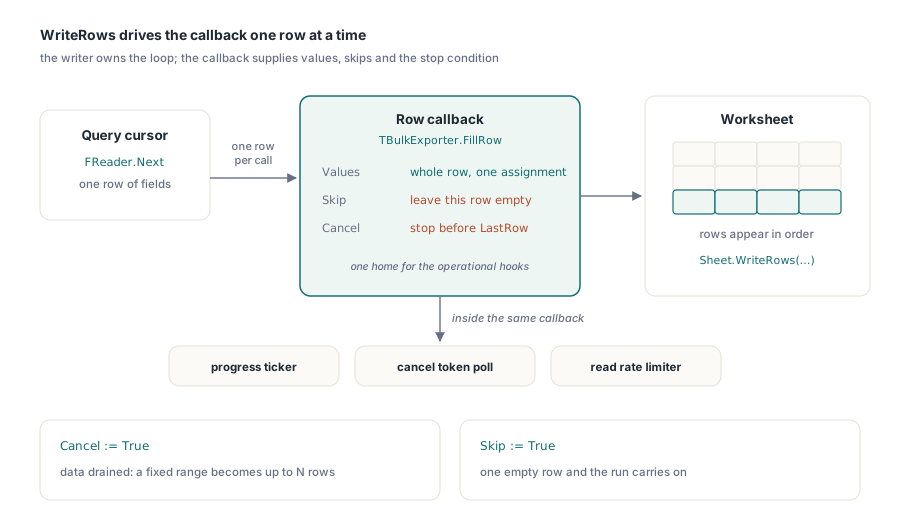
Every Cells[R, C].Value assignment pays for a cell lookup and a Variant conversion. At ten thousand rows nobody notices. At a million rows of twenty columns each, that per-call overhead becomes the dominant cost of the fill phase, and the profiler will point straight at it. The batch interfaces let you hand the writer a whole row at a time instead. WriteRows drives a callback that supplies one row per invocation:
procedure TBulkExporter.FillRow(Sender: TObject; SheetIndex, Row, FirstCol,
  LastCol: Integer; var Values: Variant; var Skip: Boolean;
  var Cancel: Boolean);
begin
  if not FReader.Next then
  begin
    Cancel := True;              // data source drained: stop cleanly
    Exit;
  end;
  Values := VarArrayCreate([FirstCol, LastCol], varVariant);
  Values[FirstCol]     := FReader.RecordId;
  Values[FirstCol + 1] := FReader.CustomerName;
  Values[FirstCol + 2] := FReader.Amount;
end;

// fill rows 2..100001, columns A..C, pulling from the reader
Sheet.WriteRows(2, 1, 100001, 3, FillRow);
The Cancel flag is what turns a fixed row range into "up to N rows," which is the natural shape when the row count comes from a query you have not finished executing. Skip is the lighter touch: it leaves an individual row empty without stopping the run. Beyond filling cells, the callback turns out to be a good home for the operational concerns that otherwise get bolted onto a fill loop in awkward ways. A progress counter that ticks every thousand rows, a cancellation token polled from the job scheduler, a rate limiter on reads from the source database: all of it lives in one place instead of being threaded through cell-writing code. On the read side, ForEachRow and ForEachCell mirror the same pattern, which matters when a batch job both consumes and produces large files
Style pools reward hoisting
The XLSX styling model is a set of shared pools. Fonts.Add, Fills.AddSolid, and Borders.Add all return a 0-based pool index, and a cell references a font by storing that index plus one in FontIndex, where zero is reserved for the workbook default. The +1 is right there in the bulk example above. Forget it and the cell quietly picks up the wrong style, because an off-by-one in a style pool index is still a valid index and nothing raises
The discipline that follows is to create every style object before the row loop and reference its index inside the loop. Fonts.Add deduplicates identical definitions, so calling it once per row only wastes CPU. Alignments.Add is the trap, because it returns a fresh entry on every call. Inside a 100k-row loop that buries styles.xml under a hundred thousand duplicate alignment records, which bloats the file on disk and slows down every later open in Excel as the duplicates are re-parsed. Build each style once outside the loop, then reference its index as many times as you need
Streams, temp directories, and the batch loop around it all
None of this requires a file system. Both facades carry TStream overloads across their IO surface, Open and SaveAs and SaveAsCSV and SaveAsHTML and SaveAsODS among them, so a batch worker can render straight into a TMemoryStream bound for blob storage or an HTTP response without ever touching disk. There is one sharp edge to remember. SaveAs(Stream) writes from the stream's current position and does not rewind afterward, so set Position := 0 yourself before handing the stream to whatever delivers it, or the consumer reads zero bytes. The XLS facade adds two knobs of its own. SetTempDir points the BIFF writer's temporary files at a volume that has the space and the IO headroom to absorb them, which matters on servers where the default temp path sits on a cramped system disk. UseSharedFormulas folds repeated formula bodies into shared groups, a real size reduction for the classic report shape where one formula is copied down an entire column
The batch loop itself stays boring on purpose:
for FileName in SourceFiles do
begin
  Book := TXLSXWorkbook.Create;        // fresh instance: no state bleed
  try
    Book.StreamingWrite := True;
    if Book.Open(FileName) <> 1 then
      Continue;                        // one bad input must not kill the batch
    Book.SaveAsCSV(ChangeFileExt(FileName, '.csv'), 0, ',');
  finally
    Book.Free;
  end;
end;
A fresh workbook instance per file costs microseconds and removes a whole category of cross-file contamination bug: styles, defined names, and document properties from file 17 have no path to leak into file 18. The skip-and-continue on a failed Open earns its keep just as much, because one truncated upload in a 600-file batch should cost you a single log line rather than the rest of the run. Worth flagging too is what the CSV leg deliberately does not do. SaveAsCSV writes formulas out as literal text and never evaluates them, so a conversion batch whose consumers expect computed numbers has to run Calculate on the relevant cells first, or start from workbooks that already carry cached results from a prior calculation
Concurrency model: one workbook per thread
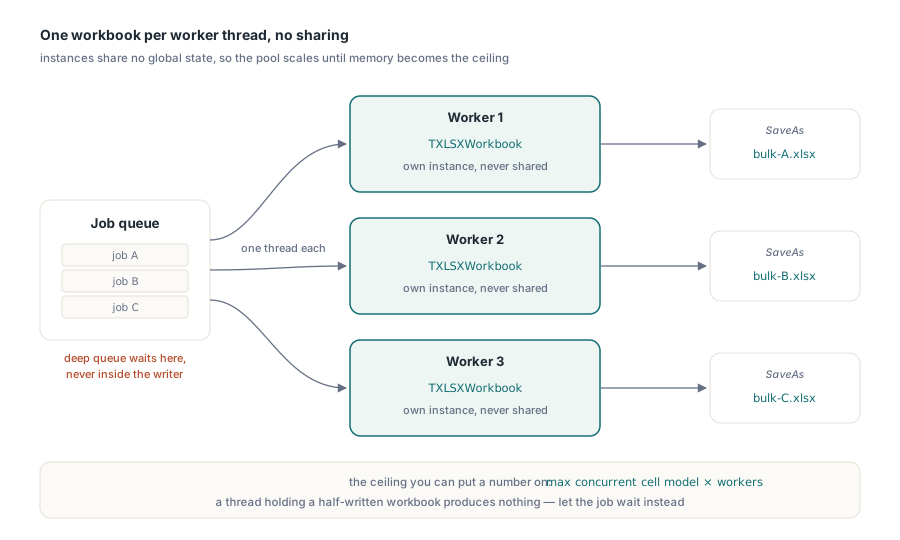
Neither facade's objects are thread-safe, and the design never pretended otherwise. Because there is no shared global state between instances, the scaling rule is simply one workbook per worker thread, with no sharing of a workbook across threads. A pool of N workers, each owning its own TXLSXWorkbook, scales close to linearly until memory becomes the ceiling, and that ceiling is something you can put a number on: the largest concurrent cell model multiplied by the worker count, plus whatever save-time overhead StreamingWrite has flattened. When the queue runs deep, apply back-pressure at the job queue instead of inside the writer. A starved thread that has half-written a workbook has produced nothing useful, whereas a job that waited a few seconds for a free worker completes intact
For the wider tuning picture, including shared formulas, graphics skipping on the read side, and the XLS-specific levers, see the large workbook performance guide. Batch jobs whose rows come straight out of a query are covered separately in the database export patterns for Delphi reports
HotXLS compiles into your Delphi or C++Builder service as native Object Pascal with no external dependencies; editions and licensing are on the HotXLS Delphi Component product page