Turning a query result into an Excel report is three problems wearing one coat. Each Delphi field type has to land in a cell as the right Excel type, the header row has to read like a report instead of a schema dump, and numbers, dates and money have to carry formats that survive the trip. Skip any one of them and the file still opens, still looks plausible, and still fails the moment a finance user selects a column and waits for a sum that never appears. The values were written as text, Excel treats them as labels, and no exception was ever raised to warn you
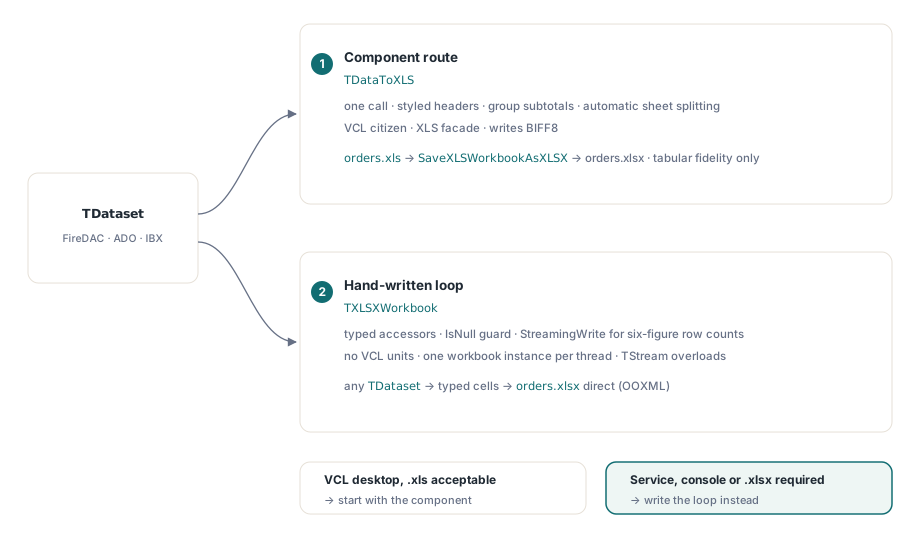
HotXLS is a native Object Pascal spreadsheet library that writes XLS and XLSX files directly from Delphi and C++Builder, with no Excel automation involved. It offers two routes from a TDataset to a workbook: the drop-in TDataToXLS component, and a hand-written loop against the workbook API. They are not interchangeable. The component is a VCL citizen built on the XLS facade, so the right choice depends on where the code runs and which file format the consumer expects. What follows is both routes, the line where the component stops being the right tool, and how to keep field types intact whichever you pick
Field types are the real export contract
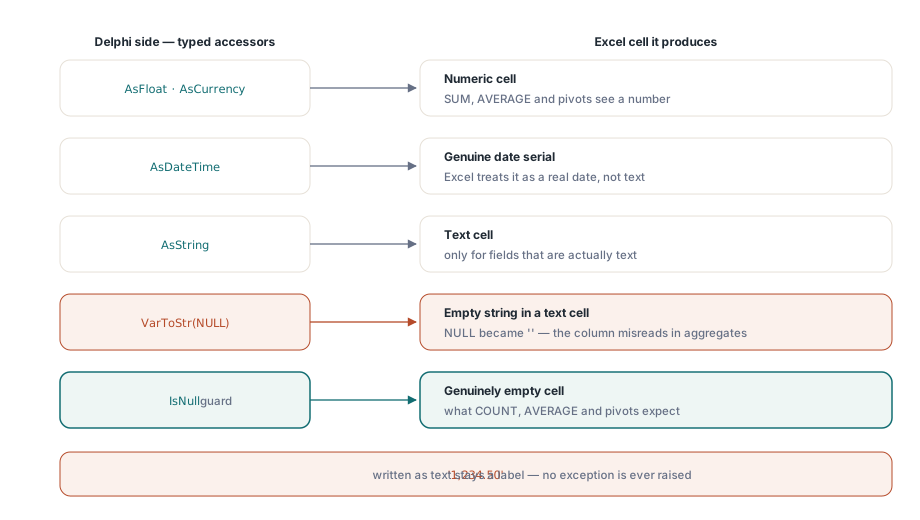
Before any API call, decide how each Delphi field type lands in a cell. A cell that receives a Delphi string stays a string. HotXLS does not guess that '1,234.50' was meant to be a number, and it should not, because locale-dependent reparsing is exactly how a German decimal comma turns into a thousands separator on an English server. The reliable pattern is to assign through the typed accessors: AsFloat or AsCurrency for numeric fields, AsDateTime for dates so the cell holds a genuine Excel date serial rather than a formatted string, and AsString only for fields that are actually text
Null handling deserves an explicit decision rather than a default. Converting a field value with VarToStr turns SQL NULL into an empty string, which is a text cell, while skipping the assignment leaves the cell truly empty, which is what AVERAGE, COUNT and pivot-table consumers expect. For money columns, decide before the loop is written whether NULL means zero or unknown. The two render identically once someone formats the column, and the difference changes every aggregate computed downstream
The component route: TDataToXLS in VCL applications
For a classic VCL application with a query already wired into a data module, TDataToXLS is the one-call route. It walks any TDataset descendant, whether FireDAC, ADO, IBX, or anything else that implements the abstract dataset interface, and produces a styled worksheet with header captions, fonts, borders, optional group subtotals, and automatic sheet splitting for large result sets
var
  Exporter: TDataToXLS;
begin
  Exporter := TDataToXLS.Create(nil);
  try
    Exporter.Dataset := OrdersQuery;          // any TDataset descendant
    Exporter.WorksheetName := 'Orders';
    Exporter.HeaderSource := hsDisplayLabel;  // captions, not raw column names
    Exporter.GroupFields.Add('CustomerID');   // subtotal block per customer
    Exporter.RowsPerSheet := 50000;           // stay below the BIFF8 row ceiling
    Exporter.VisibleFieldsOnly := True;             // respect Field.Visible
    Exporter.SaveDatasetAs('orders.xls');
  finally
    Exporter.Free;
  end;
end;
Two properties carry most of the production weight here. HeaderSource := hsDisplayLabel writes each field's DisplayLabel instead of the raw SQL column name, so the workbook says "Customer Name" rather than CUST_NM. RowsPerSheet exists because the component writes BIFF8, whose grid stops at 65,536 rows by 256 columns; setting it to 50,000 splits a large result set across sheets before the format ceiling truncates it. Appearance is handled by the HeaderFont, DetailFont, GroupColor and border-style properties, and the DisableFormat set switches off whole formatting categories when the consumer wants plain cells. For anything bespoke, the AfterCell and AfterRow events hand you the just-written range for post-processing
Where the component stops
Three constraints are designed into TDataToXLS, and knowing them up front avoids an awkward redesign two sprints later
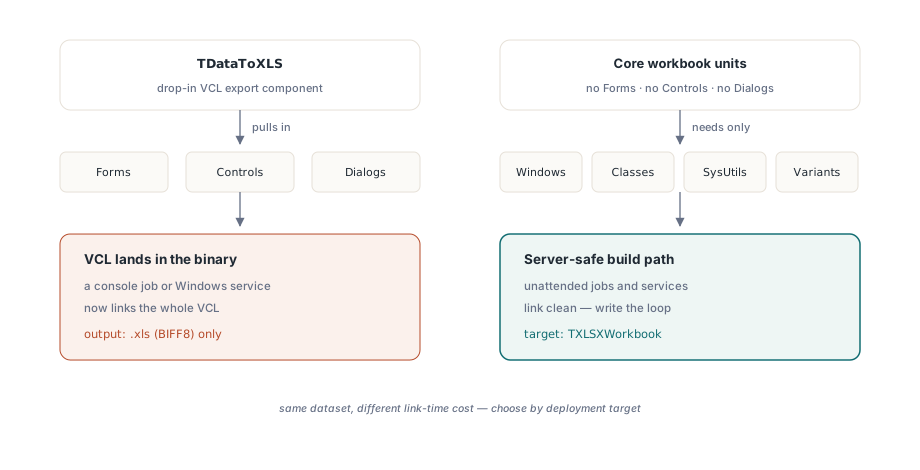
- It is a VCL component in the full sense. Its unit pulls in
Forms,ControlsandDialogs, so linking it into a console job or a Windows service drags the VCL into the binary. The core workbook units have no such dependency. They need onlyWindows,Classes,SysUtilsandVariants, which is why server-side code should use the loop shown below instead - It is built on the XLS facade. The component populates an
IXLSWorkbookand writes .xls (BIFF8). There is no property that switches it to OOXML output - Its events speak the XLS dialect. The
Cell: IXLSRangeparameter inAfterCellbelongs to the XLS object model, so per-cell customization written there is XLS-style code even if the file is converted to .xlsx afterward
Producing .xlsx from the component's output
When the consumer insists on .xlsx but the export logic already lives in TDataToXLS, the bridge function in the lxXlsxExport unit converts the populated workbook in one call:
uses lxXlsxExport;

Exporter.SaveDatasetAs('orders.xls');
// the component exposes the IXLSWorkbook it populated
SaveXLSWorkbookAsXLSX(Exporter.Workbook, 'orders.xlsx');
Treat the bridge as a tabular-data carrier, not a full-fidelity converter. It copies values, formulas, number formats, fill colors, font attributes, column widths and view settings. It deliberately does not copy borders, merged ranges, comments, charts or conditional formats. For a flat grid of header plus rows that is exactly enough. For a styled report it is not, and the honest fix is to generate the XLSX directly rather than to patch the converted file
The hand-written loop for services and batch jobs
Server-side code should target TXLSXWorkbook directly. Note the lifetime difference between the two facades before copying any sample. The XLS-side TXLSWorkbook is held through a reference-counted interface and must not be freed manually, while TXLSXWorkbook is a plain class that requires try..finally Free. Mixing the two conventions is a reliable way to manufacture either a leak or a double-free
procedure ExportOrders(Q: TDataSet; const FileName: string);
var
  Book: TXLSXWorkbook;
  Sheet: TXLSXWorksheet;
  Row: Integer;
begin
  Book := TXLSXWorkbook.Create;
  try
    Sheet := Book.Sheets.Add('Orders');
    Sheet.Cells[1, 1].Value := 'Order No';
    Sheet.Cells[1, 2].Value := 'Customer';
    Sheet.Cells[1, 3].Value := 'Ordered';
    Sheet.Cells[1, 4].Value := 'Amount';

    Row := 2;
    Q.First;
    while not Q.Eof do
    begin
      Sheet.Cells[Row, 1].Value := Q.FieldByName('OrderNo').AsInteger;
      Sheet.Cells[Row, 2].Value := Q.FieldByName('Customer').AsString;
      if not Q.FieldByName('Ordered').IsNull then
        Sheet.Cells[Row, 3].Value := Q.FieldByName('Ordered').AsDateTime;
      Sheet.Cells[Row, 4].Value := Q.FieldByName('Amount').AsFloat;
      Inc(Row);
      Q.Next;
    end;

    Book.StreamingWrite := True;  // stream sheet XML straight into the zip
    Book.SaveAs(FileName);
  finally
    Book.Free;
  end;
end;
The lines that matter are the typed assignments and the IsNull guard. Dates arrive as date serials, amounts arrive as doubles, and NULL order dates stay genuinely empty instead of becoming empty strings. StreamingWrite := True changes only the save path: worksheet XML streams straight into the zip container instead of being assembled as one large string first, which flattens the memory spike at SaveAs time for six-figure row counts. Every save method also has a TStream overload, so the workbook can go straight into an HTTP response without touching disk. The streaming write and batch job article walks through that deployment pattern, and the large workbook performance article covers what to do when row counts climb further
This loop is also the route that scales across threads. Both engines are native Object Pascal writers, BIFF8 record streams on one side and OOXML zip plus XML on the other, so no part of an export touches COM automation or needs an Excel license on the server. What that buys you is parallelism without a single-instance bottleneck, provided each thread builds its own workbook. The workbook objects are not thread-safe for shared use, so the rule is one instance per export, never a shared one guarded by a lock
One limit is worth knowing before you design around it. The XLSX grid stops at 1,048,576 rows by 16,384 columns, so the sheet-splitting that RowsPerSheet handles on the XLS side is rarely needed here. A million-row workbook is rarely what a human consumer wants either. When the result set is genuinely that large, a delimited file is usually the better contract, and the CSV and TSV export article covers delimiters, BOM behavior, and the formula-evaluation caveat that applies there
Picking a starting point
If the export lives in a VCL desktop tool and .xls output is acceptable, start with TDataToXLS and its grouping support. It is the least code, and the bridge through SaveXLSWorkbookAsXLSX is there when someone later asks for .xlsx, as long as you accept the fidelity limits already described. If the code runs unattended, or the consumer requires .xlsx from the start, write the loop. Both routes ship with working demo projects and are part of the HotXLS Delphi Component package