To produce an ODS file that both Excel and LibreOffice read correctly, HotXLS writes every formula in OpenFormula syntax under a declared of: namespace, and writes every value or formula conditional format twice: as a <style:map> on the style of each covered cell, which is the only form Excel 16 reads, and as a calcext:conditional-formats block, which is the form LibreOffice trusts. Each application ignores the half meant for the other, so a file that shows correctly in one of them proves nothing about the other
That last sentence is the lesson behind six HotXLS releases between v2.384.55 and v2.384.72. Each fix started with a file that HotXLS wrote, read back perfectly, and one of the two target applications got wrong. What follows is what each application actually accepts, the markup that satisfies both, and the HotXLS API calls that produce it from Delphi
Why does an ODS file look fine in one application and broken in the other?
An ODS file looks fine in one application and broken in the other because Excel and LibreOffice read different parts of the same package. OpenDocument gives formulas and conditional formats more than one legal spelling, LibreOffice adds its own extension namespace on top, and each consumer picks the subset it implements. A writer tested against only one consumer will happily converge on markup the other one silently misreads
Neither application reports an error. LibreOffice shows #VALUE! in cells whose formulas it could not parse; Excel opens the workbook with the conditional formats simply absent, or with a formula rewritten into something that evaluates to #NAME? or the constant 0. A writer that round-trips its own output never sees any of this. HotXLS hit exactly that trap with the formula namespace: its reader matched the of: prefix as plain text, so every self round trip passed while LibreOffice showed #VALUE! in every formula cell
| Feature | Excel 16 reads | LibreOffice 26.2 reads |
|---|---|---|
Whole column written as A:A | Misread as A:(A) | Tolerated |
Whole column written as [.A:.A] | Yes | Yes |
Conditional formats in <style:map> | Yes, the only form it reads | Ignored when calcext is present |
Conditional formats in calcext:conditional-formats | Ignored | Yes, preferred |
calcext value rule with a calcext:operator attribute | Ignored | Imported as "equal to 0" |
calcext formula rule spelled is-true-formula(...) | Ignored | Imported as a value comparison with 0 |
OpenFormula in ODS: declare the namespace, then get the syntax right
A formula cell in ODS is only readable by LibreOffice when the of: prefix in table:formula resolves to a declared XML namespace. The prefix is not decoration. of: maps to urn:oasis:names:tc:opendocument:xmlns:of:1.2, and msoxl:, the prefix HotXLS uses for formulas its OpenFormula translator does not model, maps to http://schemas.microsoft.com/office/excel/formula. Before v2.384.56 the content.xml root used both prefixes without declaring them, and LibreOffice could not identify the formula grammar at all
<!-- Before v2.384.56: prefix used, never declared; LibreOffice shows #VALUE! -->
<office:document-content xmlns:table="urn:oasis:names:tc:opendocument:xmlns:table:1.0" ...>
  <table:table-cell table:formula="of:=SUM([.A1:.A3])" office:value-type="float" office:value="245"/>

<!-- Since v2.384.56: both formula namespaces declared on the root -->
<office:document-content
    xmlns:of="urn:oasis:names:tc:opendocument:xmlns:of:1.2"
    xmlns:msoxl="http://schemas.microsoft.com/office/excel/formula" ...>
With the namespace fixed, the expression itself still has to be valid OpenFormula, as defined in OpenDocument 1.3 Part 4. The traps are the places where Excel syntax and OpenFormula look similar but are not the same:
- Cell references are bracketed and dot-prefixed, and
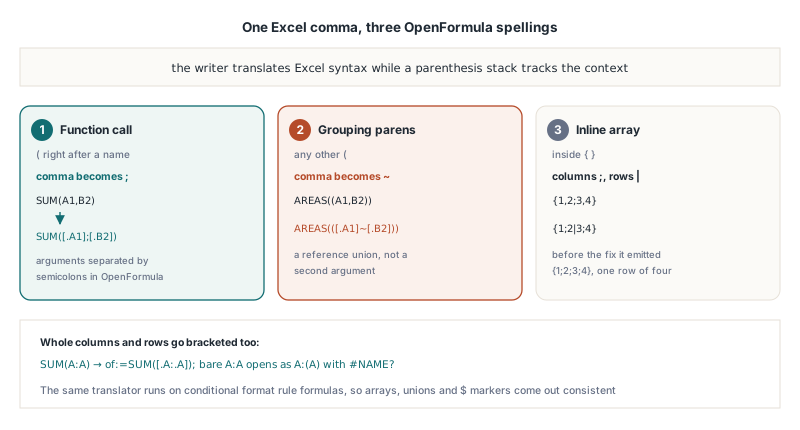
$markers are part of the reference:[.$A$1]and[.A$1:.$B2]are valid OpenFormula. Before v2.384.55 the HotXLS writer dropped every$, so absolute references came back relative and only went wrong once someone copied the cell - Whole columns and rows must use the bracketed form
[.A:.A],[.$A:.$B],[.1:.1],[.$1:.$2]. A bareof:=SUM(A:A)is tolerated by LibreOffice, but Excel 16 opens it as=SUM(A:(A))with#NAME?, and turns row references and$A:$Binto the constant 0. HotXLS writes the bracketed form since v2.384.65 - Function arguments are separated by
;, not, - Reference unions use the
~operator: ExcelAREAS((A1,B2))becomesAREAS(([.A1]~[.B2])). Translating that comma to;instead turns one union argument into two arguments - Inline arrays separate columns with
;and rows with|: Excel{1,2;3,4}becomes{1;2|3;4}. Before v2.384.55 HotXLS produced{1;2;3;4}, a single row of four values
The comma is the hard part, because one Excel character carries three meanings. Since v2.384.55 the HotXLS writer tracks a parenthesis stack while translating: a ( directly after a name opens a function call, whose commas become ;; any other ( is a grouping parenthesis, whose commas become ~; and commas inside {} are array column separators. With that and the namespace fix, LibreOffice 26.2 evaluated all eight array and union probe formulas correctly, INDEX and AREAS over unions included
uses
  lxHandleX;

var
  Book: TXLSXWorkbook;
  Sheet: TXLSXWorksheet;
begin
  Book := TXLSXWorkbook.Create;
  try
    Sheet := Book.Sheets.Add('Orders');
    Sheet.Cells[1, 1].Value := 120;
    Sheet.Cells[2, 1].Value := 80;
    Sheet.Cells[3, 1].Value := 45;
    Sheet.Cells[1, 2].Value := 0.2;

    // Written as of:=SUM([.A:.A]) since v2.384.65
    Sheet.Cells[1, 4].Formula := 'SUM(A:A)';
    // Written as of:=[.A1]*[.$B$1]; the $ markers survive since v2.384.55
    Sheet.Cells[2, 4].Formula := 'A1*$B$1';

    Book.SaveAsODS('orders.ods');
  finally
    Book.Free;
  end;
end;
Formulas that the translator does not model fall back to msoxl:= with the Excel text unchanged, which is why the msoxl declaration matters too. In the current writer that path includes sheet-qualified references such as Sheet2!A1 and structured table references. HotXLS reads msoxl: formulas back on import, so its own round trip keeps the expression intact, but how another application treats them is outside the writer's control. If a formula your consumers depend on comes out with the msoxl: prefix, open the file in both applications before you ship it
Why doesn't Excel see conditional formats written only as calcext?
Excel 16 does not see calcext conditional formats because it reads ODS conditional formats exclusively from <style:map> children of cell styles and ignores the calcext:conditional-formats block entirely. The experiment that settles it is short: take an ODS saved by LibreOffice, delete the style:map elements, and Excel reads zero rules; delete the calcext block instead, and Excel still reads all of them. LibreOffice behaves the other way round. calcext is LibreOffice's extension namespace, not part of the ODF standard, and when a calcext rule is present LibreOffice takes it and ignores the style:map
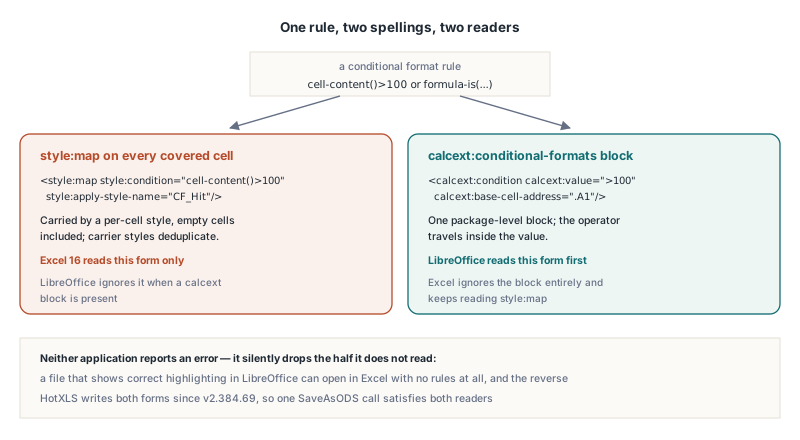
Before v2.384.69 HotXLS wrote only calcext, so an ODS file with perfectly good highlighting opened in Excel with no value rules and no formula rules at all. HotXLS now writes both forms. The style:map half uses the condition grammar of the OpenDocument schema (ODF 1.3 Part 3), with the exact spellings that Excel 16 and LibreOffice 26.2 both produce when they save ODS:
<!-- Simplified. Carrier style for every cell of A1:A50 (two value rules) -->
<style:style style:name="ce3" style:family="table-cell">
<style:map style:condition="cell-content()>100"
style:apply-style-name="CF_Hit"
style:base-cell-address="Orders.A1"/>
<style:map style:condition="cell-content-is-between(1,10)"
style:apply-style-name="CF_Low"
style:base-cell-address="Orders.A1"/>
</style:style>
<!-- Carrier style for every cell of C1:C50 (one formula rule) -->
<style:style style:name="ce4" style:family="table-cell">
<style:map style:condition="is-true-formula(COUNTIF([.$C:.$C];[.C1])>1)"
style:apply-style-name="CF_Dup"
style:base-cell-address="Orders.C1"/>
</style:style>The catch with style:map is that it lives on cell styles, so it is per cell. Every cell in the rule's range has to carry a style holding the map, empty cells included, or the rule simply does not cover that cell in Excel. HotXLS copies each cell's existing formatting style, appends the maps, and deduplicates carrier styles by the pair of original style and map text, so a range of 500 cells with identical formatting still produces one style. The writer also extends the written table to the rule's range, which means empty tail rows inside a rule are emitted rather than dropped. Since v2.384.69 styles.xml also carries an empty Default cell style, so style:apply-style-name="Default" always has a target
The calcext spelling LibreOffice actually accepts
LibreOffice accepts a calcext value rule only when the comparison operator is part of the value text, such as >3 or between(1,10), and a formula rule only when it is spelled formula-is(...). Both points cost HotXLS a release, because the wrong spellings produce a rule that imports without error and then matches the wrong cells
The first mistake was a calcext:operator attribute next to calcext:value. It reads naturally, but it is invented: LibreOffice does not know that attribute, so it imported every value rule as "equal to 0". The second was putting is-true-formula(...), the style:map spelling, into a calcext condition, which LibreOffice imported as a cell-value comparison with 0 as well. The formula fix shipped in v2.384.66 and the value fix in v2.384.69:
<!-- Wrong: LibreOffice ignores calcext:operator and imports "equal to 0" -->
<calcext:condition calcext:apply-style-name="CF_Hit"
calcext:operator="greater-than" calcext:value="100"/>
<!-- Right: the operator travels inside the value -->
<calcext:condition calcext:apply-style-name="CF_Hit"
calcext:value=">100" calcext:base-cell-address=".A1"/>
<calcext:condition calcext:apply-style-name="CF_Low"
calcext:value="between(1,10)" calcext:base-cell-address=".A1"/>
<!-- Right: formula rules use formula-is, relative refs anchored at the base cell -->
<calcext:condition calcext:apply-style-name="CF_Dup"
calcext:value="formula-is(COUNTIF([.$C:.$C];[.C1])>1)"
calcext:base-cell-address=".C1"/>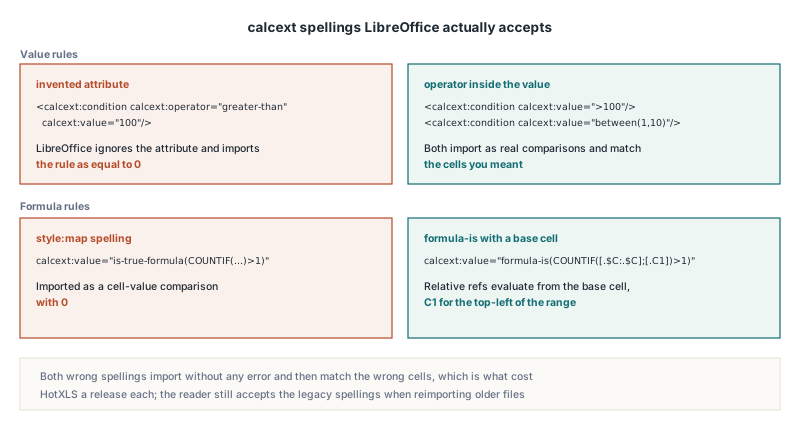
The base cell is what gives relative references their meaning. HotXLS anchors every rule at the top-left cell of its first range area, so a formula written for C1 evaluates as C2, C3 and so on down the range, exactly as it does in Excel's own conditional formatting. The rule expression goes through the same translator as cell formulas, so arrays, unions, whole columns and $ markers come out in the forms described above. On the Delphi side you add rules exactly as you would for an .xlsx file
uses
  lxHandleX;

procedure AddOrderHighlights(Book: TXLSXWorkbook; Sheet: TXLSXWorksheet);
var
  Idx: Integer;
  Opts: TODSExportOptions;
begin
  // Value rules: style:map cell-content()>100 plus calcext value ">100"
  Idx := Sheet.AddConditionalFormat('A1:A50', xlsxCfOpGreaterThan, '100');
  Sheet.ConditionalFormats[Idx].Style.SetFillBgColor($00C0C0FF); // BGR: light red

  Idx := Sheet.AddConditionalFormat('A1:A50', xlsxCfOpBetween, '1', '10');
  Sheet.ConditionalFormats[Idx].Style.SetFontBold(True);

  // Formula rule in Excel syntax (comma separators, relative to C1):
  // style:map is-true-formula(...) plus calcext formula-is(...)
  Idx := Sheet.AddCondFormatExpression('C1:C50', 'COUNTIF($C:$C,C1)>1');
  Sheet.ConditionalFormats[Idx].Style.SetFillBgColor($00CCFFFF); // BGR: light yellow

  Opts := TODSExportOptions.Create;
  try
    Opts.Generator := 'OrderExport 3.1';
    Book.SaveAsODS('orders.ods', Opts);
  finally
    Opts.Free;
  end;
end;
Reading ODS from Excel and LibreOffice back into Delphi
When HotXLS opens an ODS file, its reader accepts both conditional format dialects and both calcext spellings, and it does not count a rule twice when the file carries it in both forms. Real files come from three writers, each with its own habits:
- Old and new calcext. Files with a
calcext:operatorattribute, including ODS written by HotXLS before v2.384.69, still go through the legacy parse. Formula conditions are recognized as eitherformula-is(...)oris-true-formula(...) - Excel's style:map spelling. Excel prefixes conditions with
of:, as inof:cell-content-is-between(1,10), and omits the base cell on value rules. Both are accepted - Empty cells. Excel and LibreOffice both put the map for empty cells on the column default style rather than on a cell, so the reader resolves column default styles for repeated cells before collecting maps
- Region rebuilding. Maps are collected per cell, so after a sheet is read the reader merges cells that share the same condition and base cell back into ranges, first across each row and then down matching column spans, and drops any rule already read from calcext
The v2.384.72 fix concerns number styles, not rules. Excel 16 and LibreOffice 26.2 both write the General format as a number style whose number:number element has no number:decimal-places, typically <number:number number:min-integer-digits="1"/>. The HotXLS reader treated the missing count as two fixed decimals, so every value in the Default style imported with 0.00 and 1.5 displayed as 1.50. Since v2.384.72 a plain number element with no decimal places, no minimum decimals, no grouping and at most one integer digit maps to General, and a lone General leaves the cell with no number format at all. Text around it is kept, as in General" kg", and grouped numbers keep the previous mapping because Excel has no grouped General format
uses
  SysUtils, lxCondFormat, lxHandleX;

procedure DumpOdsRules(const FileName: string);
var
  Book: TXLSXWorkbook;
  Sheet: TXLSXWorksheet;
  Rule: TXLSXConditionalFormat;
  I: Integer;
begin
  Book := TXLSXWorkbook.Create;
  try
    if Book.Open(FileName) <= 0 then
      raise Exception.Create('cannot open ' + FileName);
    if Book.SourceFormat <> xlsxOpenDocumentSpreadsheet then
      raise Exception.Create('not an ODS package');

    Sheet := Book.Sheets[1]; // the Sheets indexer is 1-based
    for I := 0 to Sheet.ConditionalFormats.Count - 1 do
    begin
      Rule := Sheet.ConditionalFormats[I];
      case Rule.Kind of
        cfkCellIs:
          Writeln(Rule.Range, ' value rule ', Ord(Rule.Op), ' ',
            Rule.Formula1, ' ', Rule.Formula2);
        cfkExpression:
          Writeln(Rule.Range, ' formula rule ', Rule.Formula1);
      end;
    end;

    // A cell in Excel's General style reads back with no number format
    // since v2.384.72, instead of '0.00'
    Writeln('A2 format: "', Sheet.Cells[2, 1].NumberFormat, '"');
  finally
    Book.Free;
  end;
end;
Rule formulas come back in Excel syntax with comma separators, the same form you would pass to AddCondFormatExpression, so a rule written by HotXLS reads back as the identical string. For the wider picture of what the ODS import path keeps and drops, see the HotXLS ODS open and save round-trip guide; for how repeated rows from Excel and LibreOffice are expanded on import, see ODS repeated rows as row-height runs
What are the limits of HotXLS ODS conditional format interop?
The dual-markup approach covers value comparison rules and formula rules, and stops there. Everything else is one-sided or not written at all:
- Color scales and data bars are written only as calcext elements, so LibreOffice shows them and Excel does not
- Other rule kinds, such as icon sets, text rules, top-N, above-average and duplicate rules, have no ODS output in the current writer. A text rule can usually be restated as a formula rule, for example
ISNUMBER(SEARCH("late",B2))overB2:B200, which then reaches both applications - Whole-column and whole-row rules such as
C:Care laid only over the table area that is actually written, rather than over all 1,048,576 rows, so Excel sees these rules only on cells that exist in the file - Files with only style:map. When a file has no calcext block, HotXLS interprets relative references in formula rules from the top-left corner of the rebuilt range, not by shifting from the stated base cell
- Overlapping rules from LibreOffice. When one cell is covered by several rules, LibreOffice writes only the first rule's map onto it. Files like that cannot be read completely from
style:mapalone, which is one more reason the reader prefers calcext when both exist
The process limit matters more than any of these. The defects behind these releases got past round trips that wrote ODS and read it back with HotXLS, and some would also have passed a manual check in the wrong application: whole-column formulas worked in LibreOffice while Excel showed #NAME?, and from v2.384.66 formula rules worked in LibreOffice while Excel still showed no rules at all until v2.384.69. If ODS interop is a requirement, the acceptance test is opening the file in Excel and in LibreOffice and comparing what each shows. The same discipline applies to the styles that rules point at; the HotXLS conditional formatting and styles article covers how highlight styles are defined on the workbook side
Quick reference: ODS that both applications read
- Declare
xmlns:ofandxmlns:msoxlon thecontent.xmlroot, or LibreOffice shows#VALUE!for every formula (HotXLS since v2.384.56) - Write references as
[.A1], keep every$, and write whole columns and rows as[.A:.A]and[.1:.1](since v2.384.55 and v2.384.65) - Use
;for arguments,~for reference unions, and|between inline array rows - Write each value or formula rule as a
<style:map>on every covered cell's style for Excel, and as a calcext condition for LibreOffice (since v2.384.69) - In calcext, put the operator in the value (
>3,between(1,10)) and spell formula rulesformula-is(...)with a base cell (since v2.384.66 and v2.384.69) - Expect a General number style without
number:decimal-placeson import; HotXLS reads it as General since v2.384.72 - Verify every new export profile by opening the file in both Excel and LibreOffice, never in only one of them
HotXLS is a native Delphi and C++Builder spreadsheet library that reads and writes XLS, XLSX and ODS without Excel or LibreOffice installed; full source, the feature list and licensing are on the HotXLS Delphi spreadsheet component page