A Delphi reporting backend that has emitted .xlsx for years picks up a new requirement: a public-sector customer's procurement rules mandate OpenDocument Spreadsheet output, and the analysts on that account send their edits back as .ods files saved from LibreOffice. So now the same code has to write ODS and read it. HotXLS, losLab's native Object Pascal spreadsheet library for Delphi and C++Builder, handles both directions with no Excel or LibreOffice installed anywhere. What it does not do is make the two directions symmetric. Export carries far more than import recovers, and a team that assumes otherwise will watch formulas and formatting evaporate somewhere between the customer's revision and the next report, with no error to point at
ODS support lives on the XLSX facade, not the XLS one
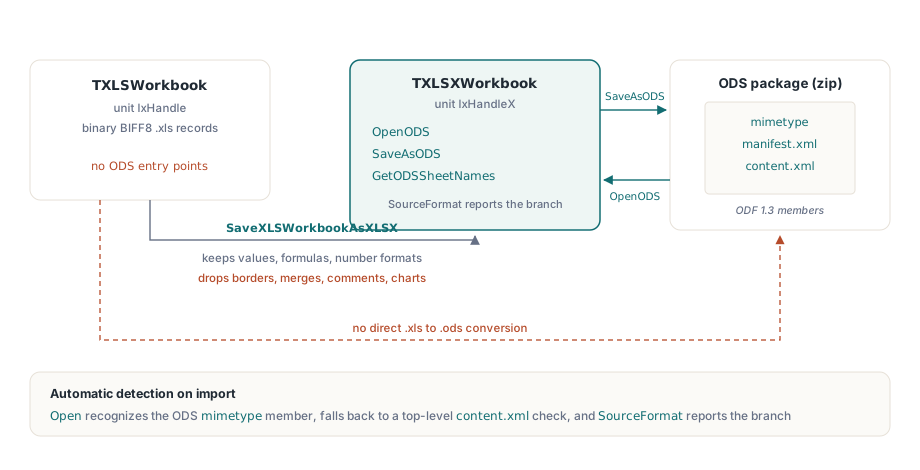
HotXLS ships two independent class hierarchies in a single package: TXLSWorkbook in unit lxHandle for binary BIFF8 .xls files, and TXLSXWorkbook in unit lxHandleX for OOXML .xlsx packages. Every OpenDocument entry point - OpenODS, SaveAsODS, GetODSSheetNames - hangs off TXLSXWorkbook. The placement is not arbitrary. An ODS package, as specified in OASIS ODF 1.3, is a zip archive carrying a mimetype member, a manifest, and a content.xml body, which makes it a structural cousin of the OOXML zip; BIFF8 is a 1990s binary record stream with nothing in common
That placement has a practical edge: a legacy .xls workbook cannot become .ods in one call. You bridge the BIFF content into the XLSX model first, with SaveXLSWorkbookAsXLSX from unit lxXlsxExport, reopen the result through TXLSXWorkbook, then export from there. The bridge is not lossless, and it is worth knowing the gaps before you build on it. It copies values, formulas, number formats, fonts, fills, and column widths. It drops borders, merged ranges, comments, charts, and conditional formatting. A .xls source with heavy formatting will reach ODS looking plainer than it left, and that is a property of the bridge, not of the ODS writer
Detection on the import side is automatic. The plain Open method recognizes an ODS package by its mimetype member, falling back to a top-level content.xml check when that member is absent, so a generic "open whatever the user uploaded" code path needs no extension sniffing of its own. After opening, the SourceFormat property reports which branch fired
Exporting to ODS with TODSExportOptions
The export call itself is one line; the options object around it carries the decisions a reviewer will ask about later:
var
  Book: TXLSXWorkbook;
  Opts: TODSExportOptions;
begin
  Book := TXLSXWorkbook.Create;
  try
    Book.Open('quarterly-report.xlsx');
    Opts := TODSExportOptions.Create;        // caller owns and frees this
    try
      Opts.Generator := 'ReportService 4.2'; // meta:generator override
      Opts.IncludeCharts := True;
      Opts.IncludeImages := True;
      Book.SaveAsODS('quarterly-report.ods', Opts);
    finally
      Opts.Free;
    end;
  finally
    Book.Free;
  end;
end;
The options object is owned by the caller. HotXLS will not free it, which is why the inner try..finally is there and not optional. The two properties that change the output, rather than just labeling it, are worth a closer look. Setting IncludeCharts := False does more than hide charts: it strips the chart sub-documents and their manifest entries out of the package, which is exactly what you want when the consumer is a data pipeline that would trip over them. Generator overrides the ODF meta:generator string, which otherwise reads HotXLS/<version>; override it when downstream tooling fingerprints file producers to route support. If none of that applies, skip the options object entirely. Calling SaveAs(FileName, xlsxOpenDocumentSpreadsheet) is the same as SaveAsODS with defaults, and stream overloads on both let you write the package straight into an HTTP response with no temp file
What the import path reads - and what it deliberately skips
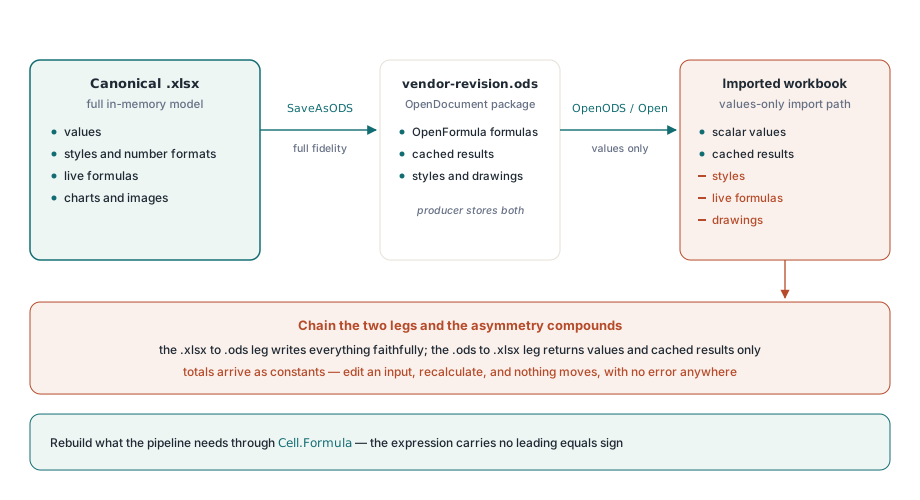
Read this part carefully before you promise anyone round-trip fidelity. ODS import in HotXLS is deliberately a lightweight path. It preserves scalar cell values and the cached result each formula carried at save time, and it expands repeated rows and columns out into the grid. It does not bring across styles, ODS formula expressions, or drawings
The formula choice is the one most likely to bite, and it was made on purpose. An ODF cell stores two things side by side: the formula expression, written in the OpenFormula dialect defined in ODF 1.3 Part 4, and the last value the producing application computed for it. Translating OpenFormula into Excel formula syntax is its own dialect-conversion problem, with real edge cases around function vocabularies, reference syntax, and error models. Reading the cached value instead sidesteps that whole class of silent mistranslation, so the numbers you import are exactly the numbers the sender last saw. The cost is that they arrive as numbers, not as the live formulas that produced them
The failure mode to design around follows directly: a spreadsheet whose totals were correct when LibreOffice last saved it imports with correct numbers, but those numbers are now constants. Edit an input cell, recalculate, and nothing moves - the formula is gone, only its final result remains. If the workflow needs live formulas after import, re-establish them programmatically from your own business rules through Cell.Formula, which on the XLSX facade takes the expression without a leading equals sign
Designing around the asymmetric round trip
Export renders from the full in-memory workbook model: values, styles, and, if you ask for them, charts and images. Import returns values only. So the .xlsx to .ods leg is high fidelity, and the .ods to .xlsx leg brings back values and cached results but no styling and no live formulas. Chain the two and the asymmetry compounds. A full .xlsx to .ods to .xlsx cycle writes everything faithfully on the way out and loses the styles and formulas on the way back in, even though nothing went wrong at either step
Book := TXLSXWorkbook.Create;
try
  Book.Open('vendor-revision.ods');          // format auto-detected
  if Book.SourceFormat = xlsxOpenDocumentSpreadsheet then
  begin
    // Values and cached formula results are present after an ODS
    // import; styles and live formulas are not. Rebuild whatever
    // the downstream pipeline depends on before saving.
    Book.Sheets[0].Cells[2, 5].Formula := 'SUM(B2:D2)';
    Book.SaveAs('vendor-revision.xlsx');
  end;
finally
  Book.Free;
end;
The architectural pattern that falls out of this: treat inbound .ods files as data feeds, not as documents to edit in place. Keep the canonical workbook in .xlsx, read values out of customer revisions, and emit fresh ODS on demand from the canonical copy. Verification belongs in both camps - open exported files in LibreOffice Calc, the reference ODF consumer, and in Excel, which has read ODS for years but disagrees with LibreOffice at the edges of chart and style support. Sheet count, a handful of key cells, and chart presence make a sufficient smoke check per export profile
Triaging an ODS file before committing to an import
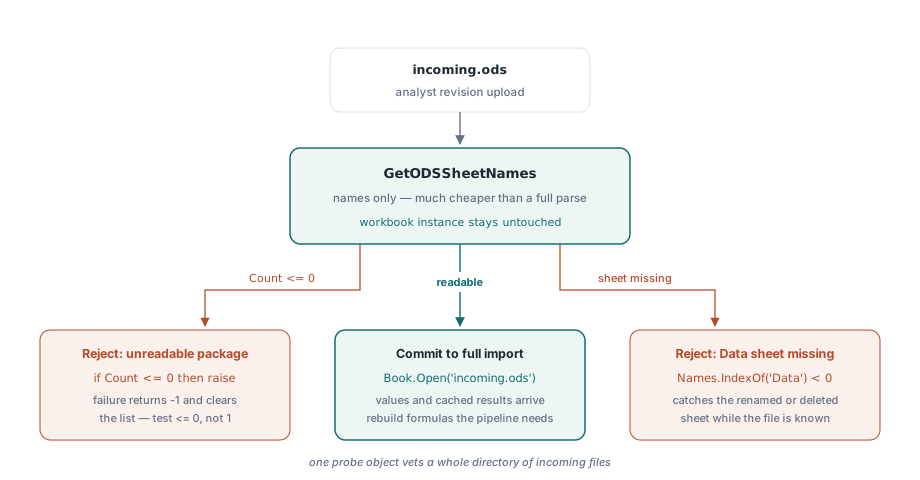
When an endpoint accepts uploads, listing sheet names is far cheaper than a full parse and catches structural surprises early:
Names := TStringList.Create;
Book := TXLSXWorkbook.Create;
try
  if Book.GetODSSheetNames('incoming.ods', Names) <= 0 then
    raise Exception.Create('not a readable ODS package');
  if Names.IndexOf('Data') < 0 then
    raise Exception.Create('revision is missing the Data sheet');
finally
  Book.Free;
  Names.Free;
end;
The return convention trips people up: HotXLS calls generally return a positive count or 1 on success and -1 on failure, clearing the list as they fail, so test <= 0 rather than comparing against one specific positive value. GetODSSheetNames neither resets nor populates the workbook instance, so a single probe object can vet a whole directory of incoming files. Structural checks like this catch the most common real-world failure - an analyst renaming or deleting a sheet before sending the revision back - at the gate, where the error message can still name the file and the missing sheet instead of surfacing as a nil reference three layers deeper
If you are building a broader conversion pipeline around this, the workbook audit and conversion workbench pattern shows how to inventory a file's features before choosing a target format, and the large-workbook performance guide keeps batch exports inside sane memory bounds
HotXLS is a native Delphi and C++Builder spreadsheet library with full source code; the complete feature list and licensing details are on the HotXLS Delphi Component product page