You hand a finished workbook to a colleague and ask them to filter it, not rewrite it. So you protect the sheet. In older HotXLS builds that gesture wrote one thing into the file: <sheetProtection sheet="1" objects="1" scenarios="1"/>, hard-coded, every time. The sheet locked, the password hash attached, and the user could do nothing at all, not even the sort and filter you actually wanted to leave open. Excel's own "Protect Sheet" dialog has fifteen checkboxes for exactly this reason, and the engine could express none of them. That gap is what the v2.91.0 protection model closes
HotXLS is a native VCL spreadsheet component for Delphi and C++Builder that reads and writes XLS and XLSX without Excel installed. This article is about the XLSX side of worksheet protection: the new TXLSXSheetProtectionOption enum, the AllowOption property that toggles each permission, and the one OOXML encoding rule that trips up everyone who writes a <sheetProtection> element by hand
What worksheet protection actually guards
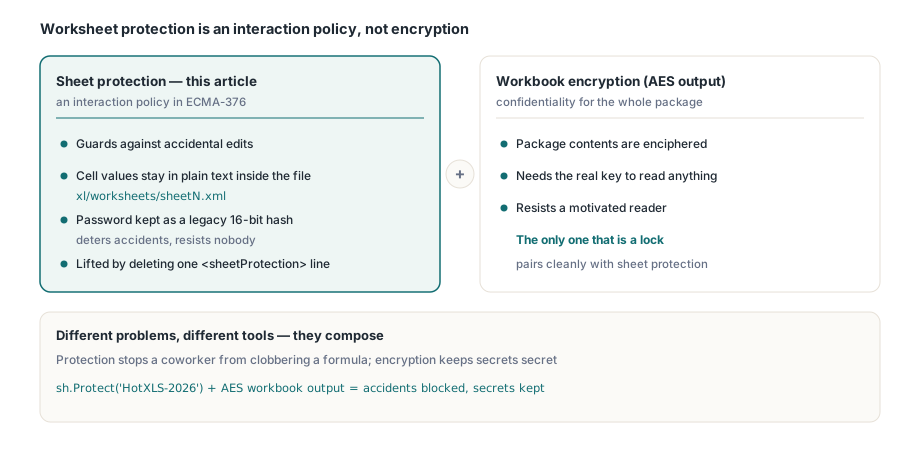
First, the boundary, because it decides how much you should trust any of this. Worksheet protection in the OOXML spreadsheet format (ECMA-376) is an interaction policy, not encryption. It tells a conforming application which edits to refuse while the sheet is protected. The cell values are still sitting in xl/worksheets/sheetN.xml in plain text; unzip the .xlsx and they are right there. The optional password is stored as a short legacy hash, not a key that scrambles anything. Anyone who renames the file, opens the part, and strips the <sheetProtection> line reads and edits everything
So protection answers "stop my coworker from accidentally clobbering a formula," not "keep this data secret from someone motivated." Those are different problems with different tools. If you need confidentiality, you want the workbook-level encryption covered in AES-protected XLSX output, which actually enciphers the package. Sheet protection and workbook encryption compose cleanly, but only the second one is a lock. Keep that line straight and the rest of this page is just plumbing
The fifteen options and the AllowOption property
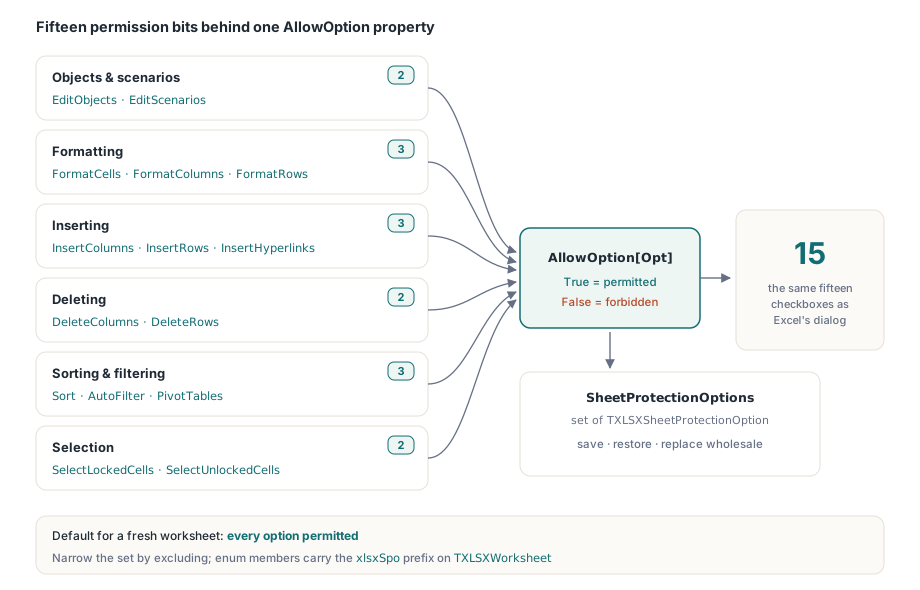
Each worksheet now carries a set of TXLSXSheetProtectionOption values describing what the user may still do while the sheet is protected. The members map one to one onto the OOXML attributes and onto the Excel dialog checkboxes:
xlsxSpoEditObjects,xlsxSpoEditScenarios— edit drawing objects and what-if scenariosxlsxSpoFormatCells,xlsxSpoFormatColumns,xlsxSpoFormatRows— reformat cells, columns, rowsxlsxSpoInsertColumns,xlsxSpoInsertRows,xlsxSpoInsertHyperlinks— insert columns, rows, linksxlsxSpoDeleteColumns,xlsxSpoDeleteRows— delete columns, rowsxlsxSpoSelectLockedCells,xlsxSpoSelectUnlockedCells— move the selection onto locked or unlocked cellsxlsxSpoSort,xlsxSpoAutoFilter,xlsxSpoPivotTables— sort ranges, use AutoFilter dropdowns, work with PivotTables
You read and write individual bits through the indexed AllowOption property on TXLSXWorksheet. AllowOption[Opt] = True means the action is permitted; setting it False forbids it. The whole set is also reachable at once through SheetProtectionOptions, a TXLSXSheetProtectionOptions (a plain Pascal set of), so you can save it, restore it, or replace it wholesale
The default matters and it is deliberate: a freshly created worksheet starts with every option permitted. The constructor seeds SheetProtectionOptions with the full range, [Low(TXLSXSheetProtectionOption)..High(TXLSXSheetProtectionOption)]. You narrow from there by excluding the actions you want to forbid, rather than building a permission set up from nothing. That choice is what makes the writer's encoding rule, below, line up with Excel's behavior
Protecting a sheet but leaving sort and filter open
Here is the common case end to end: protect a finished report so the layout cannot be reshaped, but let the reader sort and filter it. Note that Protect and the options are independent. Protect flips the sheet into the protected state and stores the optional password hash; it does not touch the option set. You adjust AllowOption separately, and the toggles take effect once the sheet is protected and saved
var
  wb: TXLSXWorkbook;
  sh: TXLSXWorksheet;
begin
  wb := TXLSXWorkbook.Create;
  try
    sh := wb.Sheets.Add('Protected');
    sh.Cells[1, 1].Value := 'Region'; sh.Cells[1, 2].Value := 'Units';
    sh.Cells[2, 1].Value := 'North';  sh.Cells[2, 2].Value := 120;
    sh.Cells[3, 1].Value := 'South';  sh.Cells[3, 2].Value := 98;

    // Protect with a password. This only sets the protected state + hash;
    // the option set is left at its all-permitted default.
    sh.Protect('HotXLS-2026');

    // Narrow: keep sort + AutoFilter, forbid reshaping and reformatting.
    sh.AllowOption[xlsxSpoSort]          := True;
    sh.AllowOption[xlsxSpoAutoFilter]    := True;
    sh.AllowOption[xlsxSpoFormatCells]   := False;
    sh.AllowOption[xlsxSpoFormatColumns] := False;
    sh.AllowOption[xlsxSpoFormatRows]    := False;
    sh.AllowOption[xlsxSpoInsertRows]    := False;
    sh.AllowOption[xlsxSpoDeleteRows]    := False;

    if wb.SaveAs('protection.xlsx') <> 1 then
      Writeln('SaveAs failed');
  finally
    wb.Free;
  end;
end;
Two things to read off that snippet. The Sort and AutoFilter lines are written explicitly even though both default to True; that is documentation for the next maintainer, not a functional requirement. And because the defaults are permissive, the only lines that change the output file are the ones setting an option to False. That is not an accident of this API, it is the OOXML wire format showing through, which is the next section
The encoding rule: omit means allow, attr=0 means forbid
This is the single counter-intuitive fact in the whole feature, and it is where hand-written <sheetProtection> usually goes wrong. In OOXML, each per-action attribute is a forbid flag, and its absence is permission. An attribute that is missing means the action is allowed. An attribute written as "0" means the action is forbidden while the sheet is protected. There is no formatCells="1" in a well-formed file to mean "formatting is allowed"; you simply leave the attribute out. (The default for an absent attribute is the OOXML boolean default of true, and these attributes are named so that "true" means the corresponding edit is permitted.)
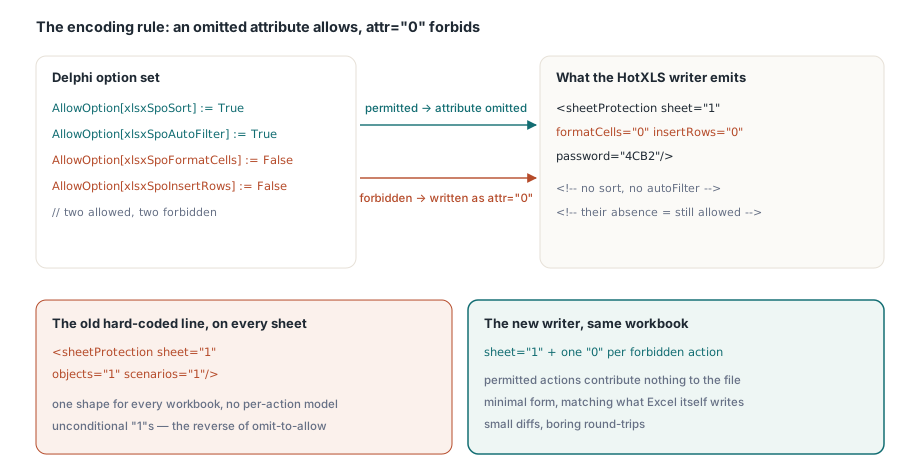
The HotXLS writer mirrors that exactly. It emits sheet="1" to switch protection on, then walks the option set and writes attr="0" only for the options you set to False. Permitted actions contribute nothing to the output. So the workbook from the previous section serializes to something like this, carrying only the forbidden actions plus the password hash:
// Conceptual output for the snippet above (attributes elided for brevity):
// <sheetProtection sheet="1"
//   formatCells="0" formatColumns="0" formatRows="0"
//   insertRows="0" deleteRows="0"
//   password="...4-hex..."/>
// Note what is NOT there: no sort, no autoFilter, no selectLockedCells.
// Their absence is exactly what tells Excel those actions stay allowed.
If you came from the old hard-coded string and expected to see every attribute spelled out, this looks sparse, almost wrong. It is correct. A file that listed sort="1" and autoFilter="1" would mean the same thing to a conforming reader, but Excel itself writes the minimal forbid-only form, and matching it keeps diffs small and round-trips boring. The objects and scenarios attributes follow the identical rule: they are default-permitted, so they only appear as "0" when you forbid them, which is the reverse of the old objects="1" scenarios="1" that was emitted unconditionally
Reading protection back: round-trip fidelity
A permission model that you can write but not read is a one-way door, and the usual symptom is a load-edit-save cycle that silently widens permissions. HotXLS closes that. When ParseWorksheetXml hits a <sheetProtection> element it sets the sheet protected, captures the password hash if present, and then decodes each per-action attribute back into AllowOption using the same convention in reverse: an attribute present and equal to "0" forbids the action; an absent attribute leaves the option at its permitted default
var
  wb: TXLSXWorkbook;
  sh: TXLSXWorksheet;
begin
  wb := TXLSXWorkbook.Create;
  try
    wb.Open('protection.xlsx');
    sh := wb.Sheets[1];                  // XLSX sheets are 1-based
    if sh.IsProtected then
    begin
      Writeln('Protected; password hash present: ',
        sh.SheetProtectHash <> '');
      Writeln('Sort allowed:       ', sh.AllowOption[xlsxSpoSort]);
      Writeln('AutoFilter allowed: ', sh.AllowOption[xlsxSpoAutoFilter]);
      Writeln('FormatCells allowed:', sh.AllowOption[xlsxSpoFormatCells]);
    end;
  finally
    wb.Free;
  end;
end;
Load the file the writer produced and you get Sort and AutoFilter back as True, FormatCells as False — the set you saved, intact. That symmetry is the whole point: edit one cell in a protected, partially-permitted sheet and resave, and the fourteen permissions you did not touch survive instead of collapsing back to the old all-or-nothing default
Practical notes and limits
A few things worth knowing before you wire this into a report pipeline:
- The password is weak by design. XLSX worksheet protection stores a 16-bit legacy hash (the same one Excel has used for decades), kept here for interoperability. It deters accidental edits; it does not resist an attacker. Do not treat it as a secret-keeper. For real protection, encrypt the workbook
- Setting options before protecting is fine.
AllowOptioncan be assigned whether or not the sheet is currently protected; the toggles simply describe what protection will permit onceProtectis in effect.UnProtectclears the protected state and the hash but leaves your option set in place for next time - Locked-cell semantics still apply. Protection only blocks edits to cells whose
Lockedattribute is set (the workbook default). Leaving an input region editable is the cell-style job, not a protection option; the two layers combine the same way they do in Excel - This is the XLSX engine. The option model mirrors the XLS engine's older
Allow*properties, but the enum and property names here (xlsxSpo*,AllowOption) belong toTXLSXWorksheetinlxHandleX. If you also drive print layout on the same sheets, the protection and page-setup walkthrough covers how these settings sit alongside print areas and headers, and data validation, AutoFilter and tables pairs naturally with leavingxlsxSpoAutoFilteropen on a locked report
The fine-grained protection model and the rest of the XLSX read/write engine ship in the HotXLS Delphi Component for Delphi and C++Builder; the product page carries the full worksheet API including the complete protection-option reference