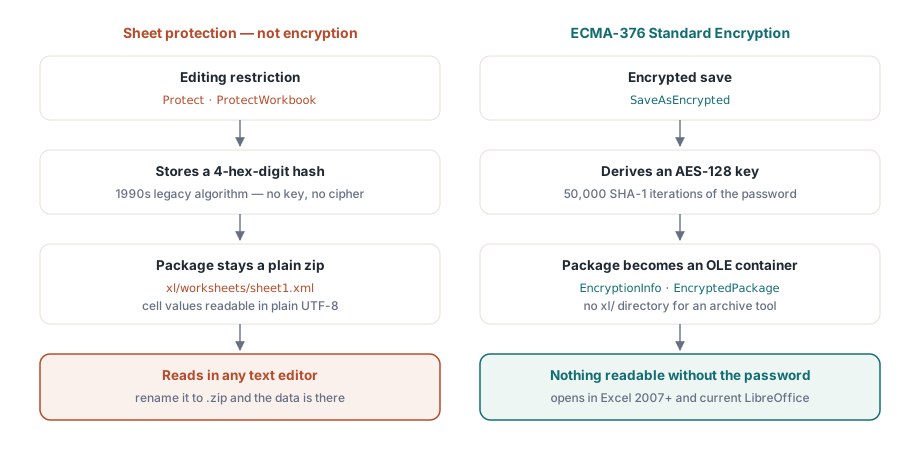
Excel exposes two things both called "password," and only one of them is encryption. The open password keys a real cipher: without it the file cannot be read at all. The worksheet and workbook protection passwords do nothing of the sort. They set a flag that a cooperating editor agrees to honor, and a workbook carrying nothing but that flag is a plain readable zip with the data sitting in cleartext. Pick the wrong one and you ship payroll that looks locked in Excel and reads in any text editor
The proof takes ten seconds. Rename a protected .xlsx to .zip, open it in any archive tool, and look at xl/worksheets/sheet1.xml. If the cell values are there in plain UTF-8, the file is not encrypted, however many password prompts Excel raises when someone tries to edit a cell. That gap survives for years inside teams that assume sheet protection is confidentiality, and it usually surfaces the day a security review runs exactly this rename
HotXLS is a native Delphi and C++Builder spreadsheet library, and it keeps the two features on opposite sides of that line. Worksheet and workbook protection are editing restrictions backed by a deliberately weak legacy hash. SaveAsEncrypted produces an AES-encrypted package that nothing short of the password will open. The sections below cover what that call writes, the asymmetry you have to design around (HotXLS writes encrypted files but cannot read them back), and how the older XLS path differs
Why sheet protection is not encryption
The Protect methods on sheets and ProtectWorkbook on the workbook store a 4-hex-digit hash of the password. That is the legacy algorithm OOXML and BIFF both inherited from 1990s Excel, and the format documentation never claims it does more than stop accidental edits. The package stays an ordinary readable zip: cell data, formulas, and shared strings all in cleartext XML. The default makes it worse, not better. Every cell starts with Locked=True, so calling Protect without first unlocking an input range freezes the whole sheet against editing while leaving every value in plain sight
None of which makes protection useless. Steering users into editable ranges and stabilizing a layout for printing are real jobs, covered in our article on worksheet protection and page setup. But those are usability jobs. The instant the requirement is confidentiality, the only API that answers it is SaveAsEncrypted
What SaveAsEncrypted actually writes
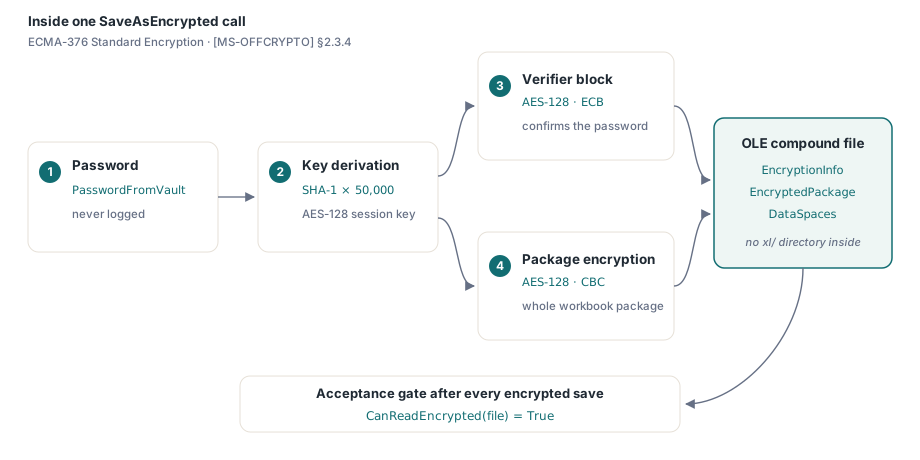
The implementation follows ECMA-376 Standard Encryption, specified in [MS-OFFCRYPTO] section 2.3.4. The password runs through 50,000 iterations of SHA-1 to derive an AES-128 key. A verifier block, encrypted with AES-128 in ECB mode, lets a consumer confirm the password before it decrypts anything, and the entire workbook package is then encrypted with AES-128 in CBC mode. What lands on disk is not a zip at all. It is an OLE compound file holding EncryptionInfo, EncryptedPackage, and DataSpaces streams, with no xl/ directory for an archive tool to list, which is why the rename test now turns up nothing readable. Excel 2007 and later opens it with the password alone, and current LibreOffice reads Standard Encryption too
var
  Book: TXLSXWorkbook;
  Sheet: TXLSXWorksheet;
  rc: Integer;
begin
  Book := TXLSXWorkbook.Create;
  try
    Sheet := Book.Sheets.Add('Payroll');
    Sheet.Cells[1, 1].Value := 'Employee';
    Sheet.Cells[1, 2].Value := 'Net pay';
    Sheet.Cells[2, 1].Value := 'A. Garcia';
    Sheet.Cells[2, 2].Value := 4815.16;

    rc := Book.SaveAsEncrypted('payroll-2026-06.xlsx', PasswordFromVault);
    if rc <> 1 then
      raise Exception.CreateFmt('Encrypted save failed (rc=%d)', [rc]);
  finally
    Book.Free;
  end;
end;
Treat the password variable with the same care as a connection string. Fetch it from a vault or a generated-secret service at the last moment, never log it, and never write it into the workbook itself. The return-code check is not optional ceremony. An encryption save that fails partway through has to abort the delivery, because the only fallback the calling code can offer is an unencrypted copy, and that copy is the exact incident this feature exists to prevent
There is also a machine-checkable acceptance test that costs almost nothing: call CanReadEncrypted on the file you just wrote. It returns true only when the output really is an encryption container, so asserting it after every encrypted save catches the regression that matters most, a code path that quietly fell back to a plain SaveAs, at the moment it happens rather than weeks later in a customer's inbox. The final word still belongs to a manual open in Excel with the real password during release testing
Write-only by design: handling EXlsxEncryptionNotImplemented
Here is the asymmetry that should shape your pipeline architecture: HotXLS encrypts on save but does not decrypt on open. OpenEncrypted raises EXlsxEncryptionNotImplemented when pointed at an actual encrypted package; on a plain workbook it simply falls through to a normal Open. The companion probe CanReadEncrypted detects the OLE encryption container cheaply, so intake code can route such files without triggering the exception:
var
  Book: TXLSXWorkbook;
begin
  Book := TXLSXWorkbook.Create;
  try
    if Book.CanReadEncrypted(FileName) then
    begin
      // Encrypted container: HotXLS cannot decrypt it.
      Writeln(FileName + ': needs manual decryption in Excel first');
      Exit;
    end;
    try
      Book.OpenEncrypted(FileName, '');   // plain files fall through to Open
      Writeln(FileName + ': opened, ' + IntToStr(Book.Sheets.Count) + ' sheet(s)');
    except
      on EXlsxEncryptionNotImplemented do
        Writeln(FileName + ': encrypted - routed to manual queue');
    end;
  finally
    Book.Free;
  end;
end;
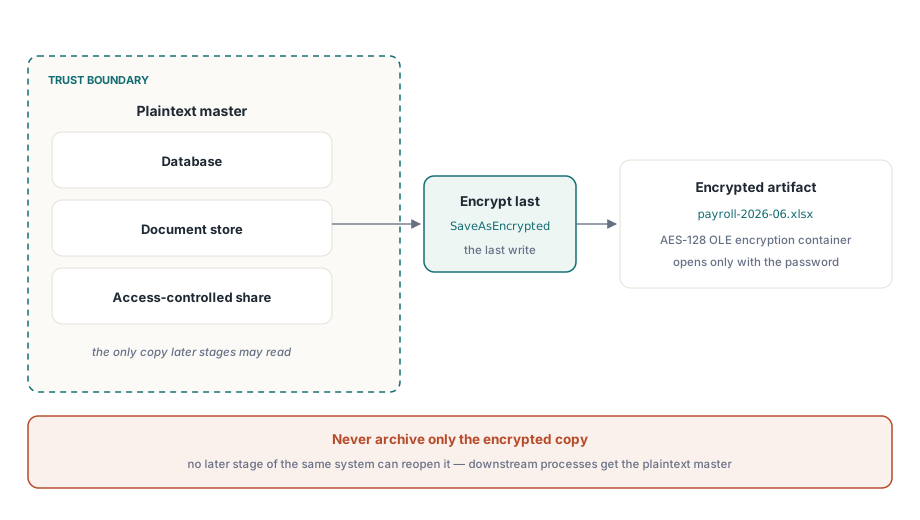
That asymmetry has one clear architectural reading: encrypt at the delivery edge, last. Keep the plaintext master inside your trust boundary, in a database, a document store, or an access-controlled share, and produce the encrypted copy as the final step before the file leaves the system. A pipeline that archives only the encrypted output has locked itself out of its own data, because no later stage of the same system can reopen those files. When a downstream HotXLS process needs the workbook again, hand it the plaintext master, never the delivery artifact
AES-128 Standard Encryption and the AES-256 compliance line
Office file encryption comes in two generations. Standard Encryption, the one HotXLS writes, uses AES-128 with SHA-1 key derivation. Agile Encryption arrived later and moves to AES-256 with SHA-512 and a different, XML-described key container. Both open transparently in Excel, and AES-128 is still computationally sound for protecting a file in transit to a customer
The difference stops being academic the day a security questionnaire asks for "AES-256 encryption of files at rest." Standard Encryption does not meet that line, no matter how strong the password is, and no parameter of SaveAsEncrypted changes the algorithm it emits. So state the profile precisely in your security documentation: AES-128, ECMA-376 Standard Encryption, SHA-1 key derivation at 50,000 iterations. A claim that survives review is worth more than an optimistic one that collapses under an audit
The legacy XLS route: RC4 out, RC4 and XOR back in
The BIFF facade has the opposite shape. Its encryption is older and weaker, but the round trip is complete: what it writes, it can also read back. Setting EncryptionPassword before SaveAs produces an RC4-encrypted .xls through the BIFF FilePass mechanism, and Open with a password parameter reads all three legacy schemes, RC4, RC4 CryptoAPI, and the ancient XOR obfuscation:
var
  Writer, Reader: IXLSWorkbook;   // interface refs: no manual Free
begin
  Writer := TXLSWorkbook.Create;
  Writer.Sheets.Add.Cells.Item[1, 1].Value := 'Confidential';
  Writer.EncryptionPassword := 'S3cret!';
  Writer.SaveAs('confidential.xls');

  Reader := TXLSWorkbook.Create;
  if Reader.Open('confidential.xls', 'S3cret!') > 0 then
    Writeln(Reader.Sheets[1].Cells.Item[1, 1].Value);  // Entries are 1-based
end;
RC4 is obsolete cryptography and should never protect data that matters today; its only remaining value is interoperability with systems that still exchange .xls. The read side, though, earns its keep in migration work. A password-protected legacy file opens with Open(FileName, Password), bridges into the OOXML model, and re-secures through the AES path, a one-way upgrade that runs without Excel anywhere in the loop. For high-volume encrypted deliveries, the save-side throughput notes in our article on streaming writes for server batch jobs apply to the content-building phase that happens before encryption
Encryption and protection are not rivals
One more point worth settling, because it comes up the moment someone reads the warning at the top of this page as "protection is worthless." It is not. Encryption and protection answer different questions, and they stack cleanly. Encryption decides who can open the file; protection decides what a reader who is already inside may change. A payroll delivery can reasonably do both: encrypt the package so only the holder of the password sees it, then lock the formula cells so the recipient can filter and sort but not quietly rewrite the calculations. The error is never adding protection. The error is letting its presence stand in for encryption when the requirement was confidentiality
The custody side has no safety net, and that is by design. The 50,000-iteration key derivation exists to make guessing expensive, and nothing inside the file escrows the secret. A password lost is data lost. Generate, deliver, and store these passwords with the same discipline you apply to database credentials, and the encryption holds up its end
Real file encryption is one call in HotXLS. The discipline lives in everything around the call: password custody, the write-only boundary that keeps HotXLS from reopening its own output, and an algorithm claim you can defend in an audit. SaveAsEncrypted and the legacy round-trip ship with the HotXLS Delphi Component, running natively in Delphi and C++Builder processes with no Excel automation anywhere in the path