HotXLS now evaluates structured table references, so =SUM(Table1[Amount]) produces a number instead of being skipped. The resolver handles Table[Column], Table[[Column]], column spans such as Table[[Q1]:[Q4]], and the item specifiers [#Data], [#All], [#Headers] and [#Totals], resolving each against the workbook's table model at parse time while the original formula text round-trips verbatim
One form is deliberately absent, and it is the one people hit first. The current-row shorthand [@Column] is not supported, for a structural reason worth understanding rather than working around blindly
Why is a structured reference not just a range with a friendly name?
Because a defined name freezes an address and a table reference does not. Write DataBlock as a name pointing at Sheet1!$A$2:$D$100 and it stays that rectangle until something rewrites it. Write Sales[Amount] and it means "the Amount column of the Sales table", whatever that table's extent happens to be when the formula is evaluated. Add twenty rows to the table and the sum covers them; there is no reference to adjust because there was never an address in the formula to begin with
That symbolic quality is exactly why the reference cannot be resolved by string substitution. The resolver has to find the table by name in the workbook, look up the column by its header text, decide which rows the requested item specifier covers, and produce a concrete rectangle. HotXLS does this during formula compilation through the table model, which is why a formula written before the table grows still evaluates against the table's current extent
![Diagram of HotXLS resolving the structured reference SalesTable[Amount] in Delphi by finding the table by name, matching the Amount column header and applying the #Data specifier to obtain a concrete range](../../assets/media/HotXLS-StructuredRef-Resolve-Pipeline.svg)
The grammar HotXLS resolves
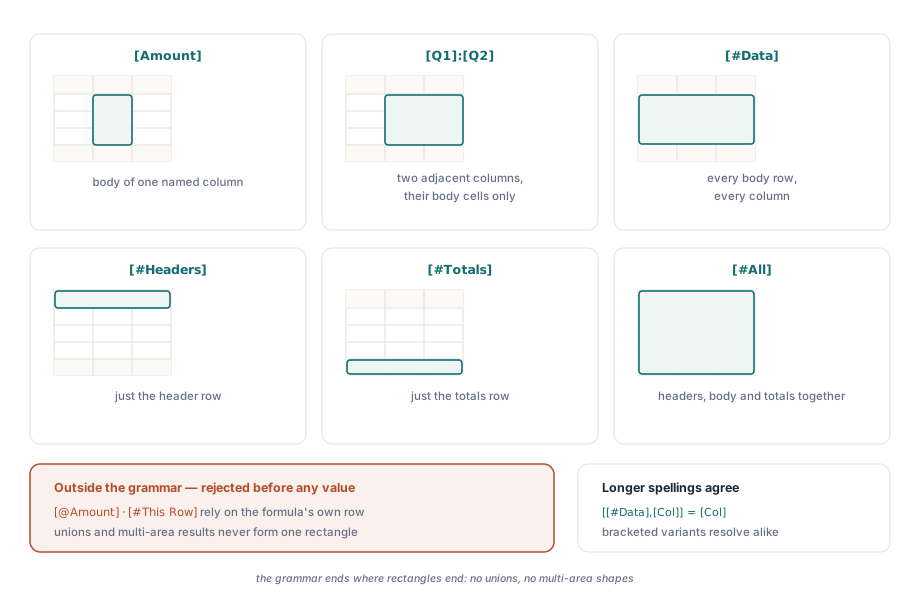
The supported spec grammar covers a single rectangular result and is worth stating precisely, because Excel's documentation presents a much larger surface than most engines implement. HotXLS accepts [Col] and the bracketed variant [[Col]], the bare item specifiers [#Data], [#All], [#Headers] and [#Totals], the combined form [[#Data],[Col]], a span within an item specifier as [[#Data],[Col1]:[Col2]], and a plain span [Col1]:[Col2]
What that set gives you is every reference shape that produces one contiguous block: a column, a run of adjacent columns, a body-only or header-inclusive slice of either. Non-adjacent unions and multi-area results are outside it. When a reference cannot be resolved, the formula keeps the previous skip-without-value behavior rather than substituting a guess, so an unresolvable reference never becomes a plausible wrong number
var
  Book: TXLSXWorkbook;
  Sheet: TXLSXWorksheet;
  Cols: TStringList;
begin
  Book := TXLSXWorkbook.Create;
  Cols := TStringList.Create;
  try
    Sheet := Book.Sheets.Add('Sales');
    Cols.Add('Region');
    Cols.Add('Q1');
    Cols.Add('Q2');
    Cols.Add('Amount');
    Sheet.Tables.Add('SalesTable', 'A1:D25', Cols);
    // ... write the header row and 24 data rows ...

    Sheet.Cells[27, 4].Formula := 'SUM(SalesTable[Amount])';
    Sheet.Cells[28, 4].Formula := 'SUM(SalesTable[[Q1]:[Q2]])';
    Sheet.Cells[29, 4].Formula := 'COUNTA(SalesTable[[#Data],[Region]])';
    Sheet.Cells[30, 4].Formula := 'ROWS(SalesTable[#All])';

    Book.Recalculate;
    Book.SaveAs('sales.xlsx');
  finally
    Cols.Free;
    Book.Free;
  end;
end;
Why is the current-row form excluded on purpose?
[@Column] and [#This Row] mean "the cell of that column on the row where this formula lives". The value therefore depends on the evaluating cell's position, not only on the table. That is a different kind of reference: not a rectangle the compiler can resolve once, but a per-cell resolution that has to be redone for every row the formula occupies
HotXLS returns False from the table-range resolver for those forms, which routes them into the skip-without-value path. The formula text is preserved and written back unchanged, so a workbook that uses [@Amount] opens correctly in Excel after a round-trip through your application; only the HotXLS-computed value is absent. Given the choice between an absent value and a value computed against the wrong row, absence is the one you can detect
The practical workaround is mechanical: in a workbook you generate, write the equivalent A1-style relative reference, which is what Excel stores internally anyway for a great deal of table-scoped logic. In a workbook you merely process, leave the formula alone and read the cached value Excel already stored, which is what a load-and-report pipeline usually wants
![Flow chart of HotXLS rejecting the current-row form [@Amount] with skip-without-value behavior in Delphi while preserving the formula text so Excel recomputes every row after the round-trip](../../assets/media/HotXLS-StructuredRef-Row-Exclusion-Path.svg)
var
  Book: TXLSXWorkbook;
  Sheet: TXLSXWorksheet;
  Table: TXLSXTable;
  Row: Integer;
begin
  Book := TXLSXWorkbook.Create;
  try
    if Book.Open('sales.xlsx') <> 1 then Exit;
    Sheet := Book.Sheets[1];

    Table := Sheet.Tables.FindByName('SalesTable');
    if Table <> nil then
    begin
      // Recordset-style lookup over the table body, 1-based row result
      Row := Table.FindFirst(Sheet, 'Region', 'EMEA');
      while Row > 0 do
      begin
        Log(VarToStr(Sheet.Cells[Row, 4].Value));
        Row := Table.FindNext(Sheet, 'Region', 'EMEA', Row);
      end;
    end;
  finally
    Book.Free;
  end;
end;
What happens when the table changes shape
Structured references are invalidated rather than silently repointed when the thing they name goes away. Delete a column and formulas referring to that column are invalidated the way Excel invalidates them; delete or rename the table and references to it are handled the same way. This is the correct behavior and it mirrors ordinary reference adjustment, described in formula reference adjustment on insert and delete, where the engine's job is to keep formulas honest rather than to keep them looking valid
Row growth is the opposite case and needs no adjustment at all. Because the reference names the table rather than a rectangle, appending rows inside the table's range widens what [#Data] covers without touching a single formula. That is the property that makes tables worth using in a report template: the totals row keeps summing everything the import produced, however many rows that turned out to be
Round-trip discipline
HotXLS keeps the original formula text. A workbook loaded with SUM(SalesTable[Amount]) is saved with SUM(SalesTable[Amount]), not with the resolved SUM(D2:D25). This matters more than it may seem: a user who opens your output in Excel expects to see the formula they wrote, and a resolved address would quietly convert a self-maintaining model into a brittle one that stops covering new rows
Two related capabilities complete the picture. Table definitions themselves, including header-less tables and per-table comments, round-trip through the table model described in data validation, AutoFilter and Excel tables. And when many cells share one pattern, XLSX stores them once as a shared formula, which is expanded and re-emitted as covered in shared formula si expansion. Structured references inside shared formulas go through both paths, so both need to behave, and they do
HotXLS reads and writes XLS, XLSX and ODS from Delphi and C++Builder with no Excel installation and no Office automation, evaluating formulas in its own engine. The table model, formula engine and recalculation API are documented on the HotXLS Delphi spreadsheet component page