HotXLS adjusts formula references automatically when you insert or delete rows or columns in an XLSX worksheet. The engine's InsertRows, DeleteRows, InsertCols, and DeleteCols methods rewrite every surviving formula so its A1 references — relative, absolute, and range — keep pointing at the same data after the structural edit, and references into a deleted block become #REF!, matching Excel's behavior
The bug this prevents is one of the quietest in report generation. A generator writes daily figures into C2:C9 with =SUM(C2:C9) underneath, then a later step inserts a header row at the top. If the engine only moves cell values and leaves formula text alone, that SUM still reads C2:C9 while the data now lives in C3:C10 — so the total silently drops the last day and double-counts a header. Nothing raises an exception, the file opens fine, and the number is simply wrong. Before version 2.160 the HotXLS XLSX engine left formulas untouched during structural edits; since 2.160 the rewrite is automatic and there is no flag to set
What happens to formulas when you insert a row in Excel?
Excel's rule is that references follow data, not addresses. When a row is inserted, every reference whose row index sits at or below the insertion point moves down by the number of inserted rows; references entirely above the insertion point are untouched. Deleting rows runs the same rule in reverse: references below the deleted block slide up, and references into the deleted block itself become #REF! because the cells they named no longer exist. Columns behave identically along the other axis. A spreadsheet library that wants its output to survive contact with Excel users has to reproduce these mechanics exactly, because users reason about their formulas in these terms without ever thinking about it
The part that surprises developers is that absolute references move too. The $ anchors in $B$2 control what happens when a formula is copied or filled to another cell — they do nothing during structural edits. Insert a row above row 2 and Excel rewrites $B$2 to $B$3, dollar signs intact, because the value the formula depends on physically moved to row 3. An engine that shifted only relative references would corrupt exactly the formulas people anchor most deliberately. HotXLS shifts both forms and preserves the $ markers in the rewritten text
How does HotXLS shift formula references automatically?
All four structural-edit methods on TXLSXWorksheet delegate to a single geometry engine: ShiftSheetGeometry(RowFrom, RowDelta, ColFrom, ColDelta). InsertRows(BeforeRow, Count) calls it with a positive row delta, DeleteRows(StartRow, Count) with a negative one, and the column methods do the same on the column axis. The routine first relocates the cells themselves — dropping any cell that falls inside a deleted block — and then walks every surviving formula cell and passes its text through XlsxAdjustFormulaRowColRefs, a scanner that finds A1-style references and rewrites their row and column components against the shift. The same pass relocates merged ranges, hyperlinks, comments, images, charts, conditional formats, data validations, and table ranges, so the whole sheet moves as one unit
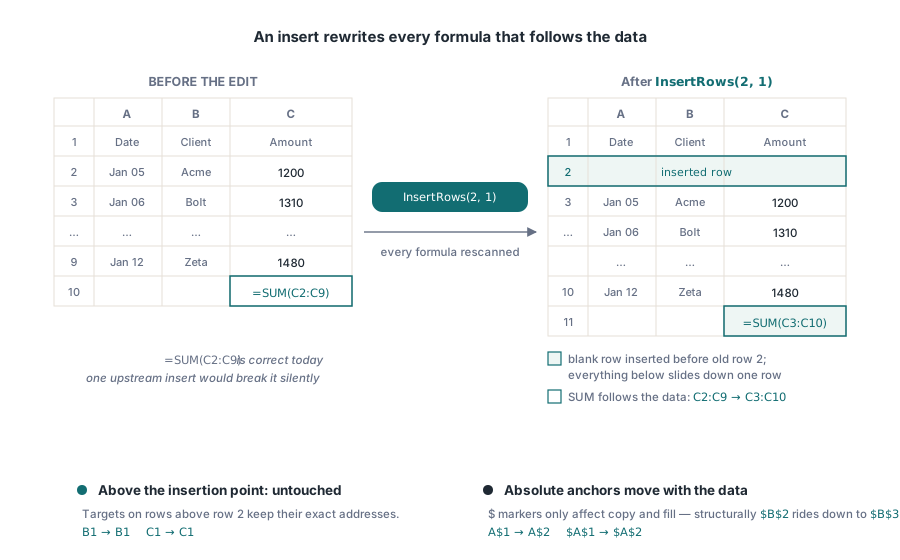
// Layout before the edit:
//   C2..C9  daily figures
//   C10     =SUM(C2:C9)
Sheet.InsertRows(2, 1);      // one blank row before row 2
// Layout after the call:
//   C3..C10 daily figures
//   C11     =SUM(C3:C10)    -- the range moved with the data
A few details of the scanner are worth knowing. XlsxAdjustFormulaRowColRefs recognizes single-cell references in all four anchor forms (A1, $A1, A$1, $A$1) and two-corner ranges such as A1:B3, adjusting each endpoint independently. Formulas whose text already begins with # — an error marker from an earlier edit — are skipped rather than re-scanned. And InsertCols adds one Excel-parity nicety of its own: newly inserted columns inherit the width of their left neighbor, which is what Excel's Insert Sheet Columns command does
When does a deleted reference become #REF!?
The shift rule for a single row or column index has three outcomes. An index before the edit point is unchanged. An index at or past the edit point moves by the delta. And under deletion, an index that falls inside the deleted block has no meaningful new value — the cell is gone — so the scanner rewrites the whole reference as #REF!. For a range reference, both endpoints are run through the same rule, and if either endpoint lands inside the deleted block the reference is rewritten as #REF! rather than left half-valid
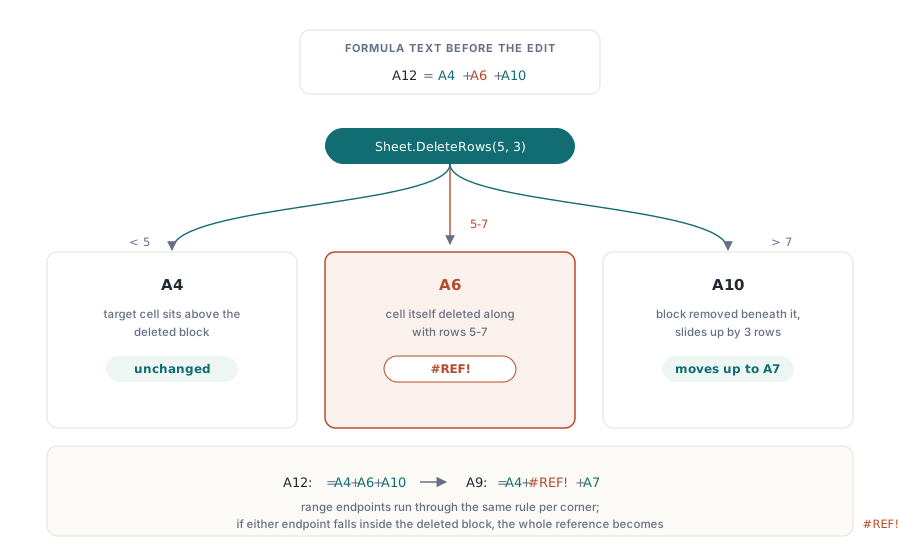
// A12 holds  =A4+A6+A10
Sheet.DeleteRows(5, 3);      // delete rows 5..7
// The formula, now in A9, reads  =A4+#REF!+A7
//   A4  : above the deleted block, unchanged
//   A6  : inside rows 5..7, gone      -> #REF!
//   A10 : below the block, slides up  -> A7
Producing a loud #REF! instead of silently retargeting is the correct trade, and it is the one Excel makes. A formula that points at a neighboring cell after its real input was deleted would return a plausible-looking number; #REF! propagates through dependent formulas and surfaces in the first smoke test. The same conversion applies on the column axis
// E1 holds  =B1*$C$1
Sheet.DeleteCols(3, 1);      // remove column C
// The formula, now in D1, reads  =B1*#REF!
// The absolute anchor did not protect $C$1 -- the cell itself is gone
Which reference forms are not rewritten?
The scanner targets same-sheet A1 references with an explicit column-letter-plus-row-number shape, and it is worth being precise about what falls outside that. Whole-column references such as A:A and whole-row references such as 1:1 lack one of the two components, so the scanner leaves them as written. Structured table references (Table1[Amount]) are likewise passed through untouched. The rewrite also operates strictly on A1 notation — if your code builds formulas in R1C1 style, convert them to A1 before a structural edit, as described in the companion article on R1C1 formula notation in Delphi
Cross-sheet and workbook-level constructs are handled by separate passes rather than by the cell-text scanner. After adjusting the edited sheet, ShiftSheetGeometry propagates the same geometry change to formulas on other sheets that reference the edited sheet, to chart series ranges, to internal hyperlink targets, and to defined names. Defined names get further protection at the sheet lifecycle level: since version 2.150, deleting a worksheet rewrites every SheetN! qualifier inside a defined name's formula to #REF!, and renaming a sheet rewrites the qualifier to the new name, so names never point at a sheet that no longer exists. How names and cross-sheet formulas fit together is covered in the article on defined names and cross-sheet formulas
Recalculate after the shift
Reference adjustment rewrites formula text; it does not recompute results. After a structural edit the cached values stored alongside formulas describe the old geometry, so the reliable sequence is: perform all inserts and deletes first, then trigger recalculation once, then save. Running the shift before recalculation also keeps the dependency information honest — every rewritten reference names its true precedent, which is exactly what the incremental recalculation engine and its dependency graph need to recompute the minimum set of affected cells. If a rewritten formula now contains #REF!, recalculation surfaces the error value immediately instead of leaving a stale number in the file
Formula reference adjustment ships as standard behavior of the XLSX engine in the HotXLS Delphi Excel Component for Delphi and C++Builder; the product page carries the full worksheet-editing API reference, including the insert and delete methods shown here