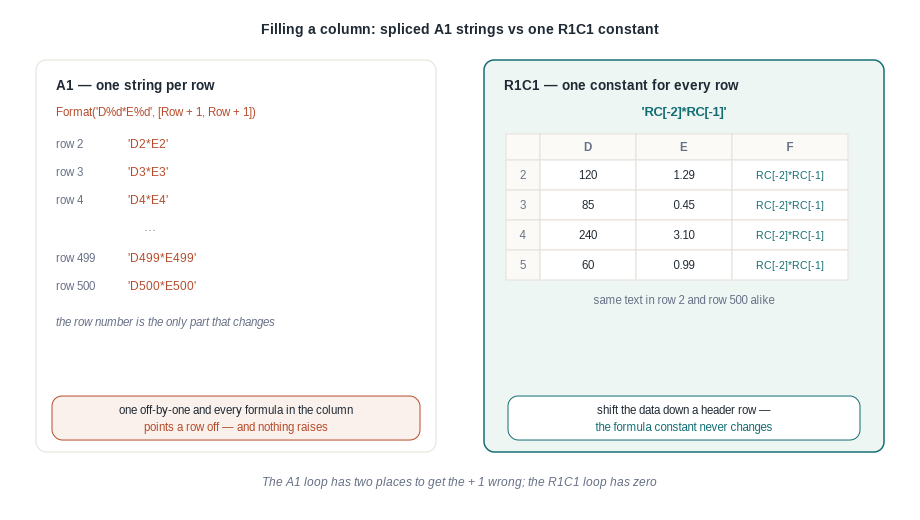
A loop that fills an amount column with Format('=D%d*E%d', [Row, Row]) works until somebody adds a header row above the data. The loop now writes into row Row + 1 but still splices Row into the text, so F2 holds =D1*E1, multiplies two header labels and shows #VALUE!, and every cell below it prices the order one row up. R1C1 notation avoids the spliced number entirely: RC[-2]*RC[-1] says "two cells to my left times one cell to my left" and reads the same in row 2 and row 500
What R2C3, R[-1]C[2] and RC actually encode
R1C1 notation addresses a cell by row number and column number, and it writes relative references as explicit offsets from the cell that holds the formula. R2C3 is the absolute cell at row 2, column 3, which A1 spells $C$2. R[-1]C[2] is one row up and two columns right of wherever the formula sits. RC is the formula cell itself. The numbers inside the notation are 1-based, exactly as Excel displays them, so R2C3 is C2 and never D3
Those bracketed offsets are what make the notation fit generated workbooks. A relative A1 reference changes its spelling in every row (D2, D3, D4), so code that writes it has to re-render the text per row and own the off-by-one risk that comes with it. The R1C1 spelling of the same reference does not change. Spreadsheet file formats lean the same way internally: a shared-formula record stores its relative references as row and column offsets from the host cell, so a per-row A1 string is something your code builds only for a parser to turn it back into offsets
For formulas a person types, A1 stays the better choice. R[-3]C:R[-1]C is harder to scan than D2:D4, and the HotXLS formula APIs default to A1. R1C1 earns its place in one job: a single formula planted, evaluated or checked across many rows by code
How does HotXLS evaluate an R1C1 formula at a given cell?
TXLSXWorksheet.EvaluateFormulaAt evaluates R1C1 text when you pass xlfrsR1C1 as the reference style, resolving every offset against the row and column you name. The classic XLS worksheet (TXLSWorksheet) carries the same method with the same signature. Row and column are 1-based here, matching Cells[Row, Col], and the call is read-only: it does not touch the cell model, the formula cache, the dirty state or the dependency graph
Underneath, the conversion is plain text work. The exported function R1C1ToA1(const AFormula: String; CurRow, CurCol: Integer): String rewrites each R1C1 reference into A1 against the host cell, and the result goes through the ordinary A1 compiler. That is the same compiler that resolves defined names and cross-sheet references and dispatches custom worksheet functions, so an R1C1 formula gets all of it without a second parser. R1C1ToA1('SUM(R[-3]C[0]:R[-1]C[0])', 4, 3) describes a formula living in D5 and returns 'SUM(D2:D4)'; the colon passes through and each endpoint converts on its own
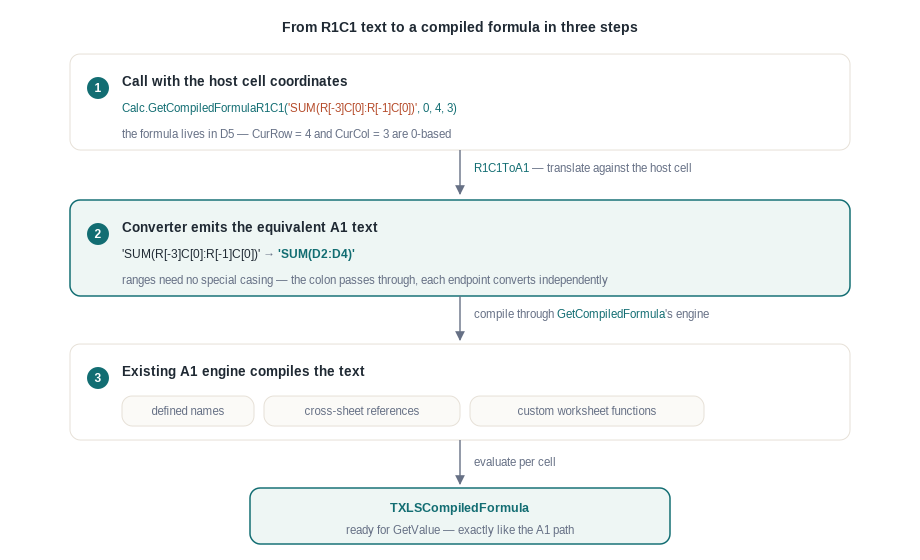
Code that drives the calculator directly has the same path one level down. TXLSCalculator.GetCompiledFormulaR1C1(UncompiledFormula: String; SheetID, CurRow, CurCol: Integer): TXLSCompiledFormula returns a compiled formula just like its A1 sibling GetCompiledFormula, with CurRow and CurCol given 0-based, and returns nil when the converted text does not compile. Most applications never need it; the worksheet method wraps it and adds typed results
The procedure below totals a prospective amount column before anything is written to it. Quantity sits in column D, unit price in column E, and the amounts would go in column F
uses
  System.Variants, lxCalc, lxHandleX;

function PreviewAmountTotal(Sheet: TXLSXWorksheet;
  FirstRow, LastRow: Integer): Double;
const
  AmountFormula = '=R[0]C[-2]*R[0]C[-1]';  // quantity times unit price
  AmountCol = 6;                     // column F, 1-based like Cells[]
var
  Options: TXLSFormulaEvaluationOptions;
  Res: TXLSFormulaEvaluationResult;
  Row: Integer;
begin
  Result := 0;
  Options := XLSDefaultFormulaEvaluationOptions;
  for Row := FirstRow to LastRow do
  begin
    Res := Sheet.EvaluateFormulaAt(Row, AmountCol, AmountFormula,
      xlfrsR1C1, Options);
    // #VALUE! and friends come back as values with Status = xlfeOk
    if (Res.Status = xlfeOk) and VarIsNumeric(Res.Value) then
      Result := Result + Res.Value;
  end;
end;
Nothing in the loop does row arithmetic on formula text. If the data block later moves down by a header row, the constant stays as it is and only FirstRow and LastRow change. A formula that fails to compile comes back with Status = xlfeParseError and a readable Issue.Message; a formula that compiles but produces an error such as #VALUE! comes back with xlfeOk and the error as its value
Writing R1C1 formulas into worksheet cells
A cell's Formula property takes A1 text, so storing an R1C1 formula means converting it per cell with R1C1ToA1 first. The workbook-level RefMode property of TXLSXWorkbook (ReferenceStyle on the classic workbook) only records how Excel should display references when the file is opened; HotXLS writes it into the workbook and leaves the parsing of Formula text as A1
uses
  lxFormula, lxHandleX;

procedure FillAmountColumn(Sheet: TXLSXWorksheet; FirstRow, LastRow: Integer);
const
  AmountR1C1 = 'R[0]C[-2]*R[0]C[-1]';  // offsets written out, see below
  AmountCol = 6;                        // column F
var
  Row: Integer;
begin
  for Row := FirstRow to LastRow do
    // Cells[] is 1-based, R1C1ToA1 wants the host cell 0-based
    Sheet.Cells[Row, AmountCol].Formula :=
      '=' + R1C1ToA1(AmountR1C1, Row - 1, AmountCol - 1);
end;
For row 2 this stores =D2*E2, for row 3 =D3*E3, and so on. The one place the code can still go wrong is the line that crosses coordinate systems. Three conventions meet in that call: Cells[Row, Col] counts from 1, R1C1ToA1 takes the host cell counted from 0, and the numbers inside the R1C1 text count from 1 again. Pass Row instead of Row - 1 and F2 receives =D3*E3, which is a valid formula pointing at the wrong order. Keep the - 1 next to the call, as above, and never inside the notation
Spell out every offset, R[0] and C[0] included
Generated formulas are safest when every relative part carries its brackets: R[0]C[-1] rather than RC[-1], R[2]C[0] rather than R[2]C. The bracketed form converts to a plain relative A1 reference at every host cell, so R[0]C[-1] at D5 becomes C5, and stored formulas, reusable templates and later row inserts all treat it as relative. Keep bare numbers for coordinates that really are fixed: R2C3 becomes $C$2 from any host, and the mixed R[1]C3 becomes $C6 at D5
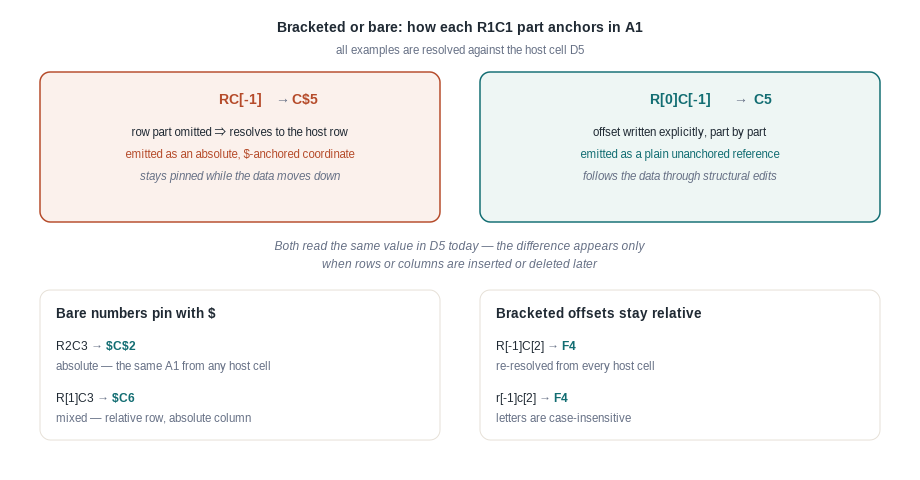
That matters once a converted formula outlives the cell it was converted for. Row inserts shift stored formulas, as the article on formula reference adjustment after inserts and deletes walks through, and CreateFormulaEvaluationTemplate compiles once at an anchor cell and shifts only the relative parts when EvaluateAt targets another cell. Both rely on the A1 text marking relative parts as relative, which the fully bracketed spelling guarantees
var
  Template: IXLSFormulaEvaluationTemplate;
  Res: TXLSFormulaEvaluationResult;
begin
  // Compiled once at F2; every part of each reference is an explicit offset
  Template := Sheet.CreateFormulaEvaluationTemplate(2, 6,
    '=R[0]C[-2]*R[0]C[-1]', xlfrsR1C1);
  if Template = nil then
    Exit;  // the text did not compile

  Res := Template.EvaluateAt(500, 6);  // multiplies D500 by E500
  if Res.Status = xlfeOk then
    UseAmount(Res.Value);              // UseAmount is your own routine
end;
A fixed input, such as a tax rate in H1, goes in as R1C8 and reaches every host cell as $H$1. Keep short forms such as RC[-1] for formulas you show to people, and standardize generated text on the bracketed spelling
A1ToR1C1 in the same unit converts the other way and writes zero offsets in the short form, so D2 seen from F2 comes out as RC[-2], the spelling a user expects to read. Treat that output as display text. To evaluate or reuse an existing A1 formula, pass the A1 text to EvaluateFormulaAt or CreateFormulaEvaluationTemplate with xlfrsA1 directly, which keeps D2 relative and $D$2 fixed exactly as written
How the converter tells references from function names and text
R1C1ToA1 starts a candidate reference only at an R or r that does not follow another letter, and the candidate must then parse completely: an optional row part, a mandatory C, an optional column part. If the parse fails, the characters pass through unchanged. That is why ROUND(R[-1]C[0], 2) converts only the inner reference: the R of ROUND is followed by O, so it is left alone, and at D5 the result is ROUND(D4, 2). ROW() survives the same way. Function names that begin with C never start a candidate, and the R inside INDIRECT or CORREL follows a letter
Row and column parts parse independently, which is what makes the mixed forms work, and the letters are case-insensitive, so r[-1]c[2] compiles like its uppercase twin. Write positive offsets without a sign, R[1]C[0], the same way Excel displays them
Text inside an R1C1 formula should not itself look like an R1C1 reference. The case that comes up in practice is INDIRECT with FALSE as its second argument, the one function that takes R1C1 text as data. Evaluate such a formula through the A1 path, where the string reaches INDIRECT exactly as written, or build the literal by concatenation inside an R1C1 formula so that no single piece is a complete reference
Options := XLSDefaultFormulaEvaluationOptions;

// A1 path: the literal reaches INDIRECT as written and D4 is read
Res := Sheet.EvaluateFormulaAt(5, 4, '=INDIRECT("R[-1]C",FALSE)',
  xlfrsA1, Options);

// Inside an R1C1 formula, split the literal so no piece parses as a reference
Res := Sheet.EvaluateFormulaAt(5, 4, '=INDIRECT("R[-1]"&"C",FALSE)',
  xlfrsR1C1, Options);
The split works because "R[-1]" on its own lacks the C the parser requires, so it passes through, and the two halves only meet at evaluation time. Compile formulas that carry text of that shape, such as a label "Total R2C3" or a defined name that starts with RC, through the A1 path
The R1C1 entry points sit in the same formula engine as the A1 compiler, the recalculation graph and the contextual evaluation API in the HotXLS Delphi Excel Component. Code that fills columns with formulas gets the most out of it: one constant per column, the host cell supplied by the loop, and no row numbers spliced into strings