A defined name is a label that stands in for a constant, a cell range, or a formula expression, stored once in the workbook and referenced symbolically everywhere it is needed. Write TaxRate in a formula and the engine resolves it to whatever the name's definition holds, be that the literal 0.08 or the range Data!$A$2:$D$100. A cross-sheet reference is the orthogonal idea: Data!D2 reaches a cell on another sheet by qualifying the address with a sheet name. Put the two together and a summary sheet can sum a detail sheet through a name that never mentions a literal address, which is exactly what you want in a workbook a generator assembles and an accountant later audits
HotXLS, losLab's native Delphi library for XLS and XLSX files, exposes the name table of both formats with create, find, and delete access, plus a formula engine that resolves names and cross-sheet references in process. The two formats keep separate class hierarchies, and the differences between their name APIs are the part that trips up code ported from one to the other
Two name stores that do not share an interface
On the XLS side, TXLSWorkbook.GetNames returns an IXLSNames collection whose Add(Name, RefersTo, Visible) overload writes a name into the BIFF name table. Individual entries come back as IXLSName objects carrying Name, RefersTo, a resolved RefersToRange, and a Delete method. On the XLSX side, TXLSXWorkbook.DefinedNames is a TXLSXDefinedNames collection with Add, FindByName, and DeleteByName
The lookup conventions diverge in a way that surfaces during porting rather than at compile time. The XLS collection's default Item property accepts a Variant, so both Names[0] and Names['TaxRate'] resolve against it. The XLSX collection has no such default property; you call FindByName('TaxRate'), which returns nil when the name is absent. Code written for one facade compiles against the other only by accident, and the failure tends to show up as a runtime nil access rather than a red squiggle in the IDE
Scope is the first decision, not a flag you add later
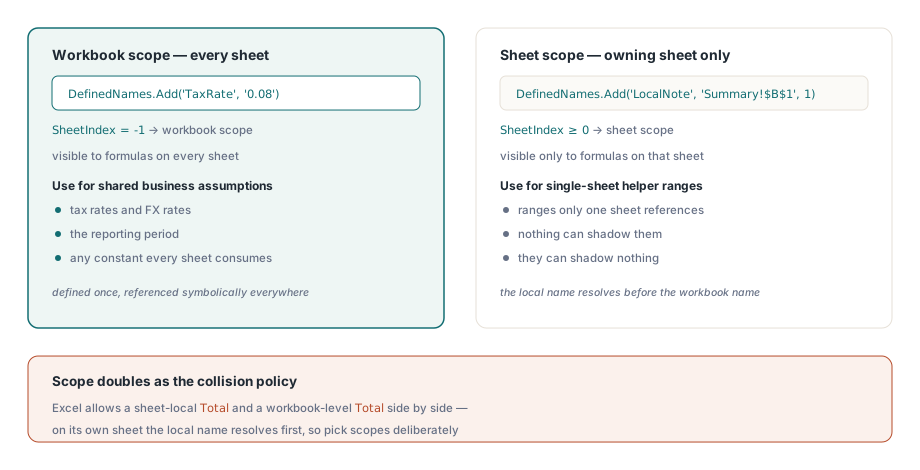
A defined name is either workbook-scoped, visible to formulas on every sheet, or sheet-scoped, visible only to formulas on its owning sheet. In the XLSX API the distinction is a single optional parameter. DefinedNames.Add(AName, AFormula) creates a workbook-level name, while Add(AName, AFormula, ASheetIndex) binds it to one sheet. Reading it back, TXLSXDefinedName.SheetIndex returns -1 for workbook scope and the 0-based sheet index otherwise
Scope doubles as your collision policy, and that is the reason to settle it before you write the first name. Excel permits a sheet-local Total on every sheet plus a workbook-level Total, and a formula on a given sheet resolves the local one first. Generated workbooks should lean on that deliberately. Business assumptions that several sheets consume, such as tax rates, FX rates, and the reporting period, belong at workbook scope. Helper ranges that only one sheet's formulas reference are safer sheet-scoped, where nothing can shadow them and they can shadow nothing
var
  Book: TXLSXWorkbook;
  Data, Summary: TXLSXWorksheet;
begin
  Book := TXLSXWorkbook.Create;
  try
    Data := Book.Sheets.Add('Data');
    Summary := Book.Sheets.Add('Summary');
    // ... fill Data!A2:D100 with detail rows ...

    Book.DefinedNames.Add('TaxRate', '0.08');                // workbook scope, a constant
    Book.DefinedNames.Add('DataBlock', 'Data!$A$2:$D$100');  // workbook scope, a range
    Book.DefinedNames.Add('LocalNote', 'Summary!$B$1', 1);   // scoped to sheet index 1 only

    // XLSX formulas take no leading '='
    Summary.Cells[2, 2].Formula := 'SUM(Data!D2:D100)*TaxRate';
    Book.SaveAs('model.xlsx');
  finally
    Book.Free;
  end;
end;
A defined name does not have to point at a range. TaxRate above refers to the bare constant 0.08, and that is the cleanest way to publish a business assumption. It appears once in Excel's Name Manager, every formula references it symbolically, and next quarter's rate change is a one-line edit to the generator instead of a search across fourteen assembled formula strings
The equals sign that belongs on one side only
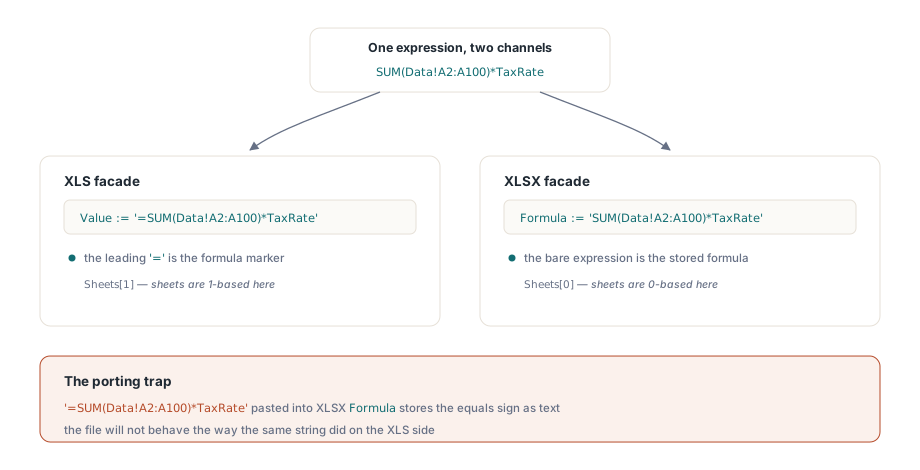
The formula entry channel is where ported code breaks most often, because the two facades disagree about the equals sign. XLS cells receive formulas through Value with a leading =. XLSX cells have a dedicated Formula property that takes the expression without the prefix. Write '=SUM(A1:A10)' into TXLSXCell.Formula and the equals sign becomes part of the stored expression text rather than a marker, and the file will not behave the way the same string did on the XLS side
var
  Book: IXLSWorkbook;   // interface-counted: do not Free
  Names: IXLSNames;
begin
  Book := TXLSWorkbook.Create;
  // assume a sheet named 'Data' already holds the detail rows
  Names := Book.GetNames;
  Names.Add('TaxRate', '0.08');
  Names.Add('Helper', 'Data!$A$2:$A$100', False);  // False = hidden from the Name Manager

  // XLS formulas go through Value, with the '=' prefix
  Book.Sheets[1].Cells.Item[2, 2].Value := '=SUM(Data!A2:A100)*TaxRate';
  Book.SaveAs('model.xls');
end;
That snippet shows two more XLS-side quirks. The sheets collection is 1-based, so Sheets[1] is the first sheet, against the 0-based XLSX Sheets[0]. And the third Add parameter creates a hidden name: present in the file and usable by formulas, yet invisible in Excel's Name Manager. Hidden names are the right vehicle for generator-internal plumbing that end users should never edit or delete by accident
Cross-sheet references, and what happens when rows move
Both formula engines accept the standard cross-sheet syntax. Plain sheet names qualify directly as Data!A1; a name with spaces or punctuation needs single quotes, as in 'Sheet With Space'!A1. Inside a name's RefersTo text, reach for absolute references such as Data!$A$2:$D$100 almost every time. A relative reference inside a defined name resolves relative to the cell using it, which is a deliberate Excel feature and a reliable source of confusion when it fires by accident
Structural edits are where cross-sheet bookkeeping earns its keep, and the XLSX side keeps names consistent through them. InsertRows and DeleteRows shift defined-name ranges along with cells, merges, hyperlinks, and chart anchors, so a name pointing at Data!$A$2:$D$100 still covers the data block after the generator opens a gap above it. Formulas come with one documented caveat: row insertion adjusts only the references that target the sheet being edited. A Summary formula referencing Data!D2:D100 is rewritten when rows go into Data, which is the case you usually want. Verify it rather than assume it, because the engine will tell you cheaply:
// the calculation engine resolves names and cross-sheet references in-process
V := Book.Calculate('SUM(Data!D2:D100)*TaxRate');
if VarIsNumeric(V) then
  Log('net total checks out: ' + FloatToStr(V));
Calculate evaluates an arbitrary expression against the current workbook state without saving anything, which makes it the natural assertion primitive for generator tests. Compute the expected aggregate from the source data in Pascal, evaluate the workbook's own formula, and compare the two. The formula engine article covers what the engine evaluates, when, and how to extend it with custom functions
The _xlnm names the property layer owns
Open a generated file's name table in a low-level inspector and you will find entries you never wrote: _xlnm.Print_Area, _xlnm.Print_Titles, and their relatives. These are how OOXML (ECMA-376 / ISO 29500) stores print areas and repeated title rows, as defined names with reserved identifiers. HotXLS manages them through dedicated worksheet properties, so setting PrintArea or PrintTitleRows writes the corresponding _xlnm.* entry for you
The trap is reaching into that reserved namespace by hand. Add a _xlnm.Print_Area entry through DefinedNames.Add while also setting the PrintArea property and the workbook carries two conflicting definitions for one reserved name, a state Excel resolves in ways no product should depend on. Treat every identifier that starts with _xlnm. as belonging to the property layer. To inspect print setup, read the properties, not the name table. The protection and page setup article covers the print-area properties in context
Two boundaries worth knowing before you commit a design
Defined names do not ride along through the convenience XLS-to-XLSX bridge. SaveXLSWorkbookAsXLSX copies cell content and basic formatting, and the name table is not on its documented copy list, so a workbook that depended on its names loses them in the crossing. Recreate the names through DefinedNames.Add after conversion. That step is less of a chore than it sounds, because it gives you a moment to normalize their scopes instead of carrying over whatever the XLS file happened to have
The other boundary is drift between formula strings and sheet names. Excel rewrites sheet references inside formulas and names during an interactive rename, so files a user edits in Excel stay consistent on their own. The exposure is on the generator side: when Pascal code assembles formula strings from a sheet-name literal, renaming the sheet in one place and forgetting the other produces a reference to a sheet that no longer exists. Keep the sheet name in a single Delphi constant and feed it to both Sheets.Add and your formula assembly, and the two can never disagree. This is the same instinct that argues for naming a report's output cells rather than hard-coding addresses: a template whose total cell is named keeps working after a designer inserts three rows above it, while a generator that writes to a literal B17 quietly lands its number in the wrong place. The template report generation article builds on exactly that pattern
The complete defined-names API for both formats, together with the formula engine reference, ships with the HotXLS Delphi Component