A spreadsheet library that only stores formula strings and a library with a working formula engine are two different products that look identical until the moment you ask one of them for a number. Most Delphi spreadsheet code never notices the gap, because Excel papers over it: write SUM(B2:B501) into a cell, save, and Excel recomputes the total the instant a human opens the file. Take the human out of the loop, run the same workbook through a server pipeline that exports straight to CSV, and the difference stops being academic. The CSV carries the literal text =SUM(B2:B501) where a number belonged, because at no point did anything actually evaluate the formula
That is the line HotXLS sits on the right side of. It treats a formula the way the file formats do, as stored text plus an optional cached result, so a bare CSV export reproduces the recipe rather than the dish. But it also carries a calculation engine you can call directly, the same engine in both the XLS and XLSX facades, plus a hook for resolving function names the engine has never heard of. HotXLS is a native Object Pascal library that reads and writes XLS and XLSX from Delphi and C++Builder without Excel automation, and the calculation half of it is what turns stored formulas back into values on demand
Formulas are stored, not eagerly evaluated
Writing a formula into a cell does not compute anything. At save time the workbook records the formula text. On the XLS side it also records flags governed by RecalcOnSave, which defaults to True and tells Excel to recalculate on open. That model is correct for files destined for Excel and wrong for pipelines that consume cell values directly, whether that is CSV export, HTML export, or your own code reading cells back. For those, evaluate explicitly with Calculate. It exists at four entry points: TXLSWorkbook, IXLSWorksheet, TXLSXWorkbook and TXLSXWorksheet all expose function Calculate(const Formula: WideString): Variant
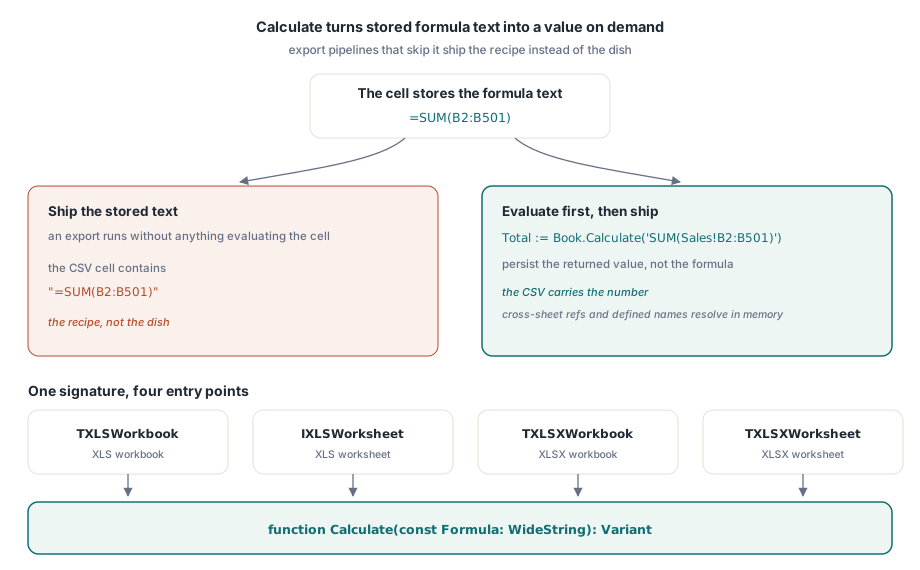
// evaluate in-process, then ship the value rather than the recipe
Total := Book.Calculate('SUM(Sales!B2:B501)');
Sheet.Cells[502, 2].Value := Total;
Book.SaveAsCSV('sales.csv', 0, ',');   // the CSV now carries the number
The expression handed to Calculate is ordinary Excel formula text. Cross-sheet references, defined names and nested functions all resolve against the current in-memory workbook, which makes the call useful well beyond patching CSV exports. Treat it as an assertion mechanism. A generator that just wrote five hundred detail rows can ask the workbook for its own grand total and compare that against the figure it computed independently in Pascal, catching an off-by-one range error before a customer's auditor does
It also frames the right testing strategy for formula-heavy output. Excel remains the reference implementation of the formula language, so for the handful of formulas that carry business consequences, keep an approved fixture file whose expected values were produced by Excel itself, and have the build pipeline evaluate the generated workbook's formulas with Calculate against those fixtures. Differences then surface as failing tests in Delphi rather than as discrepancies discovered by a customer comparing two reports
Adding business functions with OnUserFunction
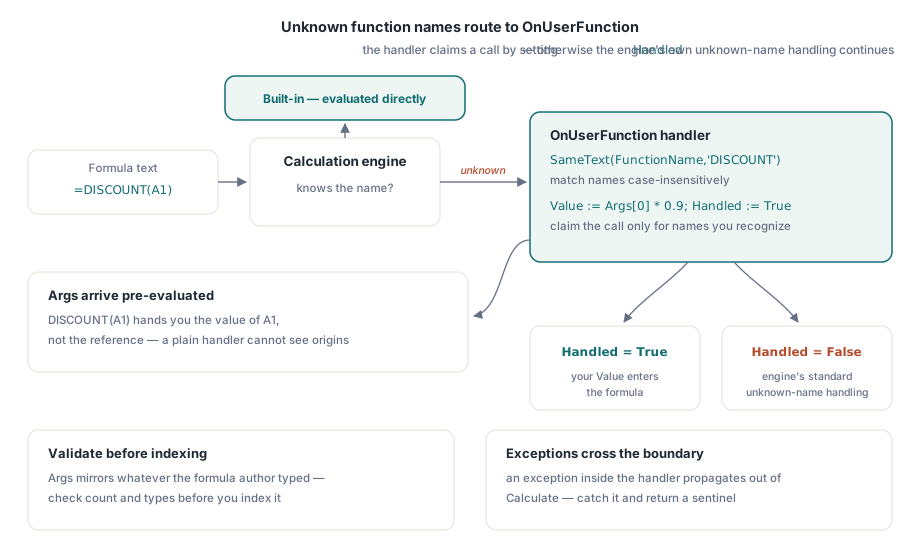
When the engine meets a function name it does not recognize, it raises an event instead of failing outright. Assign OnUserFunction on either workbook class and you can resolve the call yourself:
procedure TReportBuilder.HandleUserFunction(Sender: TObject;
  const FunctionName: WideString; const Args: Variant;
  var Value: Variant; var Handled: Boolean);
begin
  if SameText(FunctionName, 'DISCOUNT') then
  begin
    Value := Args[0] * 0.9;   // Args arrives as a Variant array
    Handled := True;
  end;
end;

// wiring and use
Book.OnUserFunction := HandleUserFunction;
Sheet.Cells[1, 1].Value := 200;
Sheet.Cells[1, 2].Formula := 'DISCOUNT(A1)';
Net := Book.Calculate('DISCOUNT(A1) + SUM(A1:A1)');
Three details earn attention. First, set Handled := True only when you actually recognized the name. Leaving it False lets the engine continue its normal unknown-function handling, so a single handler can serve several workbooks without claiming everything that passes through. Second, compare names case-insensitively with SameText, since formula authors type discount( and DISCOUNT( interchangeably. Third, arguments arrive pre-evaluated: DISCOUNT(A1) hands you the value of A1, not the reference, so a function cannot tell where its inputs came from. That last point sets up the limitation the next section is about
Treat the handler body with the same defensiveness as any external entry point. The Args array reflects whatever the formula author typed, so validate the argument count and types before indexing into it, and decide up front what an invalid call returns: a Variant error value, or a raised exception. The choice matters because an exception thrown inside the handler propagates out through the Calculate call that triggered evaluation. That is acceptable in a tightly controlled generator and rude in a service evaluating user-authored workbooks, where one bad formula would take down the request. In that setting, catch inside the handler and return a sentinel the surrounding workflow can recognize and log
Position-aware functions need the Ex variant
Some functions legitimately depend on where they are being evaluated. A rate that differs per sheet, a row-relative lookup, a per-region multiplier that only applies on the regional sheets: none of these can be answered by argument values alone. The plain event cannot express that, so the engine offers OnUserFunctionEx, identical except for one extra parameter:
procedure TReportBuilder.HandleUserFunctionEx(Sender: TObject;
  const FunctionName: WideString; const Args: Variant;
  const Context: TXLSUserFunctionContext;
  var Value: Variant; var Handled: Boolean);
begin
  if SameText(FunctionName, 'REGIONRATE') then
  begin
    // the same formula yields a different rate on each regional sheet
    Value := RateForSheet(Context.SheetIndex) * Args[0];
    Handled := True;
  end;
end;
TXLSUserFunctionContext carries SheetIndex, Row and Col of the evaluating cell. If a function's result depends on its location even slightly, wire the Ex event from the start. Retrofitting context into a handler that thirty formulas already call is far messier than choosing the right signature on day one, and the two events are otherwise so similar that there is little reason to start with the narrower one
Custom functions do not travel to Excel
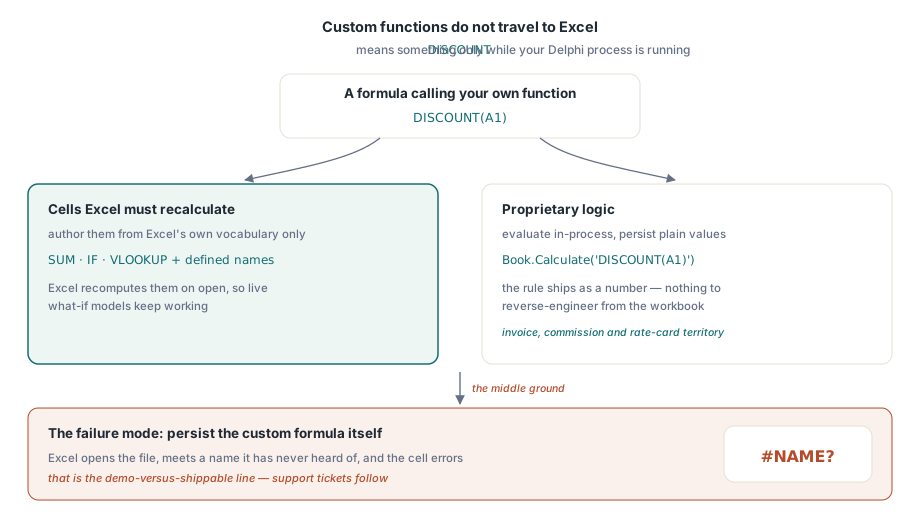
A custom function lives entirely inside your process. The name DISCOUNT means something only while your Delphi code and its event handler are running. Open the saved file in Excel and DISCOUNT is just an unrecognized name; the cell shows #NAME? unless a matching VBA function or add-in happens to exist on the user's machine. This is the design fact that separates a demo from a shippable product, and it forces a choice you have to make deliberately rather than discover later
Decide, per cell, which of two contracts you are shipping. Cells the user is meant to see recalculate inside Excel have to be built from Excel's own function vocabulary and nothing else. Cells whose logic is proprietary should be evaluated in-process with Calculate and persisted as plain values, so the custom function behaves as an internal calculation rule rather than as file content. The failure mode that reliably generates support tickets is the middle ground: persisting a custom-function formula and expecting Excel to honor it
There is a quiet upside to the values-only contract: it protects intellectual property. A pricing rule evaluated in your Delphi process and shipped as a number cannot be reverse-engineered from the workbook the way a visible formula can, and a user cannot break it by editing an intermediate cell. Invoice generators, commission statements and rate cards almost always belong in this camp. The case that genuinely needs live formulas is the interactive what-if model, where the customer is expected to change inputs and watch totals move, and those have to be built from Excel's own vocabulary plus defined names
Calculation modes, iteration, and R1C1: the XLS-facade dials
The XLS facade exposes the BIFF-level calculation settings that Excel reads from the file. CalculationMode accepts xlCalcManual, xlCalcAutomatic (the default) or xlCalcAutomaticExceptTables, and it determines how Excel behaves once the file is open. A model workbook with thousands of formulas is often friendlier delivered in manual mode, so the recipient decides when the recalculation storm happens. EnableIteration (default False), together with MaxIterations (default 100) and MaxIterationChange (default 0.001), unlocks the deliberate circular references of the iterative-convergence kind that show up in some financial models. ReferenceStyle switches between A1 and R1C1 display, and UseFullPrecision mirrors Excel's precision-as-displayed option
These properties live on the XLS facade because they map to BIFF records; when generating .xlsx, plan formulas so they do not depend on iterative settings, or compute the converged values in Delphi and write results
Array formulas: the public entry point is XLSX
Legacy CSE-style array formulas are created through TXLSXRange.SetArrayFormula:
// one array formula spanning A2:A4
Sheet.RCRange[2, 1, 4, 1].SetArrayFormula('A1*{1;2;3}');
The equivalent method exists in the XLS class hierarchy but sits in a private section, so there is no supported way to author new array formulas into .xls files. Existing ones in opened files round-trip intact; what you cannot do is create them. The rule that follows is simple enough: when array semantics are part of the requirement, target .xlsx. If a legacy .xls deliverable genuinely needs array behavior, the pragmatic route is to compute the array result in Delphi and write the individual values into the cells
Two related reads on this site: defined names and cross-sheet formulas covers the name resolution the engine performs, and the CSV and TSV export article details the export behavior that makes explicit calculation necessary. The full engine reference, including the supported function set, ships with the HotXLS Delphi Component