HotXLS, the native Delphi and C++Builder Excel library, performs incremental formula recalculation through TXLSXWorkbook.Recalculate. The first call builds a formula dependency graph and evaluates every formula cell; every later call re-evaluates only the cells affected by value writes since the last pass, in topological order, in a single sweep whose cost is proportional to the number of dirty cells rather than the size of the workbook
That one design decision is the difference between a financial model that responds to an edited assumption in milliseconds and one that stalls for seconds. If you generate reports where a handful of input cells feed thousands of downstream formulas, the rest of this article explains what the graph does, which functions opt out of incrementality, and how circular references are reported instead of looping forever
Why does changing one cell recalculate a hundred thousand formulas?
A naive formula engine has no memory of who depends on whom, so its only safe move after any edit is to evaluate everything again. Worse, the classic recursive strategy — when formula A references formula B, evaluate B on the spot — re-evaluates referenced cells unconditionally, ignoring any cached value. A chain of n formulas each referencing the previous one costs O(n²) evaluations per full pass, and a circular reference sends the recursion off a cliff. Every spreadsheet developer who has wired a cascading model into a recursive evaluator has watched both failure modes happen
Excel itself solved this decades ago with its calculation chain: an ordering of formula cells maintained so that an edit marks a small set of cells dirty and the engine walks only the affected tail of the chain. HotXLS applies the same idea as an explicit dependency graph, built once from the compiled formula trees and reused across recalculation passes. The point is not cleverness; it is that recalculation cost should track the size of your edit, not the size of your workbook
How the dependency graph turns an edit into a single pass
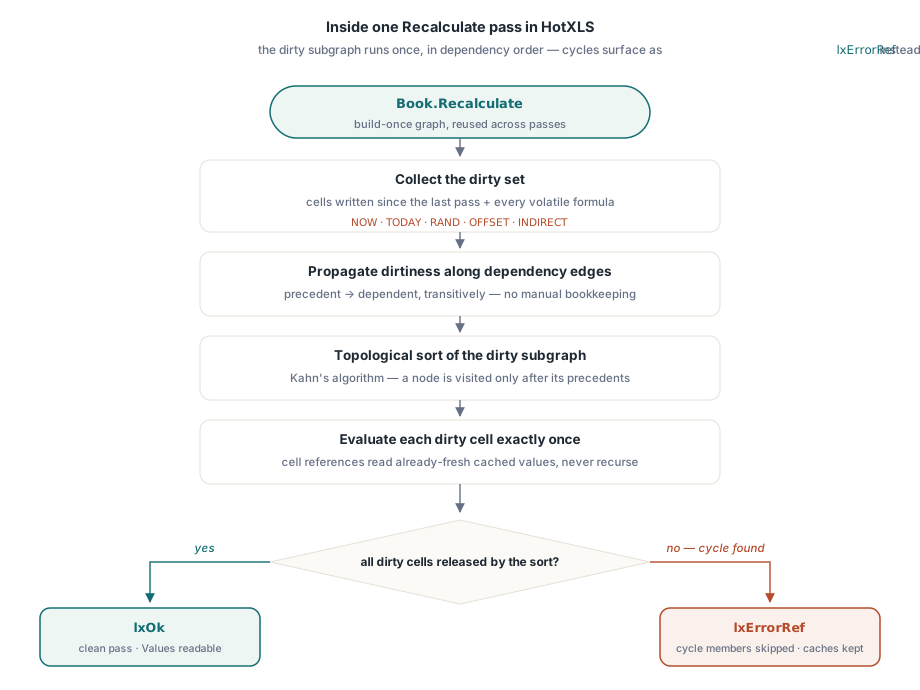
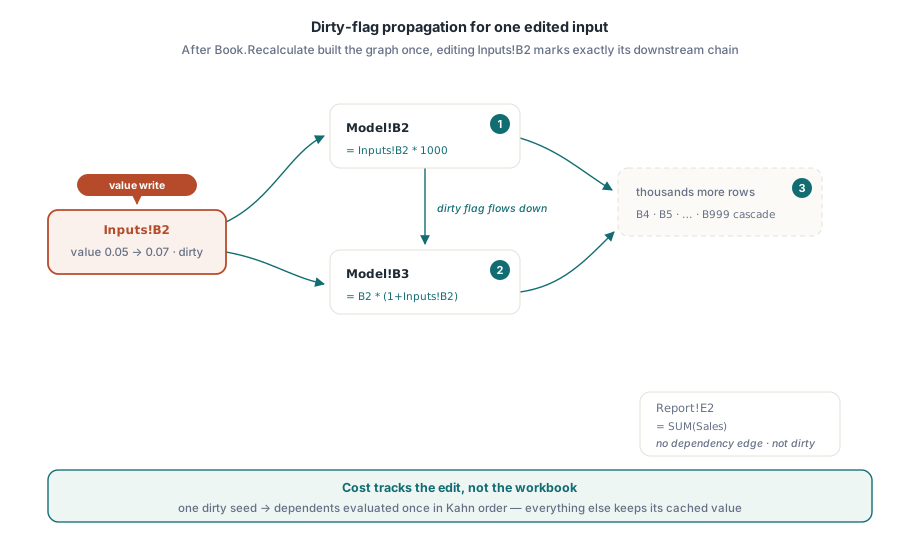
The HotXLS dependency graph gives each formula cell one node, with edges running from precedent to dependent. When your code writes a cell value, the workbook records the cell as dirty; when Recalculate runs, dirtiness propagates along the edges to every downstream formula, and the dirty subgraph is evaluated exactly once in topological order using Kahn's algorithm. Because a formula is never visited before its precedents, each node needs a single evaluation — that is what makes the pass O(dirty)
Topological order also fixes the recursion problem at its root. During a recalculation pass the engine switches into a dedicated mode in which any reference to another formula cell reads that cell's cached value directly instead of re-evaluating it — the ordering guarantees the cache is already fresh. The same mechanism means a reference cycle cannot trigger unbounded recursion: nothing inside the pass ever re-enters the evaluator for a neighboring cell
var
  Book: TXLSXWorkbook;
  Inputs, Model: TXLSXWorksheet;
begin
  Book := TXLSXWorkbook.Create;
  try
    Inputs := Book.Sheets.Add('Inputs');
    Model  := Book.Sheets.Add('Model');

    Inputs.Cells[2, 2].Value := 0.05;                 // growth assumption
    Model.Cells[2, 2].Formula := 'Inputs!B2*1000';    // XLSX formulas take no leading '='
    Model.Cells[3, 2].Formula := 'B2*(1+Inputs!B2)';
    // ... thousands more rows cascading off the same assumption ...

    Book.Recalculate;                 // first call: builds the graph, full evaluation

    Inputs.Cells[2, 2].Value := 0.07; // one edit marks one cell dirty
    Book.Recalculate;                 // second call: only the downstream chain runs
  finally
    Book.Free;
  end;
end;
Each result lands in the cell's cached Value, so after Recalculate returns you read outputs the same way you read any other cell. In a report-generation loop the pattern is exactly the code above: load or build the model once, then alternate between writing a few input cells and calling Recalculate, paying only for the formulas that actually depend on what changed
Which Excel functions force recalculation on every pass?
HotXLS treats NOW, TODAY, RAND, OFFSET, and INDIRECT as volatile: any formula containing one of them is re-evaluated on every Recalculate pass, whether or not anything upstream changed. The first three are volatile for the same reason they are in Excel — their result depends on the moment of evaluation, not on other cells. OFFSET and INDIRECT are volatile for a subtler reason: the cells they read are computed at run time, so the graph cannot know statically which edges to draw for them
The same conservative rule extends to references the graph builder cannot pin down to a single rectangle. A formula that goes through a multi-area named range, or one that references an external workbook, is likewise degraded to volatile and re-evaluated each pass. The policy is deliberate: an extra evaluation costs a little time, but a missing dependency edge means a silently stale value in a shipped report, and that is the far worse failure. If your model leans on workbook-scoped names, the companion article on defined names and cross-sheet formulas covers how single-area names resolve — those participate in the graph normally
The practical guidance follows directly. Keep hot paths of a large model on plain cell and range references where the graph can do its job, and quarantine OFFSET and INDIRECT to the few places that genuinely need dynamic addressing. A model with a thousand volatile formulas re-runs those thousand every pass no matter how small the edit was — exactly the behavior Excel users know from workbooks that "recalculate on every keystroke"
How does HotXLS report circular references?
TXLSXWorkbook.Recalculate returns lxOk on a clean pass and lxErrorRef when it detects a reference cycle. Cycle members are identified during the topological sort — they are the nodes Kahn's algorithm can never release — and they are skipped rather than looped: their cached values stay whatever they were, while every formula outside the cycle still evaluates normally in order. Your call site gets a definite error code instead of a hang
case Book.Recalculate of
  lxOk:
    SaveReport(Book);
  lxErrorRef:
    // a reference cycle exists; cycle members kept their previous
    // cached values and everything outside the cycle is up to date
    LogWarning('Circular reference detected - review model inputs');
end;
Finding which cells form the cycle is a debugging job, and the formula evaluation tracer is the right tool for it: trace the suspect formula and the reference chain that folds back on itself becomes visible step by step. Cycles in real models are almost always an authoring mistake — a summary row accidentally included in its own SUM range — so a loud error code at recalculation time is precisely what you want
Array formulas, dirty tracking, and when the graph rebuilds
CSE array formulas get one node for the whole anchored rectangle, not one node per cell. The root formula evaluates once per pass; the resulting matrix is written directly into each member cell, and a formula that references any cell inside the anchored range — not just the top-left anchor — picks up a dependency edge from that root node. Scalar results broadcast across the rectangle the way Excel's legacy array semantics prescribe
Dirty tracking hooks the ordinary property setters, so nothing about your code changes. Writing Value on a cell notifies the workbook and marks dependents dirty; assigning a new Formula is a structural change, so it marks the whole graph stale, and the next Recalculate rebuilds it before evaluating. Adding, deleting, or moving sheets also invalidates the graph, since node identity encodes the sheet index. When no graph is active — a workbook you never call Recalculate on — the hooks cost a single nil check per assignment, so plain read-write workloads are unaffected
One boundary worth stating honestly: the graph tracks dependencies between cells, so a user-defined function registered through OnUserFunction is re-evaluated when the cells feeding its arguments change, like any other formula. If you are extending the engine that way, the article on custom functions in the HotXLS formula engine walks through the callback contract and how argument values arrive
Incremental recalculation is part of the standard XLSX engine in the HotXLS Delphi Excel Component, alongside the formula calculator, defined names, and the import/export pipeline it accelerates. If your Delphi or C++Builder application maintains living models — pricing sheets, consolidation workbooks, report cascades — Recalculate is the difference between recomputing a workbook and recomputing an edit