A shared formula follower in XLSX carries no formula text. Its <f t="shared" si="N"/> element points at a master cell elsewhere in the sheet, and the reader must rebuild the text by shifting the master formula by the row and column difference. HotXLS Delphi Component for Delphi and C++Builder does that expansion at open time, so every follower reports a complete formula
If you have ever loaded a real-world XLSX in a third-party library and found that a column of a thousand formulas has text in exactly one cell and empty strings in the other 999, you have met this feature from the wrong side. Nothing is corrupt. The file is doing what ECMA-376 lets it do, and the reader simply stopped at the point where the XML stopped
Why is the shared formula cell empty?
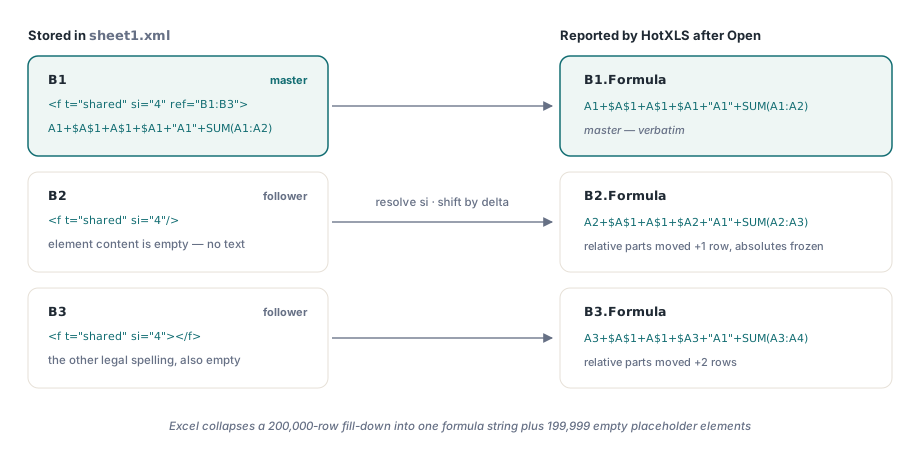
Because the format deliberately stores the formula once. In ECMA-376 Part 1 and ISO/IEC 29500-1, the <f> element (§18.3.1.40) carries a t attribute of type ST_CellFormulaType, and the value shared means this cell participates in a group identified by the si attribute. Exactly one cell in the group, the master, also carries a ref attribute giving the range the group applies to, and only that cell carries the formula text as element content. Every other cell in the group is a follower. It repeats t="shared" and the same si, and its element content is empty. Excel writes these groups aggressively, because a fill-down over a 200,000-row column collapses from 200,000 formula strings to one string plus 199,999 tiny placeholder elements. The saving is real and the cost lands entirely on the reader: without expansion, the follower has no meaning on its own
The shift is a translation, not a text copy
HotXLS resolves a follower by locating the master registered under the same si, computing the row and column delta from the master anchor to the current cell, and translating every reference in the master formula by that delta. Relative dimensions move, absolute dimensions do not, and mixed references move only their non-absolute half. String literals are skipped entirely, so a formula that happens to contain the text "A1" keeps that text unchanged in every follower
const
// xl/worksheets/sheet1.xml, trimmed to the interesting cells
SheetXml: WideString=
'<row r="1"><c r="A1"><v>1</v></c>'+
'<c r="B1"><f t="shared" si="4" ref="B1:B3">'+
'A1+$A$1+A$1+$A1+"A1"+SUM(A1:A2)</f><v>7</v></c></row>'+
'<row r="2"><c r="B2"><f t="shared" si="4"/><v>8</v></c></row>'+
'<row r="3"><c r="B3"><f t="shared" si="4"></f><v>9</v></c></row>';
var
Wb: TXLSXWorkbook;
Sh: TXLSXWorksheet;
begin
Wb:= TXLSXWorkbook.Create;
try
Wb.Open(FileName);
Sh:= Wb.Sheets[1];
// Master, verbatim
// B1 -> A1+$A$1+A$1+$A1+"A1"+SUM(A1:A2)
// Follower one row down: relative row moves, absolute row frozen,
// the mixed A$1 keeps its row, and the literal stays a literal
// B2 -> A2+$A$1+A$1+$A2+"A1"+SUM(A2:A3)
ShowMessage(Sh.Cells[2, 2].Formula);
finally
Wb.Free;
end;
end;The ref attribute is a gate, not decoration. A follower whose coordinates fall outside the master applicable range is not expanded, because the file is then making a claim the group does not support. Likewise, when a shift would push a reference above row one or left of column A, HotXLS emits #REF! for that token rather than silently clamping it, which is what Excel itself would produce for the same edit. This translation is close cousin to, but not the same thing as, the reference rewriting that happens when you insert or delete rows. That path has its own rules about what a range does when an edit cuts through it, and it is described separately in the article on formula reference adjustment during insert and delete. Shared expansion is simpler: it is a pure offset from a known anchor, applied once, at parse time
Which reference shapes must the shifter cover?
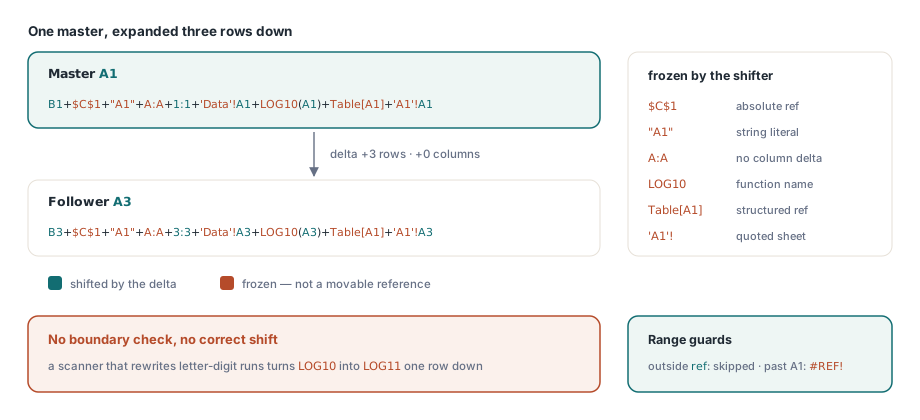
All of them, or the expansion is a data-loss bug in disguise. A naive shifter that only understands A1 and A1:B2 will corrupt or drop the more exotic forms, and real workbooks are full of them. The HotXLS shared-formula translator recognizes the whole A1 family before it decides what to move. External workbook references such as [Book.xlsx]Sheet1!A1 and 3D references such as Sheet1:Sheet3!A1 keep their prefix intact while the trailing cell reference shifts. Quoted sheet names survive, including the nasty case where the sheet is literally named A1, so 'A1'!A1 shifts only the part after the exclamation mark. Whole-column A:A moves its column dimension and nothing else; whole-row 1:1 moves its row dimension and nothing else; $A:$A does not move at all. Structured table references like Table[A1] are left untouched, because the bracketed part is a column name, not a coordinate
// One master, expanded two columns to the right and zero rows down.
// Master D1: A1+A:A+$A:$A
// F1       : C1+C:C+$A:$A
//
// One master, expanded three rows down and zero columns across.
// Master A1: B1+$C$1+"A1"+A:A+1:1+'Data'!A1+LOG10(A1)+Table[A1]+'A1'!A1
// A3       : B3+$C$1+"A1"+A:A+3:3+'Data'!A3+LOG10(A3)+Table[A1]+'A1'!A3
//
// Note what did NOT move in the second line: the absolute $C$1, the
// string literal "A1", the whole column A:A under a pure row delta,
// the function name LOG10, and the structured reference Table[A1]
Function names are the quiet trap here. A token scanner that grabs letters followed by digits will happily rewrite LOG10 into LOG11 one row down. HotXLS requires a reference boundary before a candidate token and after it, so an identifier that continues into a letter, digit, underscore, dot, or an opening parenthesis is not a cell reference. If you are working in the other notation family, the same boundary problem shows up differently, and the R1C1 notation article covers where the two models diverge
Why does a self-closing f element swallow the next value?
Because a self-closing element produces no end-element event. This is the single most expensive trap in the whole feature, and it is not specific to any one XML parser. In TXMLReader, <f t="shared" si="4"/> raises exactly one Element event with IsEmptyElement set to True, and never raises the matching EndElement. A parser that closes its formula-capturing state only on EndElement therefore stays inside the formula, and the next text it sees, which is the cached result inside <v>, gets appended to the formula buffer. Worse, the state survives the cell boundary, so the next cell that owns a real <f> has its formula text absorbed by the previous cell. The correct approach is to end the formula state at the Element event itself whenever IsEmptyElement is True, and to run the whole follower resolution there rather than waiting. That means reading t, si, ref, aca, and ca from the attributes, applying the shared expansion, writing the recalculation attributes onto the cell, and clearing the shared state, all inside the branch that handles the empty element. Note that the format allows both spellings, <f t="shared" si="4"/> and <f t="shared" si="4"></f>, and the second one does raise an EndElement. A correct reader has to handle the pair identically, so test both spellings side by side
Sparse, unordered si values and the pending queue
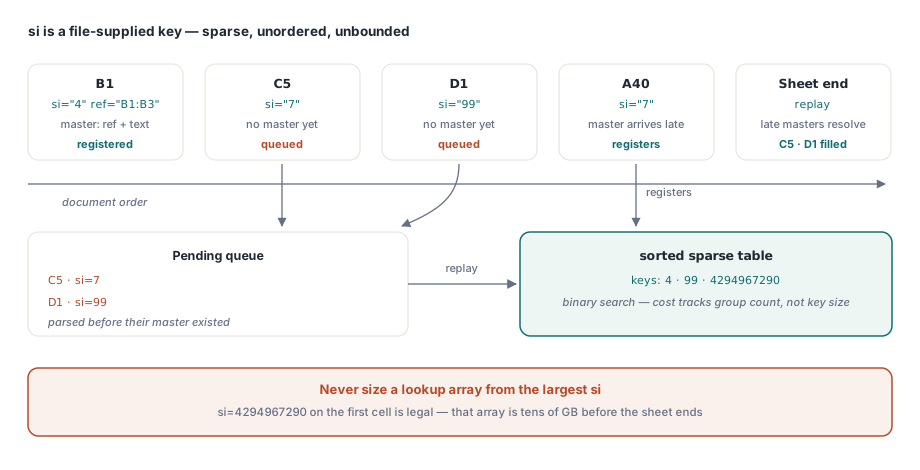
The si attribute is a file-supplied unsigned integer, not an array position you control. Nothing in the schema requires shared indexes to be dense, to start at zero, or to appear in ascending order, and nothing stops a hostile or merely strange file from using si="4294967290" on the first cell. Sizing a lookup array from the largest observed si is therefore a memory-exhaustion primitive, not an optimization. HotXLS keeps the workbook-open path on a sorted sparse table instead: shared groups are registered under their integer key in a sorted TStringList, which makes lookup a binary search over however many groups actually exist, with no relationship to the numeric size of the indexes. Order is the second half of the problem. A master normally precedes its followers in document order, but that is a convention rather than a rule, so any follower that cannot resolve its si at the moment it is parsed goes into a pending queue. When the sheet finishes, the queue is replayed against the now-complete table, and the late masters resolve their orphans. Cells that never find a master keep an empty formula, which is the honest outcome for a file that references a group it never defined
Expanding shared formulas without loading the workbook
The streaming readers face the same requirement under a much tighter memory budget, and they solve it with a worksheet-local table. TXLSDirectReader and TXLSRowCursor both expand followers into complete per-cell formulas while preserving their bounded-memory and projection behavior, so a forward-only pass over a 300 MB sheet still hands you real formula text
var
  Reader: TXLSDirectReader;
  Cursor: TXLSRowCursor;
begin
  // Projection: only rows 2..3, only column A. The master lives in row 1,
  // outside the projection, and is still parsed so the followers resolve
  Reader:= TXLSDirectReader.Create;
  try
    Reader.FirstRow:= 2;
    Reader.LastRow:= 3;
    Reader.IncludeColumn(1);
    Reader.OnCell:= HandleCell;   // Cell.Formula is fully expanded here
    Reader.ReadFile(FileName);
  finally
    Reader.Free;
  end;

  // Forward-only row traversal, same expansion
  Cursor:= TXLSRowCursor.Create;
  try
    Cursor.Open(FileName);
    if Cursor.FindFirst then
      repeat
        if Cursor.CellCount > 0 then
          WriteLn(Cursor.RowIndex, ': ', Cursor.Cells[0].Formula);
      until not Cursor.FindNext;
  finally
    Cursor.Free;
  end;
end;
Two constraints fall out of that design. First, projection can never skip the master. A row filter set with FirstRow and LastRow, or a column filter built with IncludeColumn, may skip emitting the master cell to your callback, but the parser still has to record its si, anchor coordinates, applicable range, and formula text, otherwise every follower inside the projection resolves to nothing. Only the follower-side work, the shift and the value decode, is safe to skip. Second, the table is per worksheet and its lifetime has to be managed explicitly: TXLSRowCursor holds one instance for the duration of a sheet pass and clears it on restart, sheet switch, end of file, exception, and close, so a group defined on sheet one can never leak into sheet two. Because the streaming path is a hot loop, it uses an open-addressing integer hash rather than the sorted string table, which avoids an integer-to-string conversion per cell
What happens on save, and where the boundaries are
Once a follower has been expanded it is an ordinary formula, and HotXLS writes it back as an independent <f> element with no t="shared" and no si. The round trip is stable and the cached <v> results survive, but the output is larger than the input for a heavily shared sheet, and the grouping Excel created is not reconstructed on save. If byte-level fidelity of the shared groups matters more to you than having real formula text in every cell, this is the trade you are accepting. The XLS side is different, incidentally: the BIFF8 SHRFMLA record has its own encoding and its own writer, with a shared-group toggle on the workbook
Two related things are explicitly not shared formulas even though they share the <f> element. Legacy CSE array formulas use t="array" with a ref covering the anchored range, and dynamic arrays use the same t="array" spelling but are identified by a cm attribute that chains through cellMetadata to an XLDAPR record. Treating a dynamic-array spill cell as a shared or CSE follower is a genuine correctness bug, and the separation is covered in the article on dynamic array and spill formulas. Read the three cases as three parsers that happen to share a tag name, and the code stays honest
The shared-formula expansion, the streaming readers, and the reference translator described here ship as part of the HotXLS Delphi Excel component for Delphi and C++Builder; the product page carries the full formula and direct-read API reference, including the projection properties used above